Cyber Security-2
Information Classification: This is the process of assessing data to decide how much protection it needs, mainly focused on confidentiality.
Confidentiality Levels:
Confidential: Top-secret, only for senior management.
Restricted: For a select few employees only.
Internal: Accessible to all employees within the organization.
Public: Open for anyone, no restrictions.
In larger organizations, more levels might exist to fit complex data protection needs.
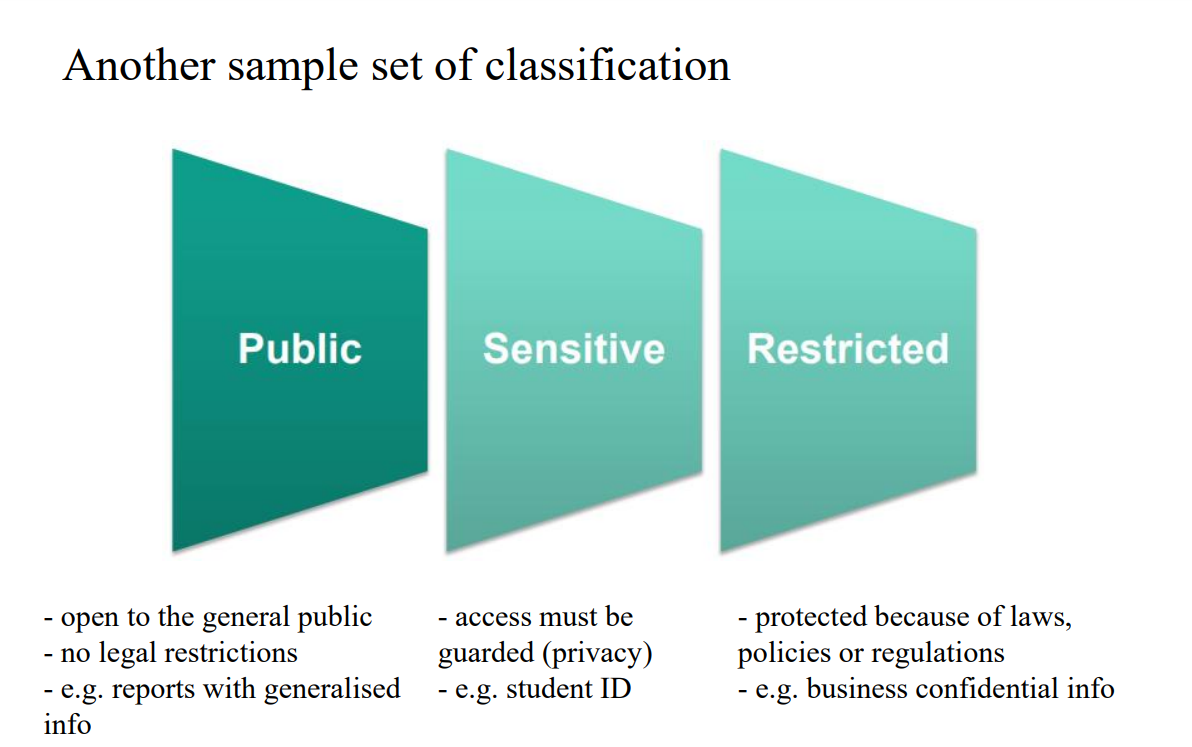
Public: Open to everyone, like general announcements—no special restrictions.
Sensitive: Limited access to trusted people, like financial data—requires some caution.
Restricted: Strictly controlled, only specific individuals have access, like trade secrets—maximum protection needed.
Think of it as "Open, Cautious, and Locked" levels of data access.
Inventory: List all your assets—know what you have.
Classify: Decide on each asset’s sensitivity level.
Label: Mark assets with their classification.
Handle: Protect and manage assets according to their label.
Think of it as "List, Sort, Tag, Protect" for managing assets securely.
Object: A passive item containing data, like files or databases.
Subject: The active entity (user, program, or process) requesting access to that object.
Access: The exchange of information between the subject and object.
Access Control: Security features that manage and restrict access, forming part of a layered defense approach (defense-in-depth).
Think of subject as the requester, object as the resource, access as the interaction, and access control as the gatekeeper.
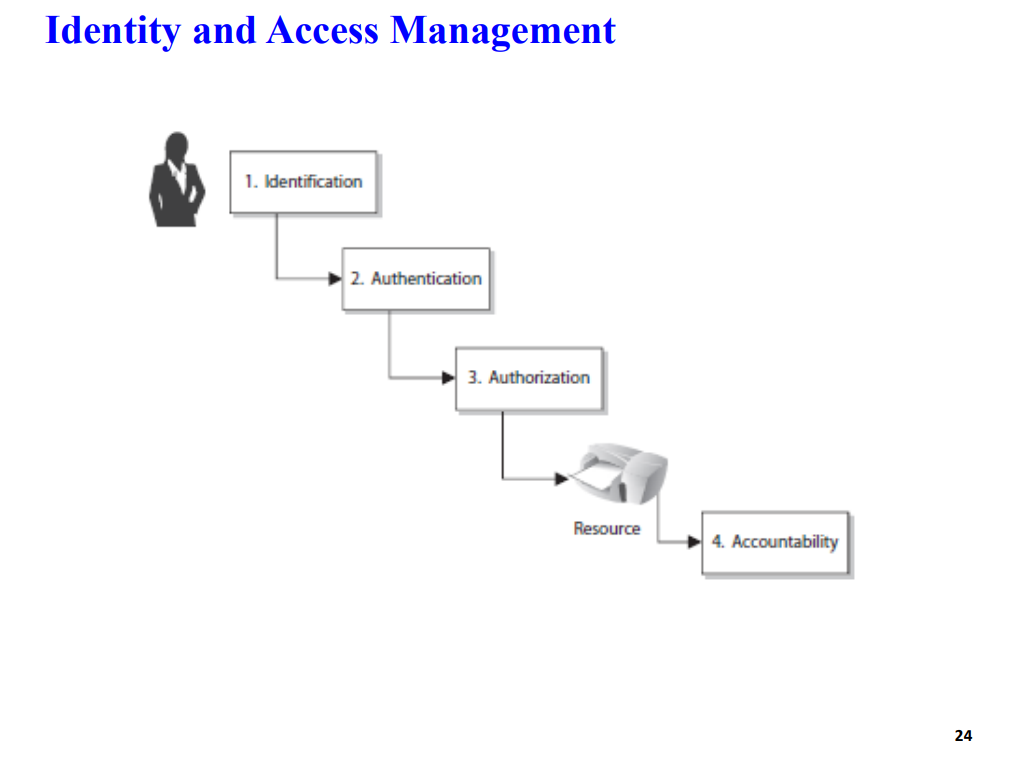
Identification: Confirming who someone is (e.g., entering a username).
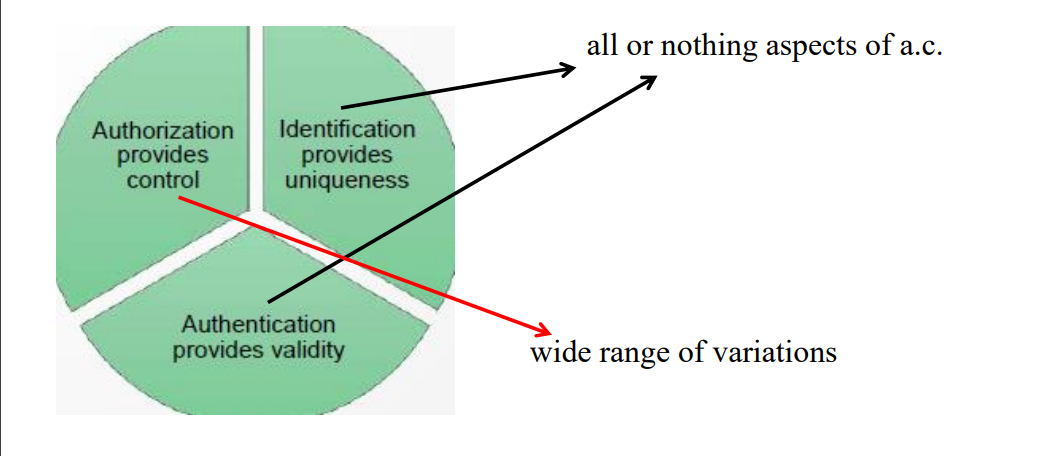
Authentication: Verifying that identity is legitimate (e.g., entering a password or using biometrics).
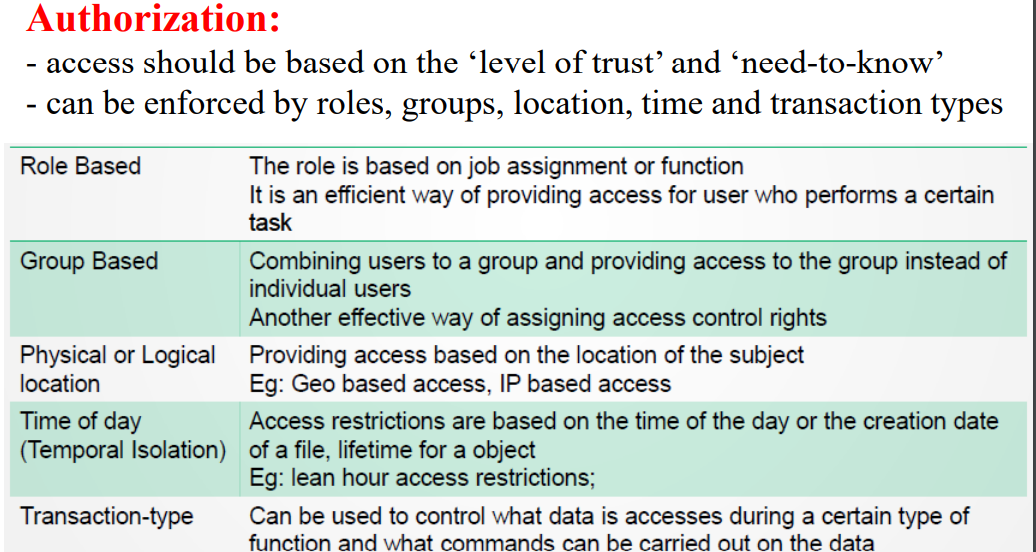
Authorization: Defining what actions the authenticated user can perform (e.g., read, write, delete permissions).
Accountability: Tracking user actions to ensure responsibility and traceability (e.g., logging activity).
In short: Identification tells who, Authentication proves it, Authorization grants permissions, and Accountability keeps track
Permissions: Define what actions can be performed on an object (e.g., read, write). They are assigned to the object itself.
Rights: Allow who can take action on an object (e.g., modify or delete files). These are assigned to the subject (e.g., a user or role).
Privileges: A combination of permissions and rights, indicating the overall ability a user or process has within a system.
In short: Permissions are tagged to objects, rights to subjects, and privileges combine both to control access and actions.
Identity - 3 Aspects:
Uniqueness: Each identity should be unique to ensure accountability, making it clear who is responsible for specific actions.
Non-descriptive: Identity names shouldn’t reveal their purpose, helping to keep the purpose of accounts private.
Issuance: Identities should be assigned by an authorized body to maintain consistency and security.
Identity Management (IdM): The process of managing entities by giving them unique identifiers, attributes, credentials, and access rights within a system. It ensures only authorized users access resources.
Directories: Databases used in IdM to store identity information.
X.500: A standard format for organizing and storing identity information in a hierarchical structure.
LDAP (Lightweight Directory Access Protocol): The protocol used to query and modify these identity databases, allowing systems to access identity details.
In short, IdM uniquely manages identities, directories store them, and LDAP provides access to this data.
Single Sign-On (SSO):
Definition: SSO allows a user to log in once and access multiple systems or applications without needing to re-enter credentials for each one.
Challenge: Interoperability, or getting different systems to work together smoothly, can be a hurdle in SSO setups.
Security Consideration: While convenient, SSO can pose security risks if a user’s credentials are compromised, as it grants access to multiple resources.
Federated Identity Management (Federated IdM):
Definition: Federated IdM extends SSO to allow a user to authenticate across different organizations or systems, sharing trust and access between them (like between two companies).
Challenge: Establishing and managing trust between entities is crucial to ensure that each organization properly vets and authenticates users.
In short, SSO simplifies access within a system, while Federated IdM expands this convenience across multiple organizations, but both need strong security and trust setups.
General Factors for Authentication:
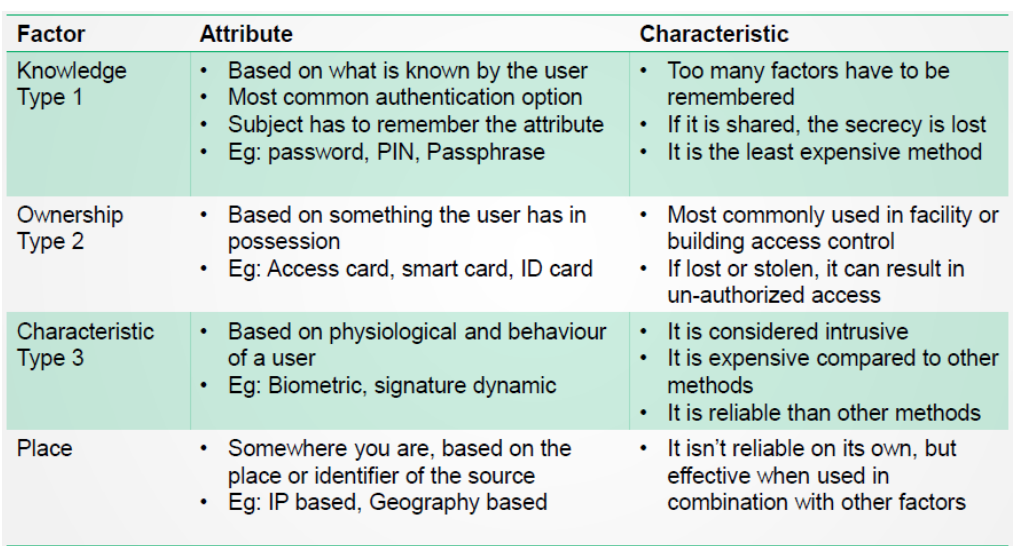
Something a person knows: Passwords or PINs that only the user should know.
Something a person has: Physical items like a smart card or mobile device that the user possesses.
Something a person is: Biometrics, such as fingerprints or facial recognition, that uniquely identify the user.
Multi-factor Authentication (MFA):
This approach combines two or more of these factors for stronger security. For example, using both a password (something you know) and a fingerprint (something you are) makes it harder for unauthorized users to gain access.
1:1 Verification:
Compares a single claimed identity with a user’s credentials. For example, a smart card check matches only the specific cardholder’s identity.
1-N
Verification:
Compares a single user against many stored identities, such as when a fingerprint is scanned against a database of multiple fingerprints to find a match.
Mutual Authentication:
Both parties in a communication (like a user and a server) authenticate each other to ensure they’re both legitimate, creating a secure, trusted connection.
Something a person knows (Knowledge-Based Authentication):
This is information only the user should know, like:
Password (pw): A simple, often shorter code.
Passphrase: A longer, more complex password.
Cognitive password: Answers to personal questions, often used by call centers for identity verification.
Password Recommendations:
Increased Length: Longer passwords are harder to guess or crack.
Special Characters & Complexity: Adding symbols, numbers, and mixed cases makes passwords stronger.
Disallow Hints: Prevents obvious hints that attackers could use to guess the password.
Attacker Techniques:
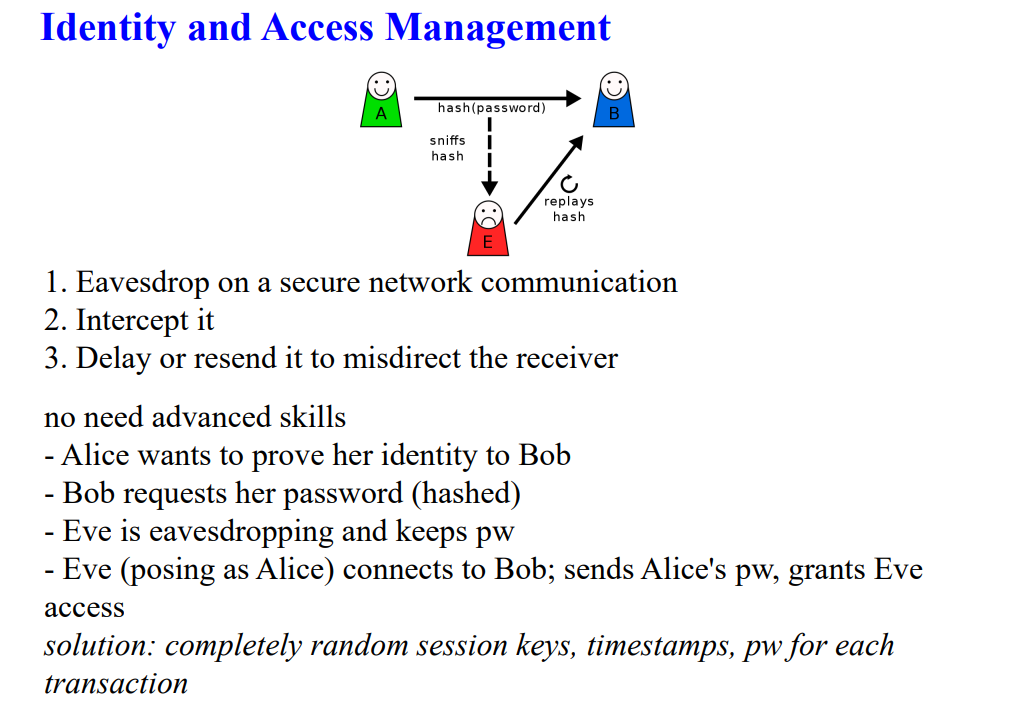
Monitoring & Listening: Observing user actions or intercepting network traffic to steal passwords.
Replay Attack: Reusing intercepted credentials to impersonate the user.
Access Password File: Directly accessing files where passwords are stored.
Brute-force: Trying all possible combinations until the password is found.
Dictionary Attack: Using a precompiled list of common words or phrases to guess passwords.
Social Engineering: Manipulating people into revealing their passwords.
Rainbow Table: A table of precomputed password hashes to crack hashed passwords quickly without decrypting each one individually.
Level of Trust
Definition: This refers to the degree of confidence placed in a user, system, or process to act securely and appropriately within a given context.
Application: It often dictates the extent of access rights and privileges assigned to individuals or systems. For example, a user with high trust may have access to sensitive data, while a user with low trust may have limited access.
Factors Influencing Trust:
User behavior and history
Authentication methods used
Security policies and compliance with regulations
Need to Know
Definition: This principle restricts access to information based solely on whether a user requires it to perform their job or fulfill a specific task.
Application: It helps to minimize the risk of unauthorized access or data breaches by ensuring users only see information that is relevant to their duties.
Examples:
A finance employee might need access to financial records but not to employee health data.
A project manager might require access to project-related documents but not to sensitive company trade secrets.
In summary, level of trust determines how much access a user is granted based on their reliability, while need to know ensures that access is limited to only the information necessary for a user’s role or task.
Important Aspects of Authorization
Default to No Access:
Definition: This principle states that unless explicitly granted access, users should have no access to resources or information.
Purpose: It enhances security by implementing an implicit deny rule, ensuring that only users with specific permissions can access sensitive data or systems. This minimizes the risk of unauthorized access.
Need to Know:
Definition: This principle emphasizes granting users access only to the information necessary for them to perform their job functions.
Relation to Least Privilege: It aligns with the least privilege principle, which advocates for limiting access rights for users to the bare minimum required to complete their tasks. This reduces the risk of accidental or malicious data exposure.
Excessive Privileges:
Definition: This occurs when a user is granted more privileges or access rights than necessary for their role.
Risks: Excessive privileges can lead to security vulnerabilities, as users may inadvertently access or alter sensitive information outside their responsibilities.
Authorization Creep (Creeping Privileges):
Definition: This term describes the gradual accumulation of excessive access rights by users over time, often due to changes in roles or responsibilities without appropriate updates to permissions.
Consequence: It can lead to excessive privileges and potential security risks, as users may hold access rights that are no longer relevant to their current position.
Solution: Implementing the least privilege principle can help mitigate this issue by regularly reviewing and adjusting access rights based on current job requirements.
In summary, these concepts emphasize the importance of restricting access and ensuring that users only have the permissions necessary to perform their roles, thereby minimizing security risks and potential data breaches.
Access Control Categories
Administrative (Management) Access Control:
Focus: This category emphasizes the policies, procedures, and practices that govern how people interact with information and systems within an organization.
Key Components:
Policy Development: Establishing rules for access and usage of resources.
Procedures: Documented processes for implementing policies.
Hiring Practices: Background checks and vetting to ensure trustworthiness of personnel.
Data Classification: Categorizing data based on sensitivity to determine access levels.
Awareness Training: Educating employees about security practices and potential threats.
Reports and Testing: Regular assessments and audits to ensure compliance and effectiveness.
Logical (Technical) Access Control:
Focus: This category encompasses the hardware and software mechanisms used to restrict access to systems and data.
Key Components:
Encryption: Protecting data by converting it into a coded format that can only be accessed with a key.
Constrained Interfaces: Limiting user interactions with systems to reduce exposure to unauthorized access.
Firewalls: Network security devices that monitor and control incoming and outgoing network traffic.
Intrusion Detection Systems (IDS): Monitoring systems for suspicious activities or policy violations.
Biometric Systems: Authentication methods using unique biological traits (e.g., fingerprints, facial recognition).
Passwords and Access Control Lists (ACLs): Passwords restrict access, while ACLs define permissions for users on specific resources.
Physical Access Control:
Focus: This category involves physical measures to restrict access to facilities and equipment.
Key Components:
Guards: Security personnel stationed to monitor and control access.
Fences: Physical barriers that delineate secure areas.
Motion Detectors: Devices that detect movement to enhance security.
Locks: Mechanical or electronic systems used to secure doors and entries.0
Lights: Security lighting to deter unauthorized access and enhance visibility.
Cable Protection: Safeguarding physical connections from tampering or damage.
Video Cameras: Surveillance systems used to monitor and record activity.
Mantraps: Controlled access areas that allow only one person to enter at a time, enhancing security.
Summary
Each category of access control plays a crucial role in establishing a comprehensive security framework. Together, they help protect sensitive information and assets from unauthorized access, both from a procedural and a technical standpoint.
Access Control Models
Discretionary Access Control (DAC):
Definition: In this model, the owner of the resource (object) has the discretion to grant or deny access to other users.
Example: A file owner can specify who can read or modify the file. The access rights are often defined using access control lists (ACLs).
Mandatory Access Control (MAC):
Definition: Access decisions are made by a central authority based on multiple security levels, and users cannot change access permissions.
Example: Military environments where data classifications (e.g., confidential, secret) determine access, and users must adhere to these classifications.
Role-Based Access Control (RBAC):
Definition: Access permissions are assigned based on roles within an organization, and users are granted access according to their assigned roles.
Example: Employees in a finance department may have access to financial data, while those in HR have access to employee records.
Rule-Based Access Control:
Definition: Access is granted or denied based on a set of predefined rules or policies.
Example: A rule might state that only users from a specific IP range can access a certain resource or that access is allowed only during business hours.
Attribute-Based Access Control (ABAC):
Definition: Access decisions are made based on attributes of users, objects, and the environment. This model allows for more dynamic and flexible access control.
Example: A user might gain access if they have certain attributes (e.g., department, clearance level) that match the requirements of the resource they are trying to access.
Risk-Based Access Control:
Definition: Access decisions are made based on the risk assessment of an action or access request, considering factors such as user behavior and environmental conditions.
Example: A user may be granted access to sensitive data only after their location and device have been evaluated for risk.
Decision Factors for Access Control Models
The choice of an access control model is influenced by several factors, including:
Business and Security Goals: Organizations must align access control with their overall objectives and security requirements.
Culture: The organizational culture, including attitudes towards security and trust, can impact the choice of model.
Habits of Conducting Business: Existing practices and workflows may dictate the most suitable access control model for an organization.
Summary
Each access control model serves different organizational needs and security requirements, allowing for tailored approaches to manage access effectively while aligning with business goals and operational practices.
System
Definition: A collection of interconnected components that work together to achieve a specific goal.
Key Idea: Think of a system as a team where each member has a role to play in reaching a common objective.
Architecture
Definition: The organized design and structure that outlines how the components of a system are arranged and interact with each other.
Key Idea: Consider architecture as the blueprint of a building, detailing how different parts fit together to create a cohesive whole.
Client-Based Systems
Definition: Software applications that run on individual user devices (clients) and perform specific tasks without relying heavily on a central server.
Key Idea: Each client manages its own data and resources, often suitable for simple, standalone applications.
Server-Based (Client-Server) Systems
Definition: Systems where multiple clients interact with a centralized server that provides resources, data, or services.
Key Idea: The server handles processing and storage, allowing clients to access and utilize shared resources, making it efficient for managing larger workloads.
Database Systems
Definition: Systems designed to store, manage, and retrieve structured data efficiently, typically using a Database Management System (DBMS).
Key Idea: These systems support data organization and enable complex queries, transactions, and data integrity across various applications.
Industrial Control Systems (ICS)
Definition: Systems used to monitor and control physical processes in industries such as manufacturing, energy, and transportation.
Key Idea: ICS include hardware and software that ensure safe and efficient operation of machinery and processes, often involving real-time data processing.
Virtualized Systems
Definition: Systems that use virtualization technology to create virtual instances of hardware or software, allowing multiple environments to run on a single physical machine.
Key Idea: Virtualization enhances resource utilization and flexibility, making it easier to manage and deploy applications without requiring additional physical hardware.
Cloud-Based Systems
Definition: Systems that deliver computing services over the internet (the cloud), allowing users to access resources on-demand without needing local infrastructure.
Key Idea: Cloud-based systems provide scalability, flexibility, and cost-effectiveness, enabling businesses to quickly adapt to changing needs and access a wide range of services.
Infrastructure as a Service (IaaS)
Definition: IaaS provides virtualized computing resources over the internet. Users can rent IT infrastructure such as servers, storage, and networks on a pay-as-you-go basis.
Key Features:
Scalability: Easily scale resources up or down based on demand.
Control: Users have control over the operating systems and applications they run.
Cost Efficiency: Reduces the need for physical hardware and maintenance costs.
Platform as a Service (PaaS)
Definition: PaaS offers a cloud platform that provides developers with the tools and services needed to build, deploy, and manage applications without managing the underlying infrastructure.
Key Features:
Development Tools: Includes tools for application development, testing, and deployment.
Integrated Environment: Simplifies the integration of databases, middleware, and development frameworks.
Focus on Development: Allows developers to focus on writing code rather than managing servers and infrastructure.
Software as a Service (SaaS)
Definition: SaaS delivers software applications over the internet on a subscription basis, allowing users to access applications via a web browser without needing to install or maintain them locally.
Key Features:
Accessibility: Users can access software from anywhere with an internet connection.
Automatic Updates: Software is updated automatically by the provider, ensuring users have the latest features and security patches.
Cost-Effective: Reduces upfront costs and allows for flexible subscription models.
Some sub services:
- IaaS: DBaaS (database-as-a-service)
- IaaS: CCaaS (compute capacity-as-a-service)
- PaaS: STaaS (storage-as-a-service)
- PaaS: DTaaS (desktop-as-a-service)
- SaaS: CaaS (communications-as-a-service)
- SaaS: SECaaS (security-as-a-service)
- SaaS: MaaS (monitoring-as-a-service)
1. Public Cloud
Definition: A public cloud is a computing environment available to anyone who wants to use or purchase it. It is hosted on the premises of the cloud service provider.
Key Features:
Accessibility: Resources are available to the general public.
Cost Efficiency: Users only pay for what they use, making it cost-effective for many businesses.
Scalability: Easy to scale resources up or down based on demand.
2. Private Cloud
Definition: A private cloud is a computing environment dedicated solely to a single organization. It can be hosted on-site or by a third-party provider.
Key Features:
Security: Offers greater control over data security and privacy, suitable for sensitive information.
Customization: Tailored to meet the specific needs of the organization.
Compliance: Easier to comply with regulations that require strict data governance.
3. Hybrid Cloud
Definition: A hybrid cloud combines both public and private clouds, allowing data and applications to be shared between them.
Key Features:
Flexibility: Organizations can take advantage of the benefits of both public and private clouds.
Workload Distribution: Critical workloads can be run in a private cloud while less-sensitive tasks can be handled in a public cloud.
Cost Management: Helps optimize costs by choosing the right cloud for different workloads.
4. Community Cloud
Definition: A community cloud is shared among several organizations with similar interests or requirements, such as security or compliance.
Key Features:
Collaboration: Promotes collaboration and resource sharing among organizations in the same community (e.g., universities, healthcare providers).
Cost Sharing: Costs are shared among the participating organizations, making it more affordable.
Common Policies: Offers tailored solutions that meet the collective needs of the community.
Cloud-unique threats
- Consumers have reduced visibility and control
- On-demand self service simplifies unauthorized use (without consent, shadow IT)
- Internet-accessible management APIs can be compromised
- Separation among multiple tenants fails
- Data deletion is incomplete