C# Program
using System;  // Importing the System namespace

namespace HelloWorldApp
{
    class Program
    {
        static void Main(string[] args)
        {
            Console.WriteLine("Hello, World!");
        }
    }
}
Element | Purpose |
|---|---|
| Allows use of built-in functionality like |
| Groups related classes |
| The blueprint for your program |
| Entry point; C# always starts here |
| Prints text to the output |
🔁 Quick Recap
C# is used widely in back-end and app development
The
Main()method is where your program startsAll code is written inside classes and namespaces
🧠 Lesson 1 Quiz & Coding Challenge
🔸 Quiz:
What is the purpose of
Main()in a C# program?What does
using System;allow you to do?True or False: C# requires all code to be inside a class.
🔸 Coding Challenge:
Write a C# program that prints:
Welcome to C#!
Let's start coding.
🧩 What is a Variable?
A variable stores data in memory so you can use or manipulate it later.
Think of it like a labeled box where you store a value.
🧱 Declaring a Variable
int age = 20; // age is the variable
string name = "Renz"; // name is the variable
🔁 Reassigning a Variable
int age = 20;
age = 25; // updates the value of age
🧪 Common Data Types in C#
Type | Description | Example |
|---|---|---|
| Whole numbers |
|
| Decimal numbers |
|
| Single character |
|
| Sequence of characters |
|
| Boolean (true/false) |
|
🧠 Lesson 2 Quiz & Coding Challenge
🔸 Quiz:
What’s the difference between
charandstring?Can you change the type of a variable after declaring it? Why or why not?
What value type would you use to store:
A user’s age
A login status (logged in or not)
A student's name
🔸 Coding Challenge:
Create a program that:
Declares these variables:
A string
fullNameAn
intforageA
boolforisStudent
Assigns values to them
Prints them to the console like this:
Name: John Doe
Age: 21
Student: True
📘 Lesson 3: Control Flow (if, else, switch)
🔍Why It Matters
Control flow lets your program "think"—it can make decisions, follow different paths, and act based on input or conditions. Essential for back-end logic and user input handling.
🧱 The if-else Statement
int score = 85;

if (score >= 90)
{
    Console.WriteLine("Grade: A");
}
else if (score >= 80)
{
    Console.WriteLine("Grade: B");
}
else
{
    Console.WriteLine("Grade: C or below");
}
✅ How it works:
Conditions are checked top-down
The first true condition gets executed
If none match,
elseruns as the fallback
🎛 The switch Statement
string day = "Monday";

switch (day)
{
    case "Monday":
        Console.WriteLine("Start of the week");
        break;
    case "Friday":
        Console.WriteLine("Almost weekend!");
        break;
    default:
        Console.WriteLine("Regular day");
        break;
}
✅ How it works:
Great for checking one variable against multiple values
Use
breakto prevent fall-throughdefaultis optional but recommended
💡 Pro Tips
Use
if-elsefor ranges (like scores, ages)Use
switchfor fixed values (days, options, commands)Don’t forget
{}aroundifblocks—even for one line. It avoids bugs later.
🔁 Quick Recap
Use
if-elsefor branching based on logicUse
switchfor comparing one variable to many valuesBe mindful of brackets and break statements
🔸 Coding Challenge:
Write a program that:
Declares an
int temperatureUses
if-elseto print:"It's hot!" if
temperature >= 30"It's warm." if
temperature >= 20"It's cold." otherwise
Then, use a
switchto check the value of astringvariableweatherCondition"sunny"→ Print "Wear sunglasses""rainy"→ Print "Bring an umbrella"Default → Print "Check the forecast"
📘 Lesson 4: Methods & Reusability
What is a Method?
A method is a reusable block of code that performs a specific task.
It helps keep your code organized, modular, and DRY (Don't Repeat Yourself).
🧱 Basic Method Structure
returnType MethodName(parameterList)
{
    // code block
    return value;
}
🔹 Example: Method without return
void GreetUser()
{
    Console.WriteLine("Hello, Renz!");
}
🔹 Method with Parameter and Return
int Add(int a, int b)
{
    return a + b;
}
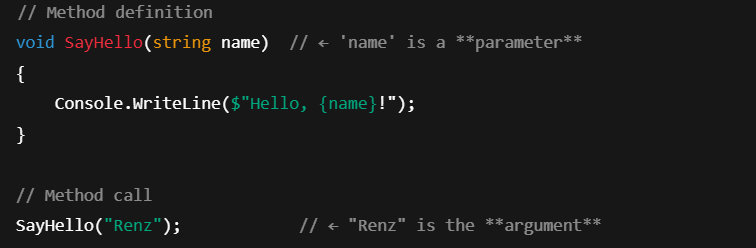
🧩 Parameters vs Arguments
Term | What it is | Where it appears |
|---|---|---|
Parameter | A placeholder/variable in the method definition | Inside the parentheses when defining a method |
Argument | The actual value you pass in when calling the method | Inside the parentheses when calling the method |
Example:
🧪 Return Types vs void
Return Type | What it Means | Example |
|---|---|---|
| Method does something, returns nothing | Print to screen |
| Method returns a value | Returns a result you can store/use |
Example:

You just call it like:
Console.WriteLine(Greet());🧠 How to Call a Method
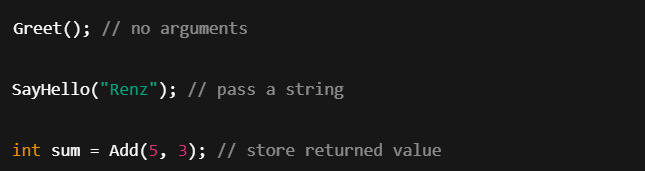
Call = Use the method by writing its name with parentheses
If it needs arguments, pass them inside:
🧠 When to Use static and private Methods in C#
🔹 static Method
You use static when:
The method does not rely on instance variables or objects.
You call the method directly using the class, like in
Main().Example use: Utility/helper functions (e.g., formatting, math, conversions).
🧠 Think of static like a standalone tool — it doesn’t care who’s using it, it just works.
🔹 private Method
You use private when:
You want to hide the method from other classes.
It's only used inside the current class.
It helps keep your code organized and secure by limiting access.
🧠 Think of private like a secret helper — only its friends inside the same class can ask for help.