Communication
What is Communication?
Data communication is the transmission of data from one device to another through a transmission medium with an agreed protocol.
Sender + receiver + transmission medium + protocol
Types of networks:
LAN (Local Area Network)
Uses small geographical area
Personal e.g companies
little delay
Fast
Low cost (Cheaper to install)
Highly secure (Can access data and protect them)
Lower error rates (short distance minimises interference)
WAN (Wide Area Network)
LANs connected to one another
high latency
high cost
Slow
Les secure
Larger geographical area
High rate of error
Not private
Client-server:
It is a model where one or more servers provide services and clients that request those services.
characteristics:
Centralised
dedicated server
requires administration and management
Client depends on servers
Advantages:
Servers are powerful machines
Can accommodate many users
Easy backup and updates
easier to enforce access rights and authentication
Disadvantages:
High cost
If server is down, clients cannot access
Network admin is needed.
Peer To Peer Server:
A model where each nodes act as a consumer and a provider of information.
Characteristics:
Not centralised.
Information is stored in local storage.
Direct data access
Nodes communicate directly with each other.
Usages:
Small companies
Frequent usage or interaction.
No need of strict security.
Think and Thick Client
Client server model offers; think client and thick client.
Thin-client server:
it is either a software or hardware that needs constant connection to a powerful server in order to function. It allows data access, procession and running of application. A fault in the connection between the device/software and the server could disrupt its flow.
The server could be; LAN, WAN, MAN or the Internet.
Pros:
Can be cheap when expanding.
Robust security
All devices are connected to the server.
Cons:
Initial cost is expensive.
When server is down, communication is cut off.
Thick-client server:
The opposite of thin-client, as it can be run independently without relying on a server but it can choose to connect to a server if needed.
Examples are; PCs, laptops....
Pros:
Does not rely on a server
Clients have control on their data.
Cons:
Updates should be done individually.
Less data security
When too many clients access the same data, it can cause inconsistencies.
Network Topologies
Bus Topology
An arrangement where all the nodes are connected to a main cable. How it works; each packet passed is checked by the nodes, if packet has reached designated node, the node will accept it.
Pros:
Can add nodes
If one node fails, the others will continue to work
Cons:
If the main cable fails, the entire thing crashes.
It is slow under heavy use.
Not secure as every node can see the data.
Star Topology
An arrangement where nodes are connected to a hub/switch with their respective cables.
Data is sent by sending them to their designated node according to their address (switch)
Hub sends the data to all the nodes.
Pros:
Fewer data collision
If one cable fails, the designated node is affected.
easy to upgrade the hub
Cons:
Can be expensive to set up
If the switch/hub crashes, the entire thing crash.
Mesh Topology
There are Routing and Flooding in the mesh topology.
Routing is a node acts like a router and sends data using the shortest path. If a node fails, it choses the second shortest path.
Flooding is a node that sends the data to all the nodes {like hub in the star topology}
Pros:
easy to expand.
Data sent to dedicated node, thus secure.
If one node is broke, it doesn't disrupt the network.
Cons:
Expensive to set up and time consuming.
Hard to set up and maintain
Hybrid Topolgy
A mixture of two or more topologies together.
Pros:
Easy to detect faults
can handle large amount of traffics.
Ideal for companies
Cons:
Difficult to install, configure and maintain.
Cloud Computing-
Cloud computing is storing or accessing data over the internet.
There are two types of cloud computing; Private and Public.
Private Computing:
Own by an organisation
is not shared with people on the internet
Dedicated infrastructure.
Very high security
Expensive.
Public Computing:
Can be accessed publicly.
Shared among a lot of people
Low cost
Low security
own by multiple organisations.
Wired and Wireless Networks:
Wired network:
Implications-
High performance - connected directly to the device.
Higher Security - Lower risk of data interception
Less Flexible - dedicated to one place
High cost - for drilling and installation
cable issues - Cables need management to avoid hazards.
Wireless Network:
Implications-
Lower performance - when moving past the access point or colliding with walls
Flexible - can move freely around the access point
Expansion - can easily add a new device.
Security - Higher risk of data interception.
Data access - in crowded places the connection may be slower.
Comparisons between Wired and wireless:
faster | Slower
reliable | Not so reliable
Expensive | Not expensive
Dedicated to one place | can be anywhere
Very secure | not so secure due to data interception
Characteristics of:
Copper wires and fibre optic
Make use of Electrical impulse | Light impulse
Short distances | long distances
Low cost | High Cost
Can be interfered | Cannot be interfered
Low security | high security
radio Wave
Microwave
Infrared
Hardware Requirement of Networks:
Switch
A switch is a device that connects multiple devices within a LAN.
it sends data towards the intended device.
Network Interface Card
it is a hardware device that allows devices to connect to the internet.
Wireless Network Interface Card
It allows devices to connect to the internet without any cables.
Wireless Access Point (WAP)
WAP is a networking device that connects wireless devices to the wired network with Wi-Fi.
How it works:
WAP is physically connected to the router via and Ethernet cable.
Then it broadcasts a Wi-Fi signal to its surroundings
This allows wireless devices to connect.
Cables
There are three types of cables; Copper twisted pair, Coaxial Cable and Fibre optic cable.
Copper twisted pair:
Made of cables twisted over one another to reduce interference.
Weakens over long distances.
Cheap and easy to install.
can be affected by electromagnetic interference.
Coaxial Cable:
Made of copper surround by insulation and metal shield.
Medium distance like copper twisted cables.
Resistant to electromagnetic interference
Fibre optic:
Transmit data as light pulses.
Travels long distant.
Immune to electromagnetic interference.
Expensive to install
Bridge
It connects two or more network segments and filters out data traffic between them.
How it works:
It reads the MAC address of the data frame.
it then decides whether or not to allow the frame depending on the segment the destination device is on.
Overtime it builds a MAC address table to make better decisions.
Repeater
A repeater is basically a booster. Since data cannot travel extremely long distances, the repeater acts as a booster to amplify the weakened data signal further along its path.
Router-
A router is a networking device that forwards data packets between different networks, directing traffic along the most efficient path to its destination.
Functions of a router:
1. Packet Forwarding
Receives incoming data packets and forwards them toward their destination
Each packet may take a different route to the same destination
2. Routing
Uses a routing table to determine the best path for each packet
The routing table stores information about known networks and the best paths to reach them
Routing tables are updated dynamically using routing protocols (e.g. OSPF, RIP)
3. Connecting Different Networks
Routers connect different networks together (e.g. your home LAN to the internet WAN)
They can connect networks using different protocols or transmission media
4. IP Address Reading
Unlike bridges/switches which read MAC addresses, routers read IP addresses
This allows them to route packets across different networks, not just within one
Process of packet reaching a router:
1.Packet arrives at the router
2. Router reads the destination IP address
3. Router checks its routing table
4. Router determines the best next hop (next router or destination)
5. Packet is forwarded out of the appropriate interface
6. Process repeats at each router until packet reaches destination
Ethernet-
It defines the rules for how devices on a network communicate over a shared medium.
Collision-
Devices are connected to a common channel.
When two devices transmit data in that channel at the same time, both of the data crash with one another, this create a collision.
To deter this problem, Carrier Sense Multiple Access (CSMA) and Collision Detection (CD).
Carrier Sense Multiple Access (CSMA):
Can listen to check if the channel is busy
Multiple devices can connect to the same medium.
Collision Detection (CD):
Can detect if a collision has taken place.
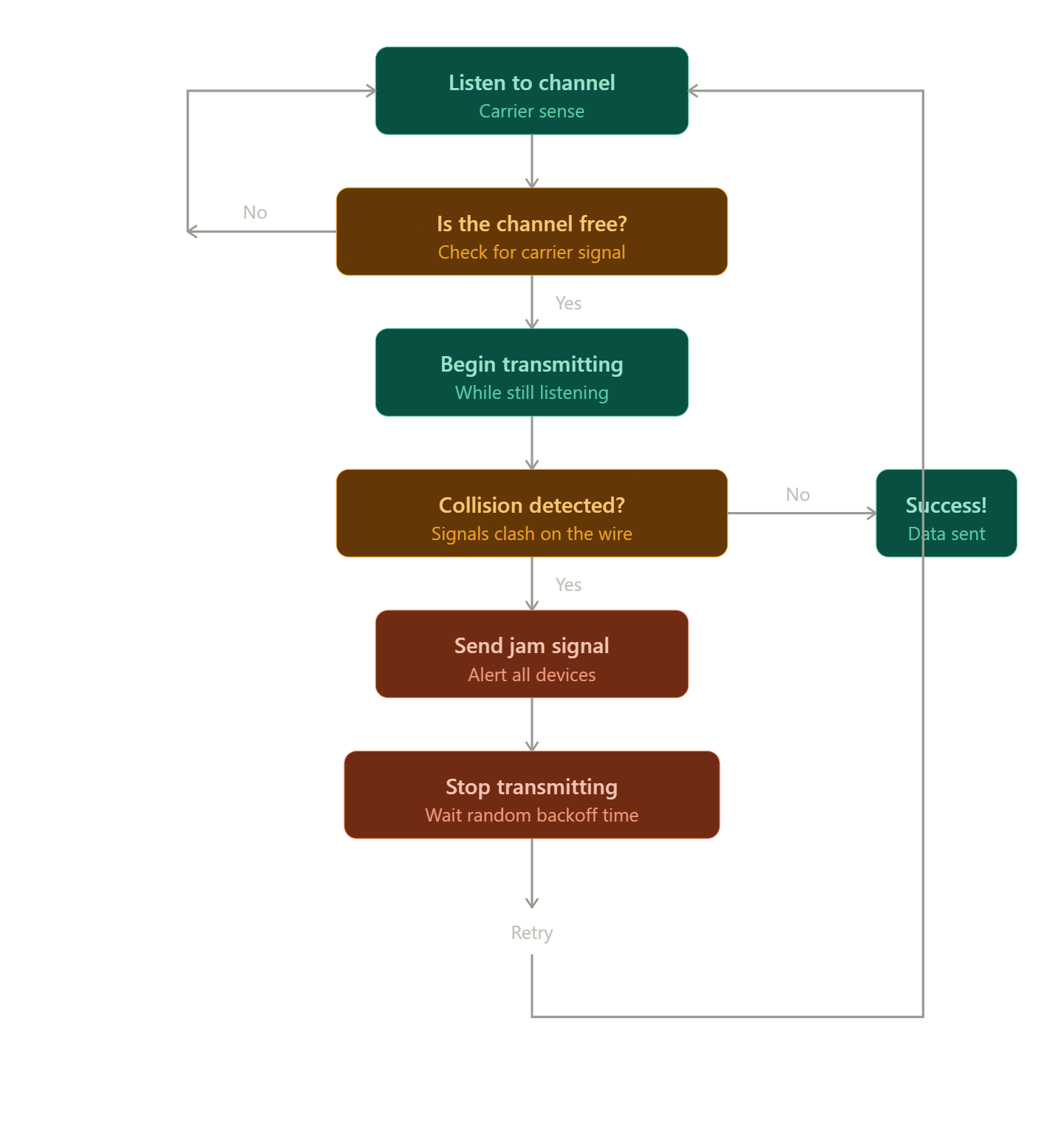
How it works:
1.LISTEN — Device checks if the channel is free (carrier sense)
2. If BUSY ‒ > wait and keep listening until it becomes free
3. If FREE ‒ > begin transmitting data
4. While transmitting ‒ > keep listening for collisions
5. COLLISION DETECTED? ‒ > Both devices immediately stop transmitting, Both send a JAM signal to alert all devices
6. BACKOFF — Each device waits a random amount of time (this randomness prevents them colliding again)
7. After waiting ‒ > go back to step 1 and try again
Bit-Streaming-
Bit streaming is the process of transmitting data as a continuous sequence of individual bits.
Data is transmitted serially — one bit at a time, in sequence
The stream is continuous — bits follow one another without gaps
Both sender and receiver must agree on the bit rate (how many bits per second are transmitted) so the receiver knows when each bit starts and end
There are two types of bit streaming: On-demand and real-time.
On-demand:
data is already stored in a server and is delivered to a client when requested.
It allows the content to be played, paused, rewind while transmitting the data.
Content can also be buffered "lag"
E.g; Netflix, YouTube, Spotify.
Real-time:
The content is played the moment it is broadcasted over the network.
Cannot be paused or rewind.
Has minimal delay when content is played real time.
E.g: Twitch, YouTube live, Zoom calls.
Importance of bit rates broadband speed on bit streaming:
Broadband is the maximum bit rate that can be transferred by the user's internet connection.
Bit rates is the rate of bits transmitted.
It is crucial when; broadband speed is greater or equal to the stream's bit rate for smooth play of the stream.
Otherwise it will "lag".
Impacts of poor broadband speed:
Buffering - content is paused to download more data.
Stuttering - unpleasant experience.
Quality downgrade - video or sound quality won't be as good.
Real - time latency - video calls can cause lags and late responses.
Frames drop - video becomes choppy as frames are skipped.
World Wide Web (WWW) and the Internet-
Internet is the global network of interconnected computers and hardware.
The World Wide Web is the service that provides access to webpages and hyperlinked content.
Differences between them:
Internet is used to transfer emails, play games, video call, file transfer, whereas WWW is used for online shopping, watching YouTube, browsing websites.
Internet makes use of IP address, WWW makes use of HTML and URLs.
Internet makes use of; Routers, fibres optics, cables and IP address. WWW uses web browsers.
Hardware used to support the internet:
Composes of; Modems, PSTN (Public Switch Telephone Network), dedicated lines and mobile network.
Modems - device that converts digital signals to analogue signal for transmission over telephone lines.
PSTN - global circuit-switched telephone network that is designed for voice calls.
When a call is made, the network establishes a dedicated circuit between the recipient and you.
Circuit remains open during the entire call, no traffic can interfere with that circuit.
dedicated lines - permanent and exclusive communication links leased from telecommunication providers.
It is solely for personal use.
Expensive.
Available at all times.
Mobile network - a wireless network that provides internet access to other devices via radio waves.
IP Address
An IP address (Internet Protocol address) is a unique numerical identifier assigned to each device connected to a network that uses the Internet Protocol for communication.
Principal Use of IP Addresses
Use | Explanation |
|---|---|
Device identification | Uniquely identifies each device on a network |
Location addressing | Specifies where a device is located on the network |
Routing | Allows data packets to be directed to the correct destination device |
Communication | Enables devices to send and receive data to/from each other |
Analogy: An IP address is like a postal address for a house. Just as a postal address ensures a letter reaches the correct house, an IP address ensures data packets reach the correct device on a network.
IPv4 VS IPv6:
Feature | IPv4 | IPv6 |
|---|---|---|
Size | 32-bit (4 bytes) | 128-bit (16 bytes) |
Format | Four decimal numbers separated by dots: | Eight hexadecimal groups separated by colons: |
Public and Private IP address:
Type | Description | Example |
|---|---|---|
Public IP | Unique address visible on the internet; assigned by ISP |
|
Private IP | Used within a local network; not visible on the internet |
|
Types of IP address:
Type | Description |
|---|---|
Static IP | Manually assigned and remains fixed; used for servers, printers |
Dynamic IP | Automatically assigned by DHCP server; can change over time; used for most client devices |
Uniform Resource Locator (URL)
It is a readable address which is used to locate and access websites or web pages in the WWW.
Purpose | Explanation |
|---|---|
Resource location | Identifies the exact location of a resource on the internet |
Resource access | Specifies the protocol needed to access the resource |
Human readability | Provides a memorable, meaningful address (unlike an IP address) |
Web navigation | Allows users to navigate to websites and web page |
How a resource is located:
Step | Action |
|---|---|
1 | User enters a URL into a web browser |
2 | Browser extracts the domain name from the URL |
3 | Browser sends a request to a DNS server to resolve the domain name to an IP address |
4 | DNS server returns the IP address of the server |
5 | Browser uses the protocol (e.g., HTTPS) to connect to the server at that IP address |
6 | Browser requests the specific path from the server |
7 | Server returns the requested resource (e.g., web page) |
8 | Browser displays the resource to the user |
EXAM PROBLEMS.
Describe the drawbacks of increasing the number of cores in a processor.
increase latency as it would take time for the cores to communicate with one another.
Increased heat generation which could cause damage to other components