CSS Positioning
Overview
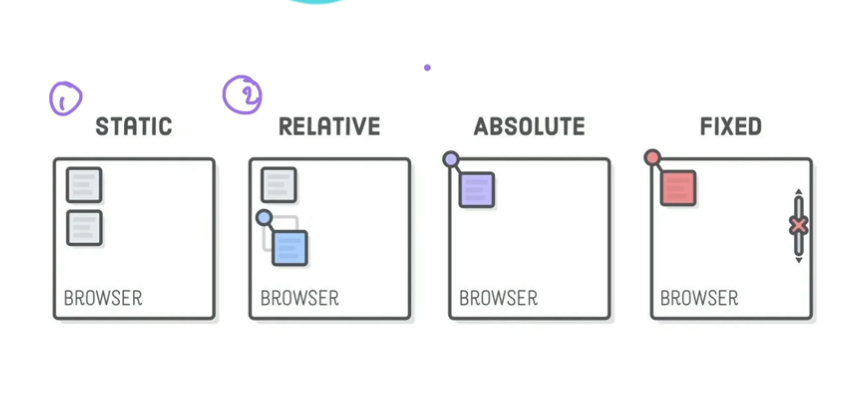
CSS positioning allows you to control the layout and position of elements on a web page. There are four main types of positioning in CSS: static, relative, absolute, and fixed.
Static Positioning
Static positioning is the default value in HTML. You cannot move around the position values at all.
Relative Positioning
Relative positioning allows you to move around with element’s position relative to its default static position.
For example:
position: relative;
top: 50px;
left: 50px;
This will move the element 50 pixels down and 50 pixels to the right from its original position.
It's important to note that relative positioning doesn't affect the positioning of other elements, as the space it would have occupied in the normal flow is still reserved.
Absolute Positioning
Absolute positioning takes an element out of the normal document flow and positions it relative to its nearest positioned ancestor (an ancestor with a position value other than static). If there is no positioned ancestor, the element is positioned relative to the document body.
For example:
position: absolute;
top: 50px;
left: 50px;
This will position the element 50 pixels down and 50 pixels to the right from the top-left corner of its nearest positioned ancestor (or the document body if there is no positioned ancestor).
Fixed Positioning
Fixed positioning is similar to absolute positioning, but the element is positioned relative to the viewport (the browser window). The element will stay in the same place, even if the page is scrolled.
For example:
position: fixed;
top: 50px;
left: 50px;
This will position the element 50 pixels down and 50 pixels to the right from the top-left corner of the viewport.
z-index
The z-index property specifies the stack order of positioned elements. An element with a higher z-index value will appear on top of an element with a lower z-index value.
Creating Circles with CSS
To create a circle in CSS, you can use the border-radius property. Setting border-radius to 50% will create a perfect circle.
For example:
.red-circle {
background-color: red;
width: 200px;
height: 200px;
border-radius: 50%;
}
This will create a red circle with a width and height of 200 pixels.