01 JAX-WS Handler
When we develop several web service endpoints and web services consumer or clients, once in a while we need to address some cross-cutting concerns or nonfunctional requirements which have to be applied across Web Services clients or across the web services endpoints. This requirements might not have anything to do with the business logic but they need us to manipulate the SOAP message.
It could be SOAP headers, the SOAP body or it could be completely different requirement which your application needs, but it is a non-functional requirements which should be applied across WS endpoints. This is where JAX_WS comes into picture.
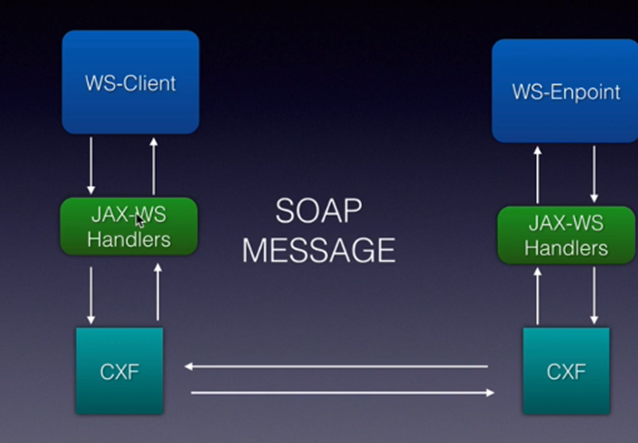
These handlers are classes that we develop by implementing certain interfaces in JAX-WS API. Web Services stacks like APACHE CXF will call into these handlers when the client request is sent from the client, when the request comes into the endpoint and the response goes back from the endpoint and also when the response comes back on to the client.
This handlers are very similar to servlet filters, if you are aware of servlet filters, except for these handlers can be applied both on the client and server side.
Whatever logic we write in the methods in the handlers will be called by webservices stacks like CXF.
Why and When to use Handlers?
Handlers can be used to implement custom authentication mechanism.
Let’s say you don’t want to use the username token profile or whatever is available in WS Standard and you want to include your own SOAP headers, you can create handlers both on the provider side and the client side of your application and you can manipulate the SOAP headers inside the handlers.
All SOAP message information will be available to you when you create a handler.
The 2nd usage is Caching. Instead of our web service doing a particular service every time, we can create a handler that will cache the responses and it can check the request to see if its the same request which came in earlier and then it can send back the response from the cache instead of calling into the web services endpoint and executing then entire business logic and database operations.
Third usage is to decide which web service to send the request into based on the soap header version it comes into.
To summarize, from this lecture you have learnt that JAX-WS handlers give you a custom way to manipulate the soap message or to address cross-cutting concerns like security caching which your application needs or the various endpoints in our application needs.
Some examples for JAX-WS handlers are to handle custom authentication, Caching, Versioning and so on. Anything that has to do with the SOAP message can be done using the Händler framework.
Two Types of JAX-WS Handlers
SOAP Handlers
SOAP Handlers have access to the entire message. They have access to the protocol information like HTTP Headers, SOAP Headers and the entire SOAP body.
Logical Handlers
We implement logical handlers when we want to access just the payload information, that is whatever goes in the SOAP body.
We implement a SOAP handler by implementing the SOAPHandler Interface. It is a generic interface.
Usually we use SOAPMessageContext which wraps the entire SOAP information. It has lifecycle methods like handleMessage, handleFault, getHeaders and close in action.
handleMessage and getHeaders are called both on the way in as well as way out on the client side as well as on provider side.
handleFault is only called when there is a SOAP Fault and the close method is called on the way out at the end of the entire flow.
close method is called before the response goes back. We will do any cleanup like code, resources, or database connections.
Question 1:
Which JAX-WS handlers should be used to access the SOAP headers? → SOAP Handler
logical handlers
soap handler
cxf handler
jee handler
Question 2:
The logical handlers can be used to access which part of the SOAP message? → payload
payload
headers
entire message
none of the above
Step to create a project
Design the handler chain
Create the handlers
Configure the handlers
Run and Test
Project Step
Design the handler chain
package com.soaptest.handlers;

import java.util.Set;

import javax.xml.namespace.QName;
import javax.xml.ws.handler.MessageContext;
import javax.xml.ws.handler.soap.SOAPHandler;
import javax.xml.ws.handler.soap.SOAPMessageContext;

public class SiteHandler implements SOAPHandler<SOAPMessageContext> {

	@Override
	public boolean handleMessage(SOAPMessageContext context) {
		// TODO Auto-generated method stub
		return false;
	}

	@Override
	public boolean handleFault(SOAPMessageContext context) {
		// TODO Auto-generated method stub
		return false;
	}

	@Override
	public void close(MessageContext context) {
		// TODO Auto-generated method stub

	}

	@Override
	public Set<QName> getHeaders() {
		// TODO Auto-generated method stub
		return null;
	}

}
2.Extract the header
package com.soaptest.handlers;

import java.util.Iterator;
import java.util.Set;

import javax.xml.namespace.QName;
import javax.xml.soap.Node;
import javax.xml.soap.SOAPEnvelope;
import javax.xml.soap.SOAPException;
import javax.xml.soap.SOAPHeader;
import javax.xml.soap.SOAPMessage;
import javax.xml.ws.handler.MessageContext;
import javax.xml.ws.handler.soap.SOAPHandler;
import javax.xml.ws.handler.soap.SOAPMessageContext;

import org.springframework.web.servlet.tags.EvalTag;

public class SiteHandler implements SOAPHandler<SOAPMessageContext> {

	@Override
	public boolean handleMessage(SOAPMessageContext context) {
		System.out.println("start handleMessage() ");

		Boolean isResponse = (Boolean) context.get(MessageContext.MESSAGE_OUTBOUND_PROPERTY);
		if (isResponse) {
			SOAPMessage soapMessage = context.getMessage();
			try {
				// Get Envelope
				SOAPEnvelope envelope = soapMessage.getSOAPPart().getEnvelope();

				// Get Headers
				SOAPHeader header = envelope.getHeader();
				// Get Child elements
				Iterator<Node> childElements = header.getChildElements();

				while(childElements.hasNext()) {
					Node eachSoapHeaderNode = (Node) childElements.next();

					//Name of soap header
					String name = eachSoapHeaderNode.getLocalName();
					if( name != null && name.equals("Sitename")) {
						System.out.println("Site name is: "+eachSoapHeaderNode.getValue());
					}
				}

			} catch (SOAPException e) {
				// TODO Auto-generated catch block
				e.printStackTrace();
			}
		} else {
			System.out.println("Response is on the way");
		}

		System.out.println("End handleMessage() ");
		return true;
	}

	@Override
	public boolean handleFault(SOAPMessageContext context) {
		System.out.println("start handleFault() ");

		System.out.println("end handleFault() ");
		return false;
	}

	@Override
	public void close(MessageContext context) {
		System.out.println("start close() ");

		System.out.println("end close() ");
	}

	@Override
	public Set<QName> getHeaders() {
		System.out.println("start close() ");

		System.out.println("end close() ");
		return null;
	}

}
Configure the handler
@Configuration
public class WebServiceConfig {

	@Autowired
	private Bus bus;

	@Bean
	public Endpoint endpoint() {
		//Endpoint endpoint = new EndpointImpl(bus, new HelloController());
		//endpoint.publish("/hello");

		Endpoint endpoint = new EndpointImpl(bus, new CustomerOrderWsImpl());
		endpoint.publish("/customerordersservice");

		//Add SOAPBinding
		SOAPBinding binding = (SOAPBinding) endpoint.getBinding();
		ArrayList<Handler> handlerchain = new ArrayList<>();
		handlerchain.add(new SiteHandler());
		binding.setHandlerChain(handlerchain);

		return endpoint;

	}

}