9th set of videos
Cloud Characteristics - CompTIA A+ 220-1201 - 4.2
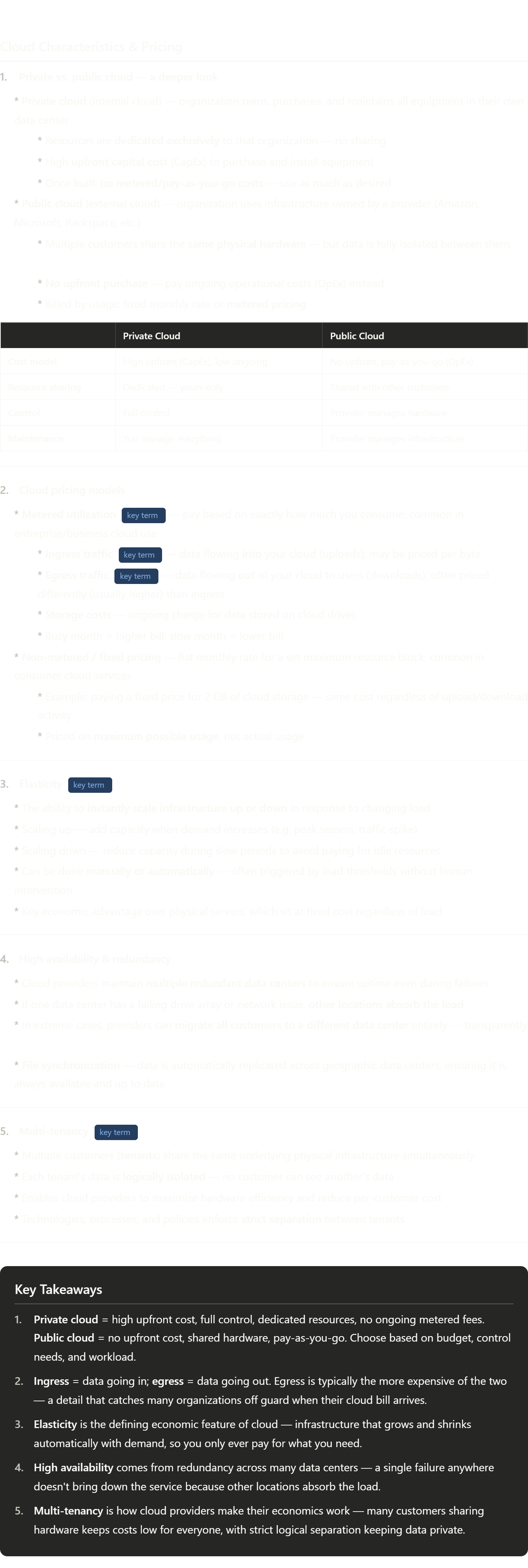
Key terminology from this one worth locking in:
CapEx vs. OpEx — the video doesn't use these terms but the concept is there. CapEx (Capital Expenditure) = a large upfront purchase of equipment you own. OpEx (Operational Expenditure) = ongoing monthly payments for services you use. Private cloud = CapEx model. Public cloud = OpEx model. This distinction drives most cloud vs. on-premises business decisions and comes up constantly in IT management discussions.
Ingress / Egress — these are networking terms borrowed from architecture. "Ingress" literally means entering (think: a building's entrance). "Egress" means exiting (think: emergency exit signs). In cloud billing, egress almost always costs more than ingress — providers want your data in, but charge you when it leaves. This is worth remembering because it affects how you architect systems.
Elasticity — technically distinct from just "scalability." Scalability means a system can handle more load if you add resources. Elasticity means it automatically scales itself without human intervention. A system can be scalable without being elastic.
Multi-tenancy — think of an apartment building. Many tenants, one building, shared plumbing and electrical — but each apartment is private. Cloud multi-tenancy works the same way. You might be on the same physical server as a competitor, but neither of you can see the other's data. The "walls" between tenants are software-enforced rather than physical.
High availability (HA) — a design goal meaning a system stays operational even when components fail. Cloud achieves this through geographic redundancy — spreading copies across multiple data centers so no single failure causes an outage.
Troubleshooting Hardware - CompTIA A+ 220-1201 - 5.1

This is one of the most practical videos yet — real troubleshooting skills. Here's the terminology to really understand:
POST (Power On Self-Test) — runs before your OS, before anything. It's the motherboard checking itself. Think of it as a pilot's pre-flight checklist that happens automatically every time you power on. If it fails, the OS never even gets a chance to load.
Beep codes — the motherboard's way of communicating when it can't use the screen. One long beep, three short beeps, etc. Each pattern means something specific — but only according to that board's manual. There's no universal standard.
CMOS battery / RTC — CMOS (Complementary Metal-Oxide Semiconductor) is the chip that stores BIOS settings. The small coin battery (usually CR2032) keeps it powered when the PC is unplugged, maintaining the real-time clock (RTC). When it dies, the clock resets to a default date on every boot.
Thermal throttling — when a CPU gets too hot, it deliberately slows itself down to reduce heat output and avoid damage. This is why a dusty laptop can feel "slow" — the CPU is throttling, not failing. Clean the fans and it speeds right back up.
Thermal paste — also called thermal compound or thermal interface material (TIM). It fills microscopic gaps between a CPU and its heat sink. Without it, air pockets insulate the chip and trap heat. Over years it dries out and must be reapplied.
Capacitor — stores and releases electrical charge on the motherboard. A bulging or blown capacitor is a visible hardware failure — one of the few you can diagnose with your eyes. The bulge means pressure is building inside from a chemical reaction. Once it blows, the board usually needs replacement.
Event Viewer vs. Reliability Monitor — both are built into Windows. Event Viewer is raw and detailed (every log entry). Reliability Monitor is a friendlier visual timeline showing stability scores over time. For quick crash hunting, start with Reliability Monitor; for deep investigation, go to Event Viewer.
Troubleshooting Storage Devices - CompTIA A+ 220-1201 - 5.2
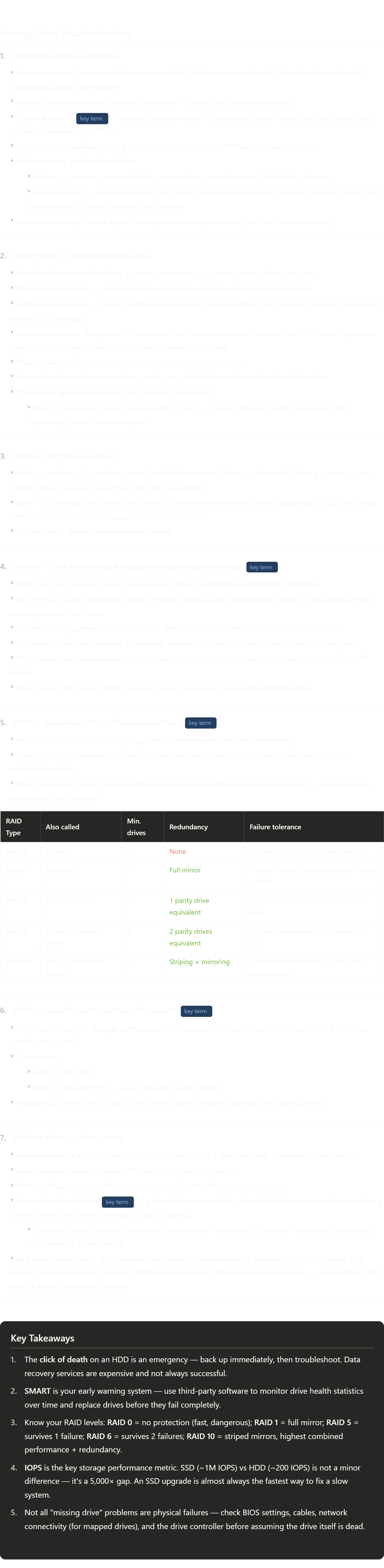
A dense but important topic. Here's the terminology to really nail down:
Platters & actuator arms — HDDs are essentially miniature record players. Platters are the spinning magnetic disks (like vinyl records). Actuator arms are the mechanical arms that swing read/write heads across them (like a tonearm). They operate at microscopic tolerances — the head floats nanometers above the platter. Any physical shock or wear causes them to contact the platter surface, producing that grinding/clicking sound.
SMART — think of it as a car's check engine light, but with actual data. The drive measures its own health internally and logs things like how many times it has powered on, how many sectors had to be reallocated (moved because they were going bad), and operating temperature. The raw numbers are cryptic; that's why you use software like CrystalDiskInfo or similar tools to interpret them.
RAID terminology unpacked:
Striping (RAID 0) — data is split across drives for speed, like cutting a document into pieces and writing each piece simultaneously. Fast but zero protection.
Mirroring (RAID 1) — exact duplicate written to two drives simultaneously. If one dies, the other has everything.
Parity (RAID 5/6) — a mathematical checksum stored alongside the data. If one drive fails, the parity information can reconstruct the missing data mathematically. RAID 6 stores two independent parity sets, tolerating two simultaneous failures.
RAID 10 — mirror first, then stripe the mirrors. You get speed from striping and safety from mirroring.
IOPS — the most meaningful single number for comparing storage speed in real workloads. Throughput (GB/s) measures how fast large sequential files move. IOPS measures how fast a drive handles lots of small random requests — which is what an OS does constantly. SSDs win here by orders of magnitude.
Mapped network drive — a Windows feature where a remote server folder appears as a local drive letter (e.g. Z:\). It's not a physical drive — it's a shortcut to a network location. If the server is down or network is broken, the drive letter disappears. A very common help desk ticket.
Troubleshooting Display Issues - CompTIA A+ 220-1201 - 5.3
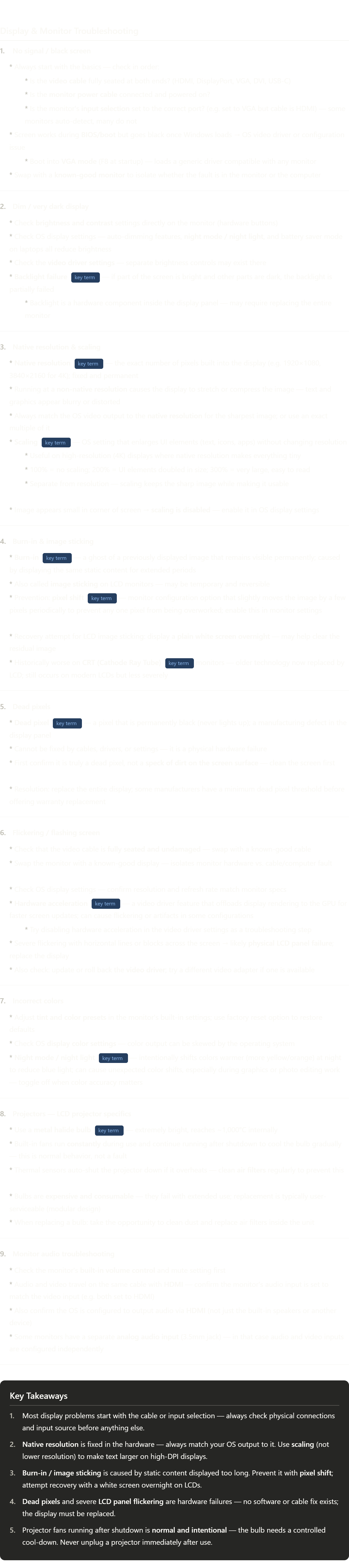
Lots of practical terminology here. Here's what's worth really understanding:
Native resolution — every LCD is a fixed grid of physical pixels. 1920×1080 means exactly 1,920 columns and 1,080 rows of pixels, period. Unlike CRTs which could display multiple resolutions natively, LCDs have only one "true" resolution. Running at anything else forces the display to interpolate (guess what the in-between pixels should look like), causing blur.
Scaling vs. resolution — these are two completely separate things that people constantly confuse. Resolution = how many pixels. Scaling = how large the UI elements appear at that resolution. On a 4K monitor at 100% scaling, everything is razor-sharp but tiny. At 200% scaling, everything is larger and still sharp because the resolution hasn't changed — Windows is just drawing things twice as big. This is why modern high-DPI displays look great even with large icons.
Burn-in — more accurately called "phosphor burn" on old CRTs (the phosphor coating literally burned). On LCDs it's a different mechanism — the liquid crystals in frequently-lit pixels degrade faster than others, leaving a faint imprint. You've probably seen this on airport departure boards, ATMs, or old TV displays showing a faint ghost image.
Pixel shift — a clever mitigation. The monitor imperceptibly moves the entire image by 1–2 pixels every few minutes so no single pixel bears the full brunt of a static element. Most modern commercial displays (especially those meant for 24/7 use) have this enabled by default.
Metal halide bulb — a type of high-intensity discharge (HID) lamp. Same technology used in stadium lighting and car headlights. Produces enormous amounts of light from a tiny source, which is why projectors can fill a large screen. The 1,000°C figure explains why the cool-down cycle is so important — thermal shock from sudden temperature changes can crack the bulb.
Hardware acceleration — when the GPU takes over rendering tasks that would otherwise be handled by the CPU. For most things this is faster and better. But when drivers are buggy or the GPU is failing, offloading work to it can cause visual artifacts. Disabling it falls back everything to software rendering — slower but more stable, useful for diagnosing display issues.
Troubleshooting Mobile Devices - CompTIA A+ 220-1201 - 5.4

A very practical video. Here's the key terminology to understand deeply:
Swollen battery / battery bloat — lithium-ion and lithium-polymer batteries can enter a state called "thermal runaway" where internal chemical decomposition produces gas. The sealed pouch expands but (ideally) contains the gas. This is why you should never puncture a swollen battery — the gas is flammable and the chemicals are corrosive. The moment a phone case starts lifting or the screen separates slightly, that's usually the battery pushing outward.
LCI (Liquid Contact Indicator) — a tiny adhesive strip, usually white or silver, that turns pink or red permanently when wet. Manufacturers place them in ports because those are the most common entry points for liquid. It's irreversible — even if the phone dries out and works fine, the LCI stays red. Repair shops use this to void warranties for liquid damage.
Desiccant — from Latin desiccare (to dry out). Silica gel is the most common type — those little packets labeled "do not eat." They work by adsorption (attracting moisture molecules to their surface). Much more effective than rice because they actively pull moisture rather than just sitting nearby.
Digitizer — a completely separate layer from the display itself. The display shows the image; the digitizer detects touch. They're laminated together in modern phones, which is why you replace them as one unit. When the digitizer fails, the display still shows everything correctly — the phone just thinks it's being touched randomly (cursor drift) or not at all.
Active stylus — "active" means it has electronics inside. Passive styluses (just a rubber tip) work on any capacitive screen but have no precision. Active styluses have a chip, battery, and sometimes pressure sensors and Bluetooth — they communicate with the device rather than just simulating a finger. Apple Pencil, Samsung S Pen, and Microsoft Surface Pen are all active styluses.
System board — the main circuit board of a mobile device, equivalent to a motherboard in a PC. Unlike desktop PCs where components are modular (swap the GPU, add RAM), mobile system boards are highly integrated — the CPU, RAM, storage, and often the charging controller are all soldered directly on. This is why a damaged charging port can cost as much as a new phone to fix properly.
Troubleshooting Networks - CompTIA A+ 220-1201 - 5.5
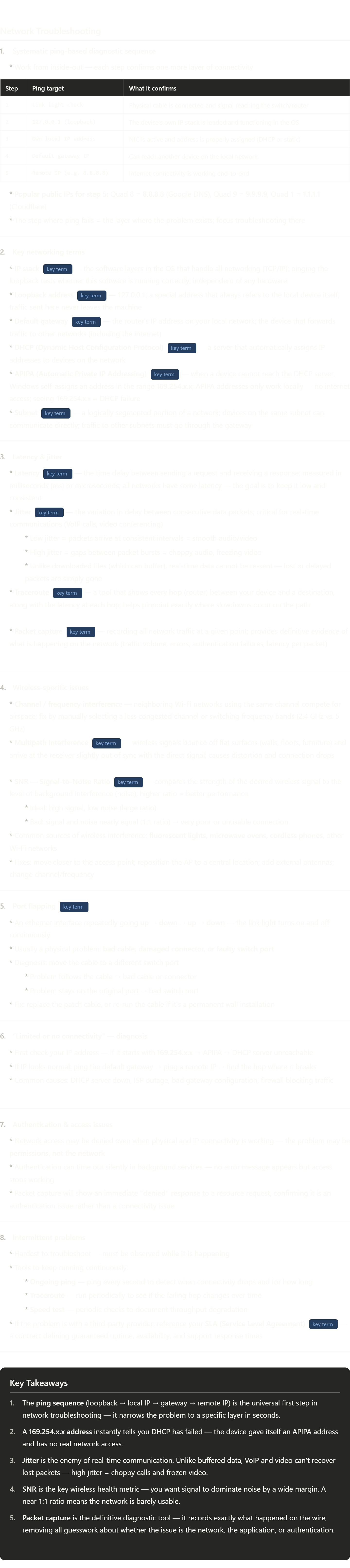
This is core IT knowledge. Here's the terminology worth really internalizing:
IP stack — short for "TCP/IP stack." Think of it as a stack of software layers, each handling a different part of networking (physical signals → data frames → IP addresses → ports → applications). Pinging the loopback (127.0.0.1) checks that this entire software stack is loaded and working, completely independent of the physical hardware. If loopback fails, the OS networking software itself is broken.
APIPA (169.254.x.x) — Automatic Private IP Addressing. When Windows can't find a DHCP server, it panics and picks a random address in the 169.254.0.0 range. It's a self-assigned "placeholder" address. Two devices doing this can technically talk to each other, but neither can reach anything outside the local segment. Seeing 169.254.x.x is like seeing a car's "check engine" light — it tells you exactly one thing: DHCP is unreachable.
Latency vs. jitter — latency is how long a single trip takes (think: how far away the restaurant is). Jitter is the inconsistency between trips (sometimes 5 minutes, sometimes 25 minutes). For watching a downloaded video, latency matters but jitter doesn't — it all buffers. For a live phone call, jitter is catastrophic — you can't buffer a live conversation.
Traceroute — think of it like tracking a package at every distribution center along the way. Each "hop" is a router the packet passes through. You see the IP of each router and how long it took. The hop where latency suddenly jumps (or where the response stops) is where the problem lives.
SNR (Signal-to-Noise Ratio) — a physics concept applied to wireless networking. "Signal" is the Wi-Fi transmission you want. "Noise" is everything else on that frequency — microwaves, other networks, cordless phones, interference. You want the ratio to be high (lots of signal, little noise). Engineers express this in decibels (dB); anything above 25 dB is generally considered good.
SLA (Service Level Agreement) — a legally binding contract between a service provider and a customer that defines exactly what performance is guaranteed. It typically specifies uptime percentage (e.g. 99.9% = ~8.7 hours of downtime per year), response time for support tickets, and penalties if targets aren't met. When your ISP or cloud provider has an outage, the SLA is what you reference to request compensation.
Port flapping — "port" here means the physical ethernet port on a switch, not a software port number. "Flapping" is the colloquial term for rapid up/down cycling. It's like a power outlet that randomly turns off — the device plugged into it keeps losing and regaining power. Usually caused by a damaged cable or dodgy RJ45 connector.
Troubleshooting Printers - CompTIA A+ 220-1201 - 5.6
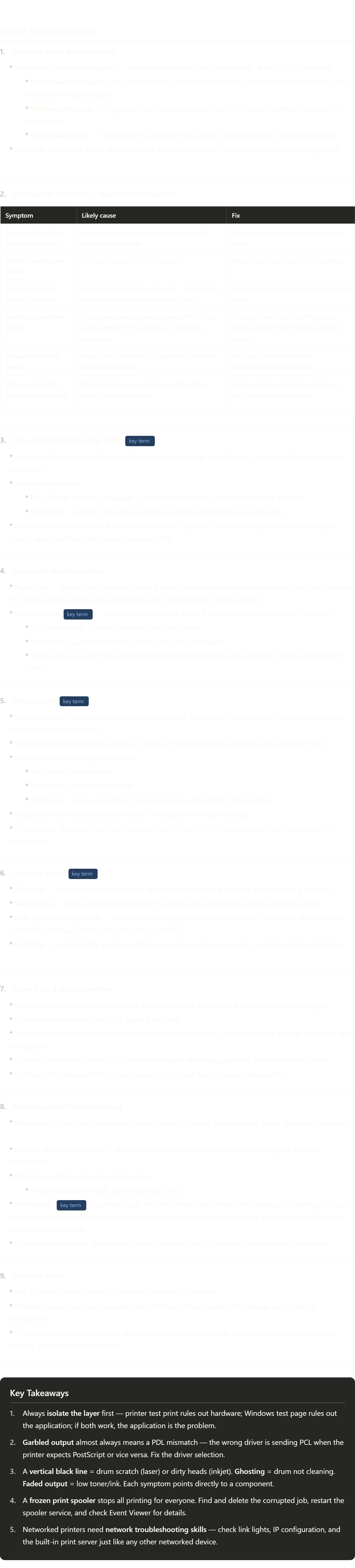
Solid practical content. Here's the terminology worth really understanding:
Photosensitive drum — the core component of a laser printer. It's a cylinder coated with a material that holds an electrostatic charge where light hits it. The laser "draws" the page by selectively discharging areas of the drum; toner sticks to the charged areas; then heat fuses the toner to paper. A scratch on the drum means one spot is always charged (or always discharged) → a permanent black line every rotation.
Ghosting — when the drum's cleaning blade fails to wipe all residual toner from the previous rotation, a faint "echo" of the previous page appears slightly lower on the next page. The drum rotates and picks up new toner, but the old residue left behind also gets transferred. It looks like a faded shadow of something that printed a few lines up.
PCL vs. PostScript — two completely different languages for describing a printed page. PCL (created by HP) is like giving the printer step-by-step drawing instructions. PostScript (created by Adobe) describes the page mathematically as objects and curves. If the driver sends one language and the printer speaks the other, neither knows what to do — hence the garbled output. Most modern printers support both, but the driver must be configured correctly.
Print spooler — "spool" stands for Simultaneous Peripheral Operations On-Line — a decades-old term. The spooler lets you hit print and immediately go back to work, while the spooler handles the slow process of feeding data to the printer in the background. It's a Windows service (spoolsv.exe). You can restart it manually in Services or Task Manager when it freezes.
Pickup rollers — the unsung heroes of printing. These small rubber wheels are the first thing that touches a sheet of paper. Over hundreds of thousands of pages, the rubber glazes and hardens, losing grip. The result is either the paper not feeding at all, or the roller grabbing two sheets at once (a "multi-feed"). Maintenance kits exist specifically because these parts have a known lifespan.
Finishing — a term borrowed from commercial printing. In a print shop, "finishing" means everything done to a document after it comes off the press: cutting, binding, laminating, stapling. Enterprise office printers brought scaled-down versions of these capabilities — collating, stapling, hole punching — built directly into the printer unit.
Print server — every networked printer has a small embedded web server running inside it. You can usually access it by typing the printer's IP address into a browser. From there you can see job queues, restart the print service, check ink/toner levels, update firmware, and change network settings — all without physically touching the printer. This is standard IT management for enterprise printers.