Databases
Basic Concepts
A.1.1 - Data vs Information
data: the quantities, symbols, and characters on which operations are being performed by a computer system, being stored, transmitted, and distributed in electrical signals, and recorded in optical/magnetic/mechanical recording media
often considered the more objective facts, having characters and symbols with no distinct meaning
information: occurs when connections between pieces of data are identified (processed data with meaning)
A.1.2 - Information System vs Database
information system: an organized collection of interconnected components that work together to collect, store, process, and distribute information, to support decision-making and operations within an organization
hardware, software, data, people, process
database: an organized collection of data, typically stored electronically in a computer system, designed for efficient storage, retrieval, and management of data
A.1.3 - The Need for Databases
needs: allow easy data sharing which enhances collaboration, improved efficiency and decision making, potential innovation and better customer experience
challenges: high implementation cost, complex to manage, performance overhead
A.1.4 - Transaction States
db state: the actual data stored in the database at a specific point in time. it reflects the current contents and changes made through operations (insertion, deletion, update). during a lifetime of a transaction, there can be multiple states to go through
A.1.5 - Database Transaction
transaction: a sequence of one or more operations treated as a single unit of work. the goal is the ensure either all operations succeed, or none do, to maintain data consistency
common operations are the CRUD operations
A.1.6 - Concurrency
two or more events/circumstances that are existing and happening at the same time
data concurrency refers to the ability of a database to handle multiple users and processes manipulating/accessing data simultaneously, without compromising data integrity and consistency
pros: better system resource utilization, higher throughput, however it is crucial that these transactions do not conflict with each other
dirty read: one transaction reads uncommitted data from another transaction
incorrect summary: one transaction reads before another has completed an update
non-repeatable read: multiple reads on one transaction gets different values
phantom read: when a read variable is read again but an error occurs due to deletion
lost update: an update is lost when another transaction overwrites the update
popular solutions (thinking procedurally) → lock based (locking data when in use), time stamp based (using timestamps to monitor multiple transactions)
A.1.7 - ACID Properties
atomicity → transactions are treated as an atomic unit (they either succeed, or not at all)
consistency → transaction follows predefined rules/constraints
isolation → data isolated from each other to avoid conflicts and interference
durability → data is persisted even during system failure
A.1.8 - Database Functions
query functions (read) → accessing and retrieving data for analyzing and reporting purposes
update functions (delete, create, update) → making sure data is consistent and accurate/up to date
A.1.9 - Data Validation and Verification
validation: ensures data is of the same type/format and within the expected range
verification: ensures data fits with the goals of the programs
Relational Databases
A.2.1 - DBMS and RDBMS
DBMS
Stores data individually
Data elements are accessed individually
No relationship is present between data
No normalization is present
No support for distributed databases
RDBMS
Stores data in table format
Multiple data elements can be accessed in the same time
Data is stored in the form of tables which are in relationship with each other
Normalization is present
Supports distributed databases
Normalization
Process of organizing data within a database to minimize redundancy and to improve data integrity
Distributed Databases
Systems where data is stored and managed across multiple computers or sites connected by a network
A.2.2 - Functions and Tools of a DBMS
Functions of a DBMS
Creation (setting up the structure of the database)
Defining schema → determining the tables, fields, data, types, and relationships
Setting constraints → primary keys, foreign keys, unique constraints, default values
Data modeling → designing entity-relationship diagrams (ERDs) to map out logical structure
Manipulation (inserting, updating, deleting, and maintaining data within the database)
Data entry and updates → adding/modifying records
Data validation → ensuring data meets required formats/rules
Transaction management → ensuring data integrity (rollback/commit)
Interrogation (retrieving and analyzing data from the database)
Querying → fetching specific data using conditions or joins
Reporting → presenting data in user-friendly formats
Aggregation → using functions like SUM(), AVG(), COUNT()
Tools of a DBMS
MySQL
Microsoft SQL Server
SQLite
A.2.3 - DBMS and Data Security
Personal vs Organizational Security
Data security is the practice of protecting digital information from unauthorized access, corruption, or loss
It involves implementing measures to ensure the confidentiality, integrity, and availability of data throughout its lifecycle
Personal data and multi-factor authentication → may be less purposeful for bigger datasets in an organization → 2/3 factor authentication
Organizational data security areas → application security, data security
Data Validation
Data type → checks that the data matches the data type for a field (letters, numbers, etc) → range validation also would be needed
Data range → the data falls within an acceptable range of values defined for the field → data constraint needed
Data constraint → data meets certain conditions or criteria for a field (type of data, number of characters, etc.) → data range validation also needed
Data consistency → data makes sense in the context of other related data → data might be consistent but still inaccurate
Code structure → data follow or conforms to a set structure → format/pattern
Code validation → checks if it exists → application code systematically performs all of the previously mentioned validations during user data input → might not properly validate all possible variations with data input
Access Rights (AKA Database Permissions/Privileges)
Define what actions users or roles can perform on various database objects, such as tables, views, schemas, or the entire database
Fundamental component of database security and access control, ensuring that only authorized individuals/systems can interact with data in specific ways
Example → policy based access rights → only administrators can create and manage policies for database permissions and then apply those policies to users → permission levels
Data Locking
Mechanism in database management systems to control concurrent access to data, ensuring data integrity and consistency, especially in multi-user environments
Prevents conflicting operations from being performed on the same data by different transactions simultaneously
Approaches to data locking → allowing many reads but limited edits, locking specific tables, pages, database rows
A.2.4 - Schema
Defines the structure and organization of data within a database, acting as a blueprint for how data is stored, accessed, and manipulated
Outlines tables, fields, data types, relationships, and constraints that govern the database’s logical design
Common components: tables, columns/fields, primary keys, foreign keys, relationships
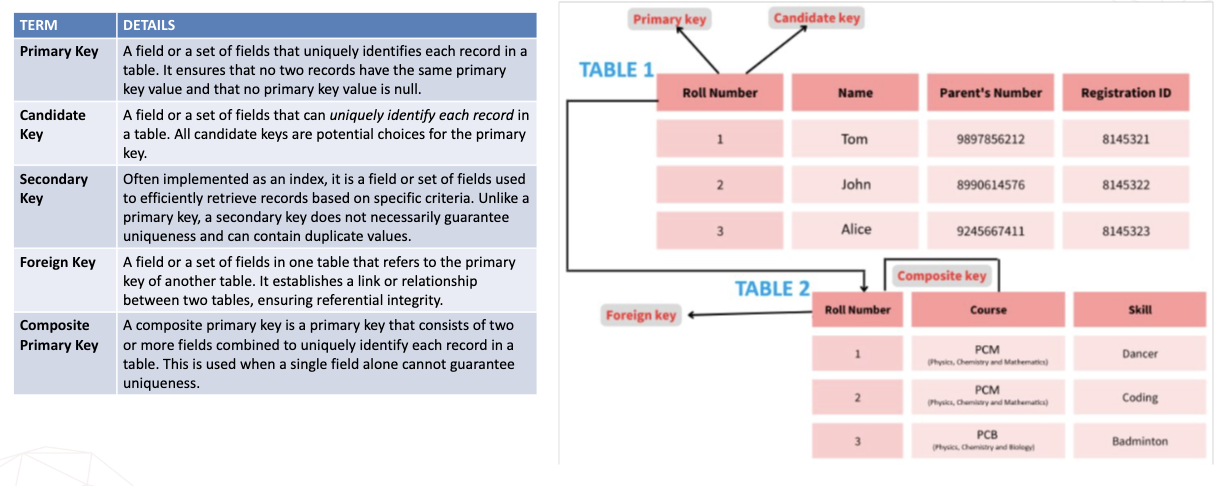
Primary key → uniquely identifies a record in the table
Foreign key → field in the table that is a primary in another table
A.2.5 - Levels of Schema
Conceptual level → represents the “what” of the data focusing on business concepts and their relationships. it is a high-level view, abstracting away technical details (stakeholder focus is upper business leaders)
Logical level → defines the structures and details of the data, still independent of any specific database system. it builds upon the conceptual model by adding more structure (data architect and analysts)
Physical level → defines how the data will be physically stored in a specific database system, it is the implementation of the blueprint (database developers)
A.2.6 - Nature of the Data Dictionary
A collection of names, definitions, and attributes about data elements that are being used in a database/information system/part of a research project
describes the meanings and purposes of data elements within the context of a project
provides guidance on interpretation, accepted meanings/representation
in DBMS, it helps users manage data in an orderly manner, preventing data redundancy
important to provide clarity about the entities/ relationships, and attributes that exist in the data model
A.2.7 - Data Definition Language
a syntax for creating and modifying database objects such as tables, indices, and users
these commands define implementation details of the database schema, which are usually hidden from the users
create, alter, drop, rename, truncate, comment
controls the design, not the data itself
it is a part of SQL (structured query language) commands used to manage RDBMS
A.2.8 - Importance of Data Modeling
process of creating a visual representation of data and how it relates to each other, often in the form of diagrams, to represent data structures and how they will be stored and used within a system
acts as a blueprint for databases/information systems, defining entities, attributes, and relationships
benefits → enhanced decision-making, optimized database performance, efficient data integration
A.2.9 - Database Terms
Basic Database Terms
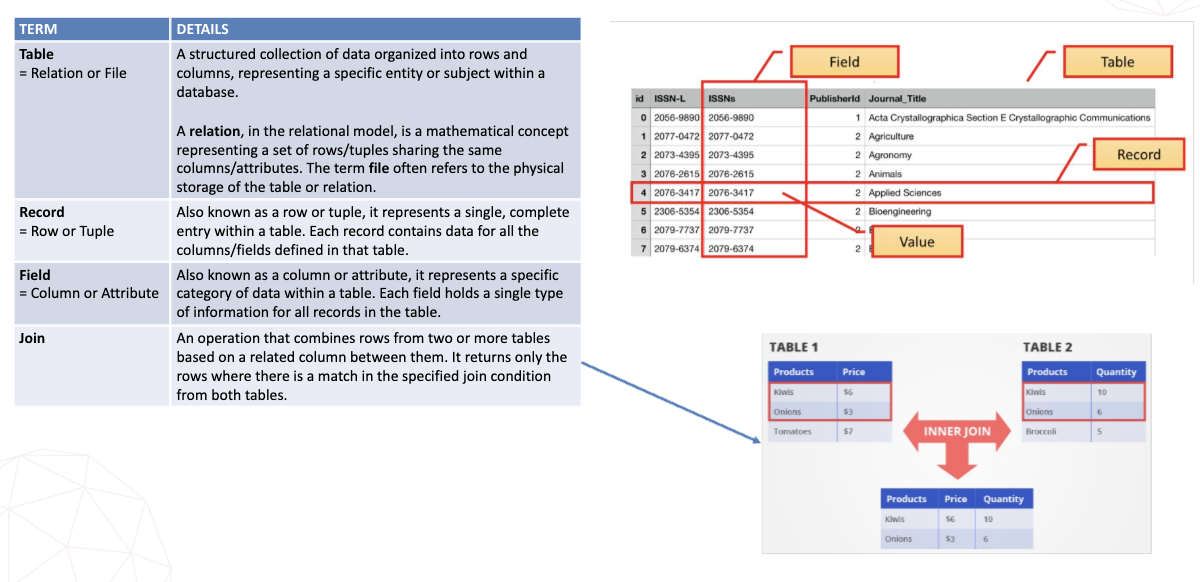
Database Keys
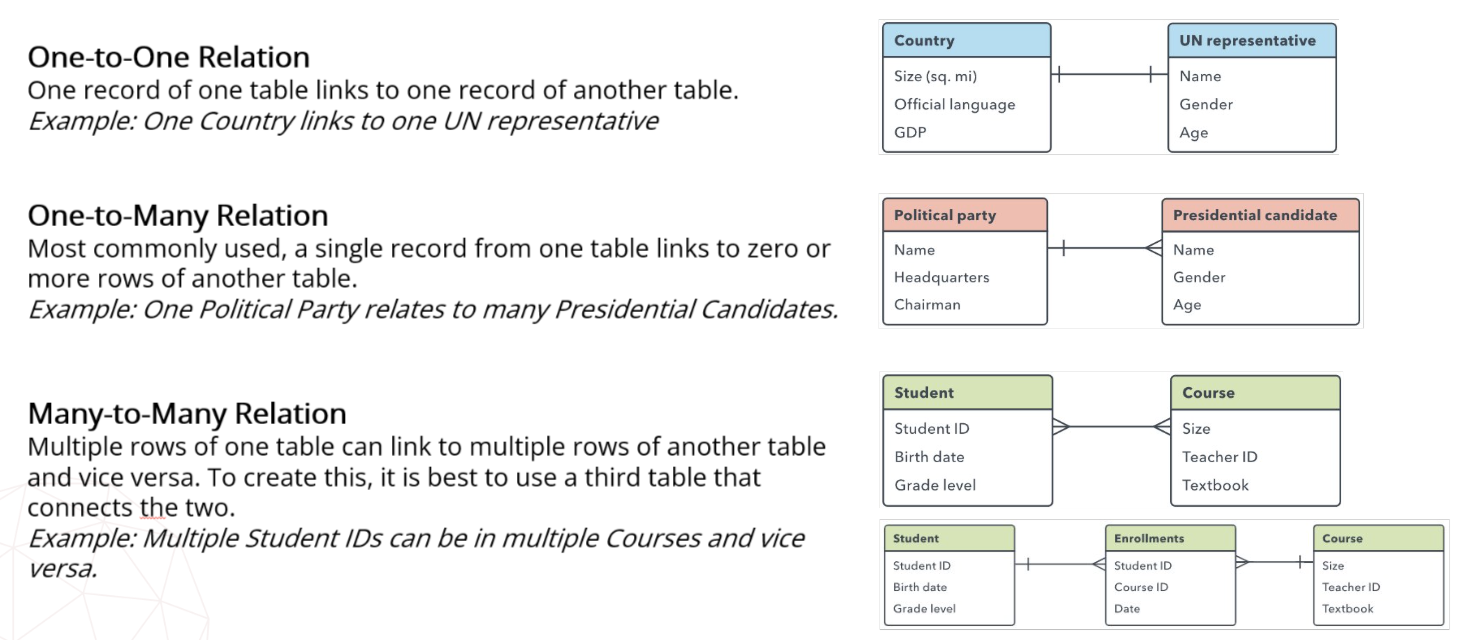
A.2.10 - Types of Relationships
A.2.11 - Issues of Redundant Data
Data redundancy simply refers to unneeded or unnecessary data
Good redundancy → system backup redundancy → failover system is a backup operational mode that automatically switches to a redundant/ standby system when a primary system fails
If one system goes down, the others allows processes to continue without interruptions
Bad redundancy → within a database, it is possible for the same data to be duplicated multiple times (same tables, across multiple tables) → increased storage costs, potential data inconsistencies and complex data management
Foreign keys can reduce redundancy → establishing relationships between tables in a relational database allows for data to be stored in a normalized fashion
Pros: better data security, faster data updates and access, improved data reliability
Cons: possible data inconsistency, increase in database corruption, increase in database size leading to unnecessary storage, increase in cost due to the need of more processing power
A.2.12 - Importance of Referential Integrity
Normalization is the process of dividing large tables in smaller ones and establishing relationships between them → improve db’s efficiency
Normalized db’s structure data into multiple linked tables → preventing anomalies (crud operation errors)
Referential integrity is a fundamental principle of relational db that ensures the consistency of relationships between tables by requiring that foreign key values always point to valid and existing primary key values in a referenced table
A.2.13 - Types of Normalized Data Forms
Normal forms are rules for structuring tables to minimize redundancy and improve data integrity. They are organized by levels that progressively get stricter
1NF → eliminate repeating values → each column should hold atomic values → one column cannot hold multiple values
2NF → eliminate partial functional dependency → no attribute should depend on just a part of a composite key → full dependency is required
3NF → eliminate transitive/indirect dependency → no non-key attribute should be dependent of another non key attribute
A.2.14 - Characteristics of a Normalized Database
reduced data redundancy
data consistency and accuracy
fewer data anomalies/oddities
clear table relationships
A.2.15 - Different Data Types
data type: an attribute associated with a piece of data that tells a computer system how to interpret its value, reinforcing code reliability and efficiency
numeric → int (whole numbers), float (decimals)
character string → char (fixed length text), varchar (variable length text)
unicode character string → nchar (fixed length unicode text), ntext (multilingual text)
binary → binary (0s and 1s for small binary data), image (stores large binary objects)
date/time → date (year, month, day), datetime (date and time stamps)
miscellaneous → json, xml (used for data transfer/serialization)
A.2.16 - Entity-Relationship Diagram
visual tool used to design databases and provide a structured blueprint for a database, ensuring clarity/consistency/efficiency during development
helps prevents redundancy and data loss
include entities, attributes, and relationships
memorize the symbols
A.2.17 - Constructing Relational Databases
A.2.18 - Query in a Database
a query is a request for information
a query asks the database to return data that meet certain conditions
a query can perform multiple functions in SQL as needed
select using SELECT
filter using WHERE
sort data using ORDER BY
database view is a type of temporary virtual table that shows data in its current state without changing what is in the tables
in SQL, CREATE VIEW can save a specific query
A.2.19 - Simple vs Complex Query
a simple query retrieves data from one table using basic commands (SELECT, FROM, and possibly WHERE)
a complex query involves multiple tables and advanced operations (JOIN, UNION, GROUP BY/HAVING, subqueries/nested queries, views/functions)
SQL parameter queries (prepared statement) separates the SQL query structure from the data value. this approach enhances security, performance and code maintainability.
a parameter value is used as a placeholder that allows the user to provide an inputted value → minimizes risk for SQL injections → removes the ability for easy injection since input is viewed as a string and not SQL code
SQL and boolean operators are logical operators that combine/modify boolean expressions (true/false values) to control program flow. common operators (AND, OR, NOT) are used to make decisions in code, similar to how it is used in search queries
SQL derived fields are new tables created in the query by performing calculations on existing fields (a new column is formed through adding, subtracting, multiplying, etc.)
A.2.20 - Query Construction
When interrogating data, queries are created through SQL commands
Commands must follow a specific order of execution
Commands/clauses
Data dictionary language → changes structure of the database
Data manipulation language (update, insert, delete, select) → changes data stored in the structure of the database
Order of execution (from, where, group by, having, select, order by, limit)
Other Database Areas
A.3.1 Database Administrator
A DBA is an IT professional who manages, organizes, and secures a company’s data by maintaining its databases
Their responsibilities include designing database structures, ensuring data access and security, performing backups and recovery, and troubleshooting performance issues to support business needs
A.3.2 End User Interactions
Direct Interaction: using query languages or tools via DBMS
SQL queries: are a common direct interaction method for end users to directly issue commands to a database → primarily performed by DB specialists
Query by example: DB query method that uses a visual interface to allow users to directly search data by providing examples, rather than writing code in languages like SQL → also focus on the DB specialists → provides GUI that shows tables with rows and columns → users fill in the blanks or example values in the relevant table column instead of writing text-based commands → users can type keywords, wildcards, or logical operations into the criteria row to specify search conditions → the DBS returns all records that match the user’s provided examples and conditions
Indirect interaction: via applications on the computers, the web, etc.
Visual queries: a visual query tool provides a GUI to construct and execute DB queries without requiring extensive knowledge of SQL syntax → searches are primarily multimedia-based searches performed by customers → users can drag and drop tables, define relationships, and specify criteria visually → automatically generates the corresponding query in the background → supports various transformations like filtering, sorting, grouping, and basic arithmetic operations on columns
Natural language interfaces (NLIDBs): systems that allow users to interact with DB using everyday, conversational language instead of technical query language like SQL → a user types a question in natural human language → then the system uses natural language processing to understand the intent of the question → it links the terms in the question to elements in the DB schema (tables and columns) → the system generates a structured query based on the user’s request and the DB schema → the SQL query is executed against the DB and the results are returned to the users.
A.3.3 Methods of Database Recovery
DB recovery is the process of restoring the DB to a correct and consistent state after failure (to maintain atomicity and durability)
Sudden power outage, software bug, hardware crash → DBMS needs a way to get back up and running without losing data or leaving it in a corrupted state
Log-based recovery
Log-based recovery: the ability to maintain or recover data by keeping a record of transaction on some stable storage device to provide easy access to data when the system fails
a log file will be created to store a log of every operation just before it is performed on the DB → when a transaction is recorded to the DB another log is then recorded as a confirmation → SQL log files are in their own format and needs a special reader → as a log file records every step of the DB transaction, when a failure occurs, a DBA can decide which recovery makes the most sense
undo for atomicity → reverse changes from transactions that did not finish
redo for durability → reapply changes from committed transactions
immediate updates → updates before transactions commit
deferred updates → updates after commits occur
Shadow paging
works by keeping two versions of the DB pages during the transaction → does not require log pages
page tables are logical divisions of data linked to physical storage locations on a disk
current/master page table: a copy of shadow page table when transaction begins, all updates are made here, and approved page tables become the new shadow page table
shadow page table: old and stable state of DB, never changes during transactions, if failure occurs, DB returns to this version
1. when a transaction starts, a shadow page table is created with pointers to the same locations as current/master table
2. prior to commit, pages needing updates are first copied → updates are included in the copies and current/master pointers are updated to new pages
3. upon transaction success, the shadow page table pointers are updated → at this point, the shadow page table has become the current/master page table ready for the next transaction
Backup and Restore
creating periodic backups/copies of a DB to protect against data loss and using those copies to recover the data and operations in case of corruption or failure
process typically done via GUI tools but can be done via command line
full backup: entire data set, regardless of any previous backups or circumstances
differential backup: additions and alterations since the most recent full backup
incremental backup: additions and alterations since the most recent backup
backups will typically just replace bad database information with the backed-up data
A.3.4 Integrated Database Systems Functions
unifying data from different sources into a single, consistent view of data
it is impossible to have one single database solution for all the different departments of a business
different levels of data integration can be helpful
1. extracting data from multiple sources
2. transformation and loading of data into a central repository or data warehouse
3. providing a common interface for visualization/reporting of data for users to interact with all data as if it were in one system
pros: better data quality, cost savings, better decision-making and collaboration, improved efficiency, higher quality customer experiences, increased revenue streams, stronger data security, improved data accessibility
A.3.5 Use of Databases in Different Areas
stock control
store product details (item codes, descriptions, quantities, price, suppliers)
automatically update stock levels when items are sold or delivered
reorder levels can be set to trigger alerts when stock is low
supplier management
historical sales data can be analyzed to forecast demand and reduce waste or shortages
police records
store personal details, criminal records, case histories
allow quick searching and cross-referencing of suspects and crimes
db help track investigations and identify patterns in crime
secure access controls protect sensitive information and ensure only authorized officers can view or edit data
A.3.6 Methods of Database Privacy
data security: focused on protecting personal data from unauthorized third-party access, malicious attacks, and exploitation. set up to protect personal data using different methods to ensure data privacy
data privacy: the right of individuals to control their personal information, dictating how organizations collect, store, use, and share it, ensuring it is handled responsibly in compliance with the law
data protection methods
network security: firewalls, network segmentation, VPNs, intrusion detection/prevention system
access management: user accounts/passwords, multi-factor authentication, role-based access control, account lockouts after input errors
threat protection: anti-malware software, SQL injection protection, web application firewalls, security monitoring and alerts
information protection: encryption at rest on server and in transit over networks, data masking, regular backups, data retention policies
data legislation
laws that control how data is collected, stores, used, and shared
different regions and countries have worked to develop laws regarding data privacy
computer misuse (unauthorized access to computer material)
data protection act (storage limitations, accuracy)
A.3.7 Need for Database Publicity
lawful access to data allows access to otherwise protected data when required by law, typically by authorized bodies such as police, courts or regulators
principles governing lawful access
legal basis: required by law (court order) and access must be clearly documented
least privilege: minimum data access needed
purpose limits: access for specific legal investigation → not for secondary/unrelated use
audibility
oversight
time-bound
integrity.custody
A.3.8 Data Matching and Mining
data matching
works to identify and link records that refer to the same real-world entity and to find similarities, creating a single, comprehensive view
compares fields (names, addresses, ID) across different datasets to resolve inconsistencies like typos or different formats
it is often used for security and verification
purpose is to improve data quality, cleansing, entity resolution, and building reliable DBs
data mining
works to discover patterns, correlations, anomalies, and trends in large datasets
uses algorithms (classification and clustering) to find buried knowledge that is not immediately obvious → works on larger datasets
purpose is for predictive analytics, targeted marketing, fraud detection, business intelligence