Hard Disks and File Systems
Introduction to Hard Disks and File Systems
Overview of contents in Module 3:
Understanding the different types of storage drives and their characteristics.
The logical structure of a disk.
The booting process of Windows, Linux, and the Mac operating system.
Various file systems used by Windows, Linux, and Mac.
Utilizing forensic tools like Autopsy and The Sleuth Kit.
Importance of understanding disk functions and boot processes for identifying abnormalities.
Characteristics of Hard Disk Drives (HDD)
Definition of a Disk Drive:
A non-volatile digital storage device that records data magnetically.
Contains a metallic platter with ferrous oxide coating on a plastic-like material.
Retains a magnetic field to represent data (binary values: one or zero).
Read-Write Performance:
Directly proportional to the RPM (revolutions per minute) of the drive platter.
Hard drives feature a spinning disk with read-write heads operated by an actuator.
Data Density on a Hard Disk
Data is recorded onto a hard disk using a method called zoned bit recording
Zone bit recording: tracks are combined together into zones depending on their distance from the center of the disk
Tracks, Sectors, and Clusters
Functionality of the Read-Write Head:
Positioned above tracks to read individual sectors and clusters.
Tracks cannot be seen due to their small size.
The disk is termed a platter; may have multiple platters in a single drive.
Power and Interface Requirement:
Requires a power connector and an interface connector (e.g., SCSI).
Various technologies enhance disk speed and durability.
Track Numbering and Cylinders
Definition of Tracks:
Concentric rings around the platters; numbered for data access.
Track 0 is typically the outermost and the count increases inward.
Definition of a Cylinder:
A group of tracks aligned across all platters, optimizing data location.
Fragmentation:
Occurs when a file is stored across multiple locations, complicating access and increasing seek times.
Drive Sectors and Addressing
Definition of a Sector:
The physical storage unit on the disk platter, traditionally fixed at 512 bytes.
Modern hard disks may utilize 4K sectors for advanced formats.
Addressing System:
Determined by CHS: Cylinder, Head, and Sector.
Formatting a drive mainly removes pointers to data, not the actual data.
Advanced Format and Efficiency
Generation 1 Advanced Format (4K Sectors):
Designed for more efficient surface area utilization compared to older 512-byte formats due to reduced wasted space.
Zoned Bit Recording and Data Density:
Tracks organized in zones based on their radial distance from the center, improving efficiency.
Definitions:
Track Density: Space between tracks.
Bit Density: Number of bits per unit length of a track.
Areal Density: Number of bits per square inch of the platter.
Capacity Calculation Formula
Formula for disk capacity using CHS:
Example Calculation:
A drive with the following specifications:
Cylinders = 16,384
Heads = 80
Sectors per Track = 63
Bytes per Sector = 512
Results in capacity: approximately 42 GB.
Performance Metrics
Disk performance is measured by:
Data Rate: The amount of bytes per second sent to the CPU.
Seek Time: The duration for the read-write head to move between tracks.
Impact of RPM on seek time and latency; higher RPM (e.g., 10,000 RPM) reduces latency compared to lower RPM (e.g., 5,400 RPM).
Solid State Drives (SSD)
Definition and Characteristics:
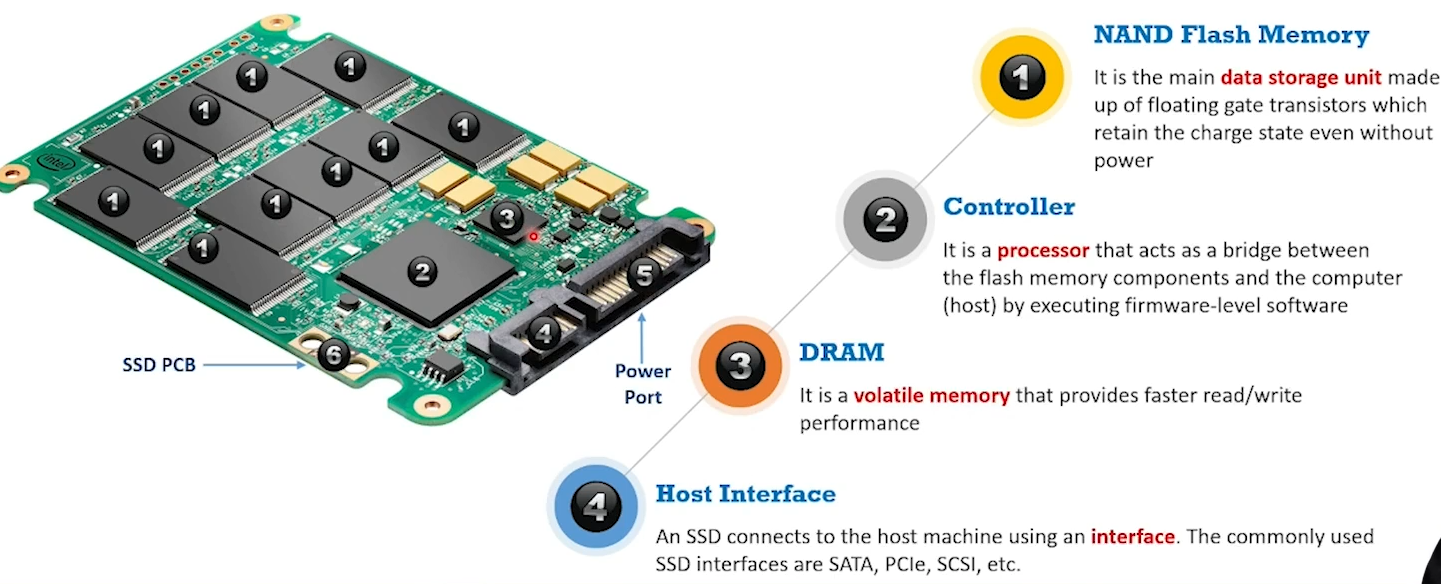
Unlike HDDs, SSDs contain no moving parts and thus do not use platters, read-write heads, or tracks.
Data is stored in non-volatile NAND flash memory.
Advantages of SSDs:
Faster performance due to lack of mechanical parts.
Quieter operation and resistance to vibrations.
Storage in NAND flash modules using floating-gate transistors that maintain charge state without power.
SSD Physical make up
Logical Structure of Disks
The logical structure of a hard disk is the file system and software utilized to control access to the storage on the disk.
Clusters: Smallest logical storage unit on a hard disk. Clusters are a set of Sectors within a disk ranging from cluster number 2-32.
When a file system divides storage on a disk its called clusters. When these clusters are assigned a location on the File Allocation Table (FAT) this process is called Allocation.
The hard disk’s logical structure affects its performance, consistency, expandability, and compatibility of storage.
Cluster Size: Cluster size can affect the OS performance and disk utilization. The size depends on the size of the disk partition and type of file system.
A large cluster <one sector has these effects: Minimizes fragmentation issue. Increase the probability of unused space in the cluster. Reduces disk storage area and reduces unused area on a disk.
Lost Clusters: Happens when clusters don’t get allocated to any file. They typically happen because of an interrupted file activity. CHKDSK is a file authentication tool that checks if the file system has a reliable volume and will repair logical file system errors
Slack space: Storage area between the end of a file and the end of a cluster. So, if a file is smaller than the cluster size, a full cluster is still assigned to that file, but the remaining space is called slack space.
Slack space ≠ Empty space. Old information that gets written over is typically in this space.
Different OSes have different file systems and use various methods of arranging and controlling access to the data on the hard disk.
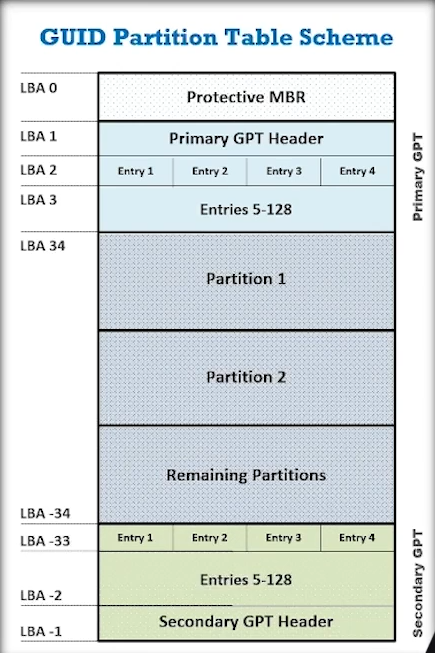
Master Boot Record MBR: The MBR is also used for Holding a partition table, and Bootstrapping an OS
BIOS Parameter Block (BPB): The BPB is a data structure in the partition boot sector.
It describes the physical layout of a data storage volume, like the number of heads and the size of the tracks on the drive.
BPB defines the filesystem structure for some files.
BPB assists investigators to locate the file table on the Hard Drive
Globally Unique Identifier (GUID): Is a 128-bit unique reference number used as an identifier in a computer. They generally display 32 hexadecimal digits with groups separated by hyphens
Common uses: Identify Component Object Model & Dynamic-link libraries
Websites may assign a GUID to users’ browser to record and track the session
Windows assigns a GUID to a username to identify user accounts
GUID Partition Table (GPT): This is a partition system used by Unified Extensible Firmware Interface (UEFI) which is what replaced BIOS firmware interface. UEFI defines a software interface between and OS and platform firmware. GPT replaced MBR for BIOS.
Hard Disk Terms
Data rate: It’s a ratio of the number of bytes per second that the hard disk sends the CPU
Seek time: It’s the amount of time required to send the first byte of the file to the CPU, when it requires the file.
Clusters: A cluster is the smallest logical storage unit on a hard disk
Master Boot Record (MBR): The first sector of a data storage device. It holds information such as the files on the disk, their locations, sizes, and more.
Disk Partitions: Disk partitioning is the creation of logical divisions on a storage device to allow the user to apply OS-specific logical formatting.
Primary Partition: Drive that holds the information regarding the OS, system area.
Extended Partition: Logical drive that holds the information regarding stored data and files in the disk.
Disk Interface
SCSI: Small Computer System Interface, a set of ANSI standard interfaces based on the parallel bus structure and designed to connect multiple peripherals to a computer. An Older Technology.
PCIe SSD: A Peripheral Component Interconnect Express SSD is high-speed serial expansion card that integrates flash directly into the motherboard.
Serial Attached SCSI (SAS): The successor and advanced alternative to parallel SCSI in server environments