8th set of videos
Thermal Printers - CompTIA A+ 220-1201 - 3.8
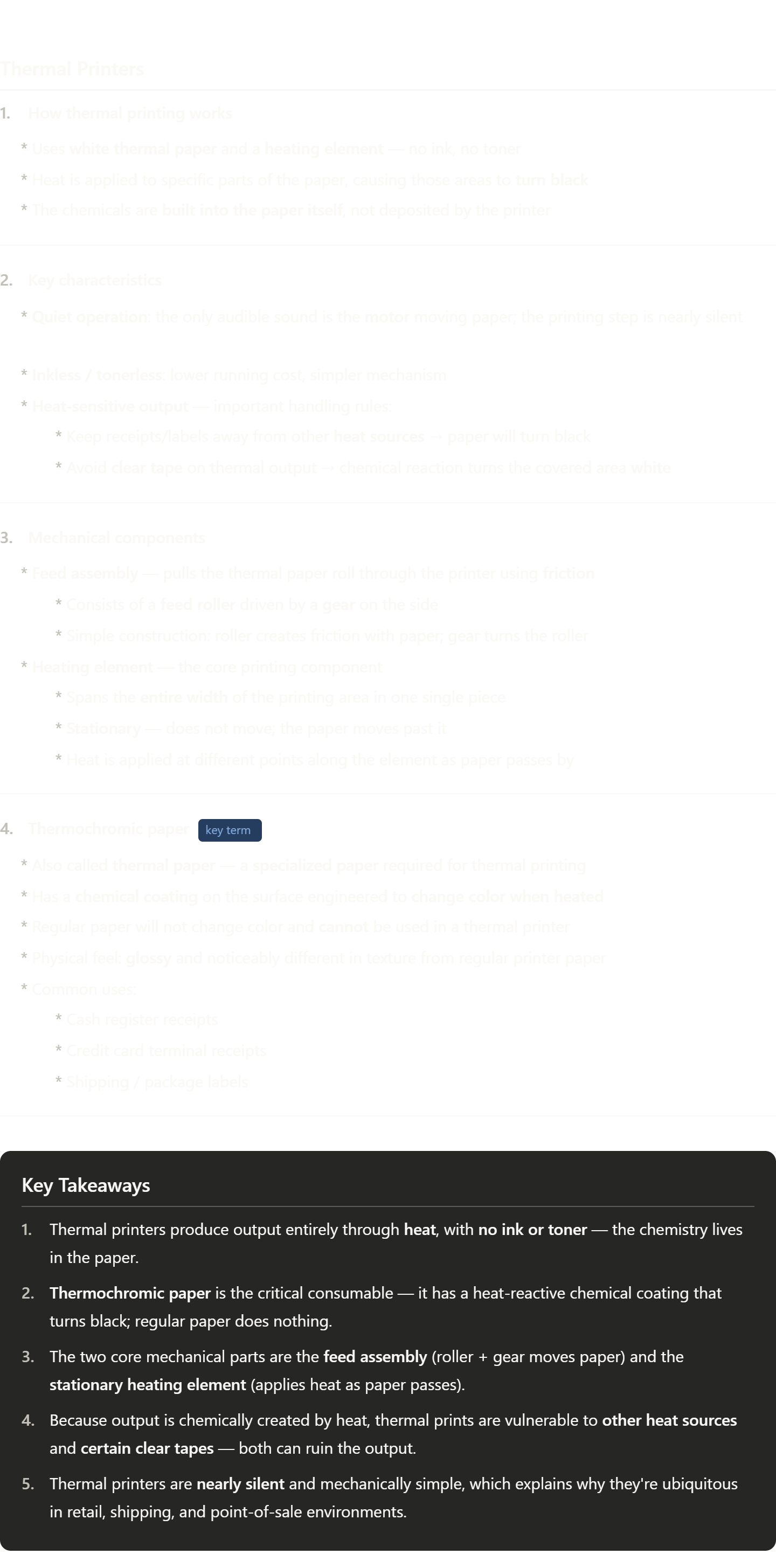
Here are your notes! A few key terms worth paying extra attention to:
Thermochromic paper — this is the big one. "Thermo" = heat, "chromic" = color. So it literally means "heat-color paper." The chemical coating on the surface reacts to heat by darkening — that's the entire printing mechanism.
Feed assembly / feed roller — the mechanical system that moves paper through the printer. "Feed" is printer jargon for how paper is transported; you'll see this term in all printer types.
Heating element — in thermal printers this is a fixed bar that spans the full width of the print area. Unlike inkjet or laser printers, nothing in a thermal printer "moves" over the page — the page moves past the element instead.
Toner — worth knowing even though thermal printers don't use it. Toner is the fine powder used in laser printers. The video specifically contrasts thermal printing against both ink (inkjet) and toner (laser) to emphasize that thermal printers need neither.
The core concept to internalize: most printers deposit something onto paper (ink or toner). Thermal printers activate something already in the paper. That's the fundamental difference.
Thermal Printer Maintenance - CompTIA A+ 220-1201 - 3.8
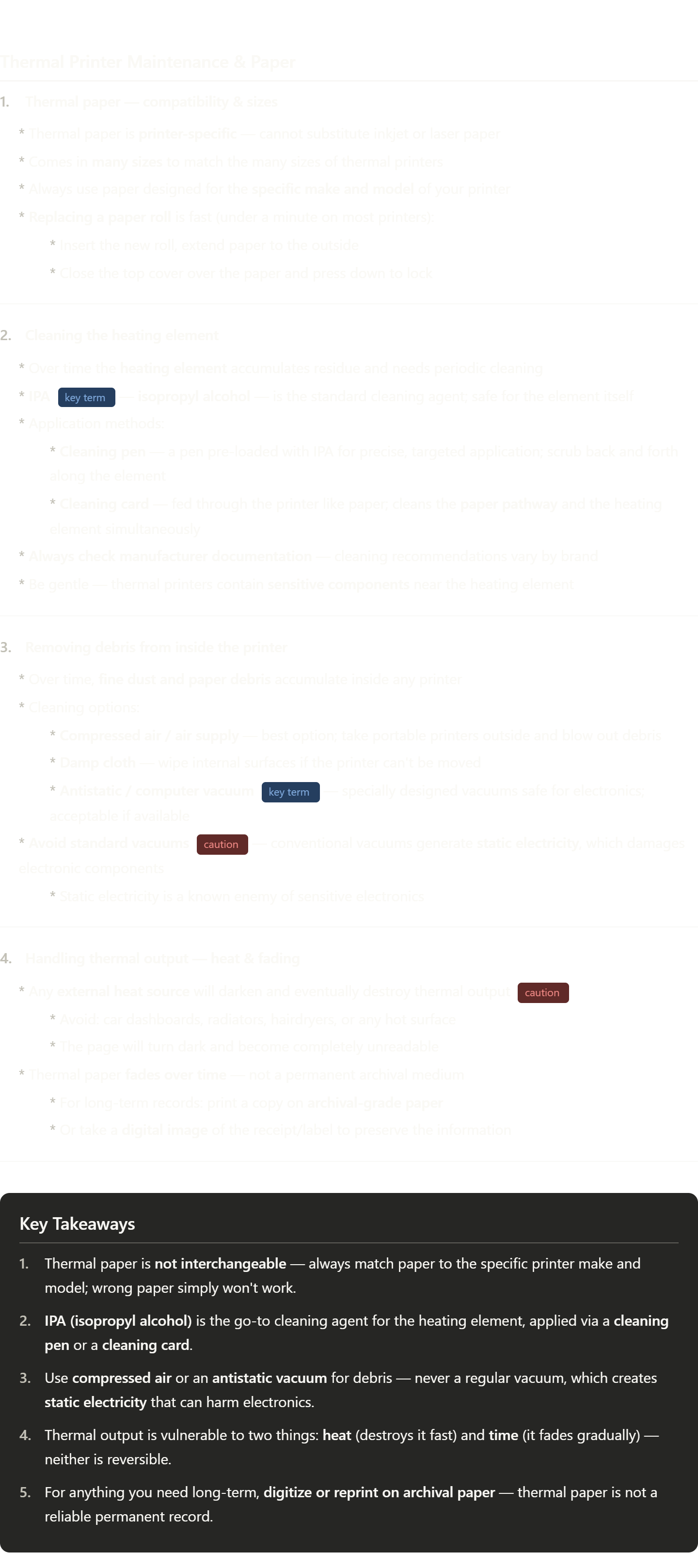
A few terms from this video worth knowing deeply:
IPA / Isopropyl alcohol — a very common electronics-safe cleaning solvent. You'll see "IPA" used as shorthand constantly in IT and hardware maintenance. It evaporates quickly and leaves no residue, which is why it's preferred over water.
Cleaning card — a maintenance consumable that looks like a card but is saturated with IPA. The idea is you "print" it through the machine and it cleans the internal path passively. You'll see cleaning cards for all kinds of equipment (card readers, ATMs, label printers).
Static electricity / antistatic — a big theme in all hardware work. When electronics are exposed to a static discharge, it can silently fry components. That's why regular vacuums are dangerous (friction builds charge), and why specialized antistatic vacuums exist. You'll also encounter this concept with antistatic wrist straps when handling circuit boards.
Archival paper / archival-grade — paper specifically made to resist fading and degradation over decades. Used for legal documents, medical records, anything requiring a long paper trail. Thermal paper is essentially the opposite — cheap, fast, but impermanent.
Impact Printers - CompTIA A+ 220-1201 - 3.8
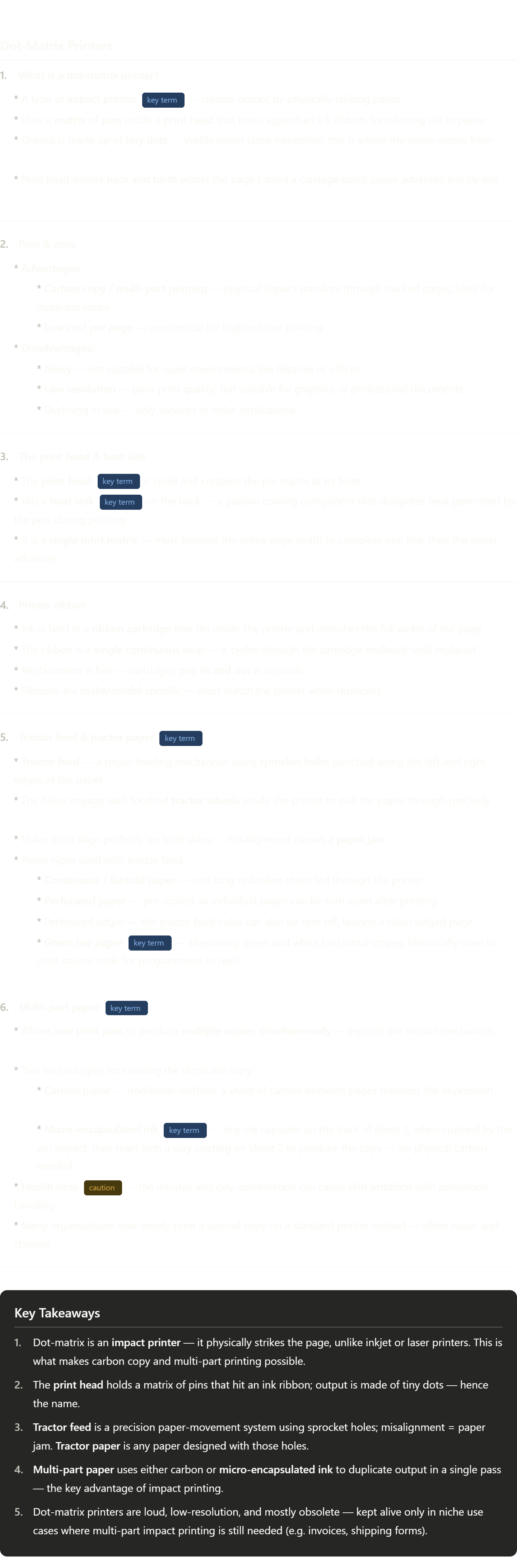
Some terminology worth really internalizing here:
Impact printer — the parent category. "Impact" means the printing mechanism physically strikes the page. Dot-matrix is the most common type. The impact is what lets it punch through multiple layers of paper — something inkjet and laser can never do.
Heat sink — this comes up constantly in hardware/IT. A heat sink is a passive metal component (usually aluminum fins) that absorbs and disperses heat away from a component. You'll see them on CPUs, GPUs, and apparently dot-matrix print heads too. No fan, no electricity — just physics.
Tractor feed — think of a tractor's tire treads gripping the ground. Same idea: the teeth grip the holes in the paper to pull it through with precision. This was the dominant paper-feed method before friction-feed (what modern printers use) became reliable enough.
Micro-encapsulated ink — "micro-encapsulated" means the ink is sealed inside microscopic capsules. When the pin strikes, it bursts those capsules, releasing the ink. You'll see this word "encapsulated" in other tech contexts too — it always means something is sealed inside a protective shell until needed.
Green bar paper — mostly a historical curiosity now, but if you ever see it referenced in IT history or legacy systems, you'll know it was the standard output medium for early computer printouts and programmer workflows.
Impact Printer Maintenance - CompTIA A+ 220-1201 - 3.8
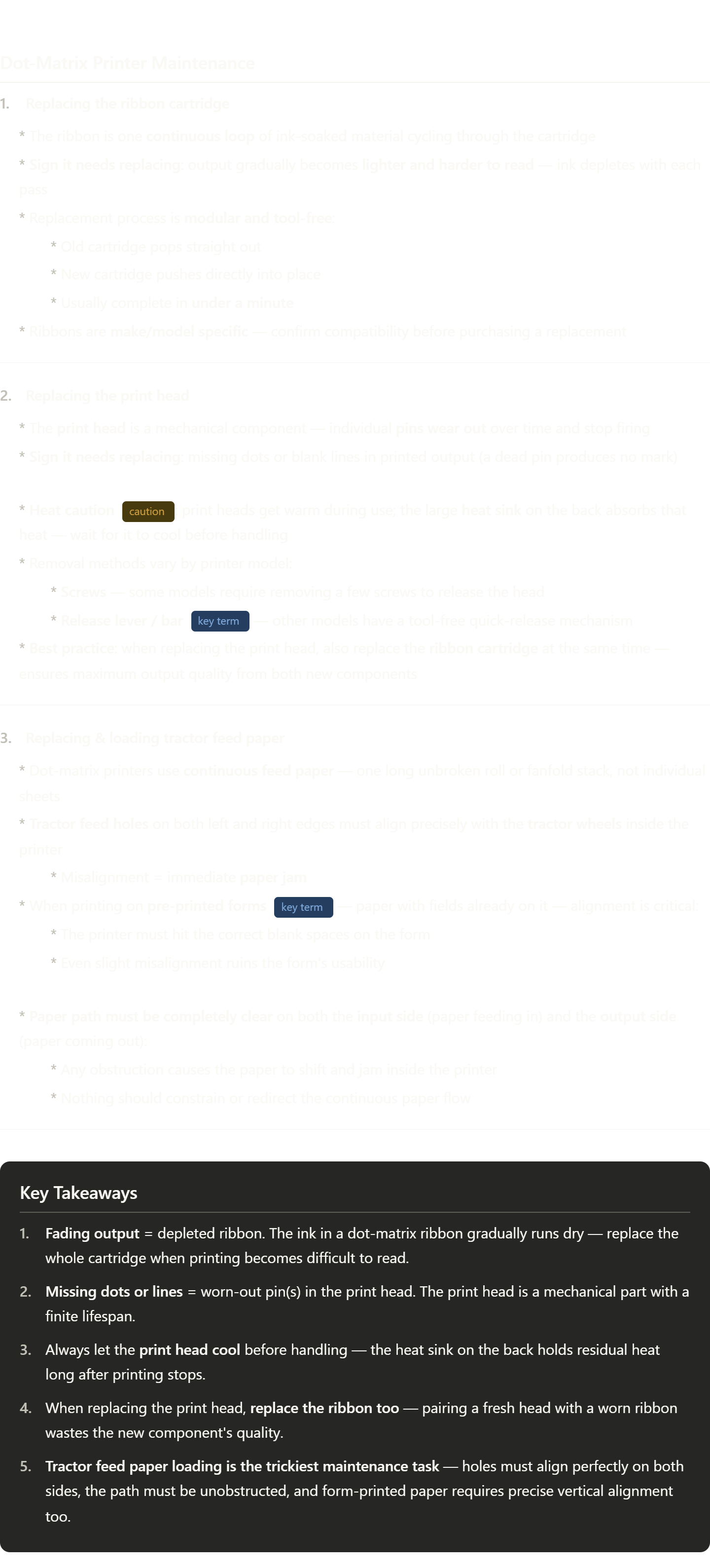
A few concepts worth understanding more deeply:
Modular design — when the video says the cartridge is "modular," that's a key hardware design principle. Modular means components are self-contained and swappable without affecting the rest of the system. You'll hear this in server design, networking gear, and all kinds of IT hardware. The opposite would be something soldered in permanently.
Release lever — this is a common tool-free mechanism in hardware. Instead of screws, a lever or latch holds a component under spring tension. Push or flip it and the component releases. You'll see this on RAM slots, PCIe cards, and printer components. It's a design choice to make field replacement faster.
Pre-printed forms — this is a very real use case for why dot-matrix printers still exist in some industries. Think multi-part invoices, government forms, shipping manifests — documents where the layout is fixed and the printer must fill in specific fields. Alignment precision matters enormously here, which is exactly what tractor feed was designed for.
Paper path — a term used across all printer types. The "paper path" is the full route paper travels from the input tray, through the print mechanism, to the output tray. Keeping it clear and unobstructed is fundamental maintenance for any printer. Obstructions in the paper path are the #1 cause of jams.
Virtualization Concepts - CompTIA A+ 220-1201 - 4.1
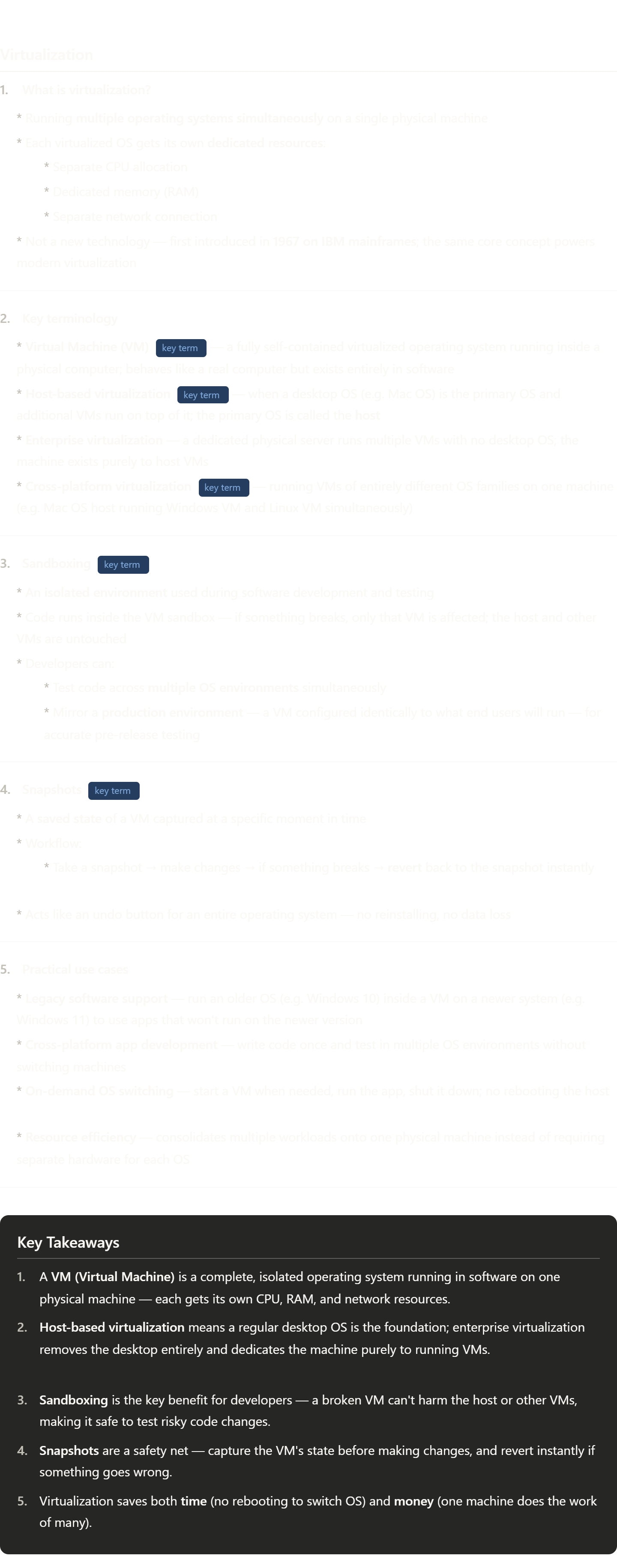
This is a big topic in IT — here's the terminology worth really locking in:
VM (Virtual Machine) — you'll see this constantly. Any time someone in IT says "spin up a VM" or "deploy to a VM," they mean creating or launching one of these virtualized OS instances. It's one of the most common units of work in modern IT infrastructure.
Host vs. Guest — the video introduces "host-based virtualization" but doesn't explicitly say "guest." The host is the real physical machine (and its OS). Each VM running on top of it is called a guest. This host/guest distinction comes up everywhere in virtualization.
Sandboxing — broader than just VMs. A sandbox is any isolated environment where code runs without being able to affect the outside system. Browsers sandbox web pages, antivirus tools sandbox suspicious files, and developers sandbox applications. The common thread: containment.
Snapshot — think of it like a save point in a video game. The entire state of the VM — every file, every setting, every running process — is frozen and stored. You can have multiple snapshots at different points and jump between them. This is one of the most powerful features of VMs that physical machines simply can't offer.
Production environment — a term you'll see constantly in IT and software development. "Production" means the live, real-world system that actual users interact with. The opposite is a "test" or "staging" environment. The goal of mirroring production in a VM is to catch bugs before they reach real users.
Virtualization Services - CompTIA A+ 220-1201 - 4.1
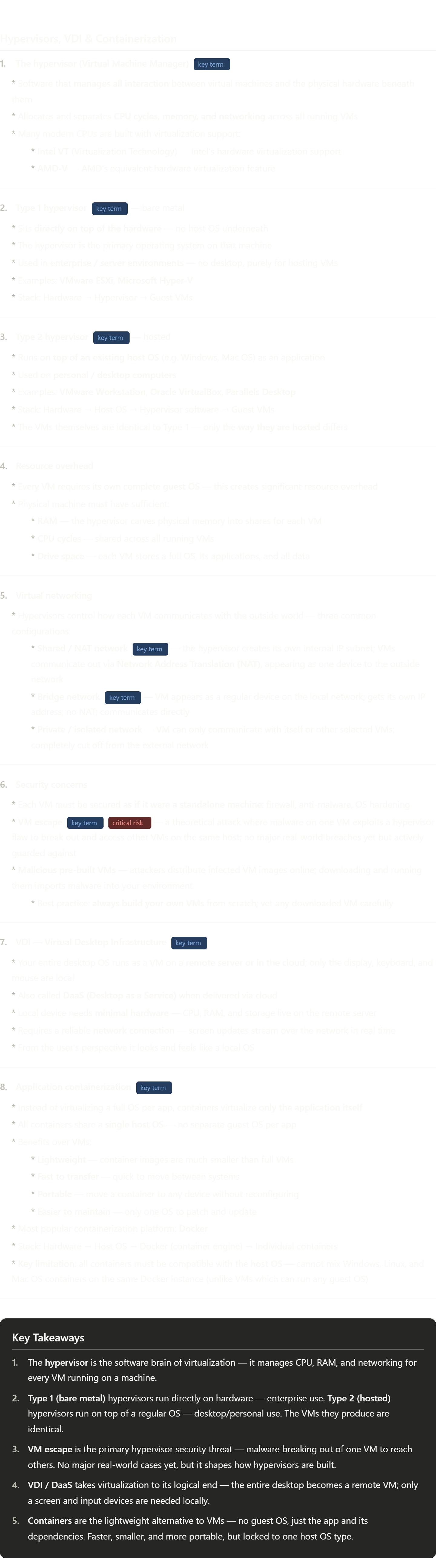
This is one of the most terminology-dense topics in modern IT. Here's what's worth internalizing:
Hypervisor — from "hyper" (above) + "supervisor." It sits above the hardware and supervises all the VMs. You'll see this word everywhere in cloud and enterprise IT.
Bare metal — means "directly on the hardware with no OS in between." You'll hear this phrase beyond virtualization too — "bare metal server" means a physical server with no virtualization layer at all. It's the rawest, fastest form of compute.
NAT (Network Address Translation) — a foundational networking concept. NAT lets multiple devices share one external IP address by translating their internal addresses at the boundary. Your home router does this too — all your devices share one public IP. In VMs, the hypervisor plays the role of the router.
Bridge network — "bridging" in networking means connecting two network segments so they act as one. A bridged VM literally joins the same network as your physical machine, with its own IP, indistinguishable from a real device.
Docker — the dominant containerization platform in the industry right now. If you go into any software or cloud role, you will encounter Docker. A "Docker image" is a pre-packaged container; a "Docker container" is a running instance of that image — same distinction as a VM template vs. a live VM.
DaaS (Desktop as a Service) — follows the same naming pattern as SaaS (Software as a Service), IaaS (Infrastructure as a Service), PaaS (Platform as a Service). The "aaS" suffix means it's delivered over the cloud rather than installed locally. Worth knowing all four.
Cloud Models - CompTIA A+ 220-1201 - 4.2
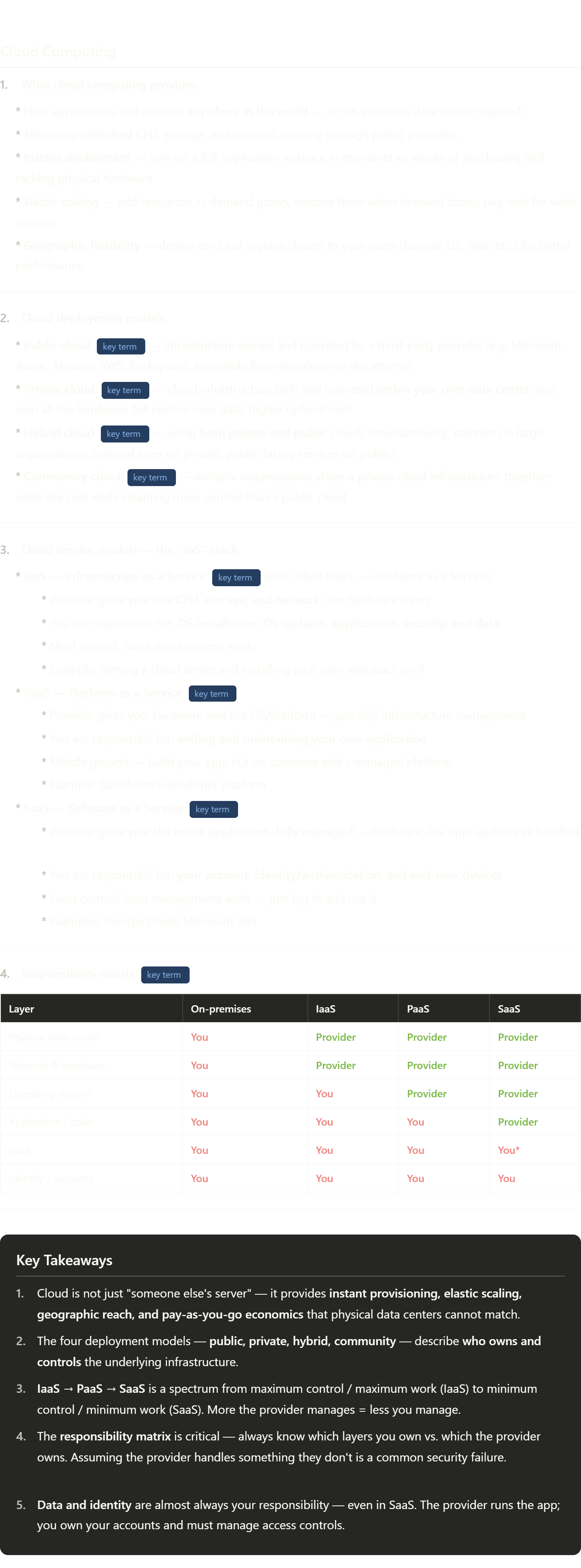
This is foundational cloud knowledge — probably the most exam-tested topic in IT certifications. Here's what to really understand:
The "aaS" naming pattern — Infrastructure, Platform, Software. A useful memory trick: think of it as building a pizza. IaaS = you rent the kitchen (oven, fridge, stovetop) but buy your own ingredients and cook everything. PaaS = you rent a kitchen with pre-made dough and sauce — you just assemble and bake. SaaS = you just order the pizza delivered. More control = more work = more responsibility.
Elastic scaling — "elastic" in cloud means the system stretches and shrinks automatically with demand. A retail site might scale up on Black Friday and scale back down in January. This is one of cloud's biggest economic advantages over physical servers, which sit idle at full cost year-round.
Spin up / spin down — industry jargon you'll hear constantly. "Spin up" means launch a new instance/server/VM. "Spin down" means shut it off and stop paying for it. It comes from old hard drives physically spinning up to speed.
Responsibility matrix — this concept is crucial for security roles. A massive number of cloud breaches happen because an organization assumed the provider was securing something the organization was actually responsible for. In SaaS especially, people assume "the cloud is secure" when in reality they still fully own their account credentials, access permissions, and data classification.
Community cloud — the least talked about model but worth knowing. Think of it like a co-op: a group of hospitals, or a group of law firms, might build and share a private cloud together to split infrastructure costs while keeping data off public servers.