2.1.3 Understanding Different Types of File Formats
Introduction to Common Data File Formats
Data professionals routinely interact with multiple file types; understanding each format’s structure, strengths, and weaknesses is critical for performance, storage, and interoperability decisions.
Six foundational formats discussed:
Delimited Text Files (CSV, TSV, etc.)
Microsoft Excel Open XML Spreadsheet (XLSX)
Extensible Markup Language (XML)
Portable Document Format (PDF)
JavaScript Object Notation (JSON)
Delimited Text Files (CSV, TSV, etc.)
Most common type: CSV and TSV
General Definition
Plain-text files where each record is a line and each field is separated by a delimiter (one or more characters marking boundaries between values).
Typical delimiters: comma (,), tab (\t), colon (:), vertical bar (|), space ( ).
CSV (Comma-Separated Values)
Uses commas as delimiters.
Widely supported by spreadsheets, databases, BI tools.
Limitation: ambiguous when commas appear inside free-text fields unless those fields are quoted.
TSV (Tab-Separated Values)
Uses tab characters as delimiters. (\t)
Chosen when data itself contains literal commas; tab stops rarely appear in sentence-level text, reducing collision risk.
Structure & Schema
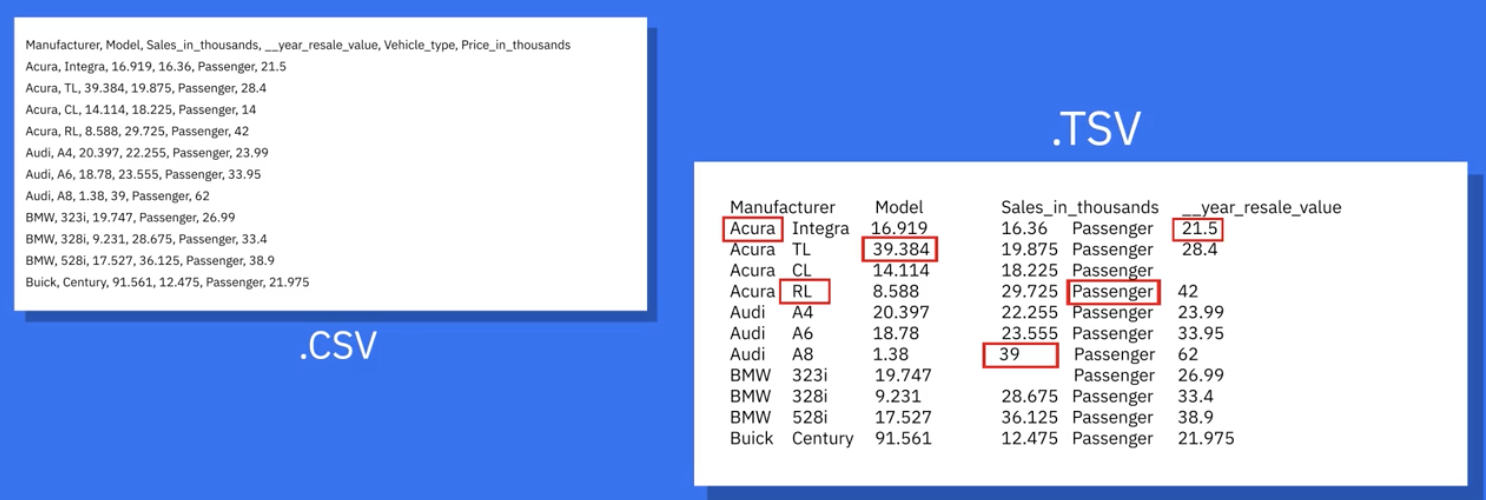
First row ⇒ header row containing column names.
Subsequent rows ⇒ records; columns may mix data types (e.g., Date, String, Integer).
No predefined length limit for field values.
Advantages
Human-readable; easy to create/edit with any text editor.
Near-universal import/export support across software stacks.
Lightweight; these files contain only the raw data and delimiters, resulting in minimal file sizes compared to more complex formats like XLSX, XML, or PDF. There is negligible metadata overhead, meaning no extra structural information, formatting bytes, or embedded objects contribute to unnecessarily inflate the file size, making them efficient for storage and transmission.
Performance/Use-Case Notes
Ideal for quick data exchange and flat-table storage.
Example: Exporting a simple list of inventory items or a log of events where each line is a distinct, self-contained record.
Lacks native support for hierarchies or complex nesting.
Example: Cannot directly represent a customer with multiple orders, each having multiple products, within a single, flat CSV file without complex workarounds or normalization into separate files.
Conceptual Connection
Delimiters are one of many boundary-definition schemes (others include fixed-width, markup tags, binary offsets).
Microsoft Excel Open XML Spreadsheet
Technical Overview
XML-based open standard introduced by Microsoft (part of the Office Open XML suite).
Physical file is actually a zipped collection of XML parts (workbook, worksheets, styles, shared strings, etc.).
Logical Model
Workbook → one or more worksheets.
Worksheet → 2-D grid of rows & columns; cell at row–column intersection stores value or formula.
Key Strengths
Supports all Excel features: formulas, pivot tables, charts, conditional formatting, data validation.
Considered more secure than legacy binary XLS; cannot embed VBA/macro code by default, mitigating malware risk.
Open file format…Widely accessible: many non-Microsoft tools read/write the format (e.g., Google Sheets, LibreOffice, Python’s openpyxl).
Limitations
Larger file size vs. CSV for same raw data (XML + zip overhead).
Requires parsing libraries; not as streaming-friendly as plain text.
Practical Example
Monthly finance workbook with multiple tabs (revenue, expenses, summary) and cross-sheet formulas—impractical to replicate in delimited text.
Extensible Markup Language (XML)
Definition & Philosophy
Markup language with user-defined tags and a strict syntactic specification (well-formed & optionally valid against DTD/XSD schemas).
Both machine-parseable and human-readable.
Distinctive Traits
Self-descriptive: tags encode the meaning of data (e.g., ).
Platform & language independent → fosters heterogeneous system integration/data sharing between systems
Contrast with HTML: HTML has a fixed tag set focused on presentation; XML’s tag vocabulary is defined by the data designer.
Use Cases
Configuration files (e.g., Maven pom.xml), document standards (DocBook), SOAP web-services payloads.
Pros
Supports complex hierarchies and mixed content.
Extensive ecosystem: XPath, XSLT, XML Schema for validation.
Cons
Verbose; high character-to-data ratio increases storage/transmission overhead.
Parsing can be memory-intensive.
/
Portable Document Format (PDF)
Core Idea
Developed by Adobe to guarantee device-independent visual fidelity; what you see on one platform is pixel-identical on another. Regardless of application software, hardware, and operating systems.
Characteristics
Encapsulates text, vector graphics, images, and metadata in a single container.
Supports interactive elements: form fields, annotations, digital signatures.
Typical Domains
Legal contracts, financial statements, academic papers.
Strengths
Layout preservation critical for official, print-ready documents.
Ubiquitous reader support (web browsers, mobile devices).
Limitations for Data Work
Not inherently structured for tabular extraction; pulling data often requires OCR or specialized parsers.
Editing usually demands licensed authoring tools.
JavaScript Object Notation (JSON)
Concept
Lightweight text format for transmitting structured data over the web; syntax derived from JavaScript object literals.
Syntax Elements
Objects → { key : value, … }
Arrays → [ value1, value2, … ]
Primitive values: string, number, boolean, null.
Strengths
Language-agnostic parsing libraries in virtually every ecosystem (Python, Java, C#, Go, etc.):
Tools to read JSON are available in almost all programming languages (like Python, Java, C#, Go, and others).
Supports nested and heterogeneous structures (ideal for APIs where records vary in shape):
JSON can hold information that's organized inside other information (like lists within lists), and it's good at handling different types of data together. This makes it great for web services where the data sent back and forth might not always have the exact same layout.
Minimal overhead, concise compared to XML:
It doesn't add much extra formatting or unneeded characters, so its files are smaller and quicker to read than XML files.
Handles binary payloads (audio/video) when base64-encoded or via URL references:
It can also handle things like audio or video files, usually by turning them into a text code (base64) or by providing a link to where they are stored online.
Usage Trends
Default response format for RESTful web services.
Storage format in NoSQL databases (e.g., MongoDB, CouchDB) and document stores.
Choosing the Right Format – Comparative Insights
Interoperability
CSV/TSV, JSON, XML all share broad cross-language support; XLSX requires toolkits but remains widely accessible.
Human vs. Machine Readability
CSV/TSV: simplest human scan; JSON & XML: readable but more syntactic clutter; PDF: human-oriented visual layout; machine parsing harder.
Hierarchical Data
JSON, XML: yes (nested objects/elements).
CSV/TSV, XLSX: fundamentally tabular, though XLSX allows multiple sheets.
Security Considerations
XLSX (no macros) and PDF (can be secured with encryption/signatures) reduce malicious code risk; CSV/TSV may trigger CSV injection in spreadsheets; JSON/XML external entity attacks need mitigation.
File Size & Performance
Plain text (CSV/TSV) smallest; JSON moderately larger; XML & PDF largest due to markup/layout.
Example Selection Scenarios
Quick ETL transfer of flat sales records → CSV.
Multi-sheet budget with formulas → XLSX.
Configuring cross-platform build pipeline → XML.
Publishing legally binding agreement → PDF.
API delivering social-media post objects with comments array → JSON.
Ethical, Philosophical, & Practical Implications
Data Portability & Vendor Lock-In
Preference for open standards (CSV, JSON, XML, XLSX) ensures long-term accessibility and freedom from proprietary lock-ins.
Accessibility
PDFs must be tagged properly for screen-reader compliance; JSON/XML require supplemental context.
Privacy & Security
Sensitive data in any format should be encrypted at rest and in transit; PDF and XLSX offer built-in encryption features vs. text-based formats requiring external measures.
Key Takeaways
Mastery of file formats widens toolset for storage, exchange, and analysis.
Always balance readability, performance, security, and structural requirements when picking a format.
Maintain awareness of evolving standards (e.g., Parquet, Avro) for big-data contexts beyond this introductory set.