TOPIC 3- Computers
The CPU
Computer architecture refers to the structure of a computer system, like the hardware it has.
Von Neumann Architecture is a design of the CPU, outlining how the memory, input/output devices, and processor all work together.
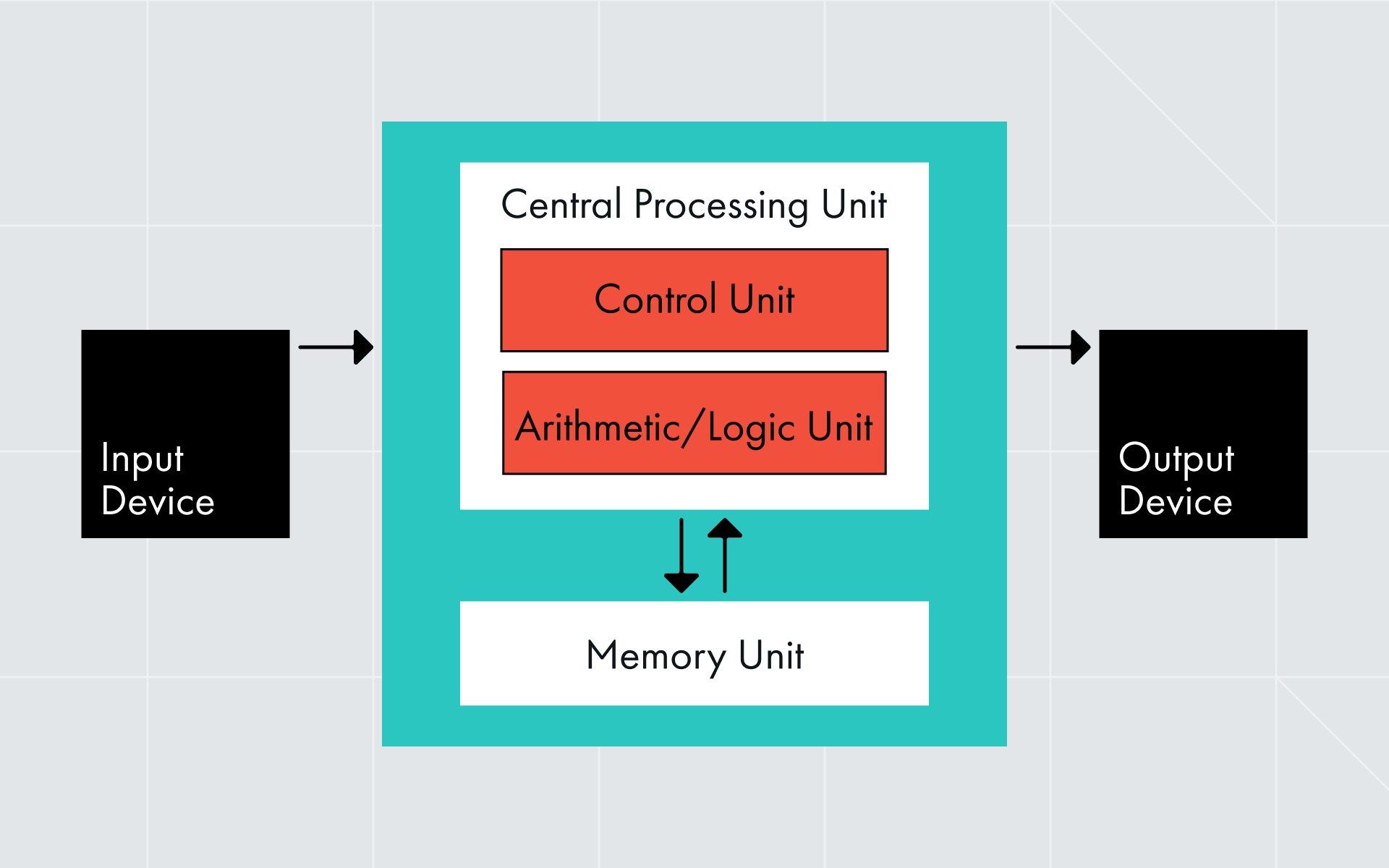
The CPU decodes and executes program instructions fetched from the memory one at a time.
The main memory holds the data that the CPU requires. There are two types of main memory:
RAM - Random Access Memory. RAM is volatile, so data is lost when the computer is turned off, but is also fast and has a high capacity.
ROM - Read Only Memory. ROM holds the first instructions a computer needs to start up and is non-volatile, but the data can only be read from it.
The CPU is made up of six components:
Arithmetic Logic Unit (ALU) - Performs arithmetic and logical operations on data.
Control Unit (CU) - Fetches instructions from memory and decodes them.
Cache - A small and fast temporary memory.
Registers - Direct access storage for data, but each has a specific function.
Clock - Synchronises the actions of the CPU. Clock speed is measured in cycles per second, and 1Hz = 1 cycle per second.
The CPU also contains buses - collections of wires used to transfer data/signals between computer components.
The CPU has three types:
Address Bus - unidirectional, holds the address of the memory location that the CPU will write/read to. The number of wires in the address bus (bandwidth) determines how many locations there are - e.g. a 3-bit address bus represents 2³ different memory addresses.
Data Bus - bidirectional, transfers instructions between the memory and the CPU.
Control Bus - bidirectional, carries signals between components.
Fetch-Decode-Execute
Fetch-Decode-Execute is a sequence of steps that the CPU repeatedly carries out while a program is being executed.
Instructions are fetched from memory, then decoded and executed inside the CPU.
Fetch: The memory location is transferred to the CPU, and stored in a register.
Decode: The CU works out what is required for the instruction.
Execute: The CPU carries out the operation, and signals to the ALU if an arithmetic or logical operation is needed.
Secondary Storage
Secondary storage provides long-term, non-volatile storage for programs and data.
It is needed because ROM is read-only and RAM is volatile.
Secondary storage has a large capacity, but cannot be directly accessed by the CPU unless transferred to memory.
Primary storage is better for direct, quick-access files and data that is currently being used by the computer.
There are three types of secondary storage:
Magnetic storage:
Hard Disk Drives contain circular metal platters that spin, coated with a magnetised substance.
Each platter has it’s own read-write head.
When data is written, the surface of the platter is magnetised to one of the two polarities (north-south or south-north, representing 1 and 0 respectively) and data is stored on concentric tracks, subdivided into sectors.
When data is read, the magnetic state of the platter is detected.
Solid-State storage:
Portable computing devices, e.g. mobile phones, use solid-state storage.
It consists of transistors.
When data is written, an electrical current is applied, which forces electrons through a barrier into pools. A full pool represents 0 and an empty pool represents 1.
When data is read, voltage is applied to see if a pool is empty. If so, a 1 is read out, or if it’s full, a 0 is read out.
Optical storage:
CDs and DVDs use lasers.
When data is written, the laser burns the surface of the disk. Reflective areas (lands) represent 1 and non-reflective areas (pits) represent 0. Data is stored as a series of lands.
When data is read, the laser shines on the surface of the disk, and the amount of light reflected is detected and translated to 1s and 0s.
Magnetic storage is best for decent capacity data at a low cost.
Optical storage is best for portability and is also relatively cheap.
Solid-state is best for high durability, low power consumption and low noise.
Embedded Systems and IoT
An embedded system is a system that performs a specific function, part of a bigger system.
Features of embedded systems:
Purpose specific
Limited memory space
Low power consumption
Low maintenance
Operates in real-time
Embedded systems have a microcontroller, which contains the CPU, memory, and input/output.
Examples of embedded systems include thermostats, dishwashers, and coffee machines.
The Internet of Things (IoT) is a network of devices with the ability to transfer data without much human interaction. It is made up of a vast number of embedded systems.
The IoT is efficient and convenient, however it has some security issues. For example, many IoT devices are dispatched with a default password. If the owner doesn’t change this, the device will be vulnerable to cyber attackers, who can access it with a simple script. The data may also be used and exchanged without the owner knowing.
Operating Systems
An operating system (OS) acts as an interface between the hardware and software within a computer system. Hardware is the physical parts of the computer, while software is the programs and instructions that tell the hardware what to do.
The user interface is how the user interacts with the OS, such as GUI (graphical user interface) or CLI (command line interface).
File Management
The process of managing files and folders on a computer system.
The OS manages where the data is stored in primary and secondary storage. Most files are stored in a hierarchal ‘tree’ structure, and each tree element is called a node.
User Management (permissions)
The OS uses identification to authenticate users and control who can log on.
This includes adding users and allocating permissions (e.g. who can write, read, edit, or delete a file).
Peripheral Management
A peripheral is additional hardware, such as a keyboard.
The OS manages how the peripherals interact with the software.
Process Management
Many processes are waiting to be executed, but because the CPU can only execute one at a time, it is up to the OS to allocate the time for each process.
The OS uses a scheduling algorithm to prioritise processes.
An example of a scheduling algorithm is Round Robin:
Each process is allocated a time slice.
Processes are held in a queue while they wait for their ‘turn’.
However if the process is unfinished at the end of the time slice, it returns to the back of the queue to wait for it’s next turn.
All processes will eventually be complete, however it may take a long time.
Memory Management
When a process is loaded into RAM, the OS allocates it a block of addresses called pages.
When a computer’s RAM becomes full, the OS frees up space by moving inactive processes into virtual memory.
A paging algorithm is used to determine which processes to swap out.
Utility Software
Utility software is a collection of specialised programs, each performing a specific task.
It helps users manage, maintain, and optimise a general-purpose computer system.
There are five types of utility software:
Data Compression - Reduces the size of a file so it transfers quicker across networks. It either uses lossy or lossless compression to do this.
File Repair - Used to restore files when they’ve become corrupt or damaged. It scans the file and extracts data from it, before storing it in a new usable file.
Disk Defragmentation - Used on magnetic software to speed up access speed. Files are sometimes deleted from a system when it’s no longer required, which leaves a gap. This is known as fragmentation. Defragmentation software shifts the data back up so the gaps are filled.
Backup - Creates copies of data in regular intervals in case it’s stolen, deleted, or damaged. These copies are usually stored externally in the cloud.
Anti-malware - The software uses database to scan through files. If the file contains a pattern that matches a known signature, it deletes or quarantines it. This software needs to be up-to-date so it can recognise new virus patterns.
Robust Software
Software is deemed ‘robust’ if it can handle unexpected actions without crashing or producing an incorrect input.
This unexpected action could be due to vulnerabilities in the code, such as weak authentication or lack of encryption.
Programmers should carry out regular code reviews and keep an audit trail to ensure their programs are robust.
Audit trails are digital records, containing information on what has been edited, deleted, transferred, etc. You can use audit trails to track back when a problem is discovered, and then restore an old version before the problem was introduced.
Code reviews are useful, since it can identify any potential vulnerabilities in a program’s code. These reviews are carried out by other programmers.
Low and High Level Languages
There are two generations of programming languages: low-level (machine and assembly code) and high-level (python).
Machine code is written in binary and is directly executable.
Assembly code uses mnemonics to represent instructions, for example ADD symbolising addition.
Both work directly with a computer’s hardware, and the programmer requires detailed knowledge to code in low-level languages.
However, high-level languages are much closer to human languages - such as Java or Python.
High-level languages use english-like keywords such as ‘if’ or ‘return’.
Programmers focus on logic, rather than how it’ll be implemented onto the computer’s hardware. There are also many tools that make debugging easier.
One line in a high-level language usually corresponds to several lines in machine/assembly code.
All languages (other than machine code, which is already in 1s and 0s) need to be translated into binary before execution.
Assembler is the translator used to translate low-level languages.
However high-level languages use compilers and interpreters.
Compilers | Interpreters |
Translates all in one go. | Translates line-by-line. |
Fast execution. | Slower execution. |
Difficult to debug. | Stops when it finds a bug. |