IT GE9-Chapter01
Information and Communications Technology: An Overview
The concept of technology has evolved throughout the years. As the rate of human progress continues to increase, society has adapted in such a way that technology no longer appeals to mechanical or electrical systems alone. The term technology presently includes advancements in communication and how information is handled, thus enabling governments, organizations, industries, and ordinary individuals to improve on their decision-making, business processes, and everyday living. The term information and communications technology or ICT was defined a study conducted by Zuppo (2012) as "related to technologies that facilitate the transfer of information and various types of electronically mediated communication." However, this definition was considered too broad that Zuppo created an ICT hierarchy to identify key aspects such as ICT in education, business, and the economic sector. These classifications, however, contain some degree of commonality.
The need for devices, such as mobile phones, laptops, and tablets, is identified in all instances. This fact is perhaps due to the human need to "belong." According to Baumeister and Lean (1995), the "belongingness hypothesis" states that people have a basic psychological need to feel closely connected to others, and that caring, affectionate bonds from close relationships are a major part of human behavior. This need can be fulfilled through the different modes of communication, be it face-to-face, online, through voice, or simply through a text message, manifested the number of people with mobile devices such as smartphones, tablets, and the latest technologies such as "wearable devices." Nowadays, it is no longer surprising to find a person owning several of these gadgets, which may not necessarily be for different purposes. ICT is ubiquitous and access to it is relatively affordable and somewhat effortless. This makes the demand much higher as different sectors, industries, and organizations now also incorporate ICT in their daily business processes.
The International Telecommunications Union (ITU) conducts an annual study of the prevalence of ICT around the world. The report, called the ICT Development Index (IDI), includes quantitative indicators regarding ICT access, usage, and skills in different regions and countries.
IT versus ICT
When we do use the term ICT and how does it differ from IT? ICT, or information and communications technology, is often used in a more general sense, and it's described as using computers and other digital technologies to assist individuals or institutions in handling or using information. ICT is technology that supports activities involving information such as gathering, processing, storing, and presenting data. Increasingly, these activities also involve collaboration and communication.
IT, or information technology, pertains to the industry that involves computers, software, networking, and other IT infrastructure to help relay or manage information important in modern day living as seen primarily in large companies or corporations. Simply put, IT is a subset of ICT as the technology used in the field of IT aids in the use of ICT (Wang, 2016).
Breakdown of ICT
ICT is made-up of three words, namely information, communications, and technology.
⇒ Information
Information refers to the knowledge obtained from reading, investigation, study, or research. Some of the tools that transmit information are the telephone, television, and radio. Not to be confused with data, information is regarded as processed data. Computers normally process data that are later understood as information. For example, while typing on your laptop, you usually punch in random letters on your keyboard to make up words and sentences. The typing on the keyboard is considered as input data while the words and sentences you see on your computer monitor is considered as output information.
Information is needed to make decisions and to foresee the future. For example, scientists can detect the formation of eight to tsunami using the latest technology and warned the public to avoid disasters in the affected areas.
Processed information is called knowledge. Knowledge helps fulfill daily task. For example, knowledge is used to predict tomorrow's weather and decide if there is a need to bring an umbrella. Knowledge is also used to analyze the stock market and check which company is worth investing in.
⇒ Communications
Communication is an act of transmitting messages. It is a process in which information is exchanged between individuals through verbal and non-verbal means. Next line in the prehistoric days, humans communicated through science or symbols as evidenced by cave paintings and drawings, rock art, stone carvings, and the like. Forms of communication have evolved through time as communicating more and more complex ideas has become necessary. With technology, communication is faster, more convenient, and more efficient. When face to face meeting is not possible, long-distance communication or virtual communication is now common and easy with the use of smartphones and computers with Internet access.
⇒ Technology
Technology has evolved in many ways that improve People's Daily activities. As mentioned above, technology has made communication much easier and faster through telephones, fax machines, mobile devices, and the Internet. It has also made broadcasting of information, such as news or weather reports, more effective. Radio, television, satellites, and the World Wide Web are powerful tools that can be used by individuals to gather needed information to aid them in their office, school or housework, or in simple day-to-day activities.
Evolution of technology
The evolution of technology has always depended on one thing: the human rationale. Humans tend to think of ways on how to discharge tasks or workload, or to do daily activities easily. The concept of technology always starts with a basic tool. In order to build a house, one cannot simply use his or her own two hands to cut wood and attach the wooden pieces together. A hacksaw,
hammer, and set of nails are needed accomplish the task. The concept of a wheel has also made transportation much easier and enabled people to move several objects from one place to another with ease.
By combining a set of tools, people have come up with machines that can do the tasks faster and more efficiently. A single-wheel transportation tool has inspired the creation of a machine capable of transporting, not just objects, but also passengers. Thus, vehicles have nowadays become more of a necessity rather than a form of luxury.
Another type of machine that is considered a necessity is the computer. A computer is an electronic device, operating under the control of instructions stored in its own memory, that can accept data, manipulate the data according to specified rules, produce results, and store the results for future use. However, as technology evolves, so do machines. Computers today they're no longer the same computers your parents must have first used. Most machines, including computers, have evolved through the process of automation.
Automation is defined as “the technique of making an apparatus, a process, or a system operate automatically.” Automation includes a broad range of technologies normally connecting computer systems to other systems, such as sensors, wireless applications, expert systems, and systems integration, among others. The integration is made in such a way that these interconnected systems are capable of self-acting or self-regulation. Automated systems can reduce the instances of errors, which are usually caused by human based decision and comprehension. Production companies often use automated systems as part of their business process as automation increases productivity and lessens the time to market.
However, an automated system is not the same as an intelligent system. Intelligent systems are far more complex and are capable of learning. This is where the concept of artificial intelligence comes in. One of the latest inventions in the automotive industry is the intelligent car which is capable of driving and parking by itself.
History of computer
With the evolution of technology, computers have taken a major role in the last three decades. This is due to the fact that people have become increasingly dependent on computers to do their daily task in school, at work, or in their routines. What started off as simply for research purposes, computers are now designed to be more compact, more mobile, and more integrated in people's daily activities.
Computers have evolved based on the type of components used in the design. At present, scientists and researchers have identified 5 generations based on design, suitability, and reliability. These generations of computers are briefly defined below (Pepito, 2002).
First generation computer (1946-1959)
The first electronic computer was developed in 1946. Designed by Jay. Presper Eckert and John W. Mauchly from the University of Pennsylvania and financed by the United States army, the Electronic Numerical Integrator and Calculator (ENIAC) is considered to be the first- generation computer. ENIAC was a modular computer, composed of several panels capable of performing different functions. However, it could store only limited or small amount of
information and only do arithmetic operation such as addition and subtraction of up to 10 digits. This computer was roughly 167 square meters in size, and weighed 27 tons.
Second generation computer (1959-1965)
In this second generation, the transistor was used as the interior sections of the computer. Transistors were much smaller, faster, and more dependable than the vacuum tubes of the first- generation computer. They generated less heat and consumed less electricity but were still very costly.
Third generation computer (1965-1971)
In 1965, let me say Jack Kilby invented the integrated circuit (IC) that was used instead of transistors as the interior sections to build the computer. A single AC has many transistors, resistors, and capacitors that even the full circuit board of a transistor can be replaced merely with one chip. This chip made the computers smaller, unfailing, and effective. In this third generation, remote processing, time sharing, and multi programming operating system were used.
Fourth-generation computer (1971-1980)
From 1971 to 1980, very large scale integrated (VLSI) circuits were used to build computers. These circuits have about 5000 transistors and other circuit elements with their connected circuits on a single chip known as the microprocessor. These fourth-generation computers such as personal computers became more powerful, then, reliable, and inexpensive. The other application of this microprocessor technology can be used and applied for pocket calculators, television sets, automotive devices, and audio and video appliances.
Fifth-generation computer (1980-onwards)
In this 5th generation, the VLSI technology has evolved into what is called ultra large-scale integration (ULSI) technology, where the manufacturer of microprocessor chips having 10 million electronic components. This generation involves computer intelligence which is associated with artificial intelligence, natural language, and expert systems that interpret the means and practices of producing computers that think like human beings.
Components of a Computer
What makes a computer work? By definition, a computer is an electronic device that manipulates information or data. It has the ability to store, retrieve, and process data. It contains both hardware components and software applications.
The hardware pertains to the computer's physical devices. It is any part of the computer that can be seen and touched. Computers hardware consists of interrelated electronic devices that are used to manipulate the computers operation, input devices, and output devices.
Input Devices
Working with a computer would be ineffective if one does not intermingle with it because the machine cannot accept and receive instructions and/or deliver an output on its own. Input devices enter or send data and instructions from the user or from another computer system on the Internet while output devices send back administered data to the user or to another computer system.
The following are some of the most common and important input devices of a computer:
Keyboard – is the most common input device that accepts letters, numbers, and commands from the user.
Mouse – lets one select options from on-screen menus. A mouse is used by moving it on a flat surface, pressing its two buttons left and right, and sprawling the wheel that is located between the buttons.
There are also alternatives to using a mouse. A trackball has a ball that can rotate using a finger or the palm of a hand to move the pointer. A touchpad also called a trackpad is a touch sensitive pad that lets the user move the pointer by touching and dragging his or her finger on the pad. Touch pads are commonly built in on laptop computers.
Microphone – allows a user to speak into the computer to input data and instructions. While there are available standalone microphones for computers, most of the time, users buy a headset – a combination of microphone and earphones – for the sake of practicality.
Scanner – converts printed materials (such as text and pictures) into a form the computer can use. There are different types of scanners available; the most common is the flatbed scanner. Scanners look like miniature printers with a flip up cover protecting the glass platen. They are often built into multifunctional printers (MPFs). Another type becoming common nowadays is the handheld or portable scanners. Portable scanners can be small enough to fit inside one's pocket. Bend scanners are just a bit bigger than fountain pens and can scan the text of a document line by line. They did not give high resolution scans and are more expensive than flatbed scanners.
Digital camera – allows one to take pictures then transfer the photograph images to the computer or printer instead of storing the images on a traditional film.
PC video camera – Is a digital video camera that enables users to create a movie or take still photographs electronically. With a PC video camera attached to the computer, users can see each other as they communicate via the computer.
Output Devices
An output device is any hardware component that transmits information to one or more people. The three commonly used output devices are as follows:
Printer – produces text and graphics on a physical medium such as paper. The two types of printer are the impact printer and the non-impact printer. An impact printer makes contact with a paper by pressing an inked ribbon against the paper using a hammer or a pins. An example of an impact printer is a dot matrix printer. A non-impact printer does not use a striking device to produce characters on the paper, and because it does not hammer
against the paper, the printer produces less noise. Examples of non-impact printers are inkjet printers and laser printers.
Monitor – displays text, graphics, and videos on a screen. Many monitors look similar to a television. The three types of monitor available in the market are the following:
Cathode Ray Tube (CRT) – is a vacuum tube containing an electron gun at one end and a fluorescent screen at the other end. From this electron gun, a process called thermionic emission generates a strong beam of electrons. These electrons travel through a narrow bath within the tube with high speed using various electromagnetic devices and finally strike the phosphorus point present on the fluorescent screen, thus creating an image. Monitors employ the CRT technology use most commonly in the manufacturing of television screens. A stream of intense high energy electrons is used to form images on a fluorescent screen.
Liquid Crystal Display (LCD) – is a flat panel display that consists of a layer of color or monochrome pixels arranged schematically between a couple of transparent electrodes and two polarizing filters. Optical effect is achieved by polarizing the light in various amount and making it pass through the liquid crystal layer.
Light Emitting Diode (LED) – is a flat panel display that uses light emitting diodes for back lighting. The display is of LCD only but the backlighting is done by LEDs. LED monitors are said to use much less power than CRT and LCD. Thus, they are also considered environment friendly.
Speaker – allows one to hear music, voice, and other sounds. The signal used to produce the sound that comes from a computer speaker is created by the computers sound card.
System Unit
The system unit is the enclosure composed of the main elements of a computer that are used to administer data. This can be referred to as a computer case or tower. The circuitry of the system unit containing the primary components of a computer with connectors into which other circuit boards can be positioned is recognized as motherboard.
Storage Devices
A computer can be utilized with only processing, memory, input, and output devices. To make it very valuable, however, a computer also needs a place to hold program files and all related files when they are not in use. The goal of using a storage is to keep data permanently.
There are many types of storage devices which include the flash disk drive, a small portable storage device often referred to as pen drives, thumb drives, or jump drives. It has a memory capacity of 2GB, 4GB, 8GB, 16GB, 32GB, 64GB, 128GB, 1TB, and now up to 2TB. Another type of storage is the hard disk drive. Most personal computers have at least one non removable hard disk that is regarded as a non-volatile memory which permanently stores and retrieves data.
Another storage device is the compact disc. At this a flat, round, and portable metal disc. One type of compact disc is a CD-ROM, which can be accessed using most CD's and DVD drives.
Another type of compact disk is a DVD ROM, which has enough storage capacity to store a full- length movie.
Why Computers are Powerful
Computers are powerful for a variety of reasons. They work with remarkable speed, reliability, consistency, and accuracy. Computers can store large amounts of data and information. Also, computers allow users to communicate with other users or computers. A user is anyone who communicates and interacts with a computer or makes use of the information it generates.
⇒ Speed
In the system unit, operations get done through electronic circuits. When data, instructions, and information drift along these circuits, they travel at incredibly fast speeds. Most computers bring out billions of operations in a single second. The world's fastest computer can perform trillions of operations in one second.
⇒ Reliability and consistency
The electronic components in modern computers are dependable because they have a low failure rate. The high reliability of components enables the computer to produce consistent results.
⇒ Accuracy
Computers processing large amounts of data and generate error free results, provided the data is inputted correctly and the instructions work properly. If data is inaccurate, the resulting output is also incorrect. A computing phrase known as garbage in, garbage out the points out that the accuracy of a computer's output depends on the accuracy of the input.
⇒ Communication
It is unbearable to go through a day without communication. Communication happens between two or more people sending and receiving messages from one another. The one sending the message is referred to as the sender while the one receiving the information is known as the receiver. The message being transmitted can contain facts, thoughts, perceptions, judgments, beliefs, attitudes, commands, and even reactions. For example, two computers connected by a communications device, such as a modem, can share stored data, instructions, and information. These two computers can be located in the same room or thousands of miles away from each other into different countries.
Classifying Computers
Computers can be classified based on size and computing power. However, as technology advances, these classifications tend to overlap as modern computers have become smaller, yet more powerful, and relatively cheaper.
The general classifications of computer are as follows:
Personal computer – is a small, single user computer based on a microprocessor. In addition to the microprocessor, a personal computer has a keyboard for entering data, a monitor for displaying information, and the storage device for saving data.
Workstation – is a powerful, single user computer. A workstation is like a personal computer, but it has more powerful microprocessor and a higher quality monitor.
Minicomputer – is a multi-user computer capable of supporting from 10 to hundreds of users simultaneously.
Mainframe – is a powerful multi-user computer capable of supporting hundreds or thousands of users simultaneously.
Supercomputer – is an extremely fast computer that can perform millions of instructions per second. Below is a picture of NASA’s Pleiades supercomputer that has 245,536 CPU cores and the total memory of 935TB.
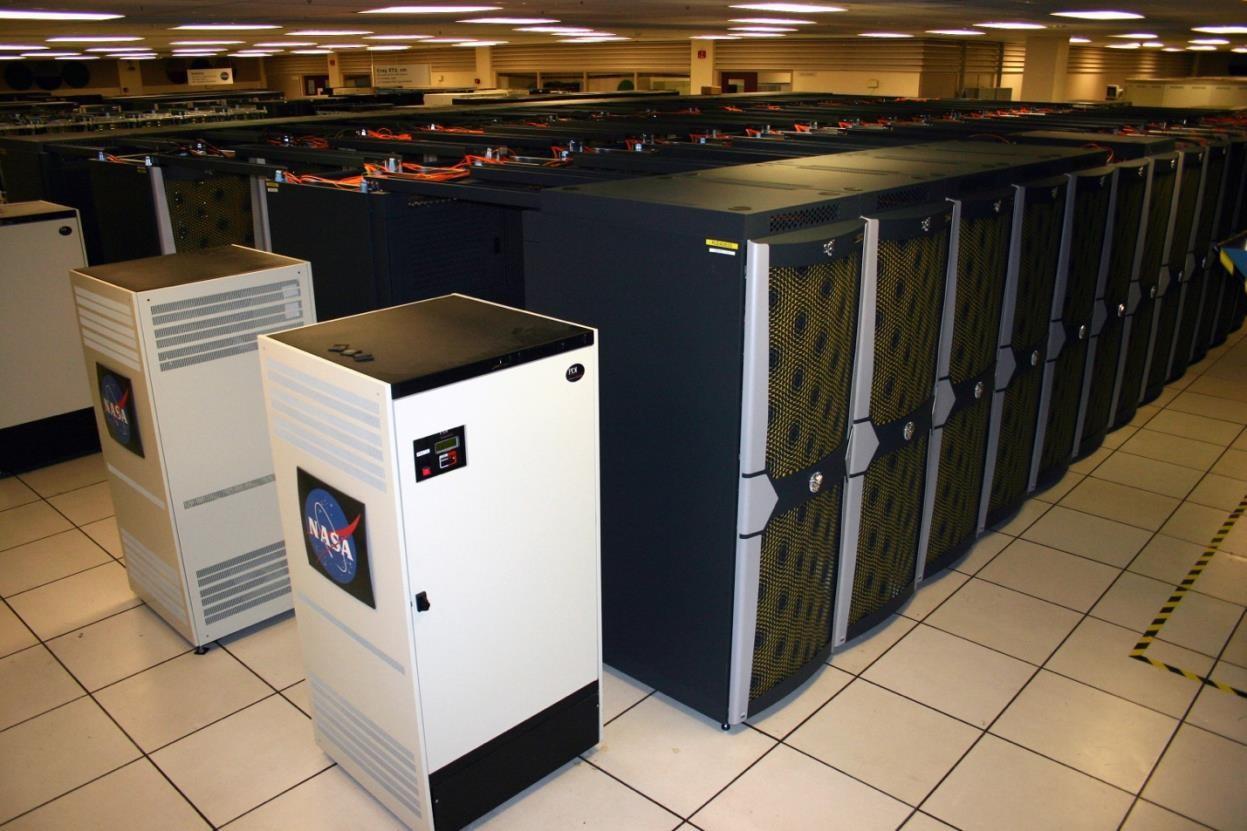
Source: https://en.wikipedia.org/wiki/Pleiades_%28supercomputer%29#/media/File:Pleiades_supercomputer.jpg
To compare, a computer with an Intel Core i3 processor, has only two cores for running its programs and applications. Core i5 and Core i7 models usually have only four cores. Core i7 extreme processors can have 6 to 8 cores; however, most applications cannot use all the cores to full advantage. Thus, they do not operate at full capacity. Imagine having more than 245,000 cores. How many applications and programs can your computer run in a second?
The computers are also categorized in several types due to the introduction of mobile devices and the proliferation of Internet capable devices. Specialized computers are now classified according to specific uses. The different types of computers are as follows:
Desktop computers – are computers designed to be placed on a desk, and are normally made-up of a few different parts, including the computer case, central processing unit (CPU), monitor, keyboard, and mouse.
Laptop computers – are battery-powered computer devices whose portability makes them possible to use almost anytime, anywhere.
Tablet computers – are handheld computers with touch sensitive screen for typing and navigation.
Smartphones – are handheld telephones which can do things that computers can do, including browsing and searching the internet and eating playing console games.
Wearables – include the fitness trackers and smartwatches that can be worn throughout the day.
Smart TVs – are the latest television sets that include applications present in computers. For example, videos can be streamed from the Internet directly onto the TV. The TV can also be used as a computer monitor and gaming monitor.
Digital Age, Information Age, and Computer Age
Digital age, information age, and computer age, use interchangeably, captured the ubiquitous nature of computing and the prolific use of technology in almost all aspects of human activity such that digital interaction is a defining characteristic of human activity.
It is a period in human history characterized by the shift from traditional industry to information technology-based economy brought by industrialization during the industrial revolution. The definition of what digital means or what information means continues to change over time as new technologies, user devices, and methods of interaction with other people and devices enter the domain of research, development, and market launch.
This period is also characterized by the digital industry creating a knowledge-based society surrounded by high tech global economy that exerts its influence on how the manufacturing process and the service sector work in an efficient and convenient way.
Media in the Digital Age
Media normally refers to the means of communication that uses unique tools to interconnect among people. The forms of media include television, radio, cellular phones, and Internet (which
involves the access and use of various social media sites such as Facebook, Twitter, Instagram, and YouTube, among others). In the digital age, however, media can be considered as the message, the medium, and the messenger.
The Message
Media is considered to be the message itself for those who create and own the rights of content. The forms of content can be user generated or professionally produced. User generated content (UGC) is a form of content created and owned by the users of a system. UGC has grown exponentially especially with a wide Internet coverage or easy Wi-Fi access, increased social media participation, and affordable smart devices.
Below is one of many examples of media tools used especially by millennials to generate content.
⇒ Blog
Keeping a diary or a journal is a traditional method of recording once thoughts or expressing one's emotions through writing. With the advent of the Internet, expressing one's feelings and thoughts was given a new concept through online writing or blogging. A blog is combination of two words web and log. It works the same way as pen and paper would but privacy becomes irrelevant given that a blog post can be seen by anyone online. A person who writes blog is called a blogger.
One of the TV personalities in the Philippines who also does blogging to further express feelings, thoughts, and opinions is Maine Mendoza, also known as “Yaya Dub,” in the Kalye Serye of the noontime show “Eat Bulaga.”
Most recently, blogs have evolved into micro blogs and video blogs. Micro blogs have become popular due to the rise of Tumblr and Twitter in which users instantly share limited content or short messages. Now, with the increasing number of YouTube viewers, people have explored uploading their own videos ranging from their travels and product reviews to any other random topics. Some vloggers, Youtubers, or social media influencers even make money based on the number of views they get and on the products they feature in their video blogs.
The Medium
The medium used refers to the tool or tools used in sending a message from the source to the destination. Traditionally, for example, professionals send messages to the audience, such as a news anchor delivering the news on TV and/or radio. However, with the latest technologies, the so-called social media has become an Ave. for information dissemination even taking over news sites in bringing the latest or up-to-date content. One such example is Twitter. Users of this application can constantly update other Twitter users about a certain topic. In this platform, Twitter users can also share other users’ content (in the form of retweeting) and discuss any topic with one another. Thus, the media, instead of just being an Ave. for delivering messages, is becoming increasingly social – with the audience themselves creating their own content and interacting with one another.
The Messenger
The messenger is the one who delivers the message. This is why broadcasters, for example, being the messenger of news are called “media.” In the digital space, however, does the “media” also refer to social network users who create content themselves but are not professional journalists? Hence, although the media can be the message, the medium, and the messenger, in the digital age, the demarcation line between them are somewhat blurry.
Evolution of Media
The media has transformed itself based on two things – (1) how information is presented; (2) how the connection is established. Wood cut printing on cloth or on paper was used in the early 15th century. It was in 1436 when Johannes Gutenberg started working on a printing press which used relief printing and a molding system. Now, the modern printing press delivers messages in print, such as newspapers, textbooks, and magazines.
In the 1800s, the Telegraph was developed followed by the telephone which made the two-way communication possible message sending and receiving can now be done both ways simultaneously.
At the beginning of the 1900s, broadcasting and recorded media were introduced. Radio and television were used to send sound and video to homes and offices through 11 electromagnetic spectrum or radio waves. Audio lower frequency band or video higher frequency band content can be received depending on the frequency used. Later on, a combination of both audio and video information made the audiences viewing experience more exciting. Films and movies became popular as they catered to larger audiences.
As communication devices also evolved and became pervasive, so did information distribution. A photo taken using a smartphone can immediately be uploaded and shared on Facebook, Twitter, or Instagram. Community websites such as OLX.ph, a Philippine counterpart of ebay.com, let its user buy and sell items online. This eliminates the need for going to physical stores.
In line with this development, the audience regardless of their professions can now interact with one another and are no longer disconnected. News sites can even get news stories for example from Twitter or other social media sites. According to Claudine Beaumont, author from The Telegraph, one good example of this happened on January 15, 2009, when dozens of New Yorkers sent tweets about the plane crash in the city. News about the US Airways flight 1549 which was forced to land in the Hudson River in Manhattan, USA immediately spread all over the country. All the plane’s engine shut down when it struck A flock of geese, minutes after takeoff from New York's LaGuardia airport.
The figure below it shows one of the first photos taken from a Twitter user, Jānis Krūms, showing the drowned plane with survivors standing on its wings waiting for rescue. It was instantly forwarded across Twitter and was used by numerous blogs and news websites, causing the TwitPic service to crash due to multiple views. In this regard, Twitter users were able to break the news of the incident around 15 minutes before the mainstream media had alerted the public about the crash incident.
This is a typical example of how individuals can now deliver content to everyone and connections are no longer controlled by professionals.

Overview of Current Trends
A trend refers to something hip or popular at a certain point in time. It can be a particular style in fashion, devices, or entertainment. A new trend may always come along to replace the old one.
Technology trends tend to change as time goes by. Following Moore's law, technology is bound to upgrade itself every two years. In 1965, Gordon Moore predicted that the computing power would dramatically increase over time. But as it increases, cost is expected to proportionately go down. Nowadays, the two-year prediction has even decreased, with releases happening less than two years, if not, yearly. Aside from cost, sizes of hardware have also decreased in making devices, such as smartphones, more useful and dependable.
A few years ago, people would have a cellular phone, a digital camera, a portable music player, and a laptop with them. They would use their phones to text and make calls, the digital camera to take pictures, and the music player to listen to music while doing their work on their laptop. Now, smartphones are capable of doing the aforementioned activities and a lot more through application or “apps” made available online. The term smartphone was coined as the cellular or mobile phone has now become smarter – it can run apps which help people perform their day-to-day activities. Apps turn mobile devices into miniature PCs capable of browsing the web, taking down notes, and playing games, among others. By default, smartphones installed with basic apps such as making calls, sending text messages, playing music, and managing schedules. As of 2017, Google Play has approximately 2.8 million apps available for Android users, whereas Apple’s App Store is estimated to have 2.2 million. These apps are not just limited to smartphones. They can be used in other mobile devices, including tablets and, another recent trend, wearable devices.
In an article from Forbes.com, Demers (2016) identified seven major trends in 2017.
IoT and smart home technology
The so-called Internet of Things (IoT) has been trending since 2016. The vision of IoT has evolved due to the convergence of multiple technologies, including pervasive wireless communication, data analytics, machine learning, and use of hardware technology such as sensors, microprocessors, and microcontrollers. Controlling home appliances through a mobile phone such as switching the lights on and off, setting the timer for the washing machine, and controlling the television to record shows that might be missed due to traffic is now possible.
Augmented reality and virtual reality
In 2016, the release of games such as Pokémon Go and the anticipated VR headset, Oculus Rift, served as a turning point for AR and VR technology.
Machine learning
Also called artificial intelligence, having machines decide for you seems to be a daunting task and would probably make you think of robots and talking computers, similar to Iron Man's Jarvis. However, with the recent release of Apple’s iPhone X, it was not just the design that improved. The iOS’ intelligent personal assistant, Siri, has also been upgraded with enhanced learning making the use of iPhone more efficient. Its latest feature include the following:
Face ID
The owner's face is the new password. It is a more secure way to unlock the phone and keep the data safe.
A11 Bionic
A11 Bionic it's claimed to be the most powerful and smartest chip ever in a smartphone, with a new neural engine capable of up to 600 billion operations per second period. A neural engine, a type of artificial intelligence, enables computer to learn from observation.
Wireless charging
A cable is not needed to charge the device.
IOS 11
In its latest operating system, one can scan documents in the notes app, edit live photos, and in the US, even pay friends in messages. Siri can also translate languages.
Augmented reality
AR is not just designed for fun. It is also meant for productivity and efficiency. It allows one to navigate without looking at a map, visualize industrial equipment, and many others.
Automation
Through advanced technology, it is now possible to automate previously human exclusive tasks. This is very much evident through wearable devices such as step counters and heart rate monitors used by health-conscious individuals. Information collected is automatically saved and stored in mobile devices for analysis later on.
Big data
Big data is a term that describes large and complex volumes of data. But it is not how much data an organization has it is what they do with it that matters. Big data can be analyzed for insights which can help management make better decisions and come up with more effective strategic plans. Waze is an example of an app which uses big data. This app helps users determine traffic, direction and route estimations, and notifies users with accident alerts and road hazards, among others.
Physical-digital integrations
Majority of organizations nowadays are moving towards system automation. As such, they identify their physical elements and create digital data for more efficient operation and backup. The concept of having a “paperless company” in which transactions, reports, and services are done using automated systems is one such example. Not only is it deemed reliable but also environment friendly.
Everything on demand
Due to the prevalence of network connectivity, it is possible to have information on demand. Movies, music, and even drivers (e.g., Grab) are made available through the apps in a smartphone.
Impact of ICT on Individuals, Organizations, and Society
ICT brings both positive and negative effects to individuals, organizations, and society. It improves education, access to information, and security. However, it limits personal interaction and physical activity and poses problems in employment and security.
Positive effects
⇒ Improve access to education
There are new ways of learning such as the use of learning management system (LMS) which implements educational enhancements such as distance learning and online tutorials, virtual reality, and interactive multimedia.
⇒ Access to information and communication
The Internet is widely used in communication. Access to it is getting better as it has become available in almost all places such as commercial establishments and public spaces. New tools have been promoted such as VoIP phone, instant messaging (IM), chat (e.g., FB messenger, Google Hangouts, Yahoo messenger, etc.), video chat (e.g., Skype, FB video chat, etc.), and e-mail. In addition, ICT has been maximized by most individuals nowadays for leisure and entertainment such as watching movies, playing games, or even reading news and articles, and for creating new relationships with people around the world.
⇒ Security
With the advancement that ICT brings, individuals and organizations can solve any security problems. Examples of security measure on applications are: (1) the use of encryption methods to keep and protect data from any malicious software; (2) the use of password/s for personal information protection; and (3) the development of physical security systems such as biometrics in a form of fingerprint, facial recognition, iris (eye) recognition, and voice recognition.
Negative effects
⇒ Reduce personal interaction and physical activity
Because of virtual communication, ironically, people are less likely to talk to or meet each other in person. And because of the comfort of working from home and the entertainment that the internet offers (i.e., streaming movies, playing online games, etc.), physical activity is reduced leading to health issues such as obesity and heart disease.
⇒ Job loss or increase in unemployment
This can be considered as one of the worst effects of ICT.
Multiple workers being replaced and reduced by a smaller number of employees capable of doing the same volume of tasks
Shipping or freight services in which a certain amount is added to the operating cost for the physical process of transporting commodities or goods
Automation through robots or machines replacing people in the assembly line
⇒ Security
ICT brings not only improvement but also threat to security. Data or files must always be kept secure and safe. The Internet connection must always be safe ordered from different attacks such as data modification, identity/IP address spoofing, password-based attacks, denial of service, etc. Computers should also be protected from various forms of viruses and malware which are released almost every day.
Ethical Issues in ICT
While some people apply ethical principles to the use of ICP, others simply do not, hence the proliferation of cyber malpractices.
The following are some of the ethical issues in ICT:
Plagiarism
It is an act of theft in which a person copies another person's ideas, words, or writings, etc. and pass them off as his or her own. Those who committed such action may lead to serious legal and ethical defilements.
Exploitation
It is an action in which one deals with a person dishonestly, unethically, and dishonorably, in order to take advantage of the latter's work and/or resources. This leads to unlawful actions.
Libel
It can either be an insult, slur, or slander. Either written or spoken or even through actions, it may lead to libel if the accusation is not true and without any piece of evidence.
Software piracy: it refers to an act of installing or copying a software into the computer and the absence of an end user licensing agreement (EULA), and/or producing a copy disregarding the copyrights.