Distributed Systems
Distributed System
a collection of autonomous computer systems that are physically separated but are connected by a centralized computer network that is equipped with distributed system software.
a system that consists of multiple independent computers that communicate with each other by passing messages.
Advantages:
Resource Sharing
Scalability
Fault Tolerance
Concurrency
Disadvantages/ Challenges:
Coordination
Synchronization
Consistency
Security
Examples:
Internet, which connects millions of computers around the world and allows them to exchange information and services.
Cloud computing platform, which provides various resources & capabilities to users through a network of servers and data centers.
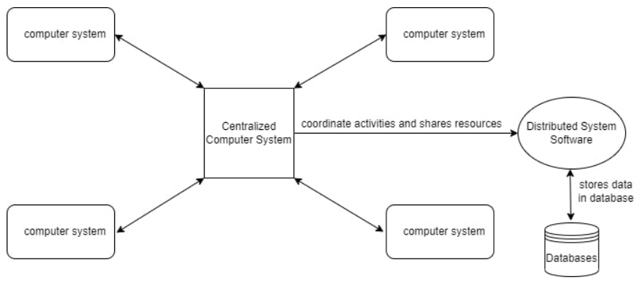
Any Social Media can have its Centralized Computer Network as its Headquarters and computer systems that can be accessed by any user and using their services will be the Autonomous Systems in the Distributed System Architecture.
Distributed System Software
This Software enables computers to coordinate their activities and to share resources such as Hardware, Software, Data, etc.
Database
It is used to store the processed data that are processed by each Node/System of the Distributed systems that are connected to the Centralized network.
Network OS
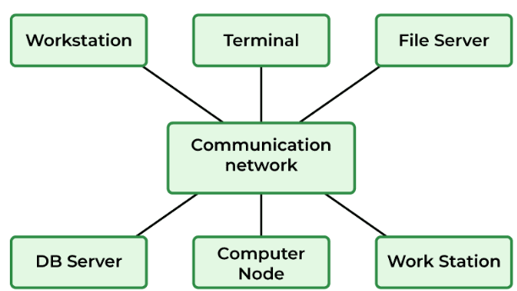
software that connects multiple devices & computers on the network and allows them to share resources on the network.
it allows managing the users, groups, data, security, applications and other networking operations on the network.
can also enable multiple computers to share resources and files on a network, such as printers, hard disks, databases, etc.
Functions of the NOS (Network Operating System)
Creating & managing user accounts on the network.
Controlling access to resources on the network.
Provide communication services between the devices on the network.
Monitor and troubleshoot the network.
Configuring and managing the resources on the network.
Types of Network Operating System
Peer-to-peer
allows the sharing of resources and files with small-sized networks and having fewer resources.
Used in LAN.
Client/ Server
provide users access to resources through the central server.
It is not too expensive to implement and maintain.
Good for big networks that provide many services.
Difference between peer-to-peer and client-server network operating systems in terms of security
Client-server network operating systems have a central server that can enforce security policies & authenticate users and devices. Peer-to-peer network operating systems rely on the individual nodes to provide security, which can be inconsistent and vulnerable to attacks.
Main advantage of using peer-to-peer network operating systems over client-server network operating systems for small-sized networks.
Peer-to-peer network operating systems are suitable for small-sized networks that have fewer resources and do not need complex services. They can save money, time, and energy by using the existing nodes and software, and they can adapt to the network changes easily.
Examples of Network Operating Systems
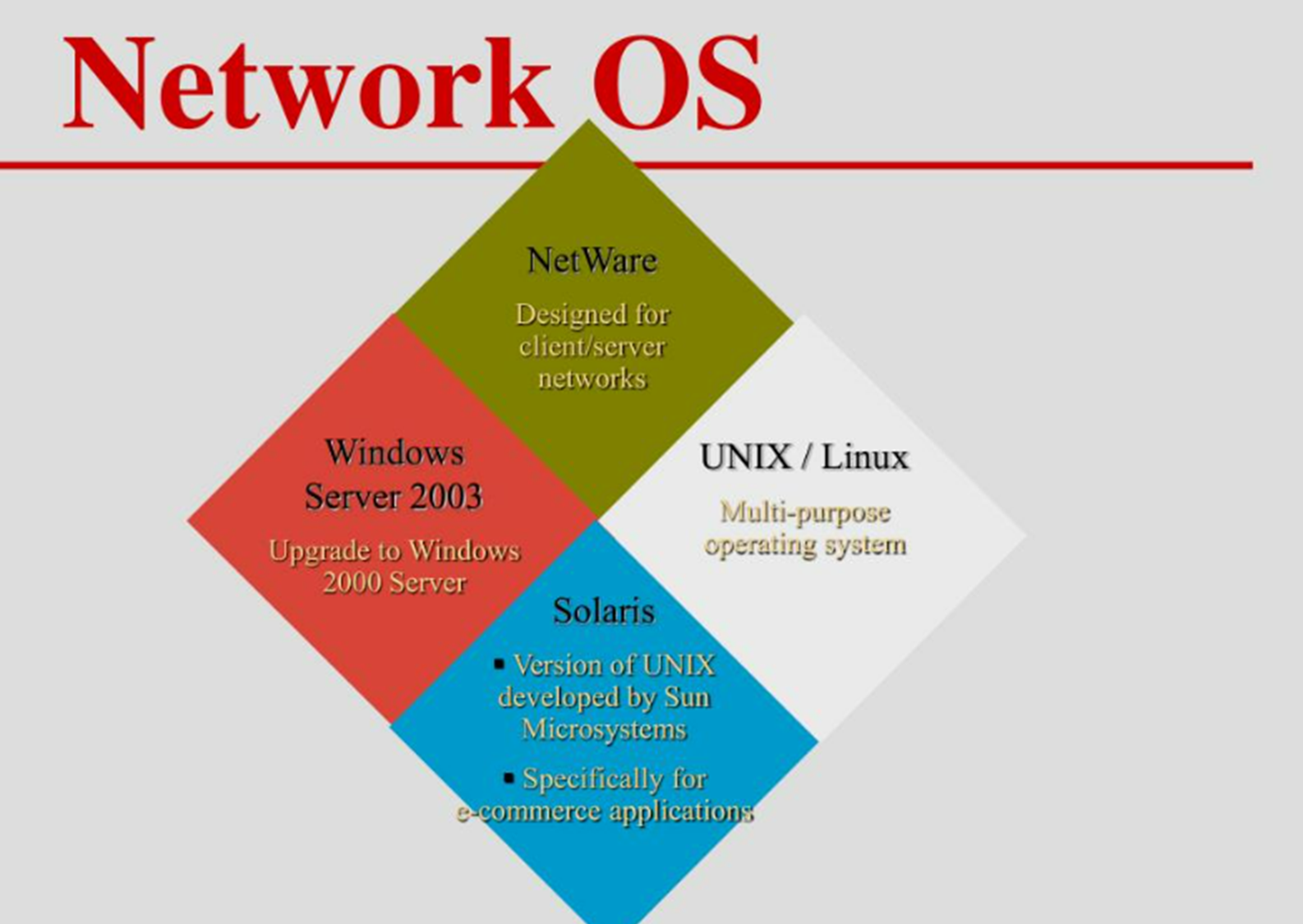
Microsoft Windows Server
UNIX/ LInux
Artisift’s LANtastic
Banyan’s VINES
Distributed Operating System
a model in which applications run on multiple interconnected computers, offering enhanced communication and integration capabilities compared to a network operating system.
Enables the sharing of various resources such as CPUs, disks, network interfaces, nodes, and computers across different sites, thereby expanding the available data within the entire system.
Effective communication channels like high-speed buses and telephone lines connect all processors.
Each processor has its own local memory and neighboring processors.
A distributed operating system is classified as a loosely coupled system.
It includes multiple computers, nodes, and sites interconnected through LAN/WAN lines.
A key feature is the ability to share processing resources and I/O files.
Provides users with a virtual machine abstraction.
Types of Distributed Operating System
Client-Server Systems
A strongly connected operating system that is appropriate for multiprocessors and homogenous multicomputers.
It functions as a centralized server, handling and approving all requests originating from client systems.
Peer-to-peer Systems
A loosely coupled system that is implemented in computer network applications, consisting of multiple processors without shared memories or clocks.
Each processor possesses its own local memory, and communication between processors occurs through high-speed buses or telephone lines.
Middleware
It facilitates interoperability among applications running on different operating systems. By employing these services, applications can exchange data with each other, ensuring distribution transparency.
Applications of Distributed Operating System
Internet Technology
Distributed Databases System
Air Traffic Control System
Airline Reservation Control Systems
Peer-to-Peer Networks System
Telecommunication Networks
Scientific Computing System
Cluster Computing
Grid Computing
Data Rendering
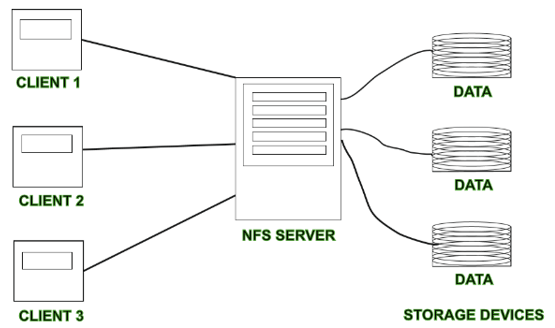
Distributed File System (DFS)
A file system that is distributed on multiple file servers or multiple locations.
Allows programs to access or store isolated files as they do with the local ones, allowing programmers to access files from any network or computer.
Its main purpose is to allow users of physically distributed systems to share their data and resources by using a Common File System.
A collection of workstations and mainframes connected by a Local Area Network (LAN) is a configuration on Distributed File System.
A DFS is executed as a part of the operating system.
In DFS, a namespace is created and this process is transparent for the clients.
2 Components of DFS
Location Transparency
Achieves through the namespace component.
Redundancy
Done through a file replication component.
Features of DFS
Transparency
User mobility
Performance
Simplicity and ease of use
High availability
Scalability
High reliability
Data integrity
Security
Heterogeneity
Transparency
Structure transparency
There is no need for the client to know about the number or locations of file servers and the storage devices. Multiple file servers should be provided for performance, adaptability, and dependability.
Access transparency
Both local and remote files should be accessible in the same manner. The file system should be automatically located on the accessed file and send it to the client’s side.
Naming transparency
There should not be any hint in the name of the file to the location of the file. Once a name is given to the file, it should not be changed during transferring from one node to another.
Replication transparency
If a file is copied on multiple nodes, both the copies of the file and their locations should be hidden from one node to another.
User Mobility
it will automatically bring the user’s home directory to the node where the user logs in.
Performance node
based on the average amount of time needed to convince the client requests. This time covers the CPU time + time taken to access secondary storage + network access time. It is advisable that the performance of the Distributed File System be similar to that of a centralized file system.
Simplicity & ease of use
The user interface of a file system should be simple and the number of commands in the file should be small.
High Availability
A Distributed File System should be able to continue in case of any partial failures like a link failure, a node failure, or a storage drive crash.
A high authentic and adaptable distributed file system should have different and independent file servers for controlling different and independent storage devices.
Scalability
Since growing the network by adding new machines or joining two networks together is routine, the distributed system will inevitably grow over time. As a result, a good distributed file system should be built to scale quickly as the number of nodes and users in the system grows. Service should not be substantially disrupted as the number of nodes and users grows.
High Availability
The likelihood of data loss should be minimized as much as feasible in a suitable distributed file system. That is, because of the system’s unreliability, users should not feel forced to make backup copies of their files. Rather, a file system should create backup copies of key files that can be used if the originals are lost. Many file systems employ stable storage as a high-reliability strategy.
Data Integrity
Multiple users frequently share a file system. The integrity of data saved in a shared file must be guaranteed by the file system. That is, concurrent access requests from many users who are competing for access to the same file must be correctly synchronized using a concurrency control method. Atomic transactions are a high-level concurrency management mechanism for data integrity that is frequently offered to users by a file system.
Security
A distributed file system should be secure so that its users may trust that their data will be kept private. To safeguard the information contained in the file system from unwanted & unauthorized access, security mechanisms must be implemented.
Heterogeneity
Heterogeneity in distributed systems is unavoidable as a result of huge scale. Users of heterogeneous distributed systems have the option of using multiple computer platforms for different purposes.
History
The server component of the Distributed File System was initially introduced as an add-on feature. It was added to Windows NT 4.0 Server and was known as “DFS 4.1”. Then later on it was included as a standard component for all editions of Windows 2000 Server. Client-side support has been included in Windows NT 4.0 and also in later on version of Windows.
Linux kernels 2.6.14 and versions after it come with an SMB client VFS known as “cifs” which supports DFS. Mac OS X 10.7 (lion) and onwards supports Mac OS X DFS.
Properties
File transparency
users can access files without knowing where they are physically stored on the network.
Load balancing
the file system can distribute file access requests across multiple computers to improve performance and reliability.
Data replication
the file system can store copies of files on multiple computers to ensure that the files are available even if one of the computers fails.
Security
the file system can enforce access control policies to ensure that only authorized users can access files.
Working DFS
Standalone DFS namespace
It allows only for those DFS roots that exist on the local computer and are not using Active Directory. A Standalone DFS can only be acquired on those computers on which it is created. It does not provide any fault liberation and cannot be linked to any other DFS. Standalone DFS roots are rarely come across because of their limited advantage.
Domain-based DFS namespace
It stores the configuration of DFS in Active Directory, creating the DFS namespace root accessible at \\<domainname>\<dfsroot> or \\<FQDN>\<dfsroot>