Chapter 3 - Vectors & Matrices
Vectors & Matrices
Scalar: a quantity that can be expressed as a single number
Ex. Height of a person
Ex. 3, -17, , , 2 + 3 i, ….
Vector: a sequence of numbers, symbols or functions
Ex. Dimensions of a box, coordinates of a point
MATLAB Ex. v = [3] , v = [1 2 3] , v = [x y z] , v = [x, x2,x3]
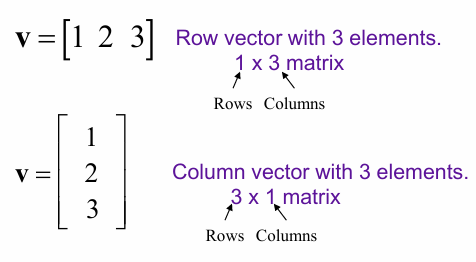
Vectors in MATLAB have dimensions
Ex. v = [3] → 1 × 1 → 1 row x w column
Ex. v = [1 2 3] → 1 × 3 → 1 row x 3 columns
Vectors can be either row vectors or column vectors.
Creating Vectors in MATLAB
Vectors can be created in MATLAB in several ways:
Directly generate a vector:
Row Vector: v = [1 2 3] or v = [1, 2, 3] (, separates row elements)
Column Vector: v = [1; 2; 3] (; separates row elements)
Convert a row vector to a column vector:
v = v’ (Transpose function)
Using a sequence:
v = [1 : 3] = [1 2 3] or v = [1 : 2 : 5] = [1 3 5] (: will be referred to as the “colon operator”)
Use when you know the initial and final values and the increment
(start) : (end) (interval of 1)
(start) : (interval) : (end)
Using linspace:
v = linspace(1, 10, 3) = [1.00 5.50 10.00]
Use when you know start and end, and number of elements in the array.
        linspace(start, end)
        linspace(start, end, n)
Indexing Vectors in MATLAB
Array indexing (MATLAB uses 1-based indexing)
Once we have created an array in MATLAB, we can read from or write to a single element at a time.
To do this, we reference the element’s position in the array including indicies.
v = [0 2 4 8]
v(1) = 0
v(2) = 2
v(3) = 4
v(4) = 8
Reading information from Vectors
Access the third element of a vector v: x = v (3) → x = 4
Writing information to vectors
Modify the third element of vector v: v(3) = 6 → v = [0 2 6 8]
Some Common Vector Operations
Magnitude
x = norm(v) Length
x = length(v)Sum the elements of a vector
x = sum(v)Minimum element of the vector
[value, index] = min(v)Maximum element of the vector
[value, index] = max(v)Matrices
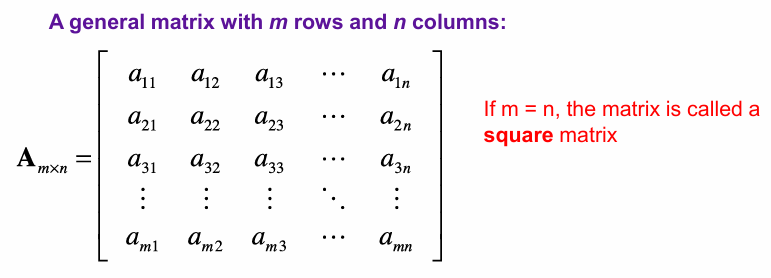
Matrix: a rectangular array of number, symbols or functions
A vector i essentially a 1-dimentional matrix → 1 row or 1 column
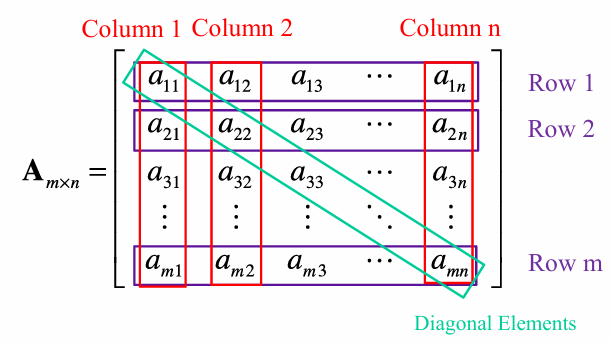
A matric is characterized by its number of rows and columns
Row: horizontal set of elements
Column: vertical set of elements
Special (Banded) Matrices
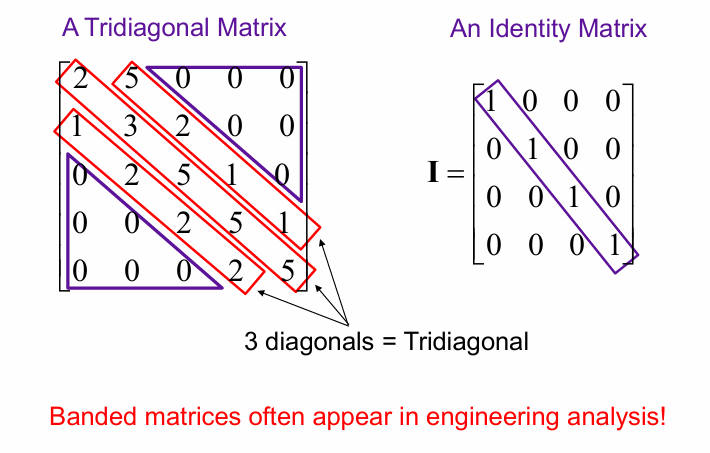
Creating Matrices in MATLAB
Directly generate a matrix:
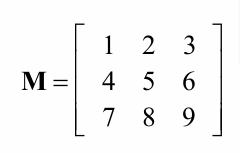
M = [1, 2, 3; 4, 5, 6; 7, 8, 9]From a collection of row vectors:
M = [r1; r2; r3]From a collection of column vectors:
M = [c1 c2 c3]Using a sequence:
M = [1 : 3; 4 : 6; 7 : 9]