A+ Virtualization and Cloud
1.1
Virtualization Concepts
With virtualization, you can have multiple operating systems a single computer’s hardware.
Separate OS and independent CPU, memory, and network, but all on one computer.
Saves time and resources in numerous areas.
Virtual Machine- The combined guest operating system and its applications created by virtualization.
Host based virtualization is the kind when all operating systems are virtualized on your desktop. You have one primary OS and virtualize others. Businesses, however, use bare metal virtualization- which means there is no “main” OS, a single computer has multiple VMs running on it.
On a VM you can do a lot.
Sandboxing- Using an isolated testing environment used for trying out different operating systems, applications or coding on a VM so that the main OS is not affected.
Great for software development.
You develop software in a secure environment in a sandbox, then test it on a separate VM to make sure it works.
Virtualization can also be used just for enabling another OS. If you or your enterprise needs an application that only uses a specific OS, you can switch to using that OS.
This does not just mea using different versions of Windows or macOS- it also means using Windows on one VM and macOS on another.
Virtualization Services
Virtualization requires something to keep the several OS running.
Hypervisor- Software that manages the interaction between virtual machines and the physical hardware they are running on.
Its role is to manage how much hardware each VM is using.
May need to be paired with a CPU that supports virtualization.
Starting a new VM requires a lot of overhead and requires a lot of hardware. It can make things slower and it is relatively expensive, but it still cheaper for an enterprise than not utilizing its hardware.
Again, there are two kinds of virtualization.
Tpe 1: Bare Metal
The hypervisor is directly installed on the hardware and acts as the primary operating system.
VMs on top of Hypervisor on top of hardware.
Examples include VMware EXSi or Microsoft Hyper-V.
Type 2: Hosted
Hypervisor runs in the existing Host OS (lWindows, macOS, Linux) and then enables the use of other operating systems.
VMs on top of Hypervisor on top of Host OS on top of hardware.
Examples include VMware Workstation, Oracle VirtualBox, Parallels Desktop
Some CPUs are designed for virtualization.
Virtualization Technology (VT)- The functionality of an Intel CPU to be designed for virtualization.
AMD-V- The functionality of an AMD CPU to be designed for virtualization.
Every virtual machine needs physical memory and drive space allocated to it. You need enough RAM to support different virtual machines simultaneously. A VM has an entire operating system applications, and data, so this means a lot is required.
From a networking perspective, you have complete control over how a VM is allowed to interact with other outside devices.
Most hypervisors create and maintain their own virtual networks.
Shared Network Address- Used when a hypervisor assigns the VM a private IP address to be used inside of a virtual network, and uses NAT to convert it to the host IP address when you want to communicate outside.
Bridged Network Address- Used when a VM is connected to the physical network and has its own IP address, allowing it to look and act like a regular computer.
Private Address- Used when a VM does not need to communicate with devices outside of its virtual network.
VM Escape- Cyberattack that occur when malware recognizes it is on a VM and attempts to break out of the virtual environment to access the host system or other VMs, potentially compromising the entire infrastructure.
Severe cyber attack that can cause massive damage. No significant breaches of this kind have occurred yet.
Every VM must be given security controls as if it is a traditional computer.
Every VM on a network needs a host-based firewall, anti-virus software, and anti-spyware.
Most VMs do not know of the existence of other VMs.
Rogue VMs- Cyberthreat created when an attacker installs an unauthorized VM on a virtual network that installs its own hostile systems.
Also very dangerous.
Self-contained VMs provided by 3rd parties are risky because they can be rogue VMs.
VDI (Virtual Desktop Infrastructure)- A technology that allows a desktop to run as a VM on a separate device across the network. Your operating systems and applications run on a remote server, all you have are a keyboard, mouse, and screen.
Benefits of VDI: No need for a lot of CPU or memory on your computer. But it does have a large network requirement. You can barely even tell you are using one.
Containerization- When you use multiple applications on the same host OS.
A lightweight alternative to virtualization, used when you only need a new application and rather than an entirely new OS.
Just like VMs, containerized applications do not know about other containerized applications unless if they are designed that way.
This requires only one host OS, so it is much more lightweight and requires less memory and processing.
Limited by the fact that containerized applications need to be compatible with the host OS.
You can’t containerize Word on macOS. But you can use virtualization to get Word on macOS.
4.2
Cloud Models
Cloud Computing- Providing IT resources (servers, storage, software, etc) as a service rather than owning and operating them yourself.
It is more than just a server that is hosted elsewhere. Services and applications can be managed and used anywhere, and you have basically limitless resources at your disposal that you can access or remove whenever you want.
Before cloud computing, you needed new physical servers placed on a rack to access them. Cloud computing was a revolutionary technology that transformed business operations globally.
NIST Definition of Cloud Computing defines cloud computing as being composed of 4 deployment models, 3 service models, and 5 essential characteristics. Summarized below:
Four Deployment Models (four kinds of clouds)
1- Private Cloud- Cloud infrastructure designed for exclusive use within a single organization, likely using its own virtualized data center. The organization pays for it, builds it, and uses it.
2- Public Cloud- Cloud infrastructure designed for open use by the general public, on the premises of the cloud provider. Every customer will likely be using the same resources simultaneously.
Google, Amazon, Microsoft, and their services are a public cloud.
3- Hybrid Cloud- A mix of private and public cloud infrastructure, often used in enterprises to take advantage of both deployment models.
4- Community Cloud- Cloud infrastructure in which resources are shared by several organizations that have similar needs but want to avoid using their own private clouds.
Three Service Models (three ways for IT resources to get to you)
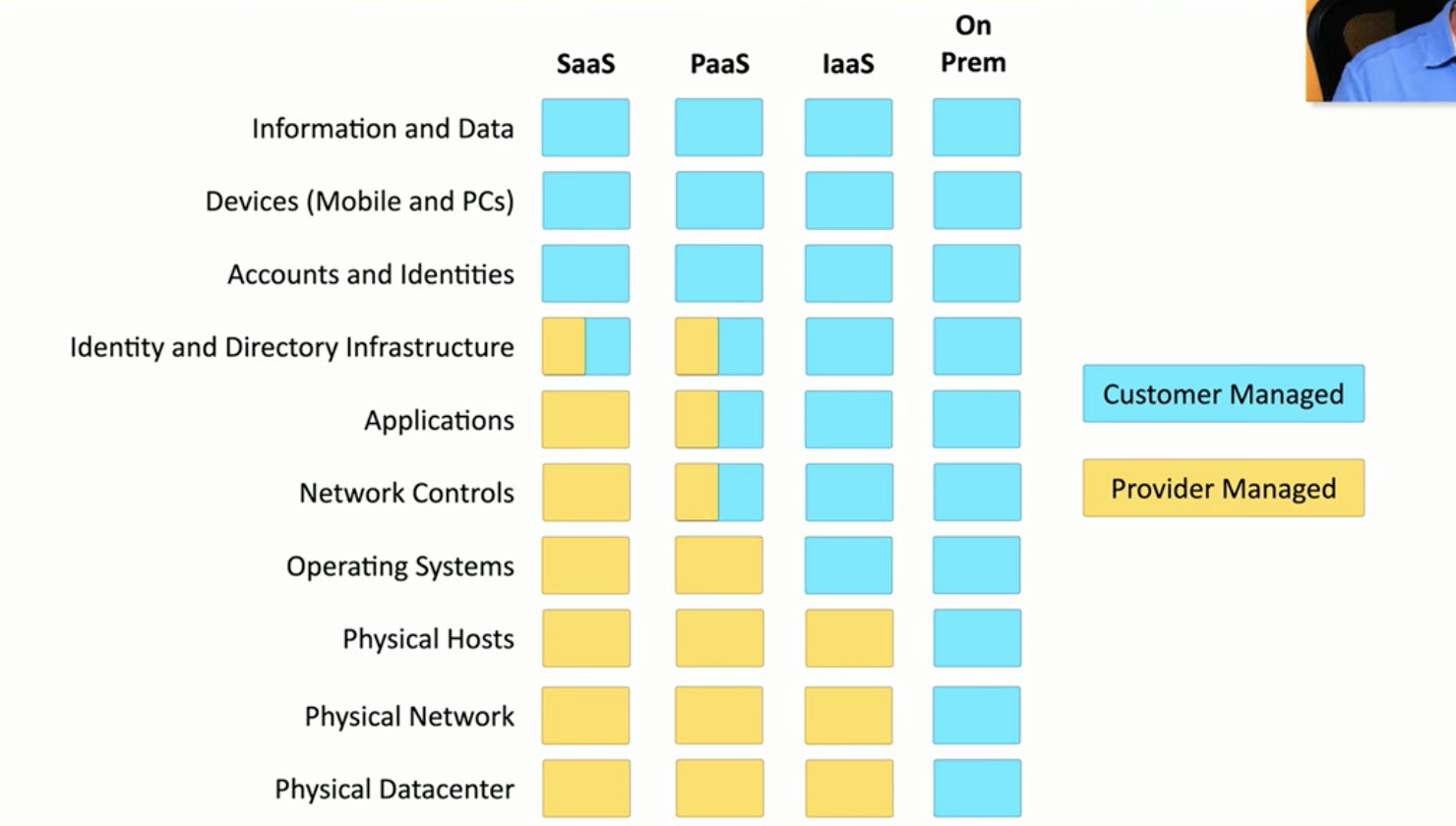
1- Infrastructure as a Service (IaaS)- When the consumer is given access to hardware and is allowed to provision storage, processing, networks and can run their own operating systems and applications.
Basically renting time to use a virtual machine. You don’t own the physical hardware.
Common examples are web server providers.
2- Software as a Service (SaaS)- When the consumer is given access to applications and does not manage any of the data or infrastructure behind them. Providers handle updates, processing, and security.
Common examples are email server providers (Gmail and Office365).
3- Platform as a Service (PaaS)- When the consumer is given access to an operating system, web server, and DBMS, but is required to develop their own applications and manage their own data.
In the middle ground of IaaS and SaaS.
Common example is Google App Engine.
In order of least to most responsibility for the user:
SaaS → PaaS → IaaS → On-Premises.
Five Essential Characteristics (five things that define a cloud)
1- On-Demand Self-Service- Cloud capabilities are accessible to users by themselves instantly, without needing human interaction with each service provider.
2- Broad Network Access- Cloud resources are accessible using standard network protocols from any location using any device.
So if a user’s device is destroyed, they can access cloud data from any other device.
3- Resource Pooling (Multi-tenancy)- Cloud resources are grouped into a single large pool that is efficient enough serve multiple customers simultaneously and are dynamically assigned as needed by demand.
So a single rack in a cloud data center can have data belonging to multiple users.
4- Rapid Elasticity- Cloud capabilities can be scaled up and down as needed by demand, appearing unlimited to the consumer.
5- Measured Service- Cloud systems automatically control, monitor, and report the usage of resources to determine costs.
Metered Utilization- When you pay for how much of the cloud resources you use variably.
Cost to Upload- When you pay for incoming data (ingress traffic)
Cost to Store- When you pay for data to be stored
Cost to Download- When you pay to retrieve data from the cloud (egress traffic)
Non-Metered Utilization- When you pay a fixed price for storage and spend nothing for uploading and downloading.
Additionally (not in NIST doc):
Cloud Sharing
The sharing and pricing of resources depends on the kind of cloud being used.
For private cloud built around an organization, they own, build, and maintain all data centers, servers, hypervisors, and hardware. As a result, the organization has no ongoing usage costs once the cloud is up (but must pay for power, cooling, security, and staff).
For public cloud used by an organization, the provider owns, operates, and maintains all data centers, servers, hypervisors, and hardware. Costs are metered and determined by how much is being used.
File Synchronization- An application feature in which data in the cloud is shared across data centers and automatically synchronizes across user devices.
Examples: OneDrive, Google Drive, iCloud, and Dropbox.
High Availability and Redundancy- A cloud design goal that ensures cloud services remain online, operational, and accessible with minimal down-time by eliminating single points of failure.
So if a cloud data center crashes, user data remains available, because file synchronization relies on this feature to duplicate your files across multiple physical data centers.
Failover- The instant and seamless transition of cloud data from hardware that fails to hardware that is functioning normally, which enables high availability.
File synchronization, high availability and redundancy, and failovers work together to make the cloud extremely convenient.