1. Intro to Imaging & Digital Image Processing
Defining Imaging
- Modality: The difference between different bioimaging methods and machines (ex: CT and MRI are different ______)
- Four necessary components of a modality: source (illumination), camera (detector), digitizer (frame grabber), imaging processing unit
- Imaging processing unit (hardware and/or software)
- acquisition (takes in the data and understands it)
- preprocessing (combines information from multiple points)
- segmentation (identifying components, facial recognition)
- & more
- An image is a 2D representation of a physical quantity as rendered by an imaging modality
- X-ray attenuation (projection x-ray yor CT)
- Proton density (MRI)
- Acoustic reflectivity (ultrasound)
- An image represents a “finite-thickness” plane within a volume of interest
- Types of imaging
- Anatomical: Imaging that represents structure/composition of objects (e.g. CT imaging)
- Functional: Imaging that represents function/physiology of an organ (e.g. PET scans)
- Projection: Imaging that shoes a single planar representation (e.g. x-ray)
- Tomographic: Imaging that shows cross-sectional representation (e.g. CT imagings)
- Imaging mechanisms
- Transmission: The imaging mechanism by which information comes from what travels through the body (e.g. x-ray)
- Reflection: Transmission: The imaging mechanism by which information that comes from what reflects back from the body (e.g. ultrasound)
Modality Comparison
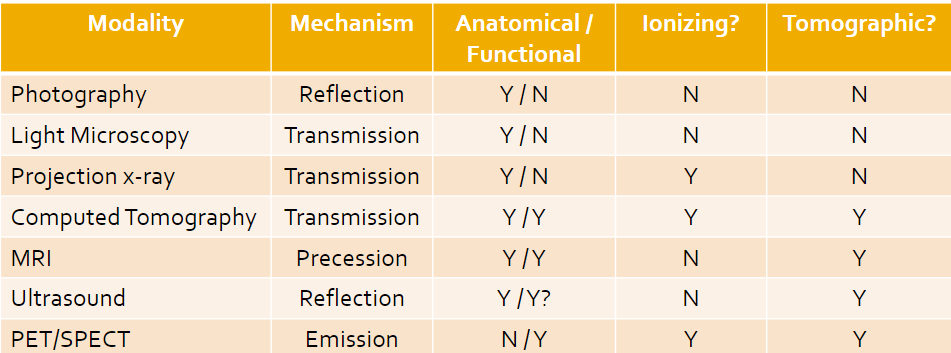
- Ionizing is when the energy we work with is higher than others, and electrons in the atoms can bump up to unsafe levels; this is something we want to avoid (can lead to cancer)
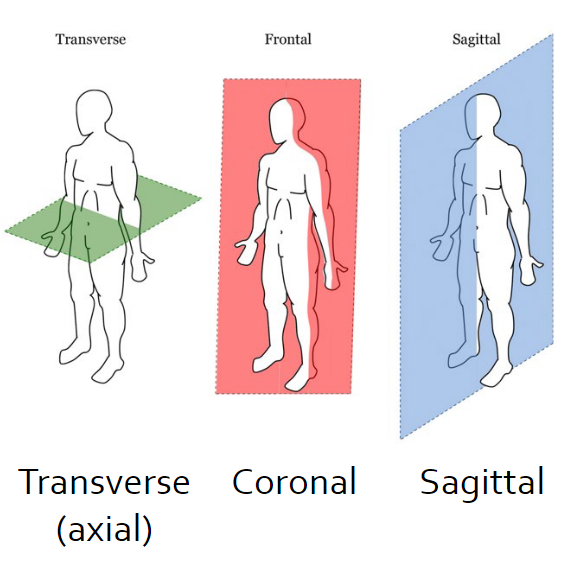
Digital Imaging
- Digital images are digital files saved on a computer
- 2D arrays of “picture elements” called pixels
- Voxels are for 3D elements
- Image size = width x height
- Real-world image size (or FOV) is (Ncolumn x pixel width) x (Nrow x pixel height)
- Resolution: Number of pixels per square inch
- Image Pixels
- Addressed with x,y coordinates
- Top left corner is (1, 1)
- (coumn, row)
- Storage type
- Pixel values depend on the storage type
- Grayscale images are NOT called black and white
- 8-Bit: Greyscale images with values from 0 to 2^8 minus 1
- 16-Bit: Greyscale images with values from 0 to 2^16 minus 1
- Color images: each pixel can have 4 values
- 1 value per pixel – e.g. indexed image
- 3 values per pixel e.g. 3x1 bytes – R_G_B, 3x2 bytes – R_G_B, …
- 4 values per pixel RGB e.g. 4x1 byte – R_G_B_Alpha, …
Image Processing
- Enhancement/restoration of image info for human reading
- Segmentation
- Characterization
- Representation of images for machine analysis
- Visualization
- Processing of image data for storage
- Processing of image data for transmission
- Matlab
- Load the image and info
- imread()
- iminfo()
- Display image
- imtool()
- imshow()
- imagesec()
- image()
- imshowpair()
- Perform needed operation
- Display and evaluate results
- Save resulting image
- imwrite()