OS Mechanisms
Amoeba
A microkernel-based OS
- The idea was to take a whole network of computers and make them into one machine
- When a process was started, it could start on a different machine entirely without the user even being aware of which machine his or her process was running on
- Different processes can exist, run and access resources on other computers in the system, which is all transparently handled by the overall distributed OS that runs across the different computers in the system
Amoeba Capabilities
- Amoeba uses capabilities to avoid having the OS do constant authentication on different machines in the same system since this would be very burdensome on the system, as well as slow it down
- Each object in the Amoeba OS resides on a server
- To perform an operation on an object, a subject would send a message to the server, which would contain the proof of capability, the object and the action that the subject wishes to perform on the object, as well as a check field to ensure that capabilities could not be modified
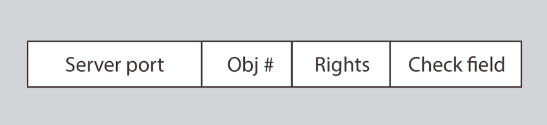
The most important part of this system from a security perspective is how it handles capabilities and how those capabilities can be verified while remaining unforgeable
- The way capabilities work in Amoeba is that when a server creates an object, it returns the owner capabilities to the owner
- Whoever created the new object becomes its owner and they have a rights field(A bit string that contains zeros, which represents permissions that you don't have, and ones, which represents permissions that you do have) where they have all permissions on it \n
- All the permissions bits for the owner's capabilities are set to one (Allowed) and then it generates a check field(A random secret number that's generated and only known by the server and the owner), which contains a random 48-bit number that is stored server-side and sent to the owner \n
- When the owner wants to grant capabilities for an object to another subject, they can set some of the rights bits' to zero (Not allowed) and calculate a new check field
- This allows you to do delegation without involving a trusted third party or server
- The server can verify the rights and check field
- Without the owner capability, you cannot forge a derived capability since the secret is in the check field (When the owner creates a new capability ticket, they generate a new check field using the new rights and gets XORed (exclusive or) together with the old check field using a one): checkn = H(checkn-1 XOR rightsn)
- The owner will create a new rights field for a subject and set the bits for all the permissions that they don't want them to have to 0 and then will generate a new check field for that subject that (The owner takes the subject's new rights and the owner's old check field and he XORs them together, then he takes the secure hash of the output, which gives him a new check field
- The owner can send this new rights string (rightsn) and the new check string (checkn) over to the subject they want to grant access to
- That subject can then send it to the server, who has the old check field as well
- The server can the XOR the new rights string with the old check field and hash that value, and if it matches the new check field then access is granted
Revoking permissions
- All you have to do is change the random check value and issue a new capability, which will make none of the old capabilities have their check fields match when the server goes and tries to match it with the new hash value
- (It's not a very fine-grained way to do trust revocation since you can't really go and revoke some people's tickets, but it does provide an effective mechanism
Android
Android Architecture
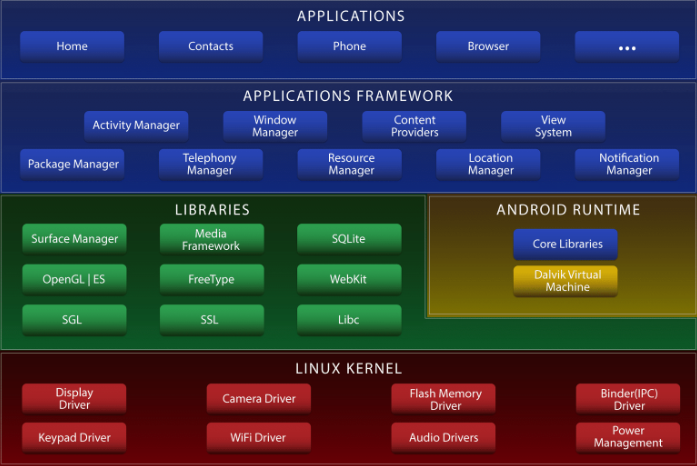
Android Access Model
- Single-user devices have a different access control focus than multi-user devices
- Assuming that a device has only one user allows the access control mechanism to focus on isolating applications from each other, called Sandboxing
- A Sandbox is a virtual machine that runs as a separate UID from a Linux perspective (Remember that there's a Linux kernel at the bottom of the Android architecture)
- so now, instead of having each user running all their apps with the same permissions, now every app runs with its own set of permissions on your Android phone
- Each application has its own unique UID and communicates with data or resources on the system through a Reference Monitor and through Android middleware that eventually translates down into a Linux kernel
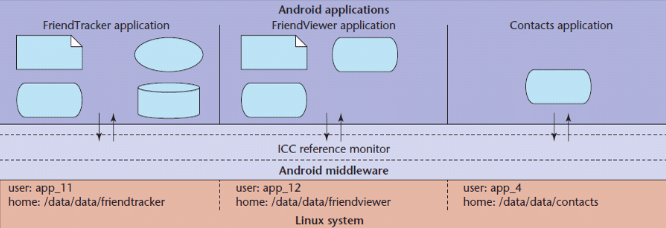
Android Manifest File
- Allows developers to define an access control policy for access to components
- Each component can be assigned an access permission label
- Each application requests a list of permission labels (fixed at install time)
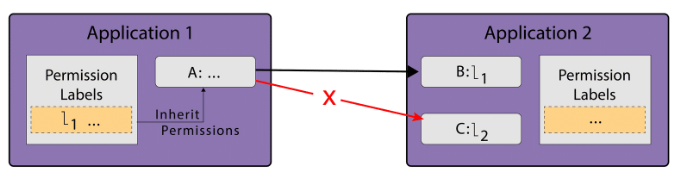
MULTICS
A time-sharing operating system that allowed multiple Processes to use the same machine all at once, which meant that no one could not make superficial assumptions about one Process not being able to access the memory or state of another
- No longer in use today
- it used Virtual addresses
- it was written using a high-level language
- it used a share memory multiprocessor
- it had a Relational Database
- at the time, it was considered the best when it came to security
Pros
- was written using a high-level language
- used a shared memory multiprocessor \n
Cons
- was the first successful operating system to have security as a consideration from the beginning, it had issues and turned out to be unwieldy to use in practice, which lead to the creation of UNIX
Demonstrates how different processes could be stopped from bypassing access control by using a few security designs, such as:
Virtual memory
Ring structure
- Rings were domains in which a Process executes in
- Rings were numbered and the lower the number (0 being the lowest), the more privileges the Process had
- Every Process had all the privileges of every ring numbered above the ring it was executing in (ex: A Process in ring 1 would have all the privileges in ring 1, as well as the privileges in rings 2, 3, and so on)
Segments
- Segments were data and text areas within a program that you could call into
- Subjects could not call into the middle of a segment, but instead, they would call a segment at a restricted segment entry point
- This was to avoid the issue of subjects jumping into the middle of a segment, past the portions of code that handled the access control, in order to ensure that they weren't granted unauthorized access
Channels
MULTICS Process
Each process consisted of multiple segments that were dynamically linked
The linking process used the file system to find segments, which may be shared by several processes
Processes could have procedures and data segments in multiple rings, and access depended on two mechanisms: a per-segment access control mechanism and concentric rings of protection
- The per-segment access control allowed file authors to specify the users that had access to it,
- while the concentric rings of protection forced access to inner rings to go through a gatekeeper, which ensured access was authorized
Process communicated with each other through channels, which was a way of communicating data through different processes and different rings efficiently and securely
UNIX
It's the modern successor to MULTICS and a multiuser, multitasking OS designed for flexibility and adaptability \n
UNIX is composed of:
Users
- Each user has a user ID (UID), which is a unique identifying number that is linked to their username
- In addition to each normal user, there are a few other special user accounts
- Root, which has a UID of 0 and can do almost anything in the system
- Owner, which is the user who owns the data, where ownership gives you certain permissions
- daemon/sys, which handles some important services
- Guest, which is used for site visitors
- FTP
- UUP
- LP
- etc.
Groups
- Each group has a unique Group ID (GID) and are useful for access control feature since they follow an easy way to quickly apply some coarse access control rules to users
- Each user in a system belongs to at least one group
- In addition to normal groups, we also have a few other special groups
- "Wheel" group, which is the group of system administrators
- UUCP
- LP
- etc.
Permissions
read
write
execute \n
UNIX has three categories of subjects that you need to specify permissions to
- Owner
- Group
- Other(Everyone else in the system) \n
- The only people who can change these permissions are the Owner and the Root
- UNIX permissions are stored as ACLs in a structure called an inode (A structure used to store UNIX permissions)
Permissions can be stored in different formats, such as:
Octal
0 - No permissions at all 1 - execute 2 - write 4 - read
- Example:
- The owner can read, write and execute: 1 + 2 + 4 = 7
- The group can read and write: 2 + 4 = 6
- The others can't do anything: 0 The final octal representation of this example: 0760
Letters and Dashes
- - --- --- ---
- The first - represents the type of object
- The first group of --- represents the permissions given to the owner
- The second group of --- represents the permissions given to the group
- The last group of *---*represents the permissions given to others \n
- Example:
- the owner has read, write and execute permissions
- the group has read and write permissions
- the others have no permissions
- The final representation of this example: - rwx rw- ---
User File-Creation Mode Mask (umask)
A four-digit octal number that UNIX uses to determine the file permission for newly created files
- Specifies the permissions that you do not want to be given by default to newly created files and directories
- It works by doing a bitwise AND with the bitwise complement of the umask (Bits that are set in the umask correspond to permissions that are not automatically assigned to newly created files)
- Example: 0666
SetUID (Set User ID)
A special type of file permission in Unix and Unix-like operating systems (ex: Linux, BSD, etc.) that permits users to run certain programs with escalated privileges
- This is done with the help of different user IDs \n
Types of IDs
- RUID (Real User ID) - Used for accounting our overall system to help understand what's happening within a system
- EUID (Effective User ID) - Used to look at what permissions you're supposed to have for the operations that you're doing within a system
- SUID (Saved User ID) - Used to store original user IDs so that you can later restore and revert a process back to its original user ID
- etc.
Windows (NTFS+)
- In general, Windows permissions are more flexible than UNIX permissions and offer explicit denies and explicit permissions for the deletion of objects
- Windows partial administrator access can be given, which is different from UNIX \n
- Subjects are defined using a security ID (SID)
- In addition to storing the SID, Windows also stores a revision number for this value and a 48-bit authority value
Windows Access Control
Permissions are implemented as ACLs that specify permissions based on the user and the group
Their ACLs include:
- the security identifier of the entity that owns the object
- the regular ACL for access permissions
- a system ACL that is used for auditing
- A group security identifier \n
Each of these ACLs is compromised of an Access Control Entity (ACE), which is compromised of basic permissions such as
- read
- write
- execute
- delete
- change access permissions
- take ownership
There are several types of ACEs
- Access-allowed ACEs, which allow access rights
- Access-denied ACEs, which explicitly deny access rights
- Access-denied ACEs always take precedence over access-allowed ACEs, meaning that if a subject is part of a group that is explicitly denied access, they will not be able to read the file, even if their user account is given explicitly allow access
- System audit ACEs, which are used in ACLs to generate an audit record when the trustee attempts to exercise the specific access rights
Windows Permission Inheritance
- When a child object is created, it inherits the properties of the parents, and the children and parents remain linked
- Whenever a parent's permissions are changed, the children are updated to have the same permissions as well \n
- Permission inheritance can be sometimes confusing when trying to figure out a child object's permissions inside of a large system since you'd have to go find and look at its parent object's permissions in order to do so