4th Set of Videos
Network Cables - CompTIA A+ 220-1201 - 3.2
Things to focus on:
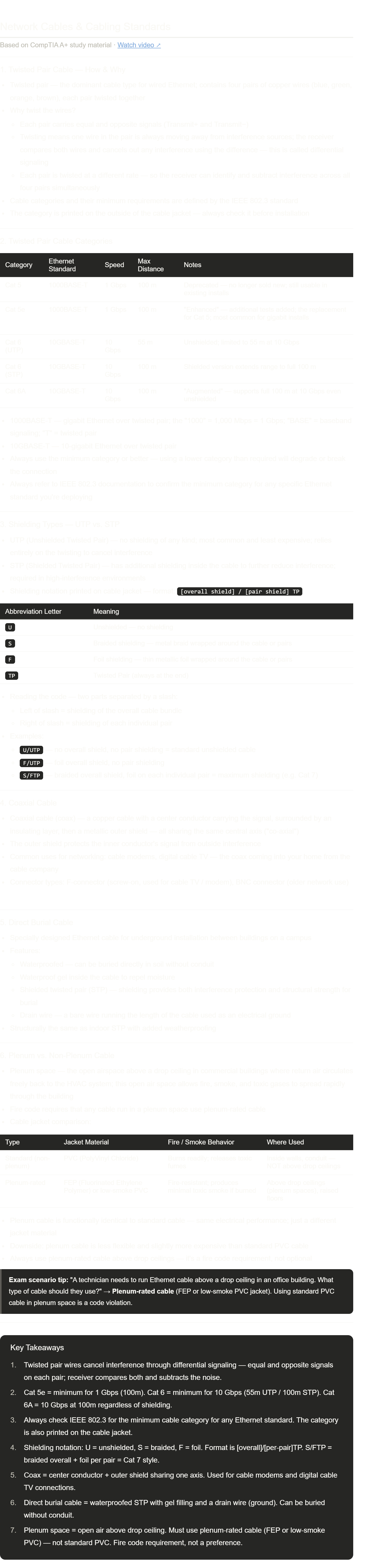
Cat 5e vs. Cat 6 vs. Cat 6A — the exam gives you a scenario ("a technician is installing 10 Gbps Ethernet in a 90-meter run") and asks what cable to use. Cat 6 UTP only goes 55m at 10 Gbps — you'd need Cat 6A or shielded Cat 6 for a 90m run. Cat 6A always safely covers 100m.
Plenum vs. standard — this is one of the most classic A+ exam questions. "Above a drop ceiling" = plenum-rated cable, full stop. The reason: PVC cable burns and releases toxic fumes that travel freely through the open plenum airspace.
The shielding notation — S/FTP is the maximum shielding (braided overall + foil per pair). U/UTP is the most common (no shielding at all). The slash separates overall shielding from per-pair shielding.
Drain wire — this term only appears in the context of direct burial or shielded cables. It's a bare wire used as an electrical ground, not for data.
Differential signaling — the technical reason twisting works. You don't need to memorize the exact term, but understanding the concept (receiver compares + and − signals, cancels out anything that appears equally on both) helps if the exam asks why twisted pair resists interference.
568A and 568B Colors - CompTIA A+ 220-1201 - 3.2
Notes done! This one has a fairly small amount of content but what's here is very directly tested on the exam.
Things to lock in:
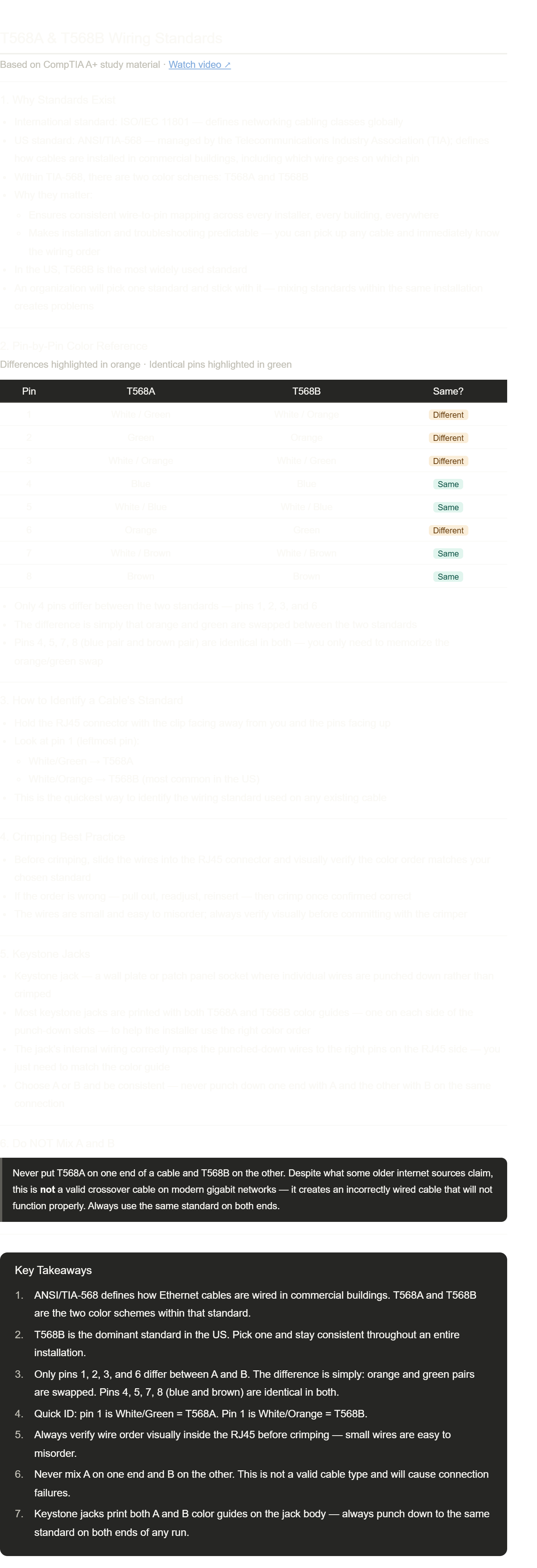
The color table — you should be able to look at it and immediately see that the only difference between A and B is that orange and green trade places (pins 1, 2, 3, 6). Blue and brown are untouched.
Pin 1 rule — White/Green at pin 1 = T568A. White/Orange at pin 1 = T568B. This is the fastest way to identify any cable in the field without memorizing all 8 pins.
T568B is the US default — on the exam, if no standard is specified and you're in the US, assume T568B.
Never mix A and B — this is tested. The exam may present "A on one end, B on the other" as an answer choice and call it a crossover cable. It's not a valid crossover — it's just a wiring mistake.
This is one of those topics where looking at a real RJ45 connector with the color chart in hand helps more than re-reading notes — if you have some spare connectors and a magnifying glass, 5 minutes of hands-on practice makes this stick instantly.
Send the next one whenever you're ready!
Optical Fiber - CompTIA A+ 220-1201 - 3.2

Core → cladding → buffer — the three layers from inside out. The exam may describe a fiber cable structure and ask you to identify the layer. The key physics is the refractive index difference between core and cladding: high inside, low outside = light bounces inward and stays in the core.
Multimode vs. single-mode — the exam shortcut really is that simple: short = multi (LED, ~2km), long = single (laser, many km). The word "mode" just means a light path, and the name tells you how many paths exist.
Color coding — not always tested but useful in real life: multimode is usually orange or aqua, single-mode is usually yellow. If you see yellow fiber at a data center, it's going a long way.
Modal dispersion — this is the technical reason multimode doesn't work over long distances (different light paths arrive at slightly different times, smearing the signal). You don't need to memorize the term for A+, but understanding it makes the concept click.
Peripheral Cables - CompTIA A+ 220-1201 - 3.2

USB-C ≠ a speed — this is the single most important concept from this video. The exam may give you "a device has a USB-C port — what speed does it support?" The correct answer is "it depends on the device." USB-C is just the physical shape. You need to look up the spec or the icon next to the port.
USB speed numbers — these come up in troubleshooting ("why is this USB 3.0 drive slow on this port?"). The progression is worth memorizing: 1.1 = 12 Mbps, 2.0 = 480 Mbps, 3.0 = 5 Gbps, 3.1 = 10 Gbps, 3.2 = 20 Gbps.
DB-9 for console access — this is a real-world skill not just an exam topic. If a switch or router is completely unreachable over the network, the console port is how you get back in. Most field technicians have a USB → serial adapter in their kit for exactly this reason.
Thunderbolt daisy chaining — unique to Thunderbolt; USB doesn't do this natively. The exam may describe a setup ("a monitor connects to a second monitor which connects to storage, all from one port") and ask what technology enables it → Thunderbolt.
Video Cables - CompTIA A+ 220-1201 - 3.2

Notes done! This one has a lot of connector trivia that shows up on the exam — especially in scenario questions.
Things to focus on:
Audio + video vs. video only — this is probably the most tested distinction. HDMI and DisplayPort carry both. DVI and VGA carry video only. If the question says "the user needs to connect one cable for both audio and video" → HDMI or DisplayPort.
DisplayPort locking — a real technician detail. "The cable won't pull out" → DisplayPort → push the release button.
DVI sub-types — DVI-A (analog), DVI-D (digital), DVI-I (integrated/both). The exam may give a scenario like "a user wants to use a DVI cable with a VGA monitor" → you'd need DVI-A or DVI-I with a passive adapter, not DVI-D.
VGA is blue, analog, ~5m max — these three facts together in a scenario = VGA.
DB-15 vs. DE-15 — same connector, two names. Just like DB-9 vs. DE-9 from the previous video. The exam uses "DB-15" most often even though technically it's DE-15.
Storage Cables - CompTIA A+ 220-1201 - 3.2
Things to focus on:
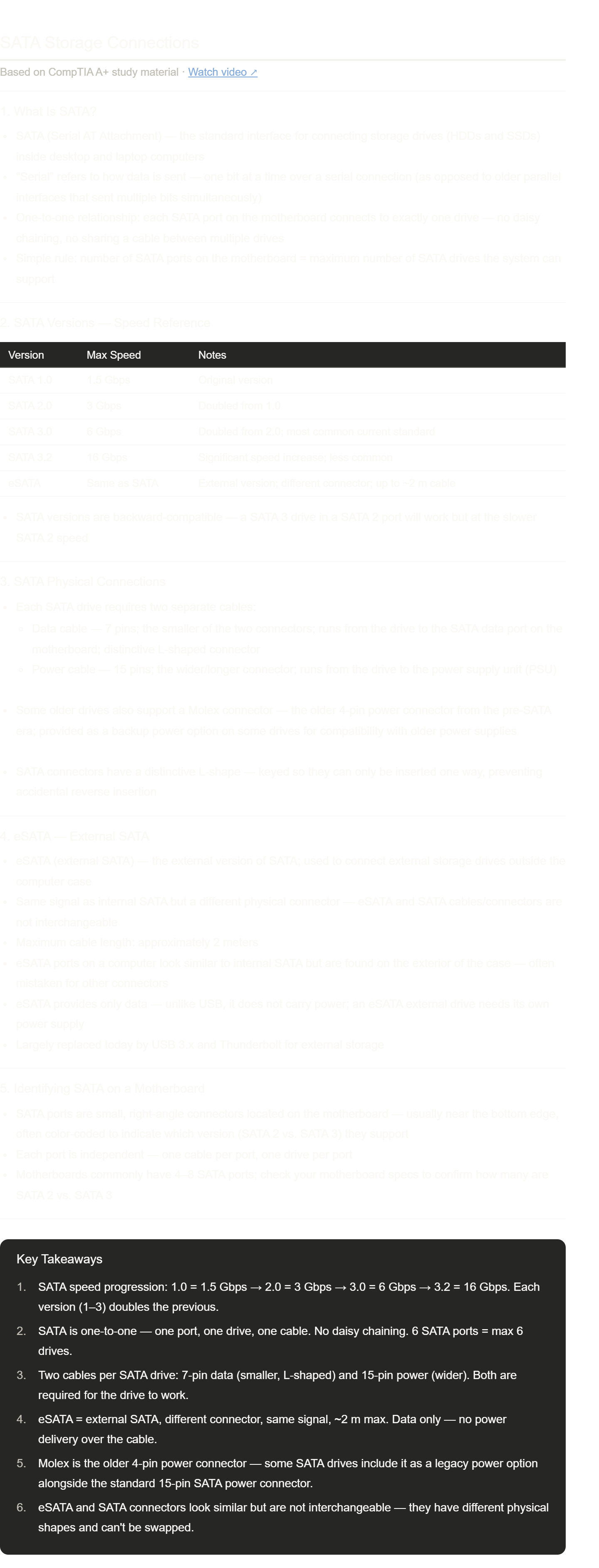
SATA 1/2/3 speed doubling pattern — 1.5 → 3 → 6 Gbps. Each version doubles. SATA 3.0 at 6 Gbps is the one you'll encounter most in the real world and on the exam.
Two cables = one drive — the exam may ask "what does a technician need to install a SATA drive?" The answer is always: data cable + power cable. Forgetting either one means the drive won't work.
7 pins = data, 15 pins = power — easy to remember since more pins = more power needs.
eSATA has no power delivery — unlike USB which can power devices, eSATA is data-only. An eSATA external drive always needs its own wall power adapter. This is a common exam distinction.
Molex — you'll see this term again when studying power supplies. It's the older large 4-pin white connector that preceded SATA power. Some legacy drives or older power supplies still use it.
Adapters and Converters - CompTIA A+ 220-1201 - 3.2
Notes done! Short video but the adapter vs. converter distinction is a recurring exam concept.
Things to lock in:
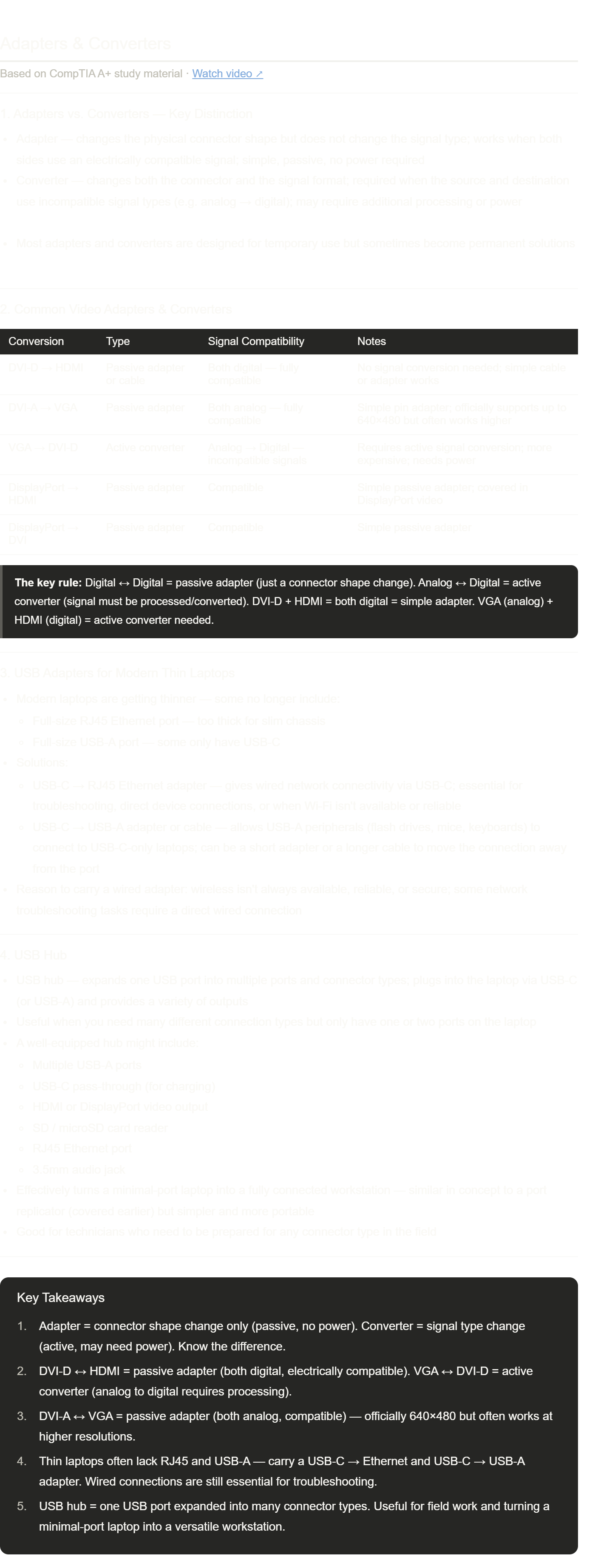
Passive vs. active — this is the core concept. The question to ask is: "are both sides using the same signal type?" If yes → passive adapter (just a shape change). If no → active converter (signal processing required, often needs power).
DVI-D + HDMI = both digital = passive — the exam loves this one. DVI-D carries digital video; HDMI carries digital video. They're electrically compatible, so a simple cable with the right connectors on each end is all you need.
VGA + anything digital = active converter — VGA is analog. Going from VGA to HDMI or DVI-D requires actual signal processing, not just a connector swap.
USB hub vs. port replicator — from an earlier video, a port replicator is laptop-specific and may support expansion cards. A USB hub is universal, connects via USB, and is more portable. The overlap is real but the distinction matters on the exam.