LECTURE 3: Control Structures
Lists
A list contains items separated by commas and enclosed within square brackets [ ]. One difference is that all the items belonging in a list can be of different data type.
Order is important
Example:
animals = [“dog”, “cat”, “horse”]
animals [1] —> “cat”
Lists are mutable, meaning you can change a value on a list
animals [1] = “mouse”
print (animals)
[“dog”, '“mouse”, “horse”]

Tuple
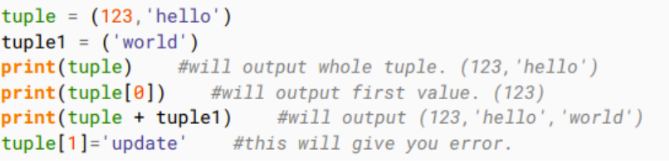
Lists are enclosed in brackets [ ] and their elements and size can be changed, while tuples are enclosed in parentheses ( ) and cannot be updated. Tuples are immutable.
Example:
animals = (“dog”, “cat”, “horse”)
animals [1] —> “cat”
Dictionary
Dictionary consists of key-value pairs. It is enclosed by curly braces { } and values can be assigned and accessed using square brackets [ ]
Order is not important
Example:
animals = {“dog” : “puppy”, “cat" : “kurt”, “horse” : “paulo”}
animals [“cat”] = “zyna”
{“dog” : “puppy”, “horse” :“paulo”, “cat" : “zyna”}

To solve our problems…
programmers “usually” do the following before coding:
Create algorithms…
Express these algorithms in pseudocode
or create graphical representations using flowcharts…
Algorithms
a procedure for solving a problem in terms of:
Actions to be executed; and
The order in which these actions are to be executed
Specifying the order in which statements are to be executed in a computer program is called program control
Pseudocode
an artificial and informal language that helps programmers develop algorithms
Consists of descriptions of executable statements
similar to everyday English (or your native language, why not?)
It is convenient and user-friendly, although it is not an actual computer programming language
Flowcharts
Graphical representation of an algorithm
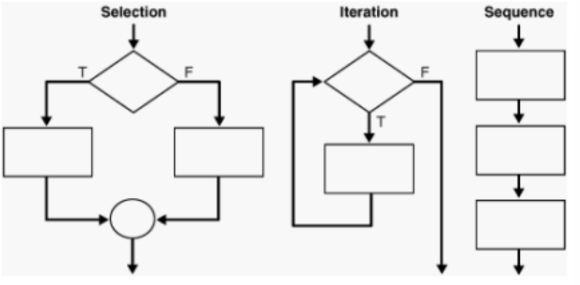
Flowcharts are drawn using certain special-purpose symbols, such as rectangles, diamonds, ovals and small circles; these symbols are connected by arrows called flowlines
Flowlines indicate order in which actions execute
Structured Programming
Normally, statements in a program are executed one after the other in the order in which they are written. This process is called sequential execution
Various statements enable the programmer to specify that the next statement to execute is no necessarily the next on the sequence. This is called transfer of control—> Control Structures
Control Structures
Sequence structure
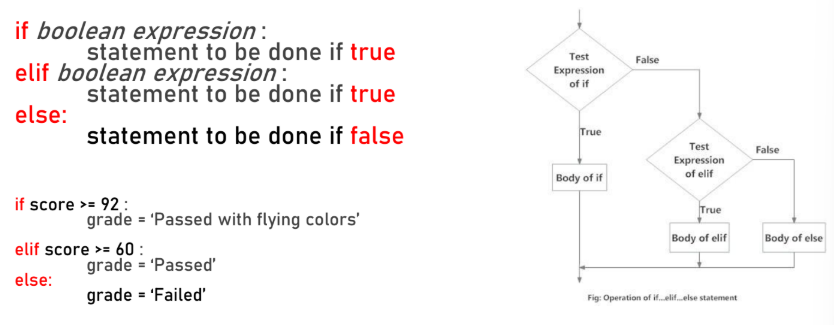
Selection structure
If
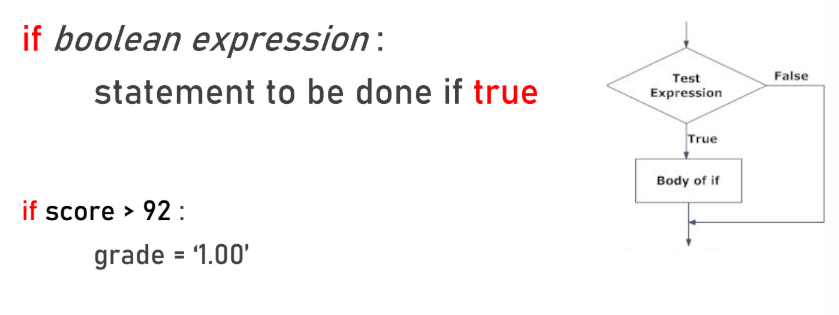
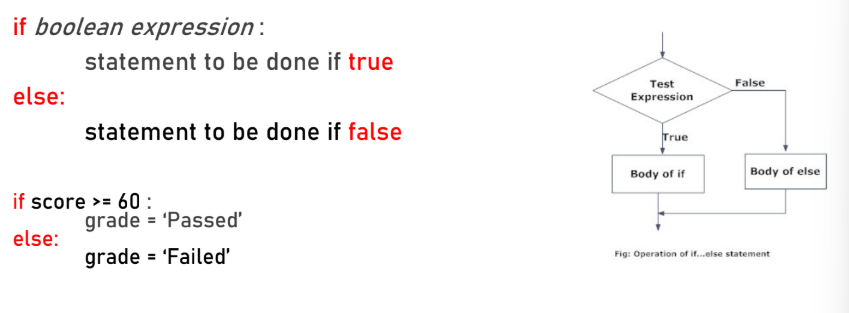
If-Else
Elif
Repetition structure
While and for loops
Boolean Data Type
Can compare values using operators
x == y #x is equal to y
x != y #x is not equal to y
x > y #x is greater than y, you can try <
x >= y #x is greater than or equal to y, you can try <=
Can also combine the use of logical operators
NOT: takes 1 argument and inverts it
AND: takes 2 arguments; evaluates true IF AND ONLY IF BOTH arguments are true. Otherwise, it is false
OR: takes 2 arguments; evaluates true IF EITHER (OR BOTH) arguments are true. When both arguments are false, it is false
Repetition
Executes a statement or set of statements repetitively or multiple times
Also called loops
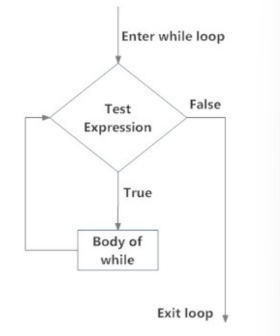
While loop
Unlike the IF statement, it can be run more than once; the statement inside the block is repeatedly executed as long as the condition holds
It is generally used when the number of iterations is unknown (sentinel-controlled)
while boolean expression:
statement to be done until false
For loop
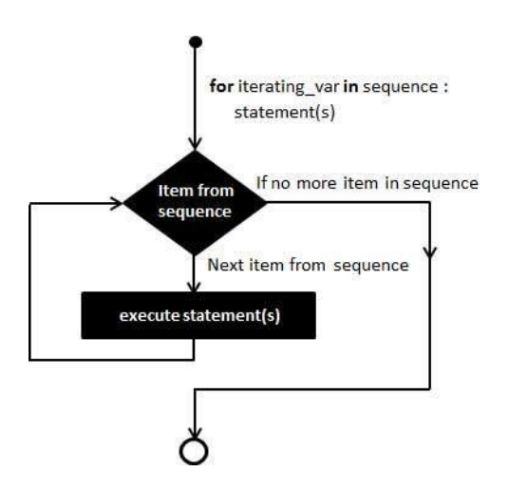
It is generally used when the user wants to iterate over items (in lists, sequences, ranges, strings)
It is generally used when the number of iterations is known (counter-controlled)
for element in sequence:
statement to be done
Loop keywords:
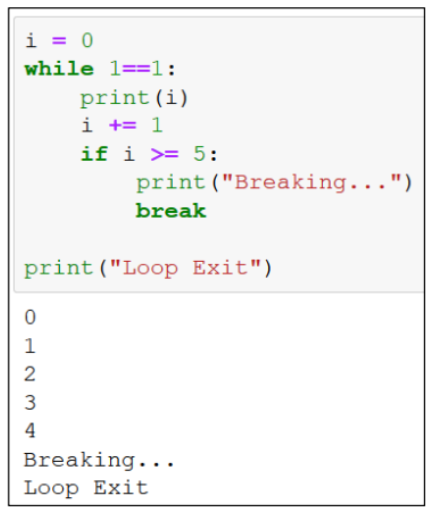
Break
Used to end a while loop prematurely; this immediately exits the loop
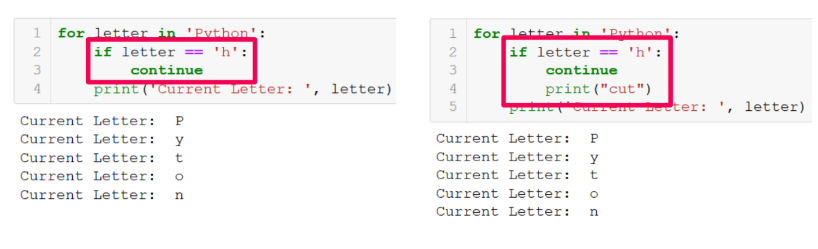
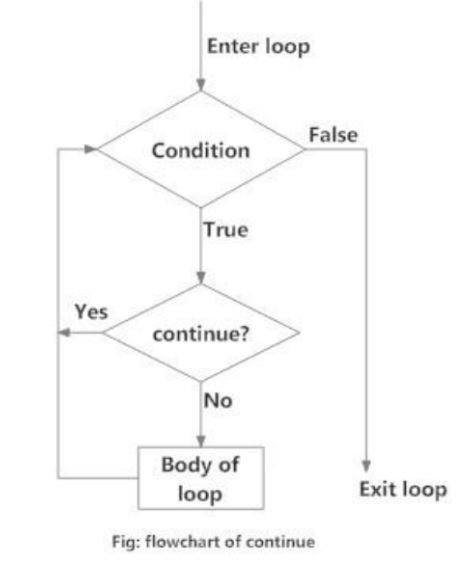
Continue
Enables the loop to jump back to the loop entry and repeats it
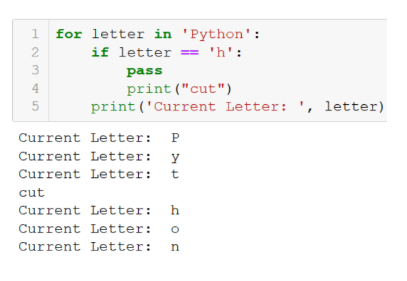
Pass
Empty statement; nothing happens when PASS is executed