Web Technology Notes
1. Internet and the Web
The Internet started in 1969 as four networked computers and grew into a global network.
World Wide Web (WWW) was created by Tim Berners-Lee in the 1990s at CERN.
The Web consists of:
HTML (HyperText Markup Language): Text files containing links.
Browser: Program for viewing web pages.
HTTP (HyperText Transfer Protocol): Rules for transferring files.
2. Web Components & Separation of Duties
Modern web pages separate content, presentation, and interaction.
A web page consists of:
HTML → Structure & Content
CSS (Cascading Style Sheets) → Layout & Design
JavaScript → Dynamic Behavior & Interactivity
3. HTML (HyperText Markup Language)
Markup language that structures web pages.
Tags define content formatting (e.g.,
<p>for paragraphs).HTML elements consist of:
Opening tag:
<b>Content: "Text in bold"
Closing tag:
</b>
Self-closing tags: Some tags don’t need a closing tag (e.g.,
<img>).
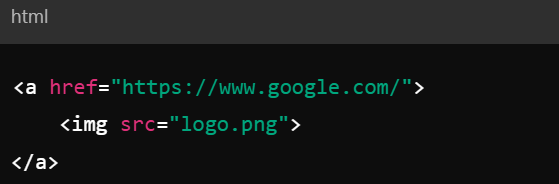
Links in HTML
<a>tag creates hyperlinks.Example:

Can also use images as links:
4. CSS (Cascading Style Sheets)
Controls web page appearance & layout.
Three ways to apply CSS:
Inline: Inside an HTML tag (
style="").Embedded: Inside
<style>in the<head>.External: Separate
.cssfile linked using<link>.
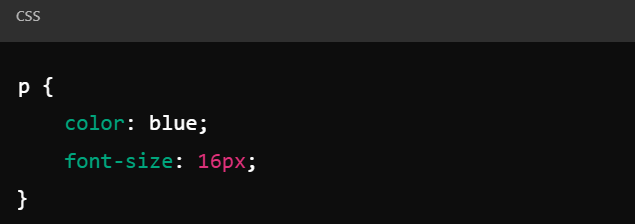
CSS Rules
Selector: Specifies the HTML element (e.g.,
pfor paragraphs).Declaration Block:
{property: value;}.Example:
CSS Conflicts & Inheritance
Inheritance: Child elements inherit styles from parent elements.
Conflicts: If multiple styles apply, the most specific rule wins.
Inline styles override embedded/external styles.
Child element styles override parent styles.
5. JavaScript (JS)
Client-side programming language for web pages.
Runs inside the browser using an interpreter.
Enables dynamic interactions (e.g., responding to clicks, changing styles).
DOM (Document Object Model) represents the web page’s structure.
JavaScript Basics
Adding JavaScript to HTML:
Inline:
<script>alert("Hello!");</script>External file:
<script src="script.js"></script>
Common JavaScript Actions:
Modify HTML elements.
Change CSS styles dynamically.
Handle user interactions (clicks, inputs).
The Window Object
Represents the browser window.
Useful properties:
window.location→ Current page URL.window.innerWidth→ Browser width in pixels.
Methods:
window.open("https://twitter.com")→ Opens a new window.
DOM (Document Object Model)
Tree-like structure representing HTML elements.
Nodes: Elements, attributes, and text.
Common operations:
Modify content (e.g., change text in
<p>).Change element styles dynamically.
6. Summary of Key Web Technologies
Technology | Purpose |
|---|---|
HTML | Structure of web pages |
CSS | Styling & layout |
JavaScript | Dynamic interactions |
HTTP | Communication protocol |