Mac Modifier Keys and Their Icons
Learning Objective
Total Time: 2 minutes
Students will be able to identify and describe the function of the Mac modifier keys and their corresponding icons.
Assessments
Total Time: 2 minutes
Students will complete a matching activity where they pair the modifier key icons with their correct names and functions.
Key Points
Total Time: 3 minutes
Modifier Keys:
Command (⌘)
Option (⌥)
Control (⌃)
Shift (⇧)
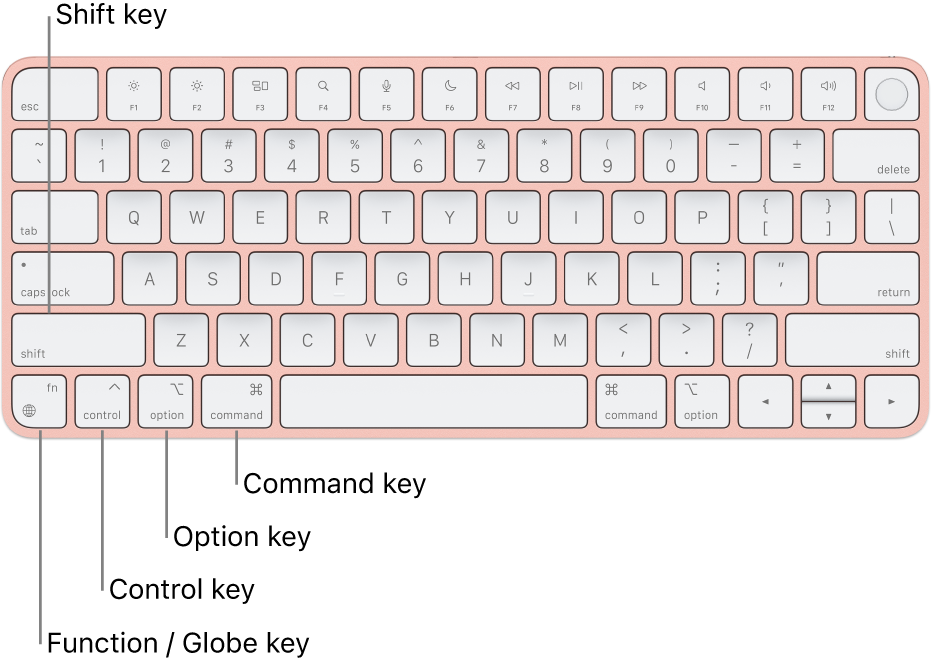
Icon Recognition: Visual symbols associated with each key
Functions: How each modifier key alters operation for shortcuts and commands.
Opening
Total Time: 3 minutes
Start with a quick poll asking students how often they use keyboard shortcuts on a Mac.
Show a physical Mac keyboard to highlight key locations.
Discuss any student experiences or tips they've learned regarding efficiency using these keys.
Introduction to New Material
Total Time: 5 minutes
Present each modifier key's icon using a slide show, explaining what each is called (e.g., Command, Option).
Explore their unique functions with real-world applications, like taking screenshots (Command + Shift + 4).
Clarify common misconceptions, such as students confusing the Option and Alt keys.
Guided Practice
Total Time: 5 minutes
In pairs, students explore their keyboards to find each modifier key and practice using a few common shortcuts (e.g., copy/paste).
Provide a worksheet with a list of common shortcuts to experiment with, encouraging discussions about their utility.
Independent Practice
Total Time: 2 minutes
Each student completes a rapid matching activity where they pair icons with the correct modifier keys and shortcuts on an individual worksheet.
Closing
Total Time: 2 minutes
Facilitate a class discussion where students share any shortcuts they learned or already utilize.
Quick reflection on how knowing these keys can enhance their efficiency.
Extension Activity
Total Time: 2 minutes
Students can look up one advanced shortcut using modifier keys not covered in class and share it with a peer, fostering a culture of sharing useful tips.
Homework
Total Time: 2 minutes
Students are assigned to create a visual poster or infographic summarizing the modifier keys, their icons, and one practical application for each, to be presented in the next class.
Standards Aligned
Total Time: 1 minute
Not specifically aligned with educational standards but promotes digital literacy and efficiency in computer use.