08 -02 VDI Hardware and Software
Overview
What are the VDI hardware used to connect to our VDI systems? The associated software? The concept of connection protocols? VDI specific issues in virtualized end-user desktops?
VDI Clients - Hardware
VDI clients can connect via a different hardware platforms.
Typically, we don’t need a device that has lot of processing power to connect to a VDI solution.
Low level processor, even processor based on mobile devices, tablets or phones are enough to connect us to and stream our VDI session because at the end of the day, we are just using the device to control the remote session. All of the processing power is being handled inside of the virtual desktop environment.
3 Types of clients used in VDI environments are Thin Client, Zero Client and Thick Client.
Thin Client - This is a lightweight machine that was built for remoting into other server environments such as a VDI. This could be a customized or paired-down OS, but ultimately is a very small hardware footprint. It could be locally installed hard drive on this thin client in which data could be saved to, but not typically.
Zero Client - It is similar to thin client, It requires very minimal configuration, but there is nothing stored on them. Typically, even if they have a hard drive component to them, that space isn’t reserved for saving any kind of end user data.
Typically, what we need in a Zero Client is the destination server under which the VDI is going to be hosted and then the ability to select a specific underlying display protocol. There maybe some system settings for zero client. Things like redirection settings, whether you are going to allow the use of USB devices, how many monitors, and essentially display type settings.
Thick Client - It can be a fully installed machine, such as laptop or a desktop or it can be repurposed one to run the software needed for VDI access or runs in addition to other applications on the device.
Some VDI solutions don't even require the full installation of our client. They can push down a connection through an HTML 5-equipped browser. Most modern browsers, whether it's Edge or Chrome or Mozilla, are HTML 5 compliant and you can run the remote session inside of that specific web browser.
VDI Examples
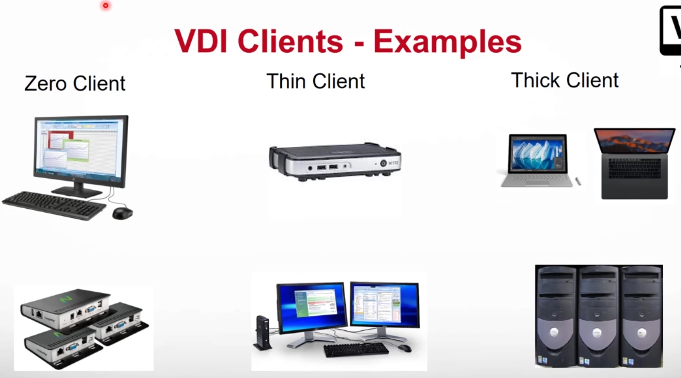
We have a display that has the VDI zero client built into it and at the rear of the display, you would simply plug in a keyboard and a mouse that would boot up initially to a login screen that might have our destination server for the VDI user name and password and then potentially the specific display protocol that's going to be used.
Raspberry pies have been used for zero clients. There is a specialized Raspberry pie image that allows end users to take a Raspberry pie and turn that into a zero client.
In the middle, we'll see some various thin clients. Thin clients are typically have gone back for many years in the computing world. We've got Weiss clients here. I believe Weiss was later acquired by Dell and then there's some other Dell equipment down there. Here again, you'll see a thin client with multiple monitors hooked up to it.
Then over there on the far right, we've got our thick client.
Again, this could be your laptop or desktop, on which you've installed the remote connection software, the client software. or it could be something that we've used to repurpose an older machine to access here.
Products
Tenzig - They offer solutions for thin and zero PC thin clients.
VDI Guest OSs
Typically guest operating systems that are used in VDI environments are windows based desktops, but also include Linux Operating systems like Ubuntu or other distributions.
Support for guest OS deployment is based upon the software provider whose VDI software is being used as well a license availability.
MACOS is not supported.
Apple hardware is compatible with some type 1 hypervisors. ESXI actually will run on top of Apple hardware and you can create multiple virtual machines on ESXI running on Apple hardware.
VDI Protocols
We have couple of different protocols that allow either for the communication between the virtual machine that is running in the VDI and the communication between that and the greater environment or the communication between the end user device that’s accessing the VDI.
Typically we have agent and a client.
The protocols could be TCP or UDP to do the following
Streaming of remote desktop image to client
Streaming of remote audio to client
manage and connection information
It's also going to manage any specific connection information. Is the desktop available?
Is it currently powered on? Is it powered off?
What's the machine state?
Connection of local resources to VDI desktop
USB Devices, Printers, Local Drives, Removable Media
VDI Protocols and Agents
Guest Agents - Is a piece of software that is going to install inside of the guest VM.
It works along with the VDI connection protocols.
Agent software, depending on VDI vendor may do the following:
Selection of display protocol (RDP, Teradici PCOIP, Vmware BLAST, VNC)
There might also be some additional back end tasks that the agent might receive from the device. These can be in the realm of when we're doing the initial deployment or imaging of our VDI solution. This could be creating, cloning, or mass replicating the machines when they're initially first built into the VDI.
They could also be doing any kind of guest customization, so taking those clone machines, changing them uniquely, identifying them, changing the Windows, IDs, Mac addresses, computer names, things like that
Reporting of machine status to connection broker
Access to VM task (ON, OFF, Suspend, Shutdown)
Deployment tasks (imaging, guest OS customization)
Access to local network stack
Application or Enforcement of Policy (GPO)
Reporting of VM state and availability
VDI - Shared Storage
Within side of a VDI solution, we have the potential to do something called tiered storage. The concept of tiered storage is that inside of a shared storage environment, we have varying arrays of storage-related technology.
We might have a high performing SSD, SAN-based discs, maybe high speed mechanical discs, so 15k SAN SAS Drives.
d
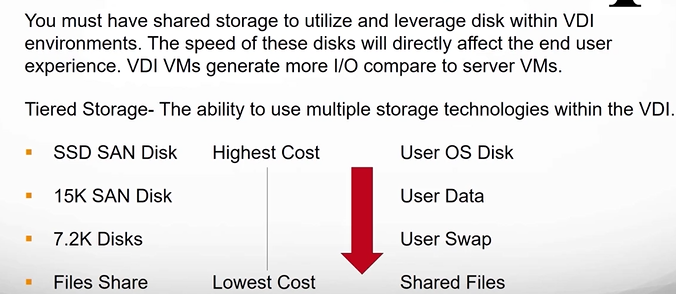
If we use lower-performing discs, then we will see a more degregated experience, choppier performance. We might say that in this realm then we could save our SSD sand disk storage for the actual user disc in which it's going to be performing and then maybe there's other types of data that we can associate with lower-performing or lower-cost storage. Maybe user data or swap files or shared files can be pushed to lower-performing discs where you don't need the same level of requirement.
VDIs typically tend to generate more Io or IOps input outputs compared to just server-based VMs and for that reason, we typically have to use things like rated SAS 15K drives and above or SSDs to give that grid user experience. Now we additionally have some things that we need to look at when deploying out our systems.
With tiered storage, it allows us to use multiple storage technologies inside of the VDI, because not every VDI task needs a certain level of performance. Now, the highest-performing storage is probably most likely going to be the end user's OS disc and what we see back and forth. The thing that's different with virtual desktop infrastructure versus doing a more generic server virtualization is typically, with server virtualization, we set up a server and it performs a function, and we don't typically see the desktop or the things associated with that.
On the end user side though, we are directly seeing everything that happens in the environment because we are virtualizing the whole experience and pushing that down to the user. Higher-performing storage technology is going to be one of the things that gives us a better end-user experience.
VDI Guest OS Deployment
VDI Solutions with different vendors allow for the ability to rapidly deploy multiple virtual machines from source images.
We can use traditional virtualization features like - Cloning, Templating and Guest Customization to rapidly create, customize an deploy VM to individual users.
Golden Image - Is a customized template for VM or virtual desktop from which other VM can be made.
Example, we can create what we would call a golden image, probably an image in which we've installed the guest operating system, we've installed our applications, we've performed Windows updates, and we've tweaked it the way we want and we can create a golden image from which we can create multiple children VMs from that.
We create our golden image and then we clone that out and we can do this very rapidly. This allows us to identify maybe it's, we're grouping these by department, by customer, number, by specific type and then we from there can build out 20 or 30 or 40 machines and rapidly create those in the matter of 5,10, 20 minutes. That's also an option in our VDI deployment is the ability to do this at scale and create customized pools of users and machines for the VDI. Now we do have some additional requirements typically when we talk about the end user experience.
VDI Specific Issues - Network
Because we are doing the fully dedicated machine to a user, we have some issues that might generate additional traffic for us that are different from server-based VMs.
Sound and Video
For example, the ability to stream sound or video is needed over the traditional server VMS.
if a user is in a browser watching YouTube, that has to be accounted for. The ability to have smoother, non-choppy video that session bandwidth per port device may increase depending upon what we're doing. Now, most VDI providers in their connection protocols account for this and try to optimize that so it still takes minimal bandwidth.
We need to account for the ability to do webcam usage for things like Zoom or Skype or Google Meets or Teams the ability to have little to no delay in the processing of audio and video from microphones and webcams back across through the VDI.
Typically and as VDIs progress, these weren't great and experiences was mixed but now, depending upon the provider, this has gotten to be pretty solid so the experience is closer and closer to what you would see on a physical machine.
USB Devices
Additionally, we need the ability to send and receive information from USB devices, so printers, peripherals, webcams removable media. We may or may not want to have those inside of the VDI, but the VDI should be able to control whether this is allowed or not and in what manner.
Quiz
Question 1: From the list below, select the option that best shows the 3 main types of VDI client hardware. → Thin, Thick, Zero
Question 2: This is software that installs within a guest OS (VM), to work in conjunction with the VDI connection protocols. → Guest Agent