Canonical Device In Input-Output System For Operating Systems
Canonical Device in Input-Output System for Operating Systems
In an operating system, the input-output (I/O) system is responsible for managing the communication between the computer and its peripherals.
A canonical device is a special type of device in the I/O system that provides a standardized interface for input and output operations.
The main purpose of a canonical device is to ensure compatibility and uniformity across different types of devices.
Canonical devices typically include keyboards, mice, printers, and displays, which are commonly used for input and output operations.
The I/O system interacts with these devices through device drivers, which are software components that facilitate communication between the operating system and the device.
Canonical devices have a set of predefined rules and protocols that govern the format and structure of data exchanged between the device and the operating system.
For input operations, canonical devices convert user input into a standardized format before passing it to the operating system. This format often includes buffering and line editing capabilities.
Similarly, for output operations, canonical devices ensure that the output data is formatted and presented in a consistent manner.
Canonical devices also handle error detection and recovery, ensuring that any errors encountered during input or output operations are properly handled.
The use of canonical devices simplifies the development of applications by providing a consistent and predictable interface for input and output operations.
However, not all devices in an I/O system are canonical. Some devices, such as storage devices or network interfaces, may have their own specific protocols and formats for data exchange.
→Detailed version of notes below:
Canonical Device in Input-Output System for Operating Systems
In an operating system, the input-output (I/O) system plays a crucial role in managing the communication between the computer and its peripherals. Within this system, a canonical device stands out as a special type of device that provides a standardized interface for input and output operations. The primary purpose of a canonical device is to ensure compatibility and uniformity across different types of devices, thus simplifying the development of applications.
Canonical devices encompass a range of commonly used peripherals, including keyboards, mice, printers, and displays. These devices interact with the I/O system through device drivers, which are software components responsible for facilitating communication between the operating system and the device. By adhering to a set of predefined rules and protocols, canonical devices ensure that the format and structure of data exchanged between the device and the operating system remain consistent.
When it comes to input operations, canonical devices play a crucial role in converting user input into a standardized format before passing it to the operating system. This standardized format often includes buffering and line editing capabilities, allowing for efficient data processing. For instance, when a user types on a keyboard, the canonical device ensures that the input is properly formatted and processed before being transmitted to the operating system.
Similarly, canonical devices also ensure that output data is formatted and presented in a consistent manner. Whether it be printing a document or displaying information on a screen, these devices take care of the necessary formatting to ensure a uniform output. By doing so, canonical devices guarantee that the output data is easily interpretable by both the operating system and the user.
Additionally, canonical devices are designed to handle error detection and recovery. In the event of any errors encountered during input or output operations, these devices are equipped to properly handle and recover from such situations. This ensures that the system remains stable and reliable, even in the face of unforeseen errors.
It is important to note that while canonical devices provide a standardized interface for input and output operations, not all devices within an I/O system fall under this category. Certain devices, such as storage devices or network interfaces, may have their own specific protocols and formats for data exchange. These non-canonical devices require specialized handling to accommodate their unique characteristics and functionalities.
In conclusion, canonical devices play a vital role in the input-output system of an operating system. By providing a consistent and predictable interface for input and output operations, these devices ensure compatibility, uniformity, and ease of application development. Through their predefined rules
Key Information:
Canonical device is a concept in operating systems.
It provides a standardized interface for input and output operations.
It ensures consistent data representation and processing.
It handles data conversion and formatting.
It simplifies communication between applications and devices.
It supports buffering and error handling.
It improves portability and interoperability.
It abstracts hardware-specific details.
It enhances system performance and efficiency.
It is a crucial component of the input-output system.
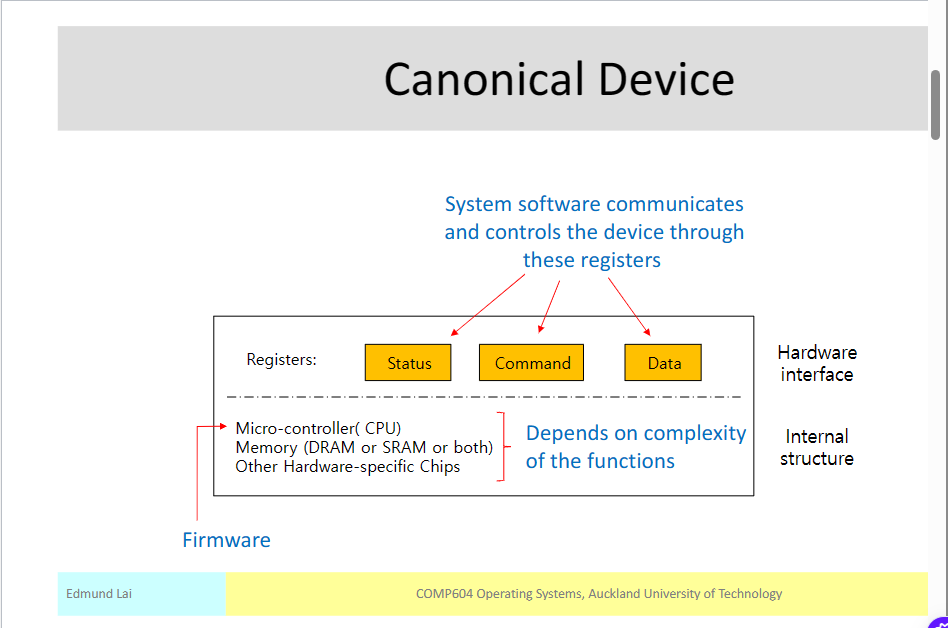
Hey there! So, the Canonical Device screenshot you see above is actually a picture of a computer screen showing some important information. The Canonical Device is a special tool used by computer programmers to make sure their software works well on different types of computers.
You know how there are many different types of computers out there, like laptops, desktops, and even smartphones? Well, each of these computers can have different operating systems, which are like the brains of the computer. The Canonical Device helps programmers test their software on different operating systems to make sure it works smoothly on all of them.
In the screenshot, you can see a bunch of text and numbers. These are actually lines of code that the programmers write to tell the computer what to do. They use this code to create software like apps and games that we use on our devices.
The Canonical Device screenshot is important because it helps programmers find and fix any problems or bugs in their software before they release it to the public. It's like a quality control tool that ensures the software works well for everyone, no matter what type of computer they have.
So, in a nutshell, the Canonical Device screenshot is a picture of a computer screen that shows programmers how their software is running on different types of computers. It helps them make sure their software works smoothly for all of us to enjoy!