ict notes
get and post
get and post are both arrays
they can all be acessed globally
ex. array( key1 => value1, key2 => value2, key3 => value3)
$_GET / $_POST
GET (used as an input and stuff)
it is visible for all, and
gets data
is limited to 2000 characters when inputting it.
you can bookmark the page
variables are also showed in the URL
cannot be used for sensitive info. (can be accessed globally)
ex. passwords amd what not
POST
it has no limitations on its characters
it is invisible to others and cannot be seen to others
used for databases
also cannot be bookmarked
imbedded in the value http request (?)
PHP mysql login system
requirements
needs knowledge of html, css, php, and mysql
a text editor / and a local server
environment system
opening xampp, start apache and mysql
create all files and do sm with xampp and phpmyadmin
files (needs 4 files, one html, one css, and 2 phps)
create an html for the gui (graphic user interface)
create an css file to style the login form
connection.php to connection code
authentication.php
<!DOCTYPE html>
<html>
<head>
<meta charset="utf-8">
<meta name="viewport" content="width=device-width, initial-scale=1">
<title>Create Table</title>
</head>
<body>
<?php
user = 'root';
dbname = 'ictsoftware_9';
host, $user, $pass, conn) {
die('Could not connect: ' . mysqli_connect_error());
}
echo 'Connected successfully<br/>';
conn, sql)) {
echo "Table emp1 created successfully";
} else {
echo "Could not create table: " . mysqli_error(conn);
}
mysqli_close($conn);
?>
</body>
</html>
php mySQL
usually using two different variations
php MYSQLI_connect() and construct or sm?
phpMYAdmin
download it / popup wnidow / then extract the downloaded folder and rename it to phpmyadmin
after extraction, move it to xampp and find it at C:xampp/htdocs or some
check if it is running correctly / then open http://localhost/phpmyadmin/ if it runs
how to create a database in phpMyAdmin
click new
create database
then click create
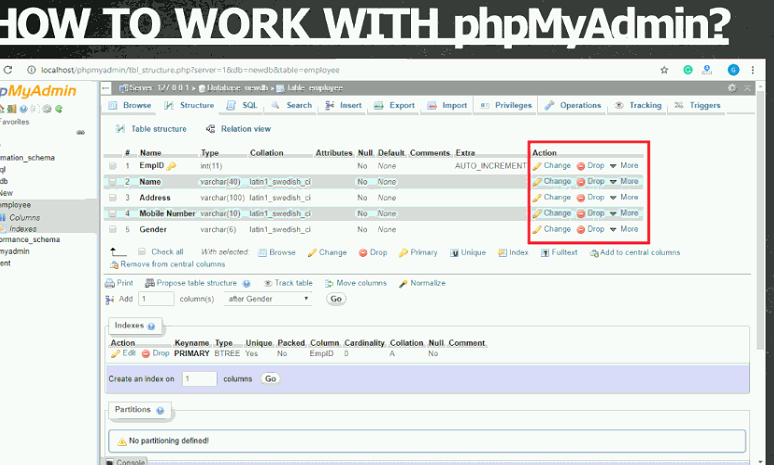
then pick table name, and numbner of columns, then pick go
then enter fieldname, size, and save it
int and varchar only

PHP MYSQL insert record
crud (create, report, update
different types of mysqli and mysqli in general
connect
it is used to connect with the database
close
used to disconnect
it is true if the connection did work or is false
create db
uses query / mysqli_query to help make it
creates a database
create table
mysql_query is also used to cerate a table
CREATES tje group of columns
insert record
uses query again to insert a record
adds one more single entity