Computing
Section 3- Fundamentals of data representation
Storage Units and Binary Numbers
-A single 1 or 0 is a binary digit or a ‘bit’ for short
-A group of 8 bits is called a byte
-4 bits is half a bite, called a ‘nibble’
Units:
1Kilobyte (kB) = 1000 BYTES
1Megabyte (MB) = 1000kB
1 Gigabyte (GB) = 1000MB
1 Terabyte (TB) = 1000GB
1 Petabyte (PB) = 1000TB
-Computer systems use the binary system to store numbers and perform binary arithmetic and logic operations
-Memory size is commonly measured in terabytes (TB)
Binary:
-Uses two digits 1 and 0
-Binary = base 2
-Order of: 128, 64, 32, 16, 8 , 4, 2 ,1
-In order to store larger numbers, computers use more bytes as units called words
-To convert a decimal to binary number, use the column headings to calculate where the 1 and 0s go
Binary Arithmetic and Hexadecimal
Binary Addition:
-Adding binary works like adding decimal numbers in column addition
-1 + 0 = 1
-1 + 1 = 10
-1 +1 +1 = 11
Overflow:
-The biggest number you can represent with 8 bits is 255
-If an answer results in a number bigger than 255 or more than 8 bits, then an overflow occurs
-An overflow error occurs
Binary Shifts:
-A binary shift to the left is equivalent to multiplying a number by 2n (n= number of shifts)
-A binary shift to the right is equivalent to dividing a number by 2n (n = number of shifts)
Hexadecimal System:
-We can represent a nibble (4 bits) with a single digit
-Hexadecimal digits are from 1-0 then A-F (so F is 15)
-FF is the largest value = 255
-Split the binary number in half and work out the value of each nibble and write the hexadecimal equivalent
-Multiply the first character by 16 then add the second character
Uses of hexadecimal:
-Easier to understand so are used more than binary numbers
-Colours are a common use of hexadecimal
-Used in assembly language instructions such as ADD and 4F3A
ASCII and Unicode
-Every time a character is typed on a keyboard a code number is transmitted to the computer
-The code numbers are stored in binary
-PCs sometimes use a character set called ACII (American Standard Code for Information Interchange)
-ASCII uses 7 bits to code each character
-The biggest number that can be held is 7 bits is 127 in decimal so 128 characters can be represented
Extended ASCII code
-Uses 8 bits which give an additional 128 characters
Unicode:
-New standard for representing the characters of all the language of the world
-Unicode uses between 8, 16, or 32 bits per character and has the advantage that it can represent many more unique characters than ASCII
Images
-A drawing you create in PowerPoint is a vector graphic
-A vector graphic is made of lines and shapes with specific properties such as line style, colour, fill, start point, end point, etc… The computer stores all data about each shape in binary
-A photograph on a digital camera image is broken down into its smallest elements called pixels
-A pixel is a single point in an image which can have its colour set independently
-The size of an image is expressed directly as the width in pixels by the height in pixels
-If the size of a picture is increased, then more pixels will need to be stored- this increases the size of the image file (a bitmap image)
Colour Depth:
-Number of bits per pixel is referred to as the colour depth
-To work out the minimum required colour depth from the number of colours in the image, convert the number of colours to a power of 2:
-2 = 21 so 1 bit is required
-256 = 28 so 8 bits are required
-If the colour depth is increases, more bits are used to represent each pixel and the overall file size will increase
Effect of colour depth and image size:
-The higher the number of colours, the more faithful the image will be but the bigger the file size is
-We have monochrome (black and white), grey scale (usually 256 shades of grey), 16-bit colour and 32-bit colour (known as true colour), etc…
-The size of an image is the number of pixels or dots that make up an image
-The greater the number of pixels per inch, the sharper the image will be, and the larger the file size of the image
-Pixel density, measured in pixels per inch (PPI) is used to describe the resolution of a computer screen, camera or scanner
-An image from the Internet is typically 72PPI, which is a low resolution
-If you try to enlarge the image on the screen, the software makes up for the pixels which do not exist and you get a blurry image
Calculating the file size:
-Size in bits= image width x image height x colour depth
Sound
-Sound waves are analogue, which means continuously changing
-Anything stored in a computer must be stored in a digital format as a series of binary numbers
-To store sound on a computer, the wave form must be converted into a numerical representation
-The device that takes real-world analogue signals and converts them into a digital representation is called an Analogue-to-Digital Converter (ADC)
Analogue sound is received by a microphone
This is converted into an electrical analogue signal
The signal amplitude (height of the wave) is measured at regular intervals (sampled)
The values are rounded to a level 9quantisation)
The values are stored as a series of binary numbers
-A sample is a measure of amplitude at a point in time
-The accuracy with which an analogue sound wave is converted to a digital format depends on two things, sample resolution and sample rate
-The sample resolution is the number of bits used to store each sample
-The sample rate is the frequency with which you record the amplitude of the sound (i.e. number of samples per second)
-Sample rate is usually measured in hertz where 1 hertz = 1 sample per second
-The more frequently the sound is sampled, the better the quality and smooth the playback will sound
Compression
-When data is transmitted across the Internet, it will go through many different physical links between routers
-The connections from a computer or a LAN into the Internet is likely to be the slowest part of this route
-One way of speeding up the rate at which files can be transmitted across the Internet is to compress them to make them smaller- smaller files take less time to transmit over a network
-The final use of the file will dictate how much you can compress the files and still have a file that is useable
-Compression is used in order to:
-Reduce the amount of storage needed on a computer to save files
-Allow large files to be transmitted as an email attachment; many email servers limit the size of a file that can be sent and compression can reduce the file size to allow users to send it
-Allow a file to be transmitted in less time, owing to the smaller file size
Lossy Compression
-A data encoding method where files are compressed by removing some of the details
-Photographs can be stored using few colours so fewer bits are needed per pixel
-This type of compression is used to compress images, audio files and video files
Lossless Compression
-A data encoding method where files are compressed but no data is lost- an essential factor for text and data files
-Bank records must keep all the data; you cannot transmit a bank statement and miss out a few 0s
-It could be used to compress data files before attaching them to an email
Type | File Suffix | Compression Type | Explanation |
Bitmap | .bmp | - | Uncompressed still image file |
JPEG | .jpg | Lossy | Good for photographs. Colour depth= 24 bit, PGB , 16.7 million different colours |
Graphic Interchange Format | .gif | Lossless | Colour dept = 8 bits (256 colours), good for images with large areas of solid colour and ideal web graphics |
MP3 | .mp3 | Lossy | Audio files: designed for downloading music from the Internet. In MP3 format, you could fit 120 songs on a CD |
Run Length Coding (RLE)
-A simple form of lossless data compression in which runs of data (sequences of data all having the same value) are stored using frequency/data pairs
-For example, a black and white image below in uncompressed form would occupy 64 bits, with 1 representing white and 0 representing black:
-11111111 10111111 00000011 00000011 00000000
-Using RLE, the first row of pixels could be represented as 8 1, meaning that there are 8 pixels each having a value of 1
-Second row can be represented as 1 1 1 0 6 1 representing 1 white pixel, 1 black pixel, 6 white pixels
⬜⬜⬜⬜⬜⬜⬜⬜
⬜⬛⬜⬜⬜⬜⬜⬜
⬛⬛⬛⬛⬛⬛⬜⬜
⬛⬛⬛⬛⬛⬛⬜⬜
⬛⬛⬛⬛⬛⬛⬛⬛
-RLE is not as useful with files that do not have many runs, and can increase the file size
-Most useful on simple images such as icons that contain many pixels of the same colour
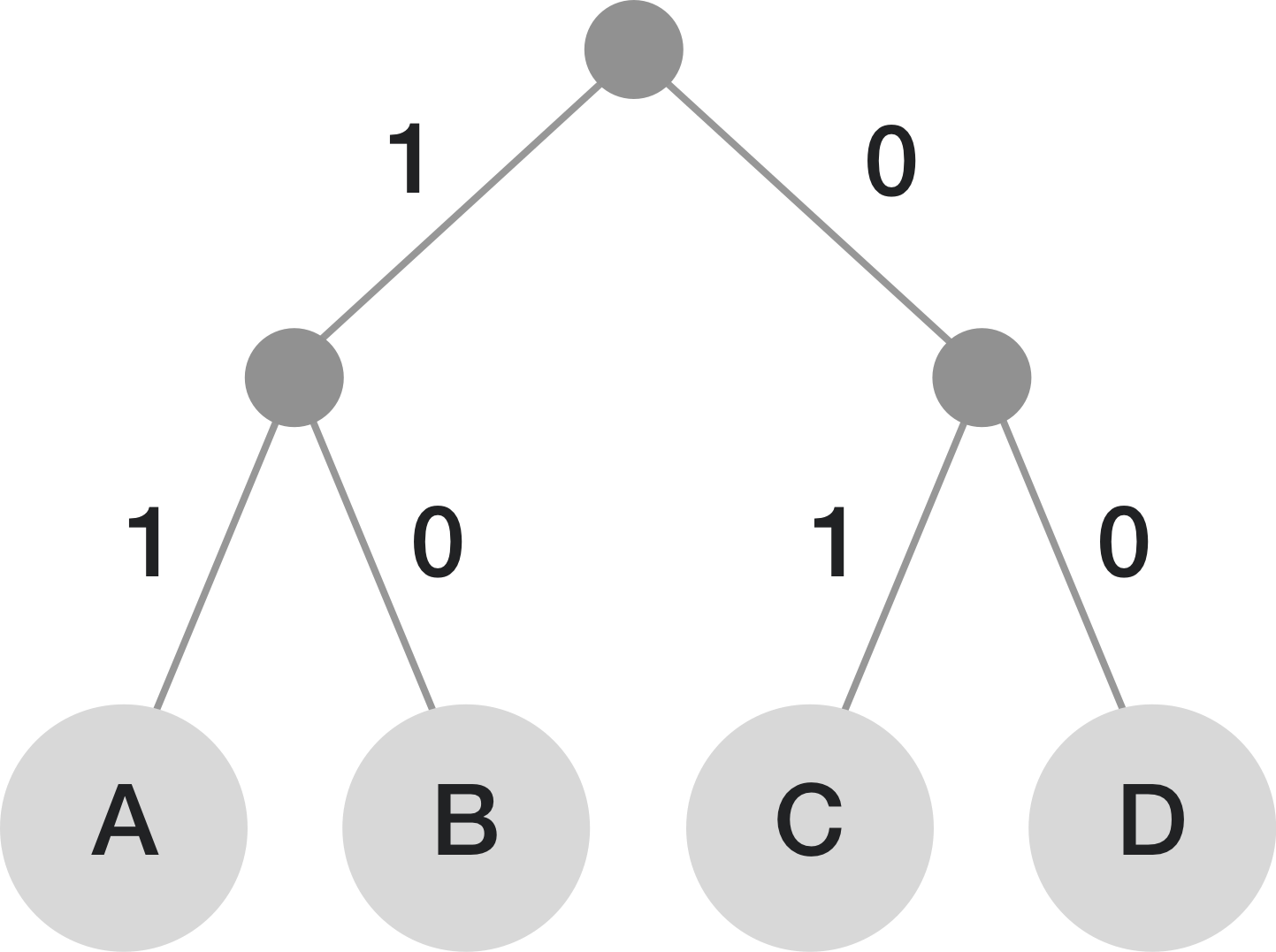
Huffman Coding
-A compression technique used to reduce the number of bits used to represent each letter
-The more frequently a letter appears in the text, the fewer bits are used to represent it in a text file
Section 8- Ethical, Legal and Environmental Impacts of Digital Technology
Ethical impacts of technology on society
Social Media:
-Social media apps such as Facebook, Twitter, YouTube and Pinterest have hundreds of millions of active followers, typically using a smartphone or other mobile device to log on and hundreds of thousands post regularly for the benefit of their followers with many earning money in the process
-People of all ages use social media apps to keep in touch with friends and family, order good or taxis, book holidays, tickets to events or hotel rooms, etc…
Trolling of public figures
-Online abuse has become increasingly common, causing depression, fear and suicide
-Trolls often target public figures such as pop stars, campaigners and Members of Parliment with cruel, threatening homophobic or sexist comments
Computers in healthcare:
-As well as the administrative tasks that computers perform, they are used for example to monitor patients, administer drugs, and diagnose illnesses
-165,000 health-related apps which run on one or both of the two main smart-phone operating systems, Apple’s iOS and Google’s Android
-As these apps are becoming more popular, there are concerns that some health apps may be sharing patients’ health data without their knowledge
Computer-based implants
-Used in many different fields of medicine:
-Cochlear implants have been successful in restoring partial hearing to profoundly deaf people
-Heart implants may include electrodes for regulating heartbeat, warn of heart attacks and monitor the effects of treatment
-A quadriplegic man, Erik Sorto, had electrodes implanted in his brain which enables him to control a robotic arm, getting it to bring a cup to his mount simply by thinking about doing it
Risks of computer-based implants:
-Many implanted devices need to be capable of being reprogrammed, and they have to collect monitoring data from the patients which can be read by medical staff
-Theoretically, it is possible for a malicious person to hack into an implanted device and collect data illegally, or even reprogram it to harm or jill the patient
Wearable Technologies:
-Dozens of different fitness and health monitoring devices on the market today which can measure calories burned, blood pressure, heart rate, sleep patterns and more
-Many fitness trackers’ privacy policies are vaguely stated in phrases such as “We respect your privacy…… We may share your information with third parties….” and under current legislation, it would not be illegal for them to do so
-Debate over who owns the data- the wearer or the business that compiles the data?
-By default, privacy setting are frequently set to ‘public’, allowing profiles to be found in search results so users should take care to reset the privacy settings unless they wish to share info with others
-Latest wearable technologies include items that can:
-Be worn as a wristwatch and monitor your movements, number of steps, time spent sleeping, sitting or standing and the advise you ‘how to live better’
-Be worn by a swimmer, attached to swimming goggles on the back of the head and measure kick- turn times, breath counts and stroke efficiency
-Tighten your trainers around your feet automatically at the touch of a button, like Nike’s replica Marty McFly’s MAG trainers
-Some of these devices, as well as your mobile phone, enable your movements to be tracked by your friends and family, or by complete strangers without your knowledge
Autonomous Vehicles
-Robots are being used to replace humans in many occupations
-Driverless cars are already being tested on Britain’s roads
-Car manufactures claim that these vehicles could improve road safety, ease traffic and improve fuel efficiency but they also raise important legal and ethical dilemas
Ethical dilemmas in programming autonomous vehicles
-If someone is hurt or killed by a driverless car, is it the manufacturers, owners or person in charge of the cars’ fault?
-These vehicles must be programmed to act in a certain way for the numerous scenarios they may face
-Car companies have carried out surveys involving millions of people to find out what people regard as the most ethical decision and the general responses are:
-Save a person rather than an animal
-Save a group of two or more people rather than a single person
-In world wide surveys, researchers found that Westerners generally prioritised the lives of children whereas Eastern countries such as Japan prioritised old people
-One cluster of respondents showed a preference for saving women over men
-In answer to a different question, respondents in another group were asked to choose between saving a homeless person or an executive:
-People from countries such as Colombia, with significant economic difference, prioritised executives over homeless people
-People from Finland, with a small economic difference, showed little preference for either option
-It appears morals change across cultures
-Another survey response indicated people would want an autonomous vehicle to prioritise pedestrians, even if it meant sacrificing its passengers, but they would not personally buy a vehicle that acted like that
Mobile Technologies:
-Refers to technology that is portable. Examples include:
-Laptop and tablet computers
-Smartphones
-GPS devices
-Wireless debit/credit card payment terminals
-Wearable technologies
-Uses of laptop and tablet computers can increase productivity in a work environment
-Ideal for delivering presentations or for keeping in touch via email while away from the office
-Development of cloud storage has led to greatly increased usage of mobile devices, since software, data and services can be accessed wherever there is an Internet connection
Issues
-A laptop may be stolen, or left somewhere by accident
-A hacker may be able to gain access to sensitive data on a laptop
-If public Wi-Fi connection is used, communications may be hacked
-A laptop owner is responsible for managing passwords, anti-virus and anti- malware protection and other safety measures
-Holding personal data and apps on the same machine as business applications may result in malware being unwittingly downloaded from an insecure or unreliable website
Environmental impacts of technology on society
Computers
-Include carbon footprint and waste products that result from manufacturing computer systems
-The negative effects are often outwieghed by the positive effects on the environment of using computerised systems to manage processes that might otherwise generate more pollutions
-Coniderations may include:
-Does a comouter system mean people can work from home and therefore drive less?
-Has computer technology led to a ‘throw-away society’, with huge waste dumps of unwnated products which are thwon away rather than repaired or upgraded?
-Is working at home more environmentally friendly friendly than everyone working in a big office, in terms of shared heating and lighting?
-Do computer-managed engines work more efficiently, create less pollution and use less fuel?
Waste
-Many devices are now only desirable for a few short years before being discared for the latest tech
-Are they recyclable or turning into a huge pile of waste containing dangerous chemicals which could leach into the ground of water supplies?
-Computer-aided manufacturing can result in more and cheaper products but does this mean more waste?
-Disposable cofee cups are cheap to make due to modern technology but are largely unrecyclable
Monitoring the Environment
-Computers are widely used for monitoring the environment including factors such as quality water quality and air quality and also radiation monitoring and warnings
-Dat a collected about weather, volcanic activity and movement beneath the earth’s surface, people can be warned about impending disasters such as hurricanes and earthquakes and move to safety
Cloud Storage
-Uses vast amounts of energy to keep its storage equipment running and cooling systems also use massive amounts of water and energy
-Generally much more energy efficient than storing all data in an organisations own data storage centre
-An organisation’s data centre must be up and running 24/7 while its actual usage may be 15%
-Large-scale cloud providers allow organisation to use fewer servers and therfore less energy
-Specially designed cloud data centres use optimsed equipment and sophisticated cooling equipment, making them more efficient and can result in significant energy savings
-Cloud storage enables many employees to work from home part time, saving carbon emissions arising from commuting daily to work
-Many cloud providers are committed to reducing the environmental impacts of usign their technology
-Data centres may be powered by wind and solar power alongside non-renewable energy sources
-Google and Amazon purchase almost 100% renewable energy
-Microsoft has reduced the huge amount of water used in cooling systems by designing air cooling systems
Wireless networking
-Local area network can be either wired or wireless
-Using wireless network means there is no need for cabling and people can log on from any device
-Wireless networks are less secure and the danger of being hacked is increased as messages can be intercepted by a hacker or a ‘worm’ (type of malware) can infiltrate your computer from another device connected to the same network
Smart Cities
-Wireless networking is being used in the development of ‘smart cities’, with technology being used to improve the running of urban areas
-Includes everything from identifying
Legislation and Privacy
-The law can affect the way that computer systems are developed, used, disposed of, etc…
General Data Protection Regulation (GDPR)
-In 2018, thes regulations replaced the Data Protection Act 1998 and contain a set of key principles that must be followed by all organistion holding personal data and is designed to protect people’s personal data
-These are the principles of the Act:
-Fair, lawful and transparent processing. Personal data must be processed lawfully and fairly fro the purpose it was acquired, and with the individual’s consent
-Purpose limitation. Data must only be collected for specified, explicit and legitimate purposes
-Data minimization. Data must be adequate, relevant and not excessive, and must not be retained longer than necessary
-Accuracy. Data must be accurate and up-to-date
-Data retention periods. Data must not be retained longer than necessay. In addition, if a person asks for it to be erased, it must be securely deleted or destroyed
-Data security. Data must be kept secure. This, including protection against unauthorised or unlaqful processing and against accidental loss, destrution or damage.
-Accountability. Data controllers must be able to prove that their data protection measures are suficient. Appropriate technical and and organisational measures must be in place
-Must conside the implications of this legislation
-Organisations must make sure that the data they hold is accurate. Inaccurate data about a person’s credit rating , for example, can have very serious consequences for an individual
The Computer Misuse Act 1910
-Has 3 main principles, primarliy designed to prevent unauthorised access or ‘hacking’ or programs or data
-Recognises the following new offences:
-Unauthorised access to computer material
-Unauthorised access with intent to commit or facilitate a crime
-Unauthorised modification of computer material
-Making, supplying or obtaining anything which can be used in computer misuse offences
Privacy Issues
-Predicted that small computers will become embedded in everything from clothes to beermats.
-We will be interfacing with computers in everuthing we do, from meeting chip-wearing strangers to entering smart buildings or sitting on a smart sofa, and each of these interfaces will end up on a database
-Google collects and stores data about millions of emails every day
-Oranisations including governments and security agencies, collect hige amounts of data about private citizens, often supplied by Internet companises such as Googole, as well as telephone companies
-Qith the aim of detecting terrorists or othe illegal activities, the US Government collects, stores and omitors metadata about all electronic communications in the US.
-Metadata includes imformation such as the telphone number called, date, time and duration of the cll
-In one month in 2013, the unit collected data on more than 97 billion emailsand 124 billion phone calls from around the world
-Edward Snowden is a famous ‘whistle-blower’ who informed the world about these pracctices
Hacking
-Unauthorised access to a computer system, private network or communcations over the Internet for an illicit purpose such as stealing or destroying personal data
-May be caried out through a phishing attack, or planting malware on a compuer
-Using information gained in this awy, a hacker may be able to:
-access your usernames and passwords
-access your bank account and steal money
-make purchases using stolen credit card details
-sell your information to other criminals who intend to use it for illicit purposes
-use your identity to apply for other credit cards, loans and bank accounts, etc…
Data privacy issues
-Cyber-attacks sometimes result in the personal data of millions of people being compromised
-Under GDPR, companies with comuter systems that store any personal data must have processes and security mechanism in place desined to meet this requirement
-Found that personal data has been compromised, companies can be fined up to 4% of their annual global turnover
Encrypted Communications
-Bnaks and many other organisations use the HTTPS protocol to esnure that communications to and form customers or othe annot be understood even if it is hacked
-WhatsApp is free and seay to used and isused by 1.5 billion worldwide
-WhatsApp used end-to-end encryption to ensure that during transmission, only, and the person you are communicating with, can read what is sent. Currently in Russia and China
-Ability to send encrypted texts may be particularly important to prominent citizens such a politicians, musicians, film starts and royalty whose communications have on many occasions been hacked by newspapers and details of their private lives splashed acoss the headlines
-Governments and security services in many countries, including UK, are concerned with keeping their citizens safe from terroist attacks and criminal activity so they need a ‘backdoor’ so that it can monitor people’s cnoversation
-Current Home Secretary stated: “The use of end-toend encryption in this wa has the potential to have serious consequences for the vital work which companies already undertake to identify and remove child abuse and terroirst content”
-Tech companies rejet this, arguing providng a backdoor woudl potentially enable it to be opened by anyone
Logic Gates
Boolean Gates Symbols:


Boolean Expressions:
-AND = ‘.’ (mulitiplication)
-OR = ‘+’ (addition)
-XOR = ‘⊕’
-NOT gate = “Ā” (an overbar)
-E.g. b.c+ā means b OR c AND NOT a
Syntax and Logic Errors
-A syntax error is an error that breaks the grammatical rules of a programming language and stops it from running
-Examples inlcude:
-Typos and spelling errors
-Missing or extra brackets and quotes
-Incorrectly nested loops
-A logic error is where the incorrent code is used that causes the program to run, but produces an incorrect output or result
-One way to identify logic erros is through the use of trace tables
-Examples include:
-Incorrect use of operations (such as using < instead of >)
-Looping too many times
-Indexing arrays incorrectly
Fundamentals of Algorithms
Representing Algorithms
-Alogrithms are step by step instuctions in order to produce a solution to a problem
-Decompostion is the process of breaking down large problems into a set of smaller, more manageable promblems
-Abstraction is the process of removing unecessary data from a problem
AQA Pseudocode common syntax’s:
-Output = OUTPUT("Hello")
-Input = Fname ← USERINPUT
-Selection = IF num = 2 THEN … ELSE IF num < 4 THEN … ENDIF
-For Loops = FOR i ← 1 to 10 … ENDWHILE
Algorithm Inputs, Processes and Outputs:
-An input is data or information being entered/ taken into the program before it is processed into the algorithm
-A process is a doing action performed in the algorithm which transforms inputs into desired outputs. The CPU (Central Processing Unit) executes this process
-An output is the result of processing in an algorithm and displays something to the user
Tracing Algorithms
—A trace table is used to trace through and algorithm and test algorithms and programs for logic errors