ER diagram
1. Introduction to ER Model
The Entity-Relationship Model (ER Model) is a high-level conceptual data model.
It helps in designing database structures visually before implementation.
It represents entities (objects), attributes (properties), and relationships.
Used in database design to ensure data integrity, consistency, and efficiency.
Converts into relational tables during database implementation.
Why is the ER Model Important?
Helps design relational databases in a structured way.
Identifies entities, relationships, attributes in the system.
Removes redundancy, avoiding data duplication.
Ensures normalization for an efficient database.
Helps in understanding complex data relationships.
Steps in Database Design
Requirement Analysis – Understand what data needs to be stored.
ER Model Creation – Draw ER diagrams to represent entities & relationships.
Relational Model – Convert ER diagram into tables.
Schema Refinement (Normalization) – Remove data redundancy.
Physical Database Design – Implement the database using SQL.
3. Components of ER Model
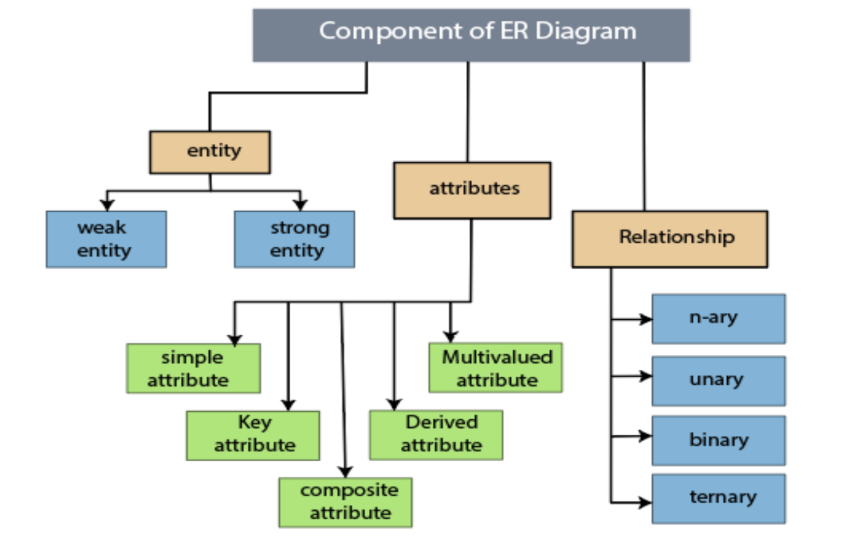
3.1 Entity
An object in the system that holds data.
Represented as a rectangle in ER diagrams.
Example:
STUDENT(students in a university).EMPLOYEE(workers in a company).
3.2 Entity Set
A collection of similar entities.
Example:
All students in a university form the STUDENT entity set.
All employees in a company form the EMPLOYEE entity set.
4. Attributes in ER Model
Attributes represent properties of an entity and are drawn as ovals (ellipses) in ER diagrams.
Attribute Type | Description | Example |
|---|---|---|
Simple Attribute | Cannot be divided further |
|
Key Attribute | Uniquely identifies an entity |
|
Composite Attribute | Contains multiple sub-attributes |
|
Derived Attribute | Computed from another attribute |
|
Multi-valued Attribute | Can have multiple values |
|
Example – EMPLOYEE Table
EMPLOYEE
 ├── employee_id (Key Attribute - Primary Key)
 ├── employee_name (Composite Attribute: {first_name, last_name})
 ├── DOB (Simple Attribute)
 ├── employee_age (Derived Attribute from DOB)
 ├── phone_number (Multi-valued Attribute - multiple numbers possible)
 ├── salary (Simple Attribute)
 ├── email (Multi-valued Attribute - multiple emails possible)
 ├── address (Composite Attribute: {street, city, state, country})
1. Simple Attribute
Definition:
These cannot be divided further.
Store a single value for each entity.
Example:
salary: A single fixed number.gender: Cannot be broken further (Male/Female/Other).DOB: A single Date of Birth value.
2. Key Attribute (Primary Key)
Definition:
Uniquely identifies an entity.
Represented with an underlined oval in ER diagrams.
Example:
employee_id: Unique for each employee.
CREATE TABLE Employee (
    employee_id INT PRIMARY KEY,  -- Key Attribute
    employee_name VARCHAR(100),
    salary DECIMAL(10,2)
);
3. Composite Attribute
Definition:
An attribute made up of multiple sub-attributes.
Each sub-attribute is meaningful on its own.
Example:
employee_name = {first_name, last_name}address = {street, city, state, country}
CREATE TABLE Employee (
    employee_id INT PRIMARY KEY,
    first_name VARCHAR(50),
    last_name VARCHAR(50),
    street VARCHAR(100),
    city VARCHAR(50),
    state VARCHAR(50),
    country VARCHAR(50)
);
4. Derived Attribute
Definition:
Computed from another attribute.
Not stored in the table, calculated when needed.
Example:
employee_ageis derived fromDOB.
SELECT YEAR(CURDATE()) - YEAR(DOB) AS employee_age FROM Employee;
🔸 Why not store employee_age?
Age changes every year, so storing it would cause redundancy.
5. Multi-Valued Attribute
Definition:
Can have multiple values for a single entity.
Stored in a separate table.
Example:
phone_number: An employee can have multiple phone numbers.email: An employee can have multiple email IDs.
🔸 ER Diagram Representation:
Multi-valued attributes are drawn with double ovals.
CREATE TABLE Employee_Phone (
    employee_id INT,
    phone_number VARCHAR(20),
    PRIMARY KEY (employee_id, phone_number),
    FOREIGN KEY (employee_id) REFERENCES Employee(employee_id)
);
Final Summary
Attribute Type | Example |
|---|---|
Simple |
|
Key |
|
Composite |
|
Derived |
|
Multi-valued |
|