Unit 8.1 Basic Database Concepts
Aims
Know what is meant by the term database and be able to give different examples of paper-based and electronic databases.
Know the difference between a file-based database and a relational database and the benefits and drawbacks of each methods.
Know the Key terminology that is often associated with relational databases and apply these concepts to different databases.
Database - Collection of data/info held together in an organised way
Can be either paper (address book/filing cabinet holding records) or computer based (hospital/school records holding personal data)
Electronic Database pro’s
Easier to retrieve/update/modify/delete data
Easier to back up & make copies
Multiple user access in different locations
File-based Databases
Database stores data in a single table, often stored in plain text file
Each line holds one record and data is separated by delimiters e.g. commas/ spaces/tabs
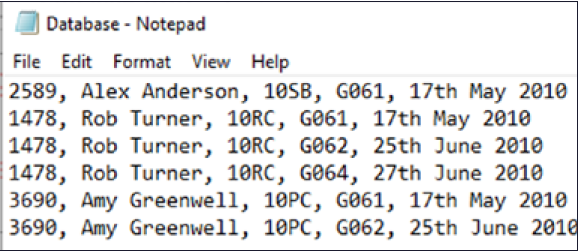
Pro’s | Con’s |
Easy setup - one table | Lots of redundant data as its repeated |
All data in one place so it may be easier to find | Hard to manage/maintain & expand in future |
Data access can be slow as there is more to search through |
Relational Databases
Stores data in multiple tables and links them together using relationships
Data in different tables all relate to each other in some way
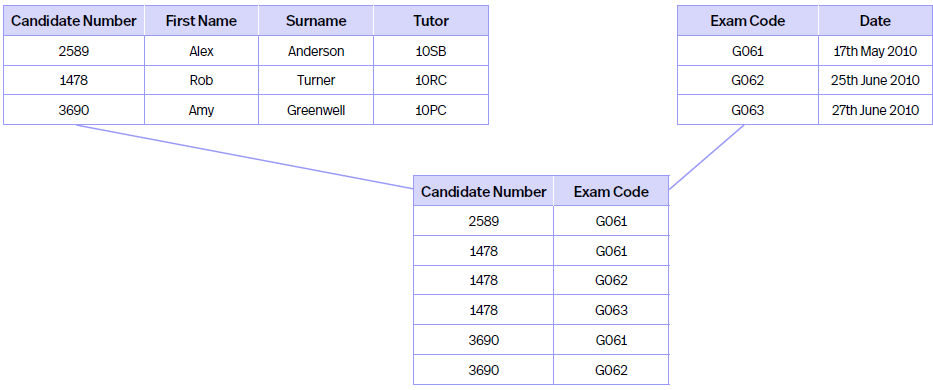
Pro’s | Con’s |
Less redundant data so smaller file size | More complex structure as more tables need to have relationships set up |
Easier to manage/maintain/expand in future | Data spread out between multiple tables |
Faster data access as less redundant data | More technical knowledge and skills needed due to harder setup |
Relational Database Terms
Term | Meaning | Example |
Entities | Person/Place/thing/object/concept about which data can be collected and stored | Customers/Houses/Cars/Drs/Teachers/students/Products |
Attribute | Single part of an entity | If Entity is House, Attribute=Sale Price, Address, Property Type, Bedroom/Bathroom No. etc. |
Table | Contains info about an entity and is made up of records and fields | If Entity is Customers, Table contains name, average spend, payment type etc. |
Records (Tuples) | Single row within table, collection of fields about single item/event, must contain one Primary Key | This table has records - from Entities to Examples is a record. - Horizontal line |
Fields | Column within a table and is separate part of a record | Lists of names/numbers, this table has fields such as terms, meaning and example. - Vertical line |
Primary Keys | Field in a table that means each record can be uniquely Identified | Patient No, NI No, Student No, Candidate No, Bank A/c No, Driver No, Membership No. (Cant be names as multiple people can have same name) |
Candidate Keys | Field(s) within table that uniquely ID’s each record, primary key can be selected from one of them | Email address & Phone no. are candidate keys as unique to a person, usable as primary keys however these can change so customer no. would be more appropriate |
Secondary Keys | Key fields used in addition to Primary Key to locate specific info within database, more than one can be used. | Student Table, Student ID best for Primary Key but harder to remember - so surname becomes Secondary Key as its easier to remember |
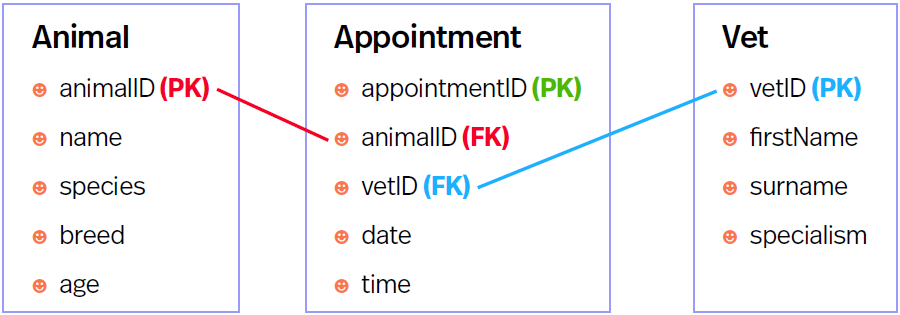
Foreign Keys | Field in one table that links to a Primary Key in another table | See below 3 tables - Foreign Key links to a Primary Key using a relationship - common field in multiple tables |
Composite Keys (Not on specification but good to know) | If one Primary Key cant be found, multiple fields can be added together to create a unique identity. Usually formed in 1NF but is taken out during 2NF. | Database about questions - Composite Key would be Topic, Question and Answer as this makes the record unique but this causes issues with 2NF characteristic of all non-key fields depend on ALL key fields (see 8.2) |
Relationships & Referential Integrity
Relationships link tables together in a relational database -commonly join Primary & Foreign Keys
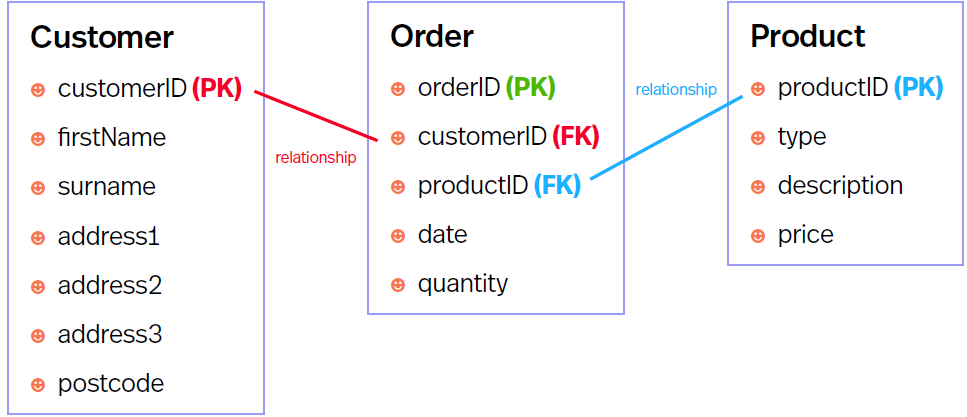
Relationship types= 1-to-1, 1-to-many, many-to-many
When creating relationships, referential integrity can be enforced (stops references being entered that aren’t in another table) Most commonly used to ensure you cant enter a foreign key that doesn’t link to a primary key in another table.
E.g. picture above - Customer ID cant be entered into order table if its not a primary key in customer table, same with Product ID in order table.
Referential Integrity ensures if data is changed in one place its changed in all places to keep tables consistent.