ComputerScience1
The types of hardware are:
- Secondary Storage Devices
- Main Memory (RAM)
- Central Processing Unit (CPU)
- Input and Output Devices
What Does CPU stand for
- Central Processing Unit
What are the Types of software
- Applications
- Operating System
What are the cycles for Computer System Central Processing?
- Fetch
- Retrieves an Instruction from Main Memory
- Decode
- Determines what the instruction is
- Execute
- Carry out the instruction
A Section of 2 or 4 bytes is a word
8 bits make a byte
Binary numbers are 1 and 0
Examples of nonvolatile storage
- Flash Drive
- DVD drive
- CD Drive
Input Drive Example
- Mouse
- Keyboard
- Scanner
- Digital Camera
Output Drive Example
- Monitor
- Printer
An operator system manages communication between software and hardware. Without OS software would not function
Application enables you to perform a specific task
What are the Major Programming languages divided into these three groups?
- Machine
- Assembly
- High Level Language
Test programming statements are known as
A text editor edits and saves the Java source code file
The extension used for java is .java
JVM stands for Java Virtual Machine
A source code is the Java programming statements for the program
A compiler program translates the source code into an executable for
Javac translates Java source file into a file that contains byte code instructions
- this is machine language of JVM and cannot be directly executed directly by CPU
Byte code files end with the .class file extension
The JVM is a program that emulates a micro-processor
The JVM executes instructions as they are read
JVM is often called an interpreter. \n Java is often referred to as an interpreted language.
Test editor→Source Code (filename.java) →Java Compiler →Bytecodes (classname.class) → Java virtual machine (java interpreter) →operating system
Portable is a program that can be written on one type of computer and then \n run on a wide variety of computers, with little or no modification
Example 1:
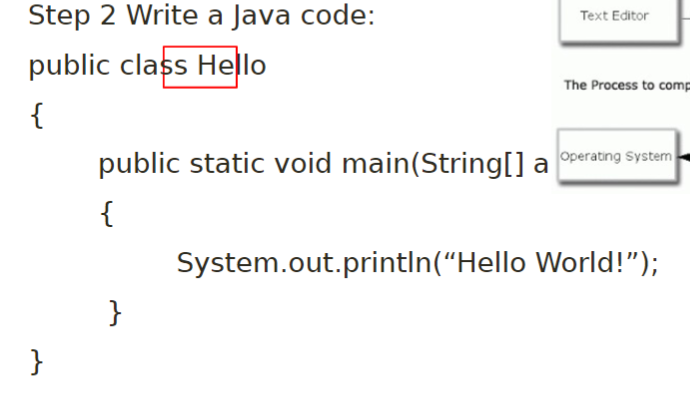
| \\ | marks the beginning of a lines comment | |
|---|---|---|
| () | marks the parameter list | |
| {} | Enclosed a group of statement such |
“ “ : Encloses a string of character such as a message that can be printed in the screen
; marks the end of a complete statement
A console window that starts a java application is a: Standard output device
Sends information to the standard output by using a java class stored in the standard Java library
Java Application Programming Interface (API)
System.out.println(“Programming is great fun!”);
System class from standard Java library
System class contains methods and objects that perform system level tasks
Out objects is a member of the system class, contains methods print and println
Println: places a newline character at the end of whatever is bring printed
- system.out.println(“This is being printed out”);
- system.out.println(“on two separate lines.”);
- This is being printed out
- on two separate lines
system.out.print does not print on two separate lines
Escape Sequences
\n: newlines-advances curser to the new line for subsequent printing
\t: tab- causes cursor to skip over to the next tab stop
\b: backspace- causes cursor to back up of move left one position
\r: carriage return- causes the cursor to go to the beginning of the current line, not the next line
\\: backslash- causes a blacklash to be printed
\’: single quote causes a single quotion mark to be printed
\”: double quote- causes the double quotation mark to be printed
Java escape sequences
Practices w/ multiple lines
public class sequences
{
public static void main(String [] args)
{
System.out.print(“I love cheese:\n”);
System.out.println(“cheeder”);
System.out.println(“white chedder”);
System.out.println(“sharp cheese”);
}
}
Coding an integer
public class Variable
{
public static void main(String[] args)
{
int value;
value = 5;
System.out.println(“The value is: “+ value);
}
}
Variable is a named storage in the computer’s memory
Identifiers are programer-defined names for
class
variable
method
A variable should begin with a lower case letter and switch to title case after
- intTaxRate
Class should be all title case
- public class BigLittle
Solving Basic Problems with Java
Numeric Data Types
| byte | 1 byte | intergers -128-127 |
|---|---|---|
| short | 2 byte | -32,768 -32,767 |
| int | 4 bytes | -2million+ to +2million+ |
| long | 8 bytes | -/+9trill |
| float | 4 bytes | 3.4e-038 to 3.4e+038 |
| double | 8 bytes | 1.7 e-308 to 1.7e+308 |
Smallest positive number: 00000000
largest positive number: 10000000
Smallest negative number: 11111111
Largest negative number: 1000000
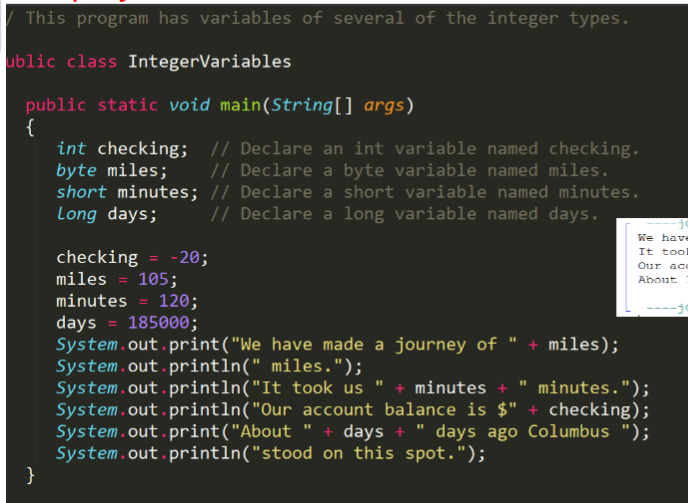
public class Interger Variables
public static void main(String[] args)
{
int checking; //Declare an int variable named Checking
byte miles; //Declare a byte variable named miles
short minutes; // Declare a short variable named minutes
long days; // Declare a long variable named days
checking = -20;
miles = 105;
minutes = 120;
days = 185000;
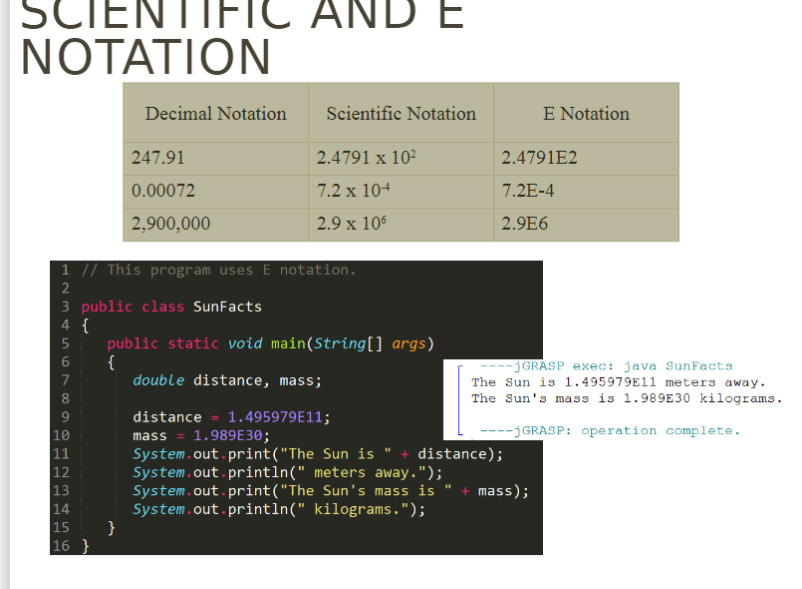
Floating point literals
- double value is not compatible with a float bc of its size and precession
- but it can be forced into a float
- number = 23.5F; // Works
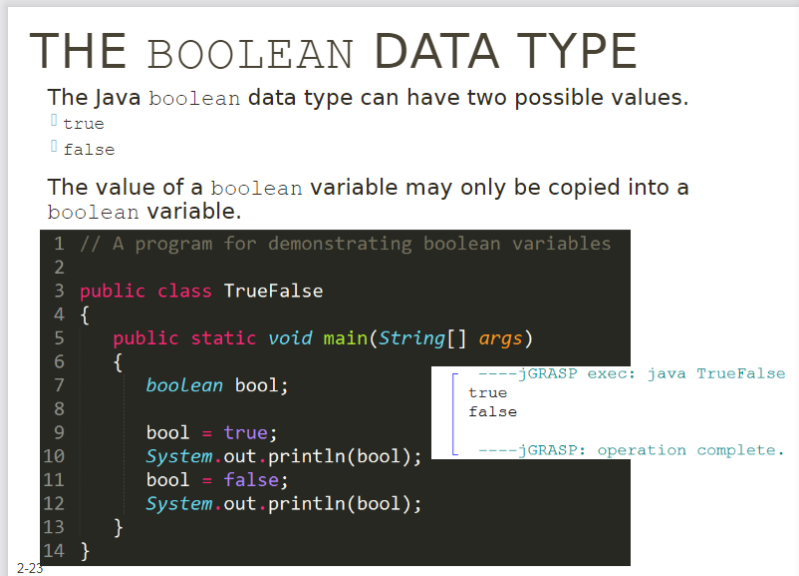
True False boolen
Char only inclose single letters with single quotation marks ‘a’ ‘Z"‘
Division → salePrice = original /2;
Practice Word Problems
- Each of their employee has a base pay \n rate and they work 40 hours per week regularly. When extra work comes, employees got overtime wage at rate $37.5 per hour.
- }}Say, now you need to calculate the total wage for anemployee, ==whose base pay rate is $20 per hou== \n r andworked 10 extra hours last week}}
- Creating a program create memory locations
double regular wages
overtime wages
regular Hours
- initialize variables
- regularWageRate = 20;
- regularHours = 40;
- Instruct Computer to Calculate
- totalWage = regularWage + overtimeWage
- regularWage = regularWageRate * regularHours
- overtimeWage = overtimeWageRate * overtimeWageHours
- Display Answer
- System.out.println(totalWage);