Machine Code With CARDIAC
Programming the Cardiac: Understanding Operations
To program the Cardiac, we first need to understand its capabilities, specifically the set of operations it can perform, known as instructions. The Cardiac has a documentation listing ten instructions, which include essential arithmetic functions. However, for this tutorial, many of these instructions will not be utilized, as they are geared towards operations like addition, subtraction, multiplication, and division. Instead, we will be focusing on a simplified subset of instructions, including the SFT (shift instruction) and others that are relevant to our example.
Problem Definition
For this example, we aim to create a program that takes in two numbers from a user and prints out their sum. At first glance, none of the ten instructions directly perform this action. Thus, we need to break down the problem into manageable steps, ultimately writing out an algorithm in the form of a step-by-step guide.
Algorithm Breakdown
Step 1: Initialize two memory locations, referred to as
tempandsum, starting withsumset to 0.Step 2: Use the
INPinstruction (instruction 0), which reads a number from the user and inputs it into thetempvariable.Step 3: Add the number stored in
tempto thesumvariable.Step 4: Repeat steps 2 and 3 to allow the user to input a second number, adding this to
sum.Step 5: Output the final value of
sum.Step 6: End the program.
This detailed approach is crucial in programming as a computer only comprehends low-level instructions, requiring clarity in every step.
Converting the Algorithm into Assembly Language Code
Next, we will convert our algorithm into assembly language code, which closely resembles what the Cardiac machine understands. Assembly language serves as a simplified human-readable representation of machine-level code, creating a one-to-one correspondence with the underlying binary instructions.
Variable Initialization
Each variable is allocated memory. For instance, the variable for
sumis initialized with a value of 0. This designation aids in clarity as we write out our instructions.
Instruction Steps
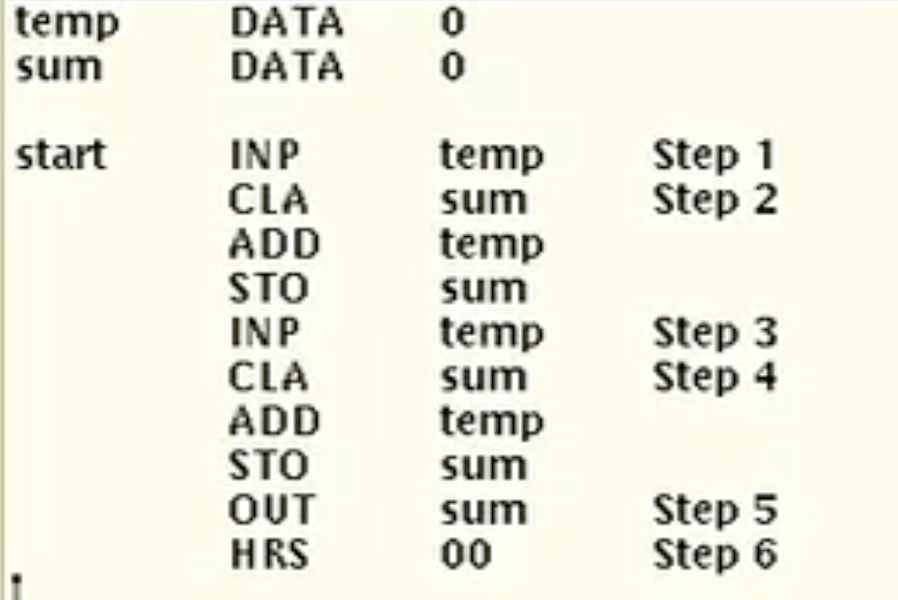
First instruction (input): Load the
tempvariable with a user-provided number using theINPinstruction.Second instruction (add): Load
suminto the accumulator, then addtemp. Store this result back intosumusing theSTOinstruction.Repeat the process for the second input.
Output the result: Utilize the
OUTinstruction to print the contents ofsum.End the program: Implement the
HRSinstruction to halt the machine.
Memory Organization and Instruction Coding
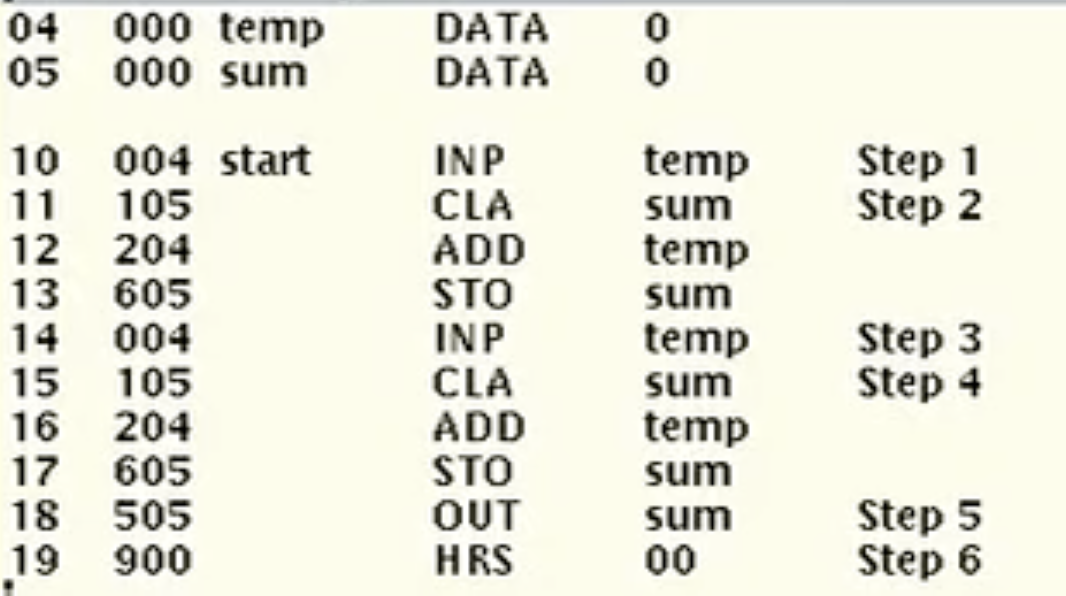
Upon establishing the necessary instructions, we need to assign memory locations to both data items and instructions. The memory consists of three-digit codes representing operations, including the opcode which identifies the specific instruction. For example:
The
INPinstruction is encoded as000, followed by the memory address oftemp(location 4), resulting in004.The
CLAinstruction has an opcode of001, pointing atsumat location 5, thus receiving105.
Following this pattern, we encode all instructions based on their corresponding opcodes and memory locations, finally easing the translation to machine language which the Cardiac can execute.
Running the Program on the Cardiac Simulator
To execute our program, we utilize the Cardiac Simulator, which features an organized memory space and a central processing unit (CPU). The simulator allows loading our coded memory at specified locations and provides means for input via simulated punch cards.
Execution Steps:
Prepare input values (for example, 15 and 27) and load them into a deck (punch card stack).
Set the program counter to indicate where the program should start executing (in our case, location 10).
Clock each instruction sequentially using the step button, allowing tracking of changes to the accumulator and memory locations.
After examining operations step-by-step, we can run the entire program at full speed and observe the final output.
Conclusion
This exercise walks through converting an algorithm into assembly language, translating it to machine language, and executing it on the Cardiac Simulator. It is a foundational step for students to enhance their understanding of low-level programming and the functionality of computer architecture. For upcoming lab exercises, students are encouraged to engage with the documentation available and familiarize themseves with other instructions to prepare for hands-on programming tasks.
CARDIAC INSTRUCTION SHEET
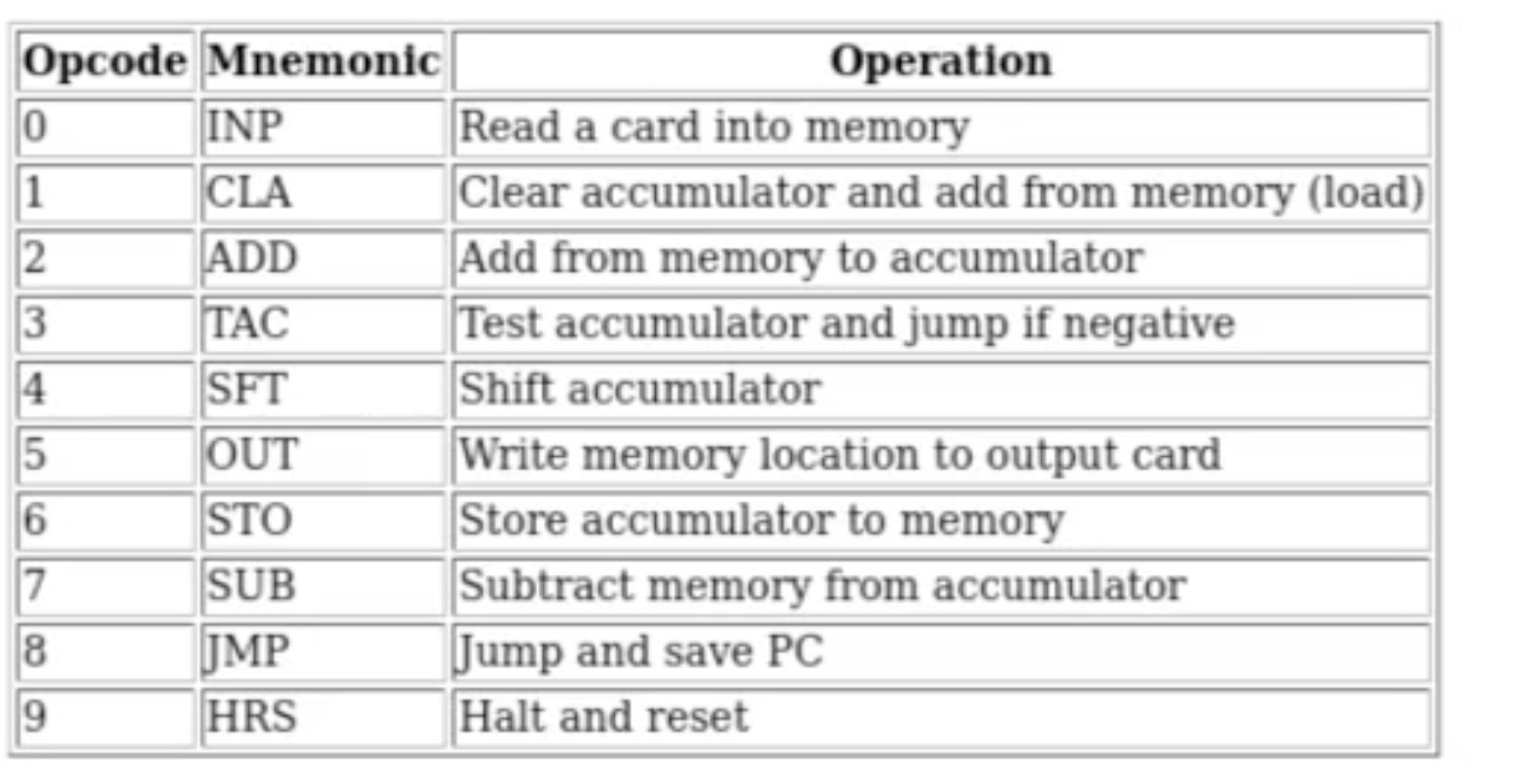
ASSEMBLY LANGUAGE FOR CARDIAC ADDITION OF TWO NUMBERS PROGRAM
MACHINE CODE FOR PROGRAM
Starting at memory locations 4 and 5, that’s where we will store the variables temp and sum.
Location 4: temp - This variable will hold the first number to be added.
Location 5: sum - This variable will store the result of the addition.
Program starts at memory location 10 and each step will increment the instruction pointer to execute the next instruction sequentially.
First step is function INP
This function will read a number from the user and store it in the temp variable located at memory address 4. OP Code 0 and memory location 4 makes the code 004
Second Step is function CLA to the sum
This function clears the accumulator and loads the value from the specified memory location, which in this case is also memory address 5. The OP Code for CLA is 1, so the complete instruction for this step is 105.
Third step is function ADD to the sum
This function adds the value stored in the specified memory location to the accumulator. Here, we will add the value from memory address 4 or temp. The OP Code for ADD is 2, thus the complete instruction for this step is 204.
Fourth Step is STO function
Stores the the result into the sum variable into the memory location designated for the sum, which is at address 5. The OP Code for STO is 6, making the complete instruction for this step 605.