Exception
Exception Handling
Basic Exception Handling
An exception is an event that occurs during the execution of a program that disrupts the normal flow of instructions.
Exception handling is the process used to change the normal flow of code execution if a specified exception occurs.
Exceptions that occur during compilation are called checked exceptions.
Exception | Description |
ClassNotFoundException | The class is not found. |
IllegalAccessException | Access to a class is denied. |
InstantiationException | Attempt to create an object of an abstract class or an interface. |
NoSuchMethodException | A requested method does not exist. |
Unchecked exceptions are exceptions that occur during execution. These are also known as runtime exceptions.
Exception | Description |
ArithmeticException | Arithmetic error, such as an integer divided by 0 |
ArrayIndexOutOfBoundsException | Accessing an invalid index of the array |
ArrayStoreException | Assigning a value to an array index that does not match the expected data type |
InputMismatchException | Entering a value that does not match the expected data type |
NullPointerException | Invalid use of a null reference |
NumberFormatException | Invalid conversion of a string to a numeric format |
StringIndexOutOfBoundsException | Accessing an invalid index (character) of a string |
try, catch, and finally
A try block is a block of code that might throw an exception that can be handled by a matching catch
block.
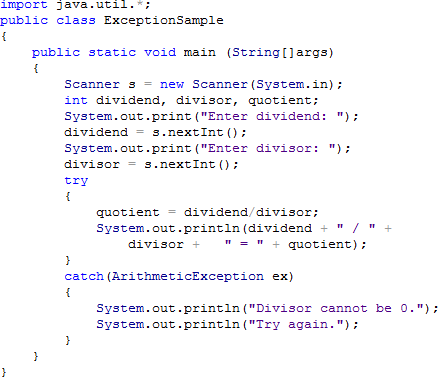 A catch block is a segment of code that can handle an exception that might be thrown by the try block that precedes it.
The getMessage() method can be used to determine Java’s message about the exception. Syntax: System.out.println(exceptionName.getMessage());
Only one (1) try block is accepted in a program but there can be multiple catch blocks.
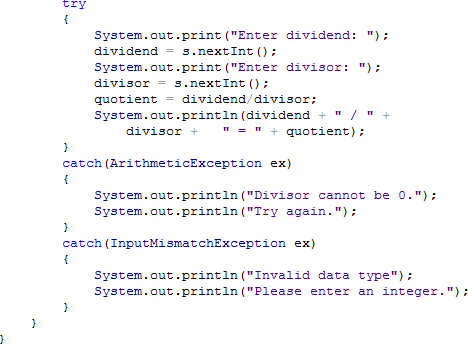
A user-defined exception is created by extending the Exception class.
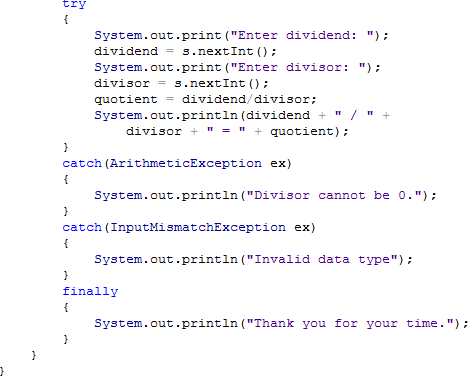
The finally block contains statements which are executed whether or not an exception is thrown. There can only be one (1) finally block after a try-catch structure but it is not required.
User-Defined Exceptions
A user-defined exception is created by extending the Exception class.

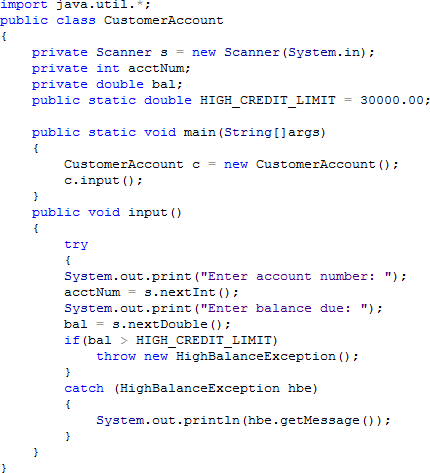 A throw statement sends an exception out of a block or a method so it can be handled elsewhere.
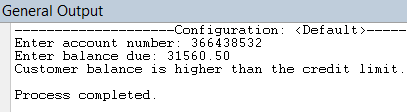
Output:
References:
Baesens, B., Backiel, A. & Broucke, S. (2015). Beginning java programming: The object-oriented approach.
Indiana: John Wiley & Sons, Inc.
Farrell, J. (2014). Java programming, 7th edition. Boston: Course Technology, Cengage Learning
Savitch, W. (2014). Java: An introduction to problem solving and programming, 7th edition. California: Pearson Education, Inc.
File Input and Output
Computer Files
Types of Storage Device:
Volatile storage is temporary. Volatile values (stored in variables) are lost when the computer loses its power. The Random Access Memory (RAM) is being used when a Java program stores a value in a variable.
Non-volatile storage is permanent. A Java program that is saved on a disk uses a non-volatile storage.
A computer file is a collection of data stored on a non-volatile device.
Categories of File:
A text file consists of data that can be read in a text editor. Data in a text file is encoded using a scheme. The most common schemes are ASCII and Unicode. Examples are program files and application files.
A binary file contains data that is not encoded as text. This file has contents in binary format, which means they cannot be understood by viewing them in a text editor. Examples are images, music, and the .class extension files which are created after compiling Java programs.
The common characteristics of a text file and binary file are size, name, and date and time of creation.
Permanent files are commonly stored in the main directory or the root directory.
To organize stored files, folders or directories are used.
Users may also create folders within folders. The complete list of the disk drive plus the hierarchy of directories in which the file is located is called path.
Example of a complete path: C:\Java\Chapter8\example.txt
In the Windows operating system, the backslash (\) is the path delimiter – the special character used to separate path components.
The Path and Files Classes
The Path class creates objects that contain information about files and directories, such as sizes, locations, creation dates, and is used to check whether a file or directory exists.
The Files class performs operations on files and directories, such as determining their attributes, creating input and output streams, and deleting them.
To use both the Path and Files classes, add the following statement.
import java.nio.file.*;
To create and define a Path, use the Paths class and its get() method.
Example: Path filePath = Paths.get(“C:\\Java\\Chapter8\\sample.txt”);
An absolute path is a complete path; it does not require any other information to locate a file on a system.
Example: C:\Java\Chapter8\sample.txt
A relative path depends on other path information. Examples: sample.txt
Chapter8\sample.txt Java\Chapter8
Path Methods:
Method | Description |
String toString() | Returns the String representation of the Path, eliminating double backslashes |
Path getFileName() | Returns the file or directory denoted by this Path; this is the last item in the sequence of name elements. |
int getNameCount() | Returns the number of name elements in the Path |
Path getName(int) | Returns the name in the position of the Path specified by the integer parameter |
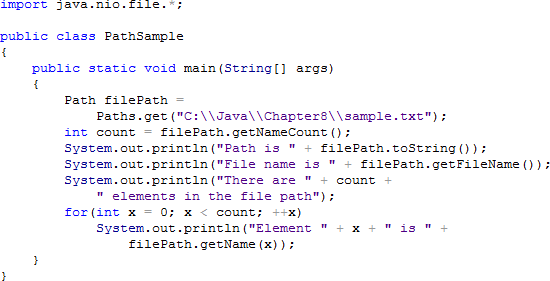 Sample Program:
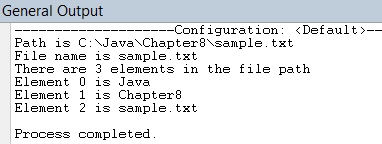
Output:
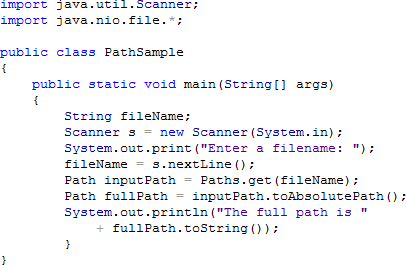 To convert a relative path to an absolute path, the toAbsolutePath() method is used. Sample Program:
Output:
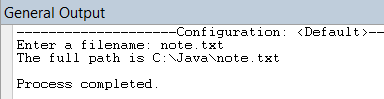
To verify if a file exists and if a program can access it when needed, the checkAccess() method is used.
Arguments of the checkAccess() Method:
Argument | Description |
None | Checks whether the file exists |
READ | Checks whether the file exists and whether the program has permission to read the file |
WRITE | Checks whether the file exists and whether the program has permission to write to the file |
EXECUTE | Checks whether the file exists and whether the program has permission to execute the file |
The delete() method of the Files class accepts a Path parameter and removes the last element (file or directory) in a path or throws an exception if the deletion is unsuccessful.
Examples of Exceptions:
If there is an attempt to delete a file that does not exist, a NoSuchFileException is thrown.
If there is an attempt to delete a directory that has files, a DirectoryNotEmptyException is thrown.
If there is an attempt to delete a file without permission, a SecurityException is thrown.
Other input/output errors cause IOException.
The deleteIfExists() method can also be used to remove a file without encountering an exception if the file does not exist.
To retrieve useful information about a file, the readAttributes() method of the Files class is used. This method takes two (2) arguments. These are Path object and BasicFileAttributes.class. The readAttributes() method returns an instance of the BasicFileAttributes.class.
Example:

BasicFileAttributes Methods:
Method | Description |
size() | Returns the size of the file in bytes |
creationTime() | Returns the date and time the file was created Format: yyyy-mm-ddThh:mm:ss (T stands for Time) |
lastModifiedTime() | Returns the date and time the file was last edited (Same format with creationTime()) |
compareTo() | Compares relationship between values retrieved from creationTime() or lastModifiedTime() |
File Organization, Streams, and Buffers
The smallest useful piece of data is the character. A character can be any letter, number, or other special symbol (such as punctuation mark) that makes up data.
A field is a group of characters that has some meaning. Fields are grouped together to form records.
A record is a collection of fields that contain data about an entity. Records are grouped to create files.
A file consists of related records.
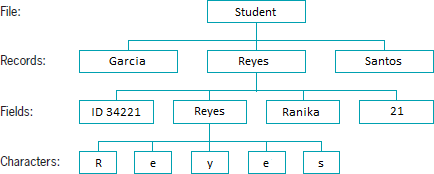
When each record in a file is accessed one after another in the order in which it was stored, the data file is used as a sequential access file.
A record’s fields can be organized into a single line or can be separated by a character. Values in a record that are separated by commas are called comma-separated values.
A stream is a flow of data. If the data is taken from a source (such as a file or the keyboard) and is delivered into a program, it is called an input stream. If the data is delivered from a program to a destination (such as a file or the screen), it is called an output stream.
A buffer is a memory location into which you can write data, which you can read again later.
Flushing clears any bytes that have been sent to a buffer for output but have not yet been displayed on a hardware device.
The IO Classes
Input and Output Classes:
Class | Description |
InputStream | Abstract class that contains method for performing input |
FileInputStream | Provides the capability to read disk from files |
BufferedInputStream | Handles input from a system’s standard or default input device (usually the keyboard) |
OutputStream | Abstract class that contains method for performing output |
FileOutputStream | Provides the capability to write to disk files |
BufferedOutputStream | Handles input from a system’s standard or default output device (usually the monitor) |
PrintStream | Contains methods for performing output that never throws an exception (System.out is a PrintStream object) |
Reader | Abstract class for reading character streams; the only methods that a subclass must implement are read(char[] int, int) and close() |
BufferedReader | Reads text from a character-input stream, buffering characters to provide for efficient reading of characters, arrays, and lines |
BufferedWriter | Writes text to a character-output stream, buffering characters to provide for the efficient writing of characters, arrays, and lines |
Common Methods of the OutputStream Class:
OutputStream Method | Description |
void close() | Closes the output stream and releases any system resources associated with the stream |
void flush() | Flushes the output stream; if any bytes are buffered, they will be written |
void write(byte[] b) | Writes all bytes to the output stream from the specified byte array |
void write(byte[] b, int off, int len) | Writes bytes to the output stream from the specified byte array starting at offset position off for a length of len characters |
The Files class’ newOutputStream() method is used to create a writeable file. A Path and a StandardOpenOption argument are passed to this method. This method creates a file if it hasn’t existed yet, opens the file for writing, and returns an OutputStream that can be used to write bytes to the file.
StandardOpenOption Arguments:
StandardOpenOption | Description |
WRITE | Opens the file for writing |
APPEND | Appends new data to the end of the file; use this option with WRITE or CREATE |
TRUNCATE_EXISTING | Truncates the existing file to 0 byte so the file contents are replaced; use this option with the WRITE option |
CREATE_NEW | Creates a new file only if it hasn’t existed yet; it throws an exception if the file already exists |
CREATE | Opens the file if it exists or creates a new file if it hasn’t existed yet |
DELETE_ON_CLOSE | Deletes the file when the stream is closed; it is used most often for temporary files that exist only for the duration of the program |
The newInputStream() method of the Files class is used to open a file for reading. This method accepts a Path parameter and returns a stream that can read bytes from a file.
A BufferedReader object is declared to read a line of text from a character-input stream, buffering characters so reading is more efficient.
Common Methods of the BufferedReader Class:
BufferedReader Method | Description |
close() | Closes the stream and any resources associated with it |
read() | Reads a single character |
read(char[] buffer, int off, int len) | Reads characters into a portion of an array from position off for len characters |
readLine() | Reads a line of text |
skip(long n) | Skips the specified number of characters |
Sequential Data Files
The BufferedWriter class writes text to an output stream, buffering the characters.
BufferedWriter Methods:
BufferedWriter Method | Description |
close() | Closes the stream, flushing it first |
flush() | Flushes the stream |
newline() | Writes a line separator |
write(String s, int off, int len) | Writes a String from position off for length len |
write(char[] array, int off, int len) | Writes a character array from position off for length len |
write(int c) | Writes a single character |
References:
Baesens, B., Backiel, A. & Broucke, S. (2015). Beginning java programming: The object-oriented approach.
Indiana: John Wiley & Sons, Inc.
Farrell, J. (2014). Java programming, 7th Edition. Boston: Course Technology, Cengage Learning
Savitch, W. (2014). Java: An introduction to problem solving and programming, 7th Edition. California: Pearson Education, Inc.