Typical Architecture In An Input Output System In Operating Systems
Typical System Architecture in an Input-Output System
An input-output (I/O) system in operating systems is responsible for managing the flow of data between the computer's central processing unit (CPU) and external devices such as keyboards, mice, printers, and storage devices.
The typical system architecture of an I/O system consists of several components:
Device Controller: Each I/O device is connected to a device controller, which acts as an interface between the device and the rest of the system. The device controller is responsible for controlling the device's operations and handling low-level details such as data transfer and error detection.
Device Driver: The device driver is a software component that interacts with the device controller and provides a standardized interface for the operating system to communicate with the device. It translates high-level commands from the operating system into low-level commands understood by the device controller.
Interrupt Handler: When an I/O operation is initiated, the device controller notifies the CPU by generating an interrupt. The interrupt handler is a software routine that handles these interrupts, suspends the current execution, and transfers control to the appropriate device driver to handle the I/O request.
I/O Scheduler: The I/O scheduler is responsible for managing the order in which I/O requests are serviced. It aims to optimize the overall system performance by minimizing the waiting time and maximizing the utilization of I/O devices. Different scheduling algorithms, such as First-Come-First-Serve (FCFS) or Shortest Seek Time First (SSTF), can be used.
Buffering: To improve the efficiency of I/O operations, buffering is employed. Buffers are temporary storage areas that hold data being transferred between the CPU and the I/O devices. They help reduce the number of I/O operations by allowing data to be transferred in larger chunks, reducing the overhead of individual transfers.
I/O Control Commands: The operating system provides a set of control commands that allow applications to interact with I/O devices. These commands include opening and closing devices, reading from and writing to devices, and seeking to specific positions within devices.
The typical system architecture in an I/O system aims to provide a standardized and efficient way for the operating system to manage the flow of data between the CPU and external devices. It involves components such as device controllers, device drivers, interrupt handlers, I/O schedulers, buffering, and control commands to facilitate smooth and optimized I/O operations.
Key Information:
Input-Output (I/O) system connects external devices to the computer
Key components: I/O devices, I/O controllers, device drivers
I/O devices: keyboards, mice, printers, disks, etc.
I/O controllers: interface between devices and computer bus
Device drivers: software that enables communication with devices
I/O system architecture: programmed I/O, interrupt-driven I/O, DMA
Programmed I/O: CPU directly controls data transfer
Interrupt-driven I/O: devices interrupt CPU when ready for data transfer
DMA (Direct Memory Access): devices transfer data directly to/from memory
I/O system manages data transfer, buffering, error handling
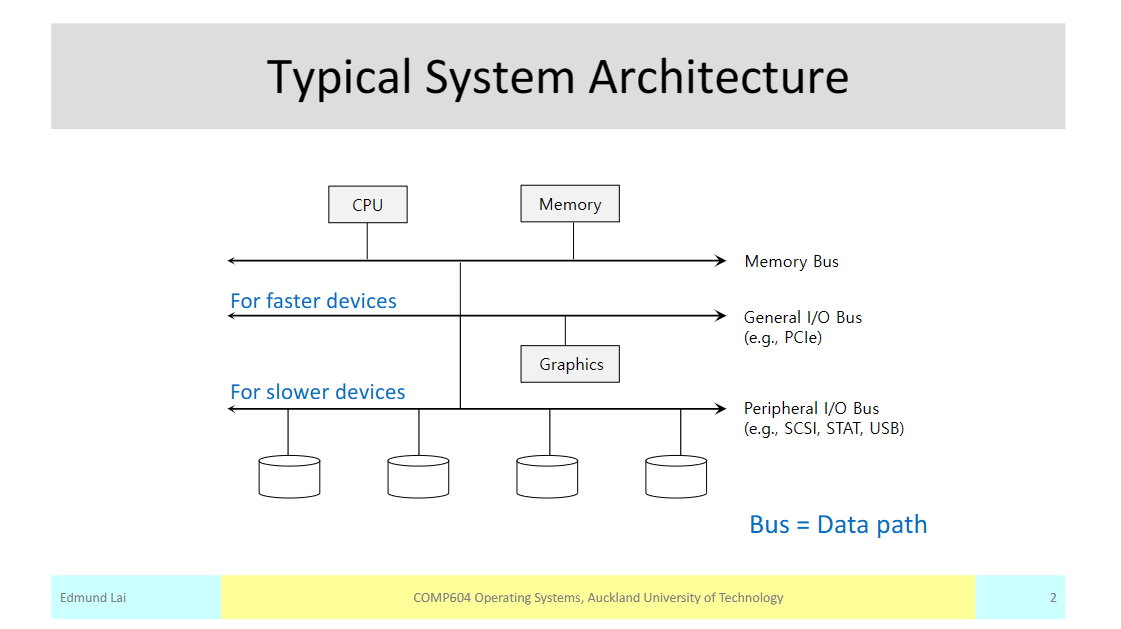
The Typical System Architecture diagram is like a map that shows how different parts of a computer system work together. It helps us understand how information flows and how different components communicate with each other.
At the center of the diagram, we have the main computer or server. It's like the brain of the system, where all the important calculations and processing happen. The server stores and manages data, like files and databases.
Next, we have the clients, which are like the users' devices, such as computers, tablets, or smartphones. They connect to the server to send requests for information or to access certain services.
In between the server and the clients, we have the network. It's like the road that connects all the devices together. The network allows the clients to communicate with the server and exchange data.
On the server side, we have different components that help it perform specific tasks. For example, we might have a web server that handles requests for websites, or a database server that stores and retrieves data.
We also have other important components, like firewalls and load balancers. Firewalls protect the system from unauthorized access and keep it secure. Load balancers help distribute the incoming requests evenly across multiple servers, so that no single server gets overwhelmed.
Overall, the Typical System Architecture diagram shows us how all these different parts work together to create a functioning computer system. It's like a big puzzle, where each piece has its own role to play in making everything work smoothly.