CH 06: Memory and Data Storage
File Formats
Musical Instrument Digital Interface (MIDI)
- associated with the storage of music files
- communications protocol that allows interaction between electronic musical instruments
- does not contain any sounds
- uses 8-bit serial transmission
- operates on 16 different channels numbered 0 to 15
- Examples of MIDI commands:
- note on/off: indicates a key has been pressed/released
- Key pressure: indicates how hard the keys have been pressed
- Pitch Byte: tells MIDI device which note to play
- Velocity Byte: tells device how loud to play the note
- MIDI files saved in the computer has file extension .mid
- Sequencer Software: interprets raw .mid files
- MIDI files are considerably smaller than MP3 files
MPEG-3 (MP3) and MPEG-4 (MP4)
MPEG-3 (MP3)
- uses audio compression to convert music and other sounds to an MP3 file format
- reduces size by about 90%
- used in devices such as MP3 players, computers, and mobile phones
- File Compression: software used to covert CD files
- less but satisfactory quality than CD files
- Perceptual Music Shaping: removes sounds that the human ear can’t hear properly
- MP3 files are known as Lossy Format: part of the original file is lost after compression
- Bit Rate: number of bits per second used when creating files
MPEG-4 (MP4)
- allows the storage of multimedia files rather than just sound
- music, videos, photos, and animations can be stored in MP4 format
Joint Photographic Experts Group (JPEG)
- another form of lossy format due to compression
- reduces photo file size by reducing Picture Resolution: number of pixels per centimeter
- reduces raw bitmap image by a factor of 5 to 15
- Raw Bitmap can be a TIFF or BMP image (.TIF or .BMP)
- TIFF and BMP files have the highest quality
Text and Numbers
- usually stored in an ASCII format. In spreadsheets, numbers can be stored in different formats:
- real (1,2,3,4)
- integer (3)
- date (12/08/2016)
- time (19:34:54)
- currency ($56.65)
- number files tends to be lossless under file compression
- When using ASCII format to store text on file then the table below is used to store each of the characters:
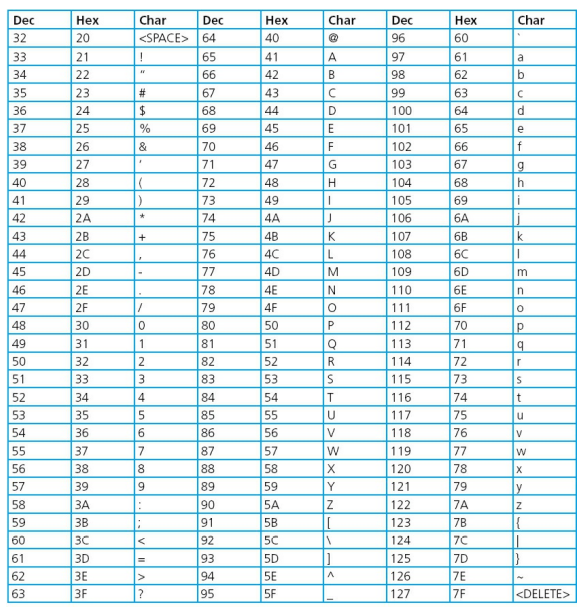
- The word “computer” can be stored as:
“67 79 77 80 85 84 69 82” or
“%43 %4F %4D %50 %55 %54 %45 %52”
- To compress text files, repeated sections of words are put into a data dictionary to be substituted into a single bit of data
- For example the sentence:
“THIS SECTION SHOWS YOU HOW THIS WOULD WORK” * “THIS” will be replaced by “1” * “HOW” will be replaced by “2” * “OU” will be replaced by “3”
- The compressed text will now be:
“1 SECTION S2S Y3 2 1 W3LD WORK”
- once decompressed, the replaced sections of words will be converted back to its original form hence lossless compression
Lossless and Lossy File Compression
Lossless File Compression
- all the data bits from the original file are reconstructed when file is uncompressed
- important for files where loss of data will be disastrous like a spreadsheet file
Lossy File Compression
- file compression algorithm eliminates unnecessary bits of data as seen in MP3 and JPEG formats
- applicable for files wherein loss of data does not degrade quality
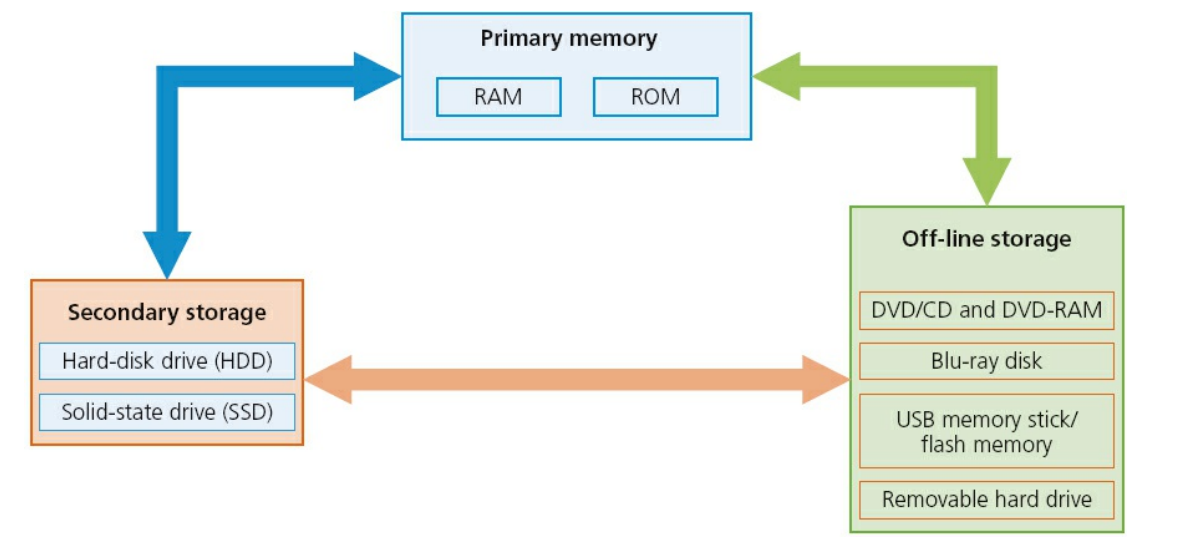
Memory and Storage
- has three distinct groups
- Primary Memory
- Secondary Storage
- Off-line storage
Primary Memory
Random Access Memory (RAM)
- volatile/temporary memory
- used to store
- data
- files
- part of operating system that are currently in use
- can be written to or read from and the contents of the memory can be changed
- the larger the size of RAM the faster the computer will operate
RAM is much faster to write and read from but it is very volatile 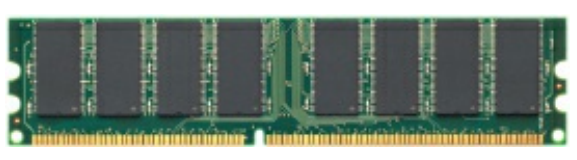
- Dynamic RAM (DRAM): consists of chips that are made up of a number of transistors and capacitors
- Capacitors: holds the bits of information (0 or 1)
- Transistors: acts like a switch; allows chip control circuitry to read or change capacitor value
- Dynamic Ram needs to be constantly refreshed (capacitors must be recharged every 15 microseconds)
- Advantages of DRAMs over SRAMs:
- less expensive to manufacture
- consume less power
- higher storage capacity
- Static Ram (SRAM)
- does not need to be constantly refreshed
- makes use of “flip flops” which hold each bit of memory
- much faster than DRAM in data accessing
- SRAM is used in the processor’s Memory Cache where most program instructions are stored
Read Only Memory (ROM)
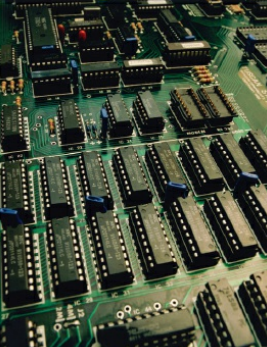
- non-volatile/permanent memories
- often used to store start-up instructions
- can only be read; cannot be rewritten
- Example application and comparison of ROM and RAM in remote-controlled toy car:
| ROM | RAM |
|---|---|
| stores factory settings such as remote control frequencies | program custom routines |
| stores ‘start up’ routines for car start up | store data/instructions received from the remote control |
| stores set routines; left turn, acceleration, stopping, and so on |
Secondary Storage
Hard Disk Drives (HDD)
- most common method to store data on a computer
- digital data is stored on the magnetic surfaces of the disks or platters
- spins at about 7000 times a second
- each platter has two surfaces which can be used to store data
- Data is stored on the surface in sectors and tracks
- a sector on a given track will contain a fixed number of bytes
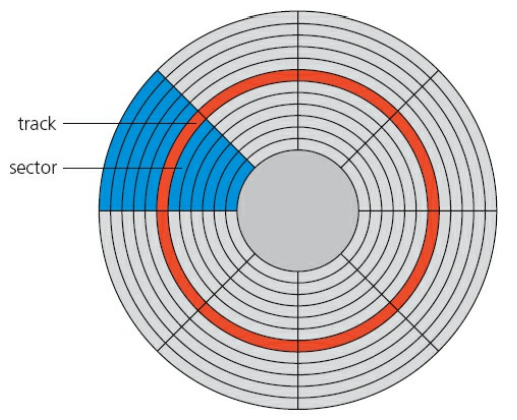
- HDDs have slower data access compared to RAM. Constant read-write movement will cause an increase of latency
- Latency: time it takes for a specific block of data on a data track to rotate around to the read-write head
- extreme effects of latency can have messages pop up such as “please wait” or “not responding”
Solid-State Drives (SSD)
- has no moving parts; does not rely on magnetic properties
- data is received at the same rate
- works by controlling the movement of electrons within NAND chips producing non-volatile rewritable memory
- Electronically Erasable Programmable Read-Only Memory (EEPROM)
- more expensive than NAND technology
- allows data to be read or erased
- more useful in certain applications where data needs to be accessed or erased in byte-sized chunks
- Advantages of SSD over HDD:
- more reliable
- considerably lighter
- don’t have initial “warm up” stage
- lower power consumption
- very thin form factor
- faster data access
- Main drawback of SSDs is the longevity of the technology (Most rated for only 3 years of read-write)
Off-line Storage
CD/DVD Disks
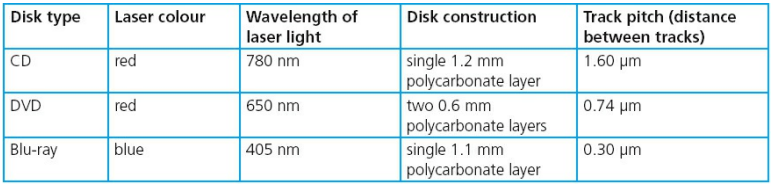
- both CDs and DVDs are described as Optical Storage Devices which use laser light to read and write data on the surface of disks
- both use a thin layer of metal alloy or light-sensitive organic dye to store data
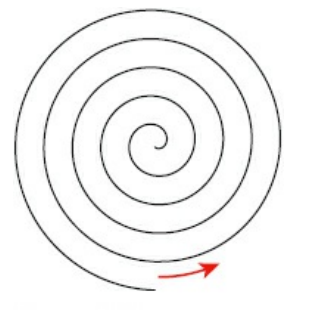
- both use a single, spiral track that runs from the center of the disk to the edge
- DVD technology uses dual-layering: increases the storage capacity by joining together two layers of standard DVD with a transparent spacer (polycarbonate), and a very thin reflector
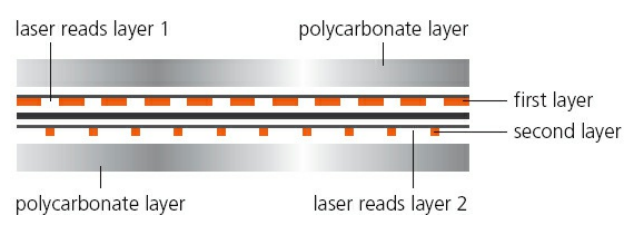
- DVDs use lasers with a wavelength of 650 nanometers; CDs use lasers with a wavelength of 780 nanometers
- The shorter the wavelength, the greater the storage capacity
DVD-RAM
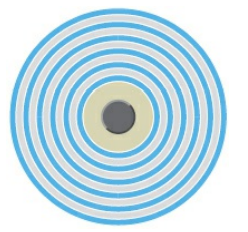
- uses a number of concentric tracks
- concentric tracks allow simultaneous read and write operations to take place
- have greater longevity (30 years); ideal for archiving
Blu-ray Disks
- uses blue laser instead of red; blue laser has a wavelength of 405 nanometers
- can store up to five times more than normal DVD
- uses a single 1.1 mm polycarbonate disk
- Birefringence: light is refracted into two separate beams causing reading errors
- since Blu-rays only uses one layer, it does not suffer from Birefringence
- automatically come with a secure encryption system which helps prevent piracy and copyright infringement
Differences between CDs, DVDs, and Blu-ray
- DVDs:
- mostly used in movies and games
- used in supplying software
- back-up systems for photos, music, and multimedia files)
- CDs:
- used in supplying software
- back-up systems for photos, music, and multimedia files)
- Blu-rays:
- mostly used in movies and games
Future of Optical Media
USB Flash Memories
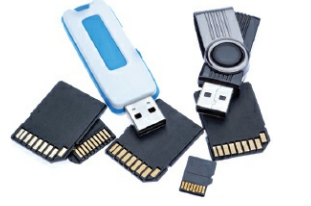
- uses solid-state technology
- usually connects to a computer through USB port
- small, lightweight devices; suitable for file transfers between computers
- can be used as a small back up device for multimedia files
eXtreme Digital (XD) or Secure Digital (SD) Cards
- allow photos to be transferred from the camera to computer via USB port
- made up of NAND chips
Removable Hard Disk Drives
- essentially HDD but can be connected externally to a computer using one of the USB ports
- can be used as a back up device with huge storage capacity