module 1
Historical Foundations and Hardware Concepts
Evolution of Computing Systems:
The progression of modern computing spans several pivotal milestones:
Census Tabulating Machine
Silicon Transistor
Integrated Circuit (Microchip)
Personal Computers
World Wide Web
Smartphones
Desktop Computer Architecture:
A desktop computer is a computer system designed to fit on a desk, typically consisting of a system tower, monitor, keyboard, and mouse.
Unlike laptops or mobile computing devices, desktop computers are built to remain stationary in one place.
Semiconductor Components:
Transistor: A semiconductor computer component featuring three electrical connections, serving as the foundational building block for digital logic circuits.
Microchip: A small piece of semiconducting material holding the integrated circuit components.
Digital Data Representation and Binary Systems:
Binary: A counting system that uses only two digits: zero () and one (). Computers use binary to encode data; data encoded in this manner is designated as digital data.
Bit: A single or within a digital signal.
Byte: A grouping of \,bits.
Kilobyte (KB): Consists of \,bytes.
Megabyte (MB): Consists of \,kilobytes.
Analog vs. Digital Systems:
Analog: A method of recording data that directly represents or reproduces real-world physical phenomena (for example, a sound wave mechanically recorded onto a vinyl disc).
Digital: A method of representing data as a discrete string of \text{s} and \text{s}.
Display Technology and RGB Color Architecture:
RGB Display: A computer or television monitor constructed from tiny red, green, and blue lights. Together, one light of each color forms a single pixel.
Image Formatting: Digital graphics are categorized into raster (pixel-based) and vector (mathematically calculated path-based) graphics. Pixel color values are dictated by specific RGB combinations.
File Compression and Algorithmic Encoding:
File Compression: A process used to reduce the overall size of a digital file.
Run-Length Encoding: A simple compression algorithm that reduces file size by identifying and condensing repeated data sequences.
Technology Ethics:
Ethics: Personal behaviors and moral principles that foster responsibility, integrity, and trust in technical practices.
The Internet, World Wide Web, and Cloud Infrastructure
Internet Infrastructure vs. World Wide Web:
Internet: A global infrastructure of interconnected computer networks that links users and devices globally, enabling communication and collaboration.
World Wide Web (WWW): An information system operating over the Internet where documents can be shared and viewed using a web browser.
Global Web Scale and Metrics:
The World Wide Web contains close to () websites.
Over new websites are created every day.
Over () web pages have been indexed by Google.
Web Navigation and Browsing Engines:
URL (Uniform Resource Locator): A standardized address used to specify a unique resource location on the Internet.
Web Browser: A software program that processes HTML web pages so users can view and interact with websites.
Popular Web Browsers:
Microsoft Internet Explorer
Microsoft Edge
Google Chrome
Mozilla Firefox
Apple Safari
Cloud Computing and Web Applications:
Cloud Computing: The delivery of computing services—including server hardware and software applications—over remote networks to store and process data.
Web Applications: Web-based applications operating directly inside browsers, including Webmail suites (such as Gmail), calendar applications (such as Google Calendar), cloud productivity suites (such as Google Docs), video hosting (YouTube), and social networks.
Digital Streaming Paradigms:
Streaming: Transmitting or receiving digital video or audio as a continuous stream, enabling real-time playback while remaining data downloads.
Live Streaming: Continuous real-time media transmission as events unfold.
On-Demand Streaming: Media delivered on request from stored archives, permitting playback control (pause, rewind, fast-forward).
The Internet of Things (IoT):
Internet of Things (IoT): The network of physical everyday objects embedded with sensors, processing software, and Wi-Fi or cellular connectivity.
Examples include connected smartphones, coffee makers, smart lamps, and motor vehicles.
Modern Digital Communication and Netiquette
Digital Communication Modalities:
Email: Electronic messages sent from one computer user to one or more recipients.
Attachment: A digital file transmitted alongside an email message.
Instant Messaging (Chat): A real-time service where typed messages are immediately delivered to active recipients.
Forum: A website where users participate in discussions by posting messages. Conversations are grouped into top-level posts, with discussions occurring as threaded replies.
SMS (Short Message Service): The standard protocol for mobile texting, transmitted over cellular networks rather than Internet protocols.
Video Call: Interactive audio-visual communication routed over Internet connections utilizing Voice over Internet Protocol (VoIP).
Email Application Interfaces:
Webmail Applications: Browser-hosted email services accessible from any web client (such as Gmail).
Desktop Email Clients: Fully featured software installed directly onto local desktop or laptop computers (such as Microsoft Outlook).
Mobile Hardware and Operating Systems:
Touch Screen: A display capable of detecting and processing user input via direct physical touch.
Mobile OS: Operating systems designed for touch-centric mobile devices (primarily Android and iOS).
Mobile App: A program engineered to operate on mobile platforms, distributed via application stores.
SIM Card (Subscriber Identity Module): A microchip that assigns a unique customer ID, telephone number, and authentication keys to a mobile device.
Online Conduct and Netiquette:
Netiquette: Rules and norms governing polite, safe, and effective communication online.
Troll: An individual who intentionally posts inflammatory content online to disrupt discussions, provoke arguments, and cause distress.
Cyberbullying: Using Internet communication tools to deliberately harass, intimidate, or threaten others.
Information Evaluation, Source Categorization, and Intellectual Property
Search Engines and Academic Research Databases:
Search Engine: A program that indexes and searches the World Wide Web for user-specified query terms.
Popular Search Engines:
Google (Default search engine for Chrome)
Bing (Default search engine for Microsoft browsers)
Yahoo
AOL
Ask (Formerly known as Ask Jeeves)
Baidu (Dominant search engine in China)
DuckDuckGo (Privacy-centric search engine)
Top Research Databases:
ProQuest Research library
PsycINFO
Web of Science
PubMed
JSTOR
Academic Search
Google Scholar
ScienceDirect
Classification of Information Sources:
Primary Source: Provides direct, firsthand evidence or accounts of events or topics. Examples include original speeches, letters, poems, legal statutes, scientific fieldwork data, and original artwork.
Secondary Source: Books or articles that analyze, critique, review, or synthesize primary sources.
Tertiary Source: Materials that compile, index, or summarize primary and secondary sources. Examples include encyclopedias, bibliographies, indexes, and directory databases.
Academic Source: A book or journal article authored by credentialed experts in a specific field, subject to formal peer review and validation by scholar experts.
Intellectual Property and Copyright Protections:
Intellectual Property: Creative works and intangible assets owned by a copyright holder (such as books, paintings, songs, poems, and films).
Copyright: Federal legal protection granted to creators, writers, and inventors. Encompasses exclusive rights to reproduce, display, create derivative works, sell, rent, or lease a work.
Piracy: Unauthorized distribution, copying, or usage of copyrighted intellectual property (for example, downloading movie files without payment, making photocopies of books, or selling unauthorized CD copies).
Public Domain: Works whose legal copyrights have expired. Public domain assets are free for anyone to copy, display, distribute, or adapt.
Fair Use: A legal doctrine providing exceptions to copyright law, permitting limited usage of copyrighted material without permission for public-benefit purposes such as criticism, news reporting, teaching, scholarship, and research.
Software Licensing Models:
Proprietary Software: Software where the publisher retains intellectual property rights and restricts access to the source code.
Open-source Software: Software distributed under licenses permitting anyone to inspect, modify, enhance, and redistribute the source code.
Cybersecurity Threats, Defensive Systems, and Privacy Controls
High-Profile Historical Cyber Attacks:
Equifax: Attackers breached databases and compromised Social Security numbers, birth dates, physical addresses, and credit card data for nearly () consumers.
Target: Intruders compromised payment data for () customer credit and debit cards, as well as () phone numbers and physical addresses.
Home Depot: Data breach exposed () credit cards and () email addresses.
J.P. Morgan Chase: Compromised contact records (phone numbers and email addresses) belonging to () households and () small business accounts.
Social Engineering Attack Framework:
Social Engineering: Psychological manipulation and deception techniques used by threat actors to dupe individuals into divulging confidential information, bypassing security protocols, or granting access to protected systems.
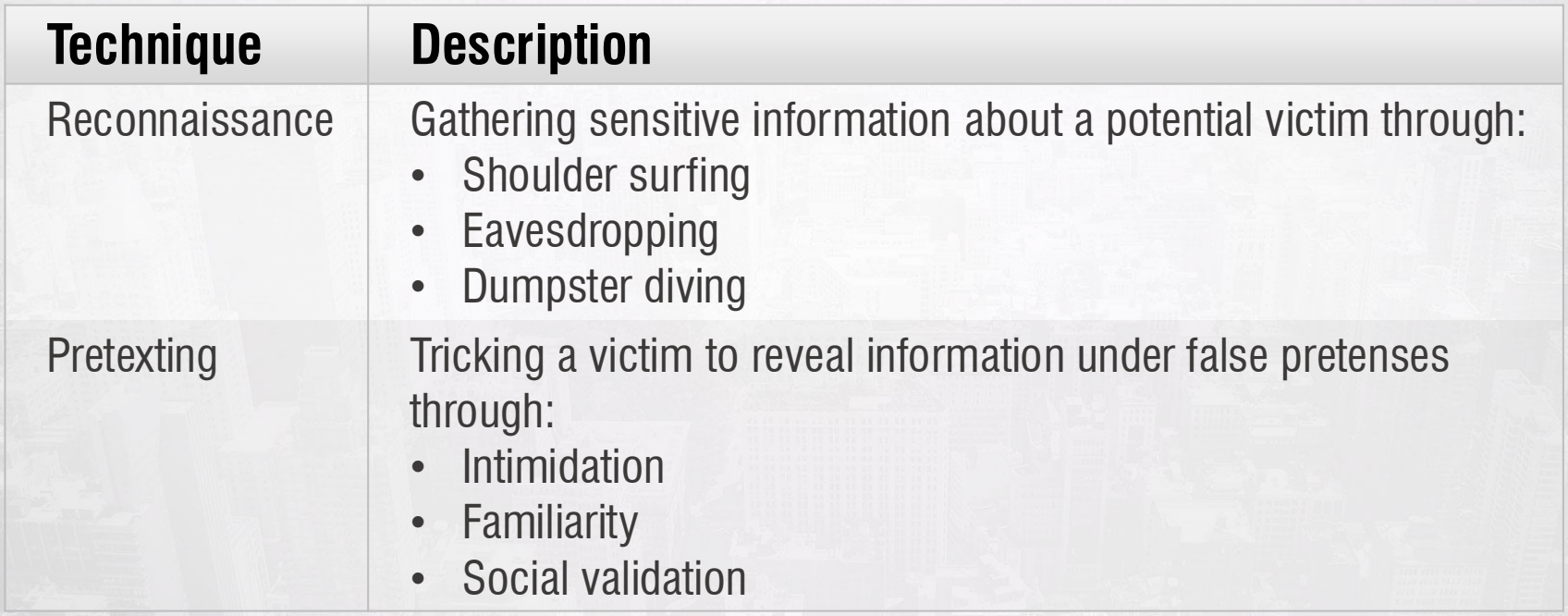
Reconnaissance Techniques:
Shoulder surfing
Eavesdropping
Dumpster diving
Pretexting Techniques:
Intimidation
Familiarity
Social validation
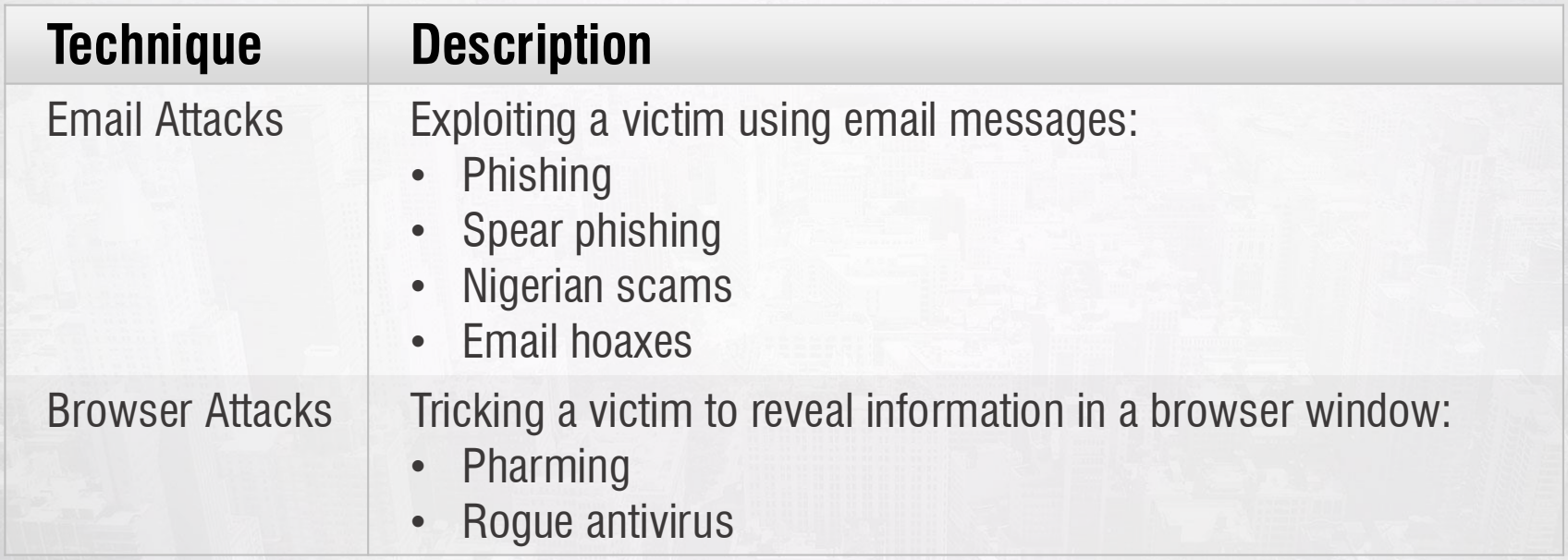
Email-Based Exploits:
Phishing
Spear phishing
Nigerian scams
Email hoaxes
Browser-Based Exploits:
Pharming
Rogue antivirus software
Technical Security Controls:
Firewall: Software or hardware security devices configured to inspect, filter, and control incoming and outgoing network communications based on established security rules.
Anti-malware Software: Defensive software suites engineered to scan, identify, quarantine, and eliminate malicious code designed to breach computer systems.
Encryption: Mathematical transformation of plain text into unreadable ciphertext to prevent unauthorized access.
Authentication: Security mechanisms designed to verify user identity credentials before granting network access.
HTTPS (Hypertext Transfer Protocol Secure): Encrypted web protocol that combines HTTP with Secure Sockets Layer (SSL) or Transport Layer Security (TLS) algorithms to protect web data transmissions, unlike standard HTTP which transmits data in plain text.
Browser Privacy and Cache Management:
Web Browser Cache: A temporary local storage repository recording visited websites and caching static site elements (graphics, scripts) to optimize subsequent load times.
Cookies: Small data text files sent by websites and stored on local browsers to maintain user session persistence, preference tracking, and browsing history.
Pop-up Blocker: Software controls integrated into web browsers to suppress pop-up advertisements.
Questions, Discussion, and Critical Thinking Activities
Online Influence and Economic Incentives:
Analysis: Online content is crafted to shape public opinion through targeted advertising, algorithmic feeds, and partisan bias.
Incentive Structure: Commercial platforms and content providers gain financial revenue via ad impressions, data harvesting, and user engagement metrics.
Data Privacy Policies and Search Engine Tracking:
Search engines collect search queries, IP addresses, location data, device details, and cookie identifier tags.
Policies governing corporate data tracking are detailed directly by providers:
Google Data Transparency:
https://privacy.google.com/your-data.htmlMicrosoft Privacy Statement:
https://privacy.microsoft.com/en-us/privacystatement
Evaluating Online Misinformation:
Verification Methodology: Verify controversial internet claims by checking cited sources, auditing domain URLs for spoofing, searching authoritative databases, and corroborating facts against peer-reviewed academic literature.
Navigating Online Ethics and Cyberbullying:
Personal Strategy: Maintain robust privacy controls, decline engagement with trolls, document digital evidence of harassment, and utilize platform reporting tools and support networks.