Comp Hardware Review (Final)
ESD Strap: an antistatic device used to safely ground a person working on very sensitive electronic equipment.
Tower Case: A tower case is a case that sits upright (i,e: Lenovo Thinkcentre).
Desktop Case: A desktop case is a case that sits sideways on your desk, usually with a monitor on top of it.
Chassis: Also known as a computer case, holds and protects all the components.
Loopback Plug: A hardware component engineered to assess and resolve issues in network interfaces by emulating a network connection without directly linking to external apparatus.
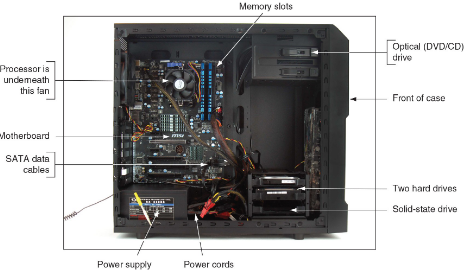
Inside a Computer Case:
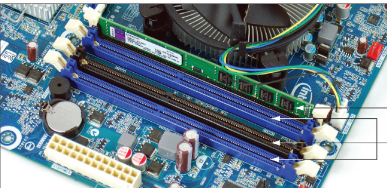
Ram DIMM: Holds ram and is mounted directly on the motherboard.
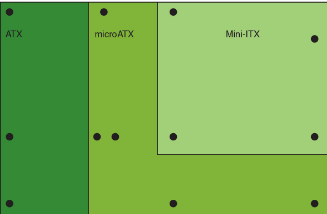
Form Factors: The motherboard size, can be either Micro-ATX, Extended-ATX, ATX, or MINI-ATX
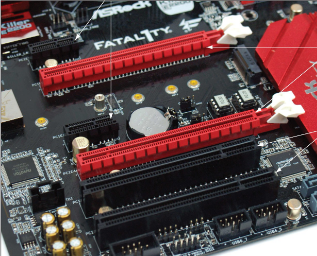
PCI Express (PCIe) Slot: Allows your motherboard to connect with your PC’s most critical components and provide key functionality. Examples include Graphics Card, Network Card
Micro ATX: A motherboard that reduces the total cost of the system by allowing for a smaller case size, reducing the number of expansion slots and reduces the power supplied to the board.
ATX: Standard Motherboard type that most computers use.
Mini ATX: Smallest motherboard type that you can get, allows smaller cases, reduced power, and reduced expansion slots. Usually found on Mini-PC’s.
Post Diagnostic Cards (PDC): Help Discover and report computer errors and conflicts at POST.
Firmware: Programs and data stored on the motherboard.
Power-on self test (POST): A series of tests performed by the startup BIOS/UEFI
ZIF connector: A type of socket or electrical connector that requires very little force for insertion.
Chipset: set of chips on the motherboard that work closely with the processor to control memory, buses, and some peripherals.
Socket: is rectangular with pins or pads to connect the processor to the motherboard. There are two types, LGA and PGA.
Land Grid Array (LGA): Has the CPU Pins on the motherboard instead of on the CPU itself. Usually used by Intel.
Pin Grid Array (PGA): Has the CPU pins on the CPU instead of the motherboard. Usually used by AMD.
SATA Cable: Modern connector for Hard Drives and some SSD’s.
PATA Cable: Also known as a ribbon cable. Used to connect a Magnetic Hard Drive.
Port: An opening in your firewall that can be passed back and forth. Example: Internet is port 80, Email is port 25.
Different Motherboard Sizes:
Traces: Are circuits or paths that enable data, instructions, timing signals, and power to move from component to component. Also known as a Bus Line
Bus: a system of pathways used for communication and the protocol and methods used for transmission.
Protocol: a set of rules and standards that any two entities use for communication.
PCIExpress Example:
Serial Advanced Technology Attachment (SATA): an interface standard used mostly by storage devices.
Serial Attached SCSI (SAS): an interface standard used mostly by storage devices and is the successor of SCSI.
M.2: is formerly known as the Next Generation Form Factor (NGFF). It uses the PCIe, USB, or SATA interface to connect a mini add-on card.
EUFI: offers a sleek and fast experience. Offers more features than the BIOS. can usually be accessed by pressing F2, F10, or F12.
Secure Boot: was invented to help prevent malware from launching before the OS and anti-malware software are launched. Supported by Windows 10 and Several Linux Distros. Can be accessed in the Security Tab of your EUFI/BIOS.
USB PowerShare: allows you to power devices like a mobile device or an MP3 player through a USB port.
Overclocking: running a processor at a speed higher than intended. Can shorten the lifespan of your processor.
Power on Password: requires a password to boot to your Operating System (OS). Also known as a System Password.
Supervisor Password: a security feature designed to prevent unauthorized access when a computer is booting.
Drive Password: Supports the anti-brute-force attack mechanism, no one can access the hard disk data without the password.
Full Disk Encryption: Protects the data on your device in the event that it is lost or stolen.
Drivers: a software component that lets the operating system and a device communicate.
Flashing your BIOS: Allows the user to update the BIOS/UEFI of a motherboard. steps are different per manufacturer.
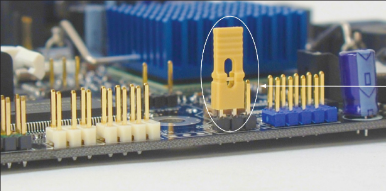
Jumper:
Lithography: The process of making a motherboard, Specifically Bus Lines.
ARM Processor: require fewer transistors, resulting in a smaller die size for the integrated circuitry. Usually used in smaller devices like smartphones, smartwatches, tablets, etc.
Thermal Compound: also known as Thermal Paste, is a substance used to improve the transfer of heat between two surfaces.
Thermal Pads: The alternative to Thermal Compound, is a solid material that is placed between the processor and heat sink.
SO-DIMM: Also known as Laptop Ram, Smaller in size, they draw higher power.
DIMM: Ram found in Desktop computers. There are 4 types, DDR SDRAM, DDR3, DDR4, DDR5
DDR: Runs twice as fast as earlier DIMMs when it was invented.
DDR3: Faster than DDR
DDR4: is faster and uses less power than DDR3 and DDR
DDR5: is faster and uses less power than DDR3 and DDR4
Single Channel: means the memory controller is accessed one DIMM at a time
Dual Channel: allows the memory controller to communicate with two DIMMs at the same time and doubles the speed of memory access. Used by DDR3, DDR4 and DDR5
Triple Channel: Can access three DIMMs at once. Only used by DDR3
Quad Channel: Can access four DIMMs at the same time. used by DDR3, DDR4, and DDR5.
ECC: is used for reliability. a DIMM that supports it will have an extra chip. it Compares bits written to the module to what is later read from the module.
CAS: is a way of measuring access timing. It refers to the number of clock cycles that it takes to write or read a column or row of data off a memory module.
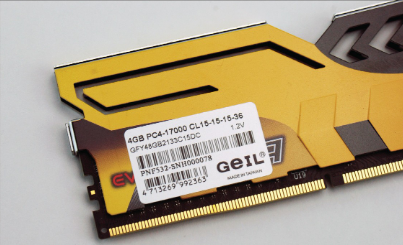
Ram DIMM label:
Cooler: Sits on top of the processor and consists of a fan and a heat sink
Heat sink: Uses fins that draw heat away from the processor.
Redundant PSU (RPS): Uses two identical Power Supply Units. it is a backup power system that is implemented to ensure uninterrupted electrical power in a case of a primary power failure.
30% Rule: Used to calculate how much power your PC will draw. Add all the power that your pc will use and multiply by 30% to get your optimal power supply.
Step 1: Interview the User and Backup data
Step 2: Establish a Theory
Step 3: Test your Theory
Step 4: Plan a Fix and Resolve the Problem
Step 5: Verify and Prevent
Step 6: Document