[Chp 4] Control Stuctures I
This chapter goes through SELECTION CONTROL STRUCTURES.
[1] Control Structures
3 Ways for a Program to Execute:
Sequence - default, from top to bottom
Selection - choose a path (if / switch) ← lesson this week
Repetition - loops
[2] Logical Expressions
A logical expression evaluates to:
true (1)
false (0)
// Example:
8 > 3
// -> true
[3] Relational Operators
These compare values:
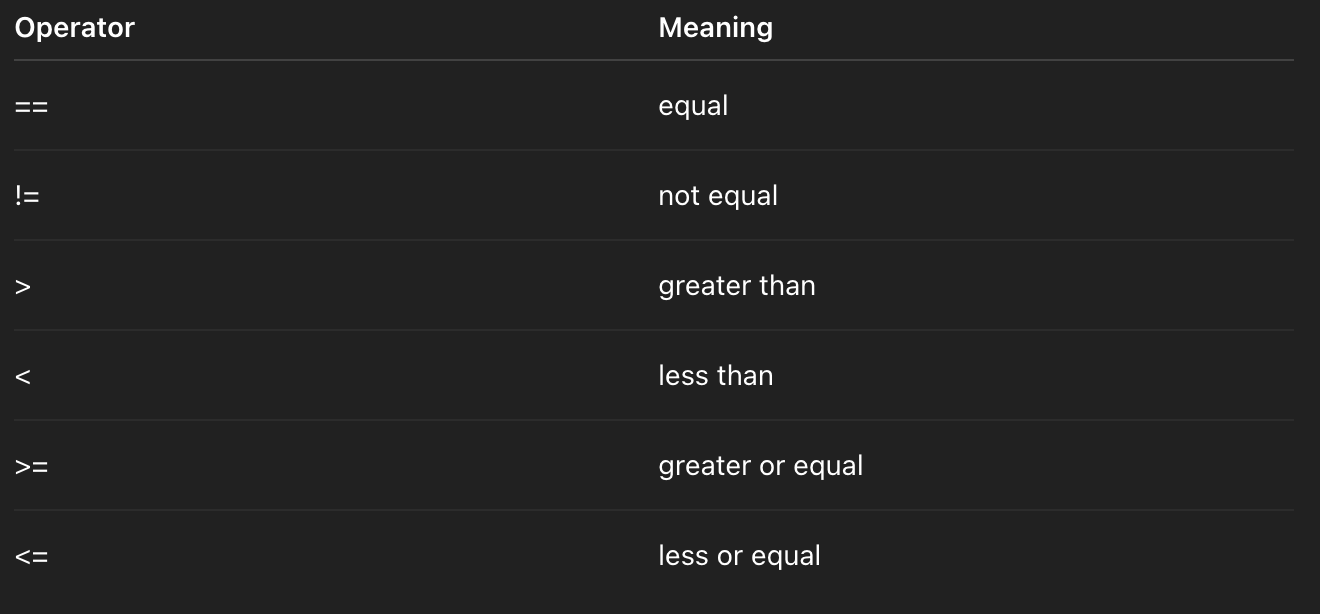
⭐️ NOTE: These two are different
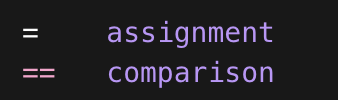
This is a common error
if (x = 5)
// This assigns 5 to x
// Evaluates true because 5 ≠ 0, so it always runs
// This is a logic error, so be attentive
[4] Comparing char
Characters are compared using ASCII values
'A' < 'B'  // true
'a' > 'A' // true⭐️ Lowercase letters have higher ASCII values
Uppercase Letters (A-Z): The ASCII values range from 65 to 90.
Ex. 'A' is 65, 'B' is 66, and so on up to 'Z' which is 90.
Lowercase Letters (a-z): The ASCII values range from 97 to 122.
Ex. 'a' is 97, 'b' is 98, and so on up to 'z' which is 122.
Case Difference: A lowercase letter's ASCII value is exactly 32 greater than its corresponding uppercase letter's value
[5] Comparing string
Strings compare character by character.
When == is used, it checks for equality and if the string is the same length
When >, < or compare() is used, string is compared using lexicographical comparison, going by character and referencing ASCII values
"apple" < "banana"
// a vs b -> a (value 97) < b (value 98) -> true
If "cat" < "caterpillar"
//Shorter string is smaller
[6] One-Way Selection (‘If’ Statements)
if (age >= 18)
    cout << "Adult";
If the condition is false → skip.
[7] Two-Way Selection
if (condition)
    statement1;
else
    statement2;
// Example
if (x > y)
    cout  << "x is bigger";
else
    cout << "y is bigger";
If condition is true, statement1 is outputted, if not, else (statement2) is outputted.
[8] Compound Statements (Blocks)
If you want multiple statements
if (age >= 18)
{
    cout << "Adult" << endl;
    cout << "Eligible to vote";
}
Without braces, only ONE statement belongs to if
[9] Dangling Else Problem
if (v1 >= v2)
   if (v1 == v2)
      cout << "equal";
else
   cout << "v2 larger";
// Based on this, you don't know whether the else belongs to the first or second if
//Answer: It belongs to the closest unmatched if

// Instead:
if (v1 >= v2)
{
    if (v1 == v2)
        cout << "equal";
}
else
    cout << "v2 larger";
That is why, ALWAYS use braces
[10] bool Data Type
bool isValid = true
// Internally
// true = 1
// false = 0
bool result = (5 > 3)
[11] Logical Operators (Boolean Operators)
AND (&&)
// Syntax
condition1 && condition2⭐️ both condtions must be true to return true, or else retruned false
OR (||)
condition1 || condtion2⭐️ at least one condition must be true, to return true
NOT (!)
!condition⭐️ reverses the truth
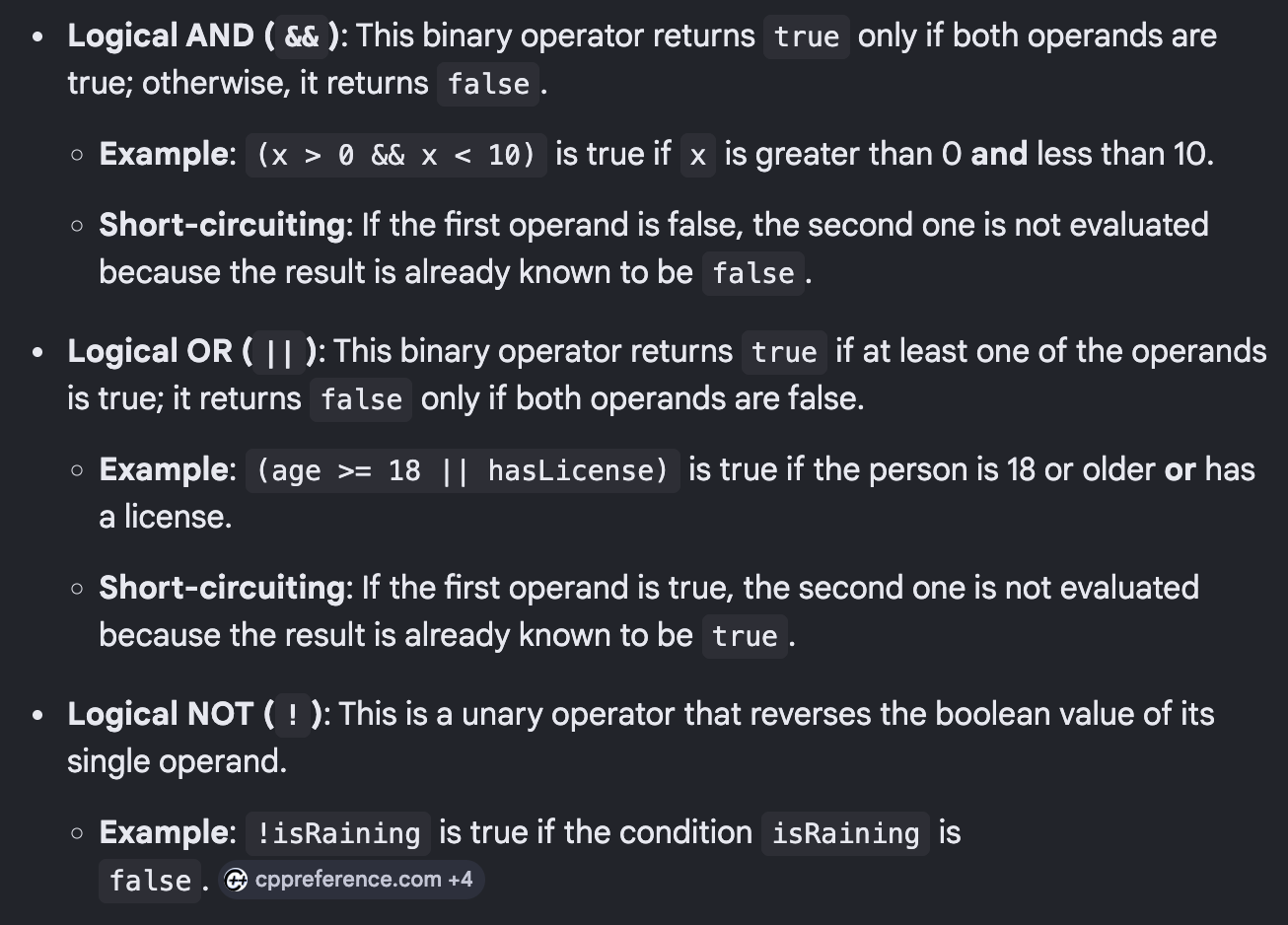
[12] Short-Circuit Evaluation
AND
expr1 && expr2If expr1 if false → expr2 is NOT evaluated
OR
expr1 || expr2If expr1 is true → expr2 is NOT evalutated
Prevents crashes like division by zero
//Example
if (x != 0 || y/x > 2)
// If x is 0
//second part is never evaluated
[13] Operator Precedence
NOT !
relational operators
AND &&
OR ||
Left to right associativity
[14] Formatting Errors
if (0 <= num <= 10)
// cpp evaluates left to right;
// 0 <= num
// returns 0 or 1
// 0/1 <= 10
// returns true because 0 or 1 is always LESS than 10

// Correct Formatting
if (num >= 0 && num <= 10)
[15] Conditional Operator (?:)
Also know as ternary operator
// Syntax
condition ? expr1 : expr2;

// Example
max = (a > b) ? a : b;
// Means:
// If a > b -> max = a
// Else -> max = b
Essentially a short, concise form of if-else statements
Are ideal for simple, one-line conditional assignments
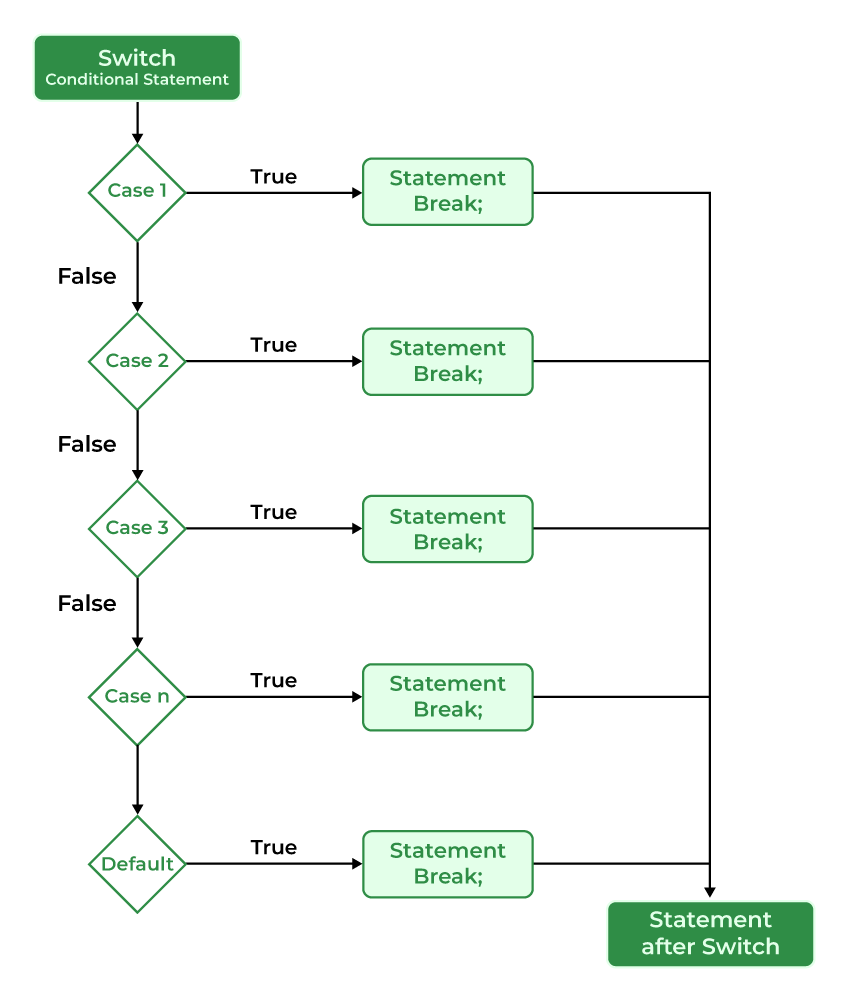
[16] switch Statement
Alternatives to if-else statements but use a a specific set of data type
switch (expression)
{
   case value1:
      statements;
      break;

   case value2:
      statements;
      break;

   default:        // Executes if no match is found
      statements;
}⭐️ Expressions MUST be:
int
char
enum
CANNOT be double, string
[17] switch Execution Rules
Expression evaluated: switch expression is evaluated once, and its result is compared to each case value
Case Matching: The program jumps to the first case cluase that matches the expression’s value
Continues until break: Used to exit the switch block immediately after a case executes
[18] Fall Through
If break is missing:
case 1:
    cout << "One";
case 2:
    cout << "Two";
// If value is 1, result is OneTwo
Fall-Through Behavior: If a
breakstatement is omitted, execution proceeds to the next case clause, even if that case does not match the expression
[19] break
Ends:
switch
loop
After break → exits out
[20] assert()
Used to stop program if condition false
include <cassert>

assert( x != 0);
If false → the program terminates
Used during debugging