1.4 - Network Security
1.4.1 - Threats to computer systems and networks
Malware = any type of harmful programs that seeks to damage or gain unauthorised access to your computer system:
Viruses:
A type of malware that is installed without your knowledge
It is a program that embeds itself in other programs, infecting them
It can then spread to other users and computers if an infected file is sent to someone else
Virus is only activated when activated by a human
Once activated a virus can change data or corrupt a system so that it stops working
Worms:
A worm is a standalone program that does not need to attach itself to an existing program in order to spread
Does not need an infected file or human interaction to spread
It may scan the internet and look for other computers to spread and it can spread very quickly across a network
Trojans:
A program which is disguises as a program that has a legitimate purpose but actually has another
Normally spread by email
The user is invited to click on a link which then executes a program (e.g. giving unauthorized access to that computer)
A trojan secretly gives the attacker backdoor access to the system
Trojans do not self replicate or infect other files
Spyware:
Secretly records the activities of a user on a computer
Main aim is to record usernames, passwords and credit card info
All recorded info is passed back to the attacker to use
Keylogger:
Recordes the key presses of a user on a computer
Data is stored or sent back to the attacker
Main aim is to record usernames, passwords and credit card info
Keyloggers can be downloaded or plugged into the USB port
Ransomware:
Locks files on a computer system using encryption so that a user can no longer access them
The attacker demands money from the victim to decrypt the data
Social engineering:
Means tricking or persuading someone to reveal their confidential and personal information (e.g. passwords)
Phishing:
Phishing emails are designed to steal money get login details or steal an identity
A phishing email will invite you to press on a link - the criminal will then ask you to insert some personal details so you can get a reward
Human error:
People are often the weakest point in security systems and criminals have engineered methods to take advantage
For example, users choose easy to guess passwords or send and receive personal emails which many contain viruses
Brute-force attacks:
Every possible combination of a password is tested in order from start to finish
This is not a quick method but can break the password eventually
This process can be sped up if multiple computer systems are used at the same time
Used to access a system to modify or take data
Denial of service attacks (DoS):
When a computer (or many computers) repeatedly sends requests to a server to overload the system
A server overload will slow the system and may make some websites offline temporarily
Could be used for reputation damage and financial losses owner as the website server fails at a specific point
Data interception and theft:
When data packets on a network are intercepted by a third party and copied to a diff location that the intended destination
Done using a software called a packet sniffer which intercepts and analyses data packets
SQL (Structured Query Language) injection:
A programing language used for manipulating data in a database
Is when a malicious SQL query is entered into a data input box on a website
If the website is insecure then the SQL query can trick the website into giving unauthorised access to the website’s database
So this can be used to view and edit the contents of a database or even gain administrator privileges
1.4.2 Identifying and preventing vulnerabilities
Penetration testing:
Penetration tests are carried out as a part of ethical hacking
Purpose is to review the system’s security to find any risks or weaknesses and to fix them
Anti-malware software:
Used to locate and delete malware on a computer system
The software scans each file on the computer and compares it with a database of known malware
Files with similar features to malware in the database are identified and deleted
Must be updated regularly to keep systems secure as new forms of malware are created each day
Other roles:
Checking all emails and their attachments
Checking files as they are downloaded
Scanning the hard drive for viruses and deleting them
Firewalls:
Manages incoming and outgoing network traffic
Each data packet is processed t check where it should be given access to the network by examining the source and destination address
Unexpected data packets will not be accepted to the network
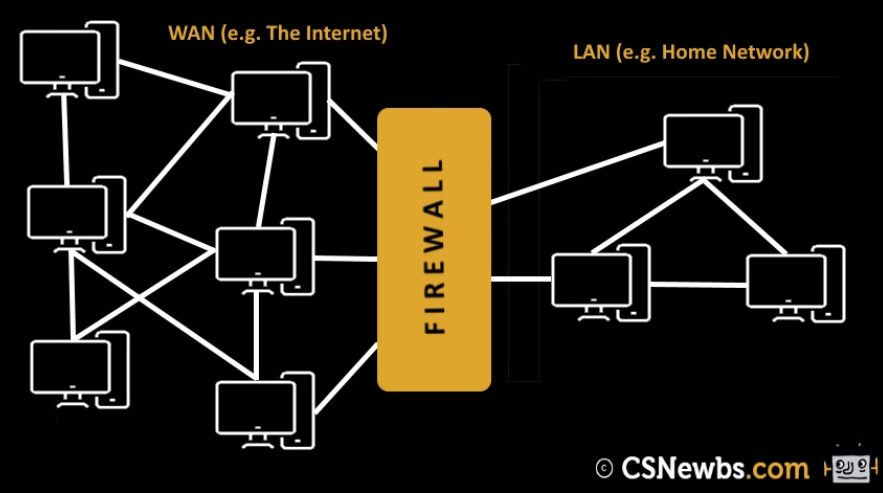
Other roles include:
Blocking access to insecure websites
Blocking certain programs from accessing the internet
Blocking unexpected / unauthorised downloads
User access levels:
Are used to only allow certain users to access and edit particular files
It is important as only authorised users can view and change data
Passwords:
Users must use secure passwords to minimize the chances of unauthorised users accessing a system
Passwords should contain a mix of uppercase and lowercase letters, punctuation and numbers
Passwords should be fairly long and should be regularly changed
Encryption:
Learnt ts before
Physical security:
A lock can be used to prevent access to server rooms or locations that store confidential data
Only authorised personnel will have access
Biometric devices require the input of a human characteristic
The biometric data is checked against the previously inputted data in a database
Only a match will allow access to the user
Other forms of physical security include keycards, security staff, CCTV cameras and alarms