Multithreading, Multiprocessing, and IPC
 Studied by 0 people
 Call Kai
 Learn
Learn Practice Test
 Spaced Repetition
 Match
Match Flashcards
 Knowt Play
1/22

There's no tags or description
Looks like no tags are added yet.
Name | Mastery | Learn | Test | Matching | Spaced |
|---|
No study sessions yet.
23 Terms
Pass-by-value vs Pass-by-reference
Pass-by-value: the function gets a copy → changes don't affect the original
int addFIve(int x);
Pass-by-reference: the function gets the original → changes affect the original
int scanf(const char *format,…)void add_five(int *x);
Process in RAM
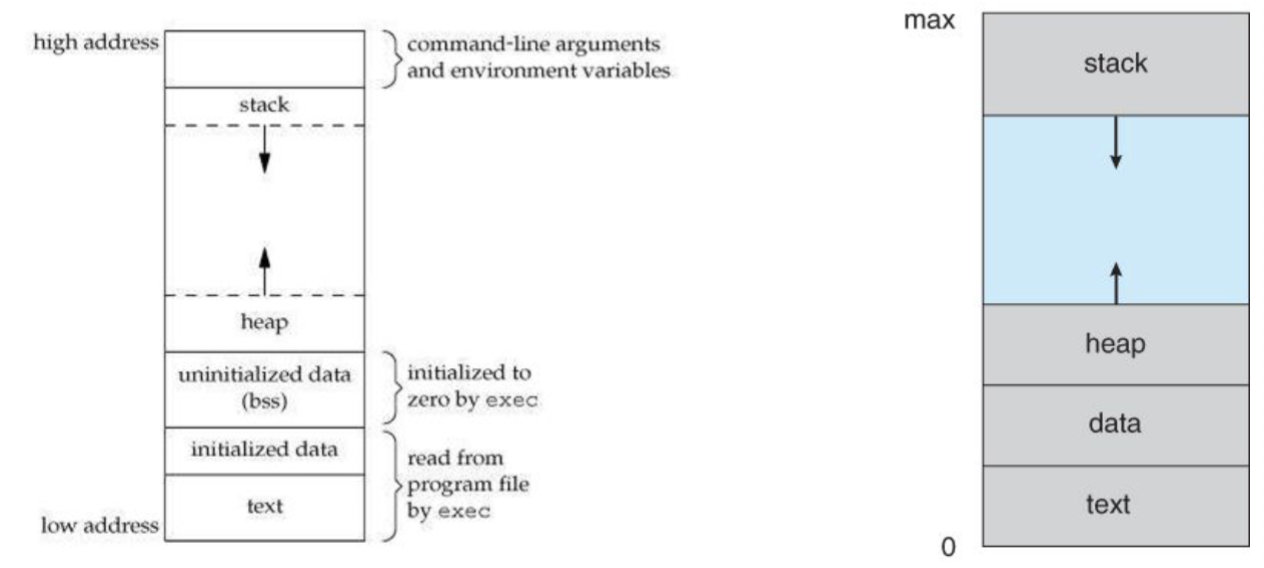
Process States
NEW - the process is in the stage of being created
READY - the process has all the resources available that it needs to run (but CPU is not currently working on this process’s instructions)
RUNNING - CPU is working on this process’s instructions
WAITING - the process cannot run at the moment, it is waiting for some resource to become available or for some event to occur
ex. process may be waiting for keyboard input, disk access request, inter-process messages, a timer to go off, or a child process to finish
TERMINATED - process has completed
POSIX Threads Library <pthread.h>
allows spawning of new concurrent process flow
most effective on multi-processor/multi-core systems where the process flow can be scheduled to run on another processor
thus gaining speed through parallel/distributed processing
must include -lpthread to your gcc arguments
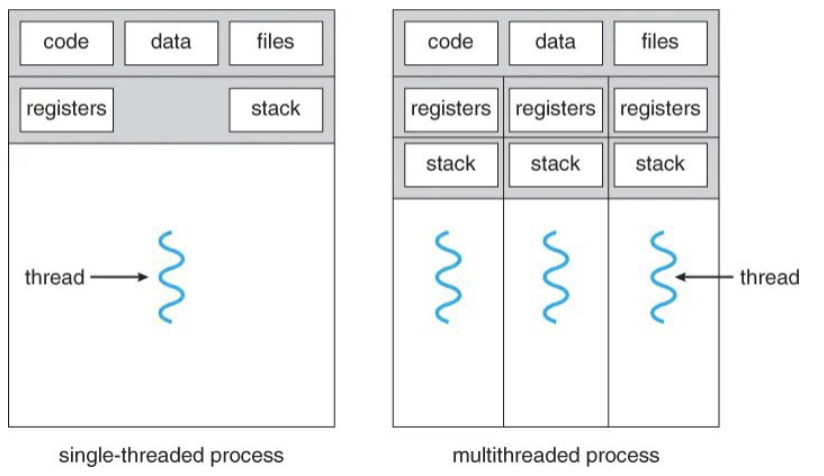
each thread has a unique…
Thread ID
set of registers, stack pointer
stack for local variables, return addresses
signal mask
priority
return value: errno
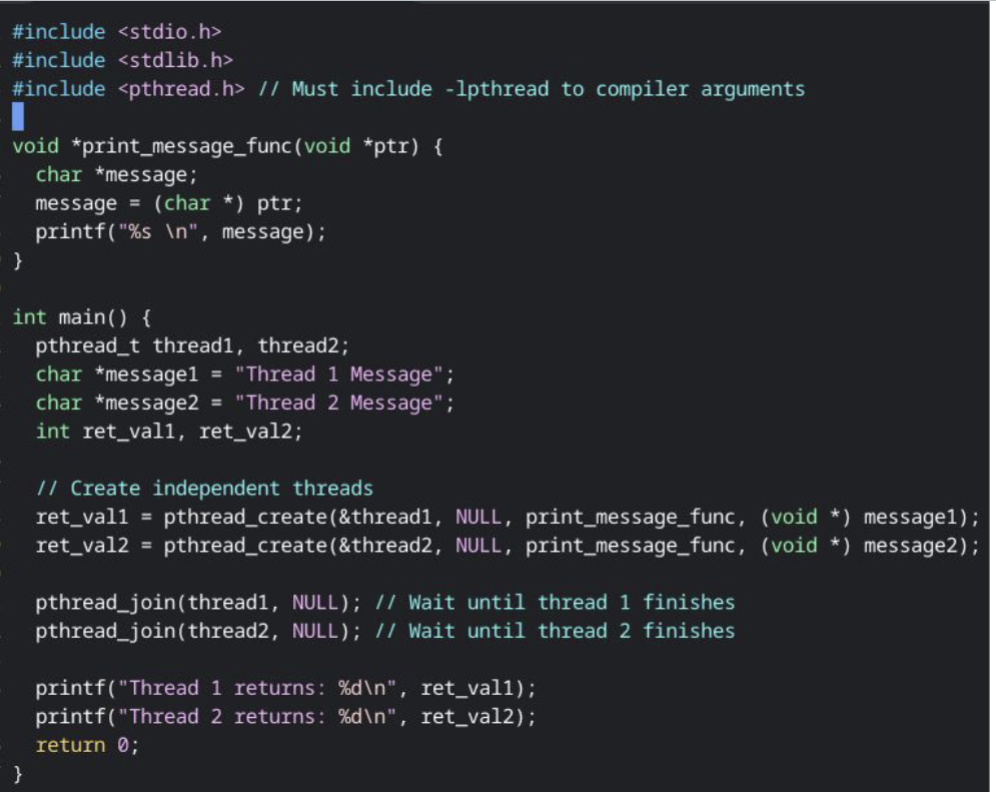
important functions
int pthread_create(pthread_t * thread, const pthread_attr_t * attr, void * (start_routine)(void *), void *arg);
thread - returns the thread id
attr - set to NULL if default thread attributes are used (else define yourself)
function - pointer to the function to be threaded
arg - pointer to the argument for the function, to pass multiple arguments, send a pointer to a structure
In-class exercise: Passing a struct into a thread
$ cp /user/cmlucero/threads/struct_thread.c ~/struct_thread.c
In the print_student function, cast the void pointer to a Student struct and print the contents
In the main function, use pthread_create for both Student structs
Remember to pthread_join
NOTE: There are no return values being used for this example
Mutexes in Threads
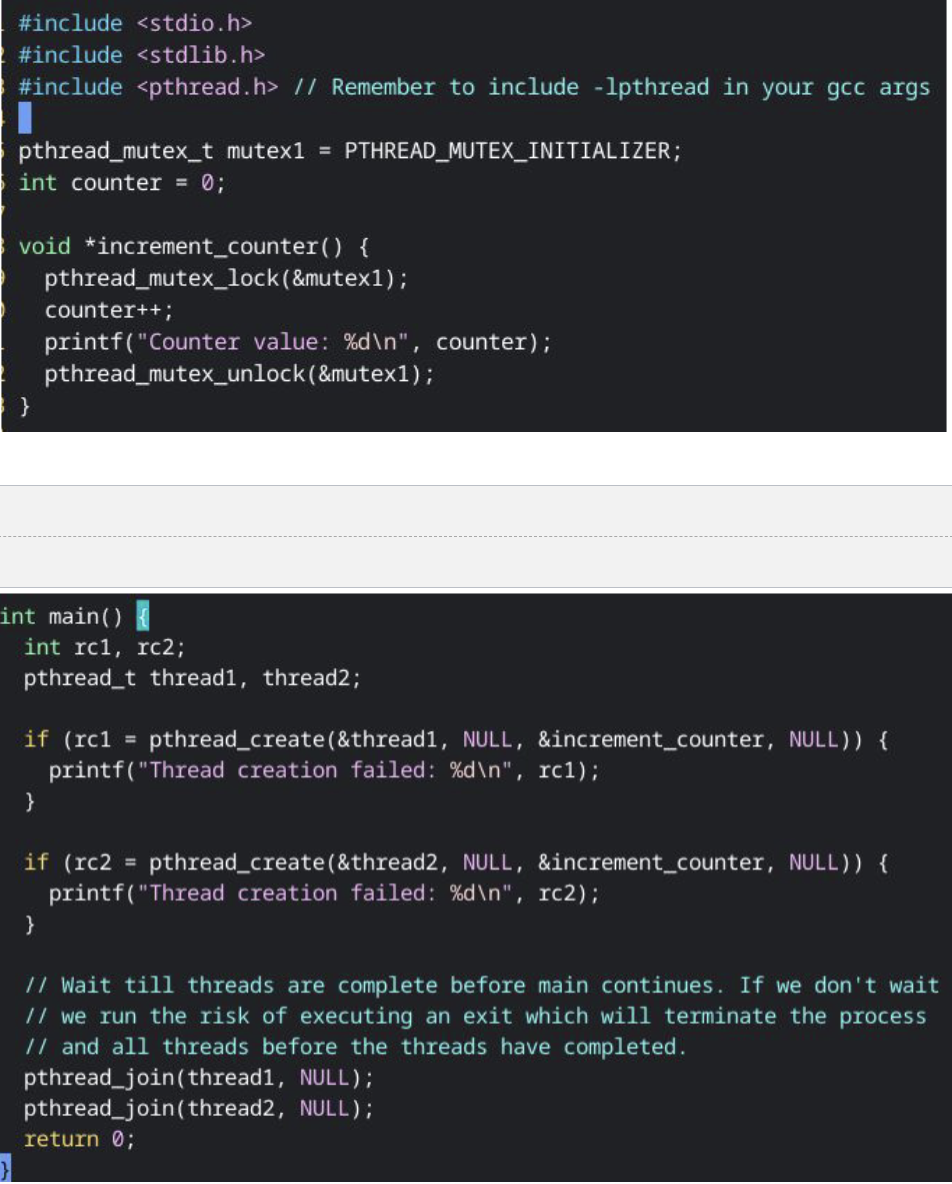
Parrallel Threading
$ cp /user/cmlucero/threads/parallel.c ~/parallel.c
- First find the average in a single-threaded approach by filling in the
calculate_average_single_thread() function.
- For the multithreaded approach, the thread function you should use is
calculate_average()
- Pass in the Range struct to that function to determine which part of the array
you’ll be solving.
multithreading vs multiprocess
fork()
the creator (parent) and created (child) processes, by default, do not share memory
whatever data the parent contains is copied to the child process but alterations aren’t seen by either
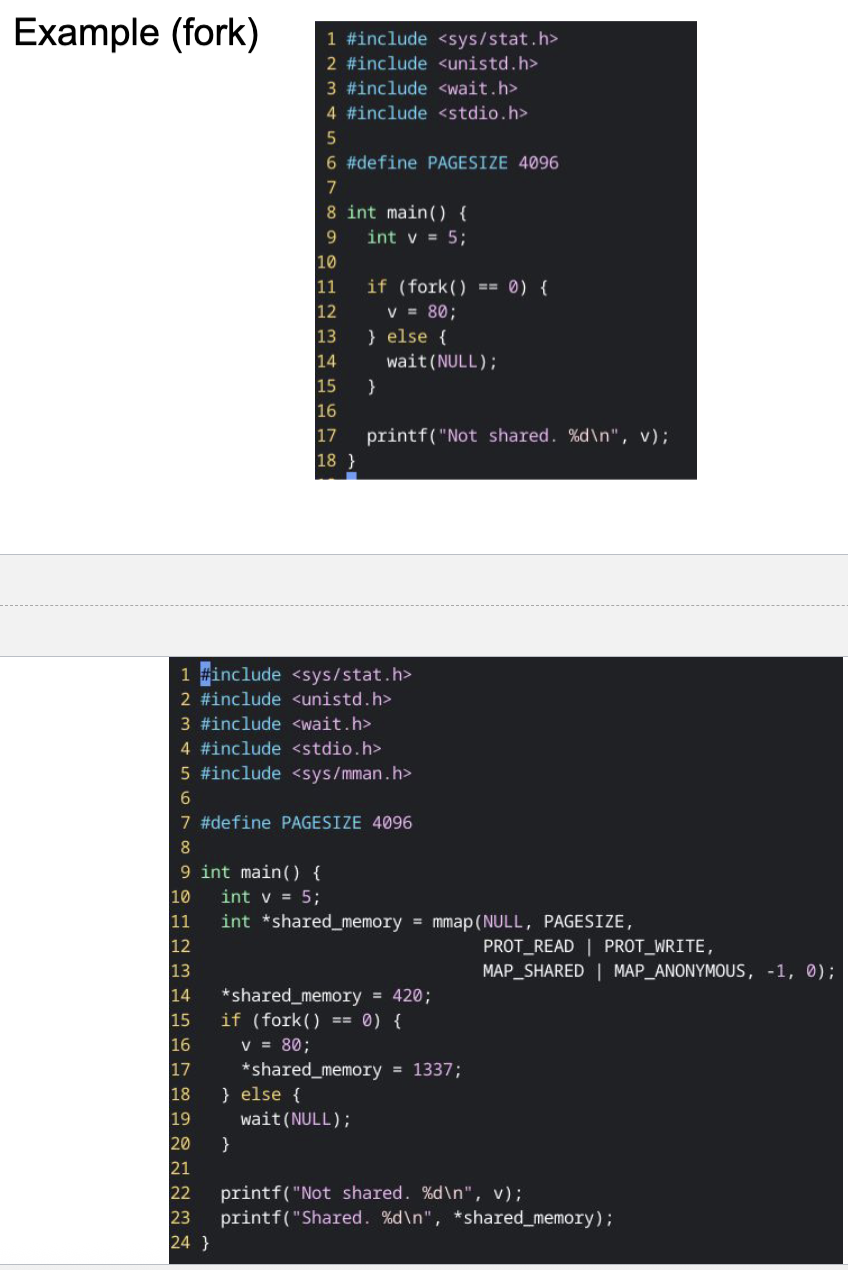
Shared Memory
unlike shared files, doing IPC over shared memory gives it the benefit of faster memory access
whenever shared memory comes into the picture with a writer (whether multi-process or multi-threading) so does the risk of a memory-based race condition; hence the usage of semaphores
Semaphores
general semaphore (aka counting semaphore) has a value that can be incremented/decremented
typically initialized to zero
consider a shop that rents bicycles (100 in stock): Every time a bike is rented, the semaphore is decremented by 1, when a bike is returned it’s incremented by 1. Rentals can continue until the value hits 0; must halt until at least one bike is returned.
binary semaphore is a special case requiring only two values: 0 and 1
in this situation, the semaphore acts as a mutex (mutual exclusion construct)
Sockets
channel-based communication mechanism between processes
shared files, shared memory, and pipes all deal with IPC within the same computer
IPC Sockets (aka UNIX domain sockets) enable channel-based communication for processes on the same physical device (host)
rely upon the local system kernel to support communication
ex. a local file as a socket address
Network Sockets enable this kind of IPC for processes that can run on different hosts, thereby bringing networking into play
Network Sockets
need support from an underlying protocol such as TCP/IP (Transmission Control Protocol) or the lower-level UDP (User Datagram Protocol)
you can still use network sockets to have two processes communicate with each other on the same machine by leveraging the localhost (127.0.0.1) network address
network sockets are externally identified to other hosts by a socket address (defined by the transport protocol (TCP vs UDP), IP address, and port
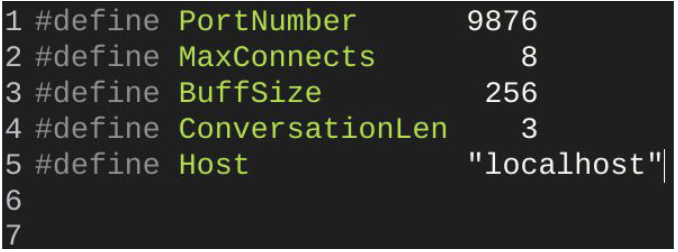
Using Sockets (Server)
The application programming interface (API) for the network protocol stack creates a handle for each socket created by an application (socket/file descriptor).
socket() - get a file descriptor for the socket connection
bind() - bind the socket to an address on the server’s host
listen() - listen for client requests
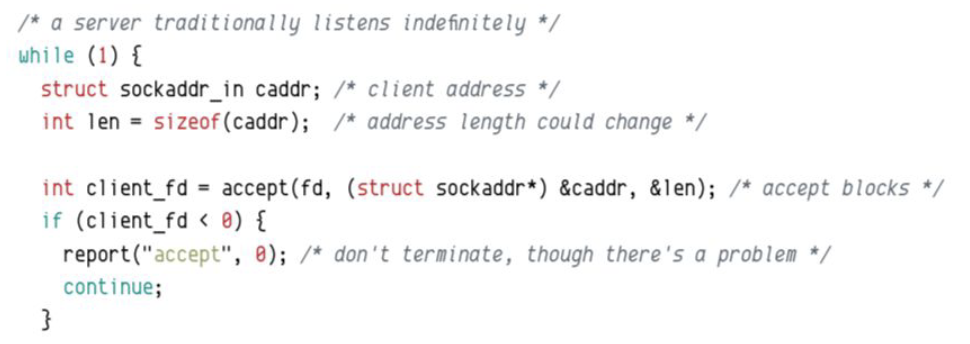
accept() - accept a client’s request
socket()
#include <sys/socket.h>creates the socket by taking in 3 arguments and returning an integer for the file descriptor
int socket(int domain, int type, int protocol);domain: AD_INET vs AF_LOCAL
type: SOCK_STREAM, SOCK_DGRAM, SOCK_SEQPACKET
protocol: 0 for system default
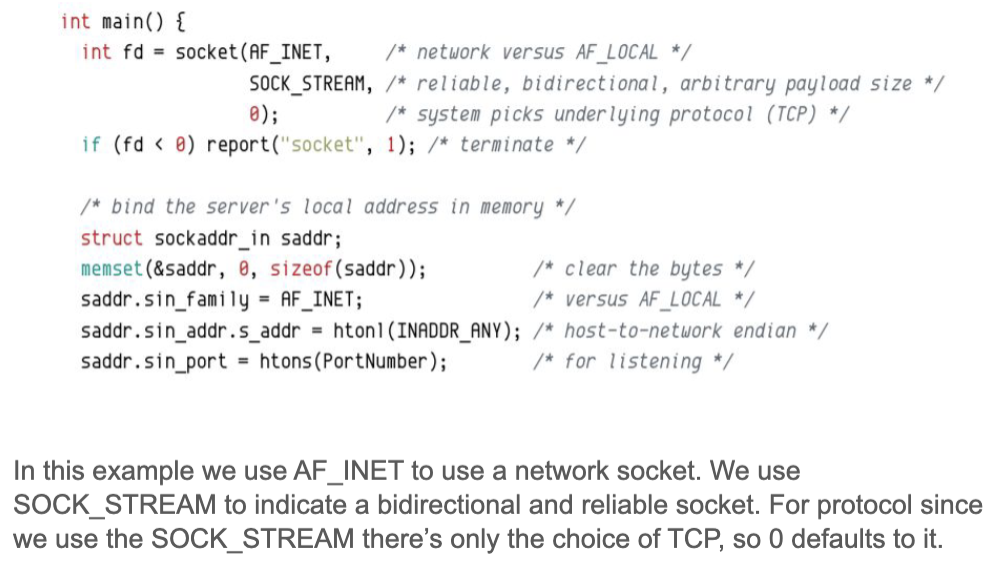
bind()
#include <sys/socket.h>binds the socket to a memory address
int bind(int socket, const struct sockaddr *address, socklen_t address_len);socket - file descriptor
address - the sockaddr we defined when creating the socket
address_len - the length of the sockaddr

listen()
#include <sys/socket.h>listen for socket connections and limit the queue of incoming connections
int listen(int socket, int backlog);socket - file descriptor
backlog - limits the number of outstanding connections to a socket’s listening queue

accept()
#include <sys/socket.h>accept a new connection to the socket
int accept(int socket, struct sockaddr *address, socketlen_t *address_len);defaults to a blocking wait: the server will do nothing until a client attempts to connect and then it proceeds
returns -1 if there is an error, otherwise it returns the file descriptor
to cleanup a connection use:
close(client_fd);
when accept() succeeds, the server can then read a client request and respond to them with write:
ssize_t read(int fildes, void buf, size_t nbyte, off_t offset);ssize_t write(int fildes, const void buf, size_t nbyte);
Using Sockets (Client)
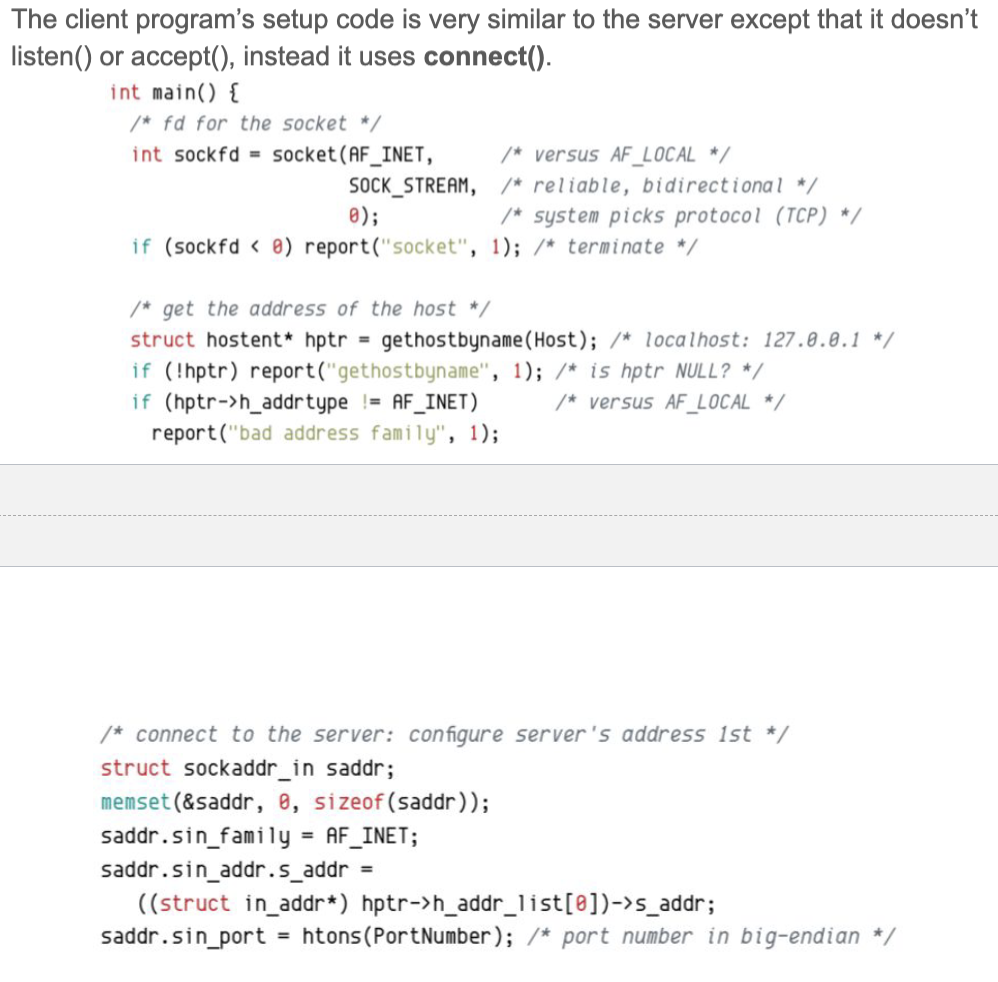
connect()
#include <sys/socket.h>attempts to make a connection on a socket
int connect(int socket, const struct sockaddr *address, socketlen_t address_len);socket - file descriptor
address - points to a sockaddr we defined when creating the socket
address_len - length of the sockaddr
can fail for a number of reasons:
wrong server address
too many clients already connected to the server
if connect() succeeds, the client can write requests to the server and subsequently use a loop to read responses from the server
when finished REMEMBER:
close(socketfd);

Useful Libraries